

QUOTE(lyc1982 @ Feb 12 2019, 03:05 PM)
if not mistaken....win10 speedtest app is unable to choose server ?

Can choose but only top nearby server only,cant type to choose.Unifi Official TM UniFi High Speed Broadband Thread V37, READ 1ST PAGE FOR TURBO SPEED INFO!
|
|
 Feb 12 2019, 04:09 PM Feb 12 2019, 04:09 PM
|
 
Senior Member
1,882 posts Joined: Sep 2017 
|
QUOTE(lyc1982 @ Feb 12 2019, 03:05 PM) if not mistaken....win10 speedtest app is unable to choose server ? Can choose but only top nearby server only,cant type to choose. |
|
|
|
|
|
Feb 12 2019, 04:11 PM
|

Senior Member
2,741 posts Joined: Jan 2007
|
QUOTE(mysh @ Feb 12 2019, 02:15 PM) Saw your review on Xiaomi wireless router pro Yes, China version. No IPTV support.https://bit.ly/2thWSEI the one you testing in china version? can it support IPTV? |
|
|
Feb 12 2019, 04:19 PM
|

Senior Member
1,588 posts Joined: Mar 2014 From: 75°26'11.6"S, 136°16'16.0"E 
|
QUOTE(lolzcalvin @ Feb 12 2019, 01:13 PM) my home unifi has been down since 2nd of Feb, I've called the unifi hotline everyday since then, complained everyday but no one seems to be taking any action except for giving dozens of excuses e.g. unifi server down, some cards from the server are spoiled, then the cable connecting to our home is out of order, then all of the sudden say my area is down. my technical report has been "in progress" for 11 days now. what to do? The entire company seems to be operated by a bunch of lazy asses. i'm bumping this one up again in case it gets buried. |
|
|
Feb 12 2019, 04:53 PM
|

Senior Member
5,714 posts Joined: Mar 2007 
|
QUOTE(linkinpark @ Feb 12 2019, 07:22 AM) Last week my BTU (located in my living room) + L7 NR2000 router (located in my room) after 7year usage finally spoil. Call TM and they replace a new modem router all in 1 Netis DL4480V1. Since my house is high-rise with copper wired that is the best they can give. Is it true? Because my room is abit far from my living room wifi 2.4ghz signal abit weak. Can i configure the Netis as BTU and add-on a new wifi router? Nope, but you can consider mesh WiFi which you can set as WAPs to improve your wireless coverage. Yes, it is true. You have to wait for them to upgrade the fibre or get TIME if they become available someday.QUOTE(mysh @ Feb 12 2019, 02:15 PM) Saw your review on Xiaomi wireless router pro Nope. It will need a smart switch as it does not support VLAN tagging.https://bit.ly/2thWSEI the one you testing in china version? can it support IPTV? |
|
|
Feb 12 2019, 04:53 PM
|
|
Senior Member
5,714 posts Joined: Mar 2007
|
QUOTE(lolzcalvin @ Feb 12 2019, 04:19 PM) i'm bumping this one up again in case it gets buried. Go directly to TMPoint and complain and get someone to see your case immediately. |
|
|
Feb 12 2019, 05:06 PM
|

Junior Member
336 posts Joined: Jul 2010 From: Changlun, Kedah
|
QUOTE(lolzcalvin @ Feb 12 2019, 04:19 PM) i'm bumping this one up again in case it gets buried. May get your area representative MP to help since they are voted to help the community for that area. |
|
|
|
|
|
Feb 12 2019, 05:09 PM
Show posts by this member only | IPv6 | Post
#227
|

Senior Member
732 posts Joined: Dec 2017
|
QUOTE(lolzcalvin @ Feb 12 2019, 04:19 PM) i'm bumping this one up again in case it gets buried. Lodge skmm report, demand for rebate for duration of downtime. Refuse to pay bill. |
|
|
Feb 12 2019, 06:03 PM
|

Junior Member
304 posts Joined: Aug 2018
|
Hello, My friend is using Unifi Turbo 300Mbps.
Router: TP-LINK Archer C7(V5) BTU: Alcatel Lucent I240G(Silver) Download speed: 228.10Mbps then can fluctuate to 35.25Mbps suddenly Upload: 49.35Mbps then fluctuate to 35.25Mbps Mainly wifi user. Definitely line issue right? This post has been edited by xjoshualaw29: Feb 12 2019, 06:04 PM |
|
|
Feb 12 2019, 07:18 PM
Show posts by this member only | IPv6 | Post
#229
|

Junior Member
154 posts Joined: Dec 2011
|
TM changed me a new BTU since the last one faulty. Got a Nokia BTU now. Anyone knows about this Nokia BTU?
|
|
|
Feb 12 2019, 07:23 PM
|
|
Junior Member
336 posts Joined: Jul 2010 From: Changlun, Kedah
|
QUOTE(BayuDroidz @ Feb 12 2019, 07:18 PM) TM changed me a new BTU since the last one faulty. Got a Nokia BTU now. Anyone knows about this Nokia BTU? screenshot label on the unit, please. |
|
|
Feb 12 2019, 07:27 PM
|
 
Staff
72,797 posts Joined: Sep 2005 From: KUL 
|
QUOTE(BayuDroidz @ Feb 12 2019, 07:18 PM) TM changed me a new BTU since the last one faulty. Got a Nokia BTU now. Anyone knows about this Nokia BTU? Yes, that's the latest BTU. Nokia bought over Alcatel-Lucent, hence no more ALU branded networking stuff in the market. I'm using that BTU too. |
|
|
Feb 12 2019, 07:57 PM
|

Senior Member
2,657 posts Joined: Feb 2008 From: Highbury House, 75 Drayton Park, London
|
QUOTE(fruitie @ Feb 12 2019, 07:27 PM) Yes, that's the latest BTU. Nokia bought over Alcatel-Lucent, hence no more ALU branded networking stuff in the market. I'm using that BTU too. Same here using the Nokia BTU. Just reinstalled UNIFI last month.  Currently using RM129 package, any chance will get TURBOed in future? |
|
|
Feb 12 2019, 07:59 PM
|
|
Staff
72,797 posts Joined: Sep 2005 From: KUL
|
QUOTE(ericpires @ Feb 12 2019, 07:57 PM) Same here using the Nokia BTU. Just reinstalled UNIFI last month. Slim chance until everyone is Turbo-ed, probably they will review 129 group. Who knows. Currently using RM129 package, any chance will get TURBOed in future? |
|
|
|
|
|
Feb 12 2019, 08:10 PM
|
|
Senior Member
5,714 posts Joined: Mar 2007
|
QUOTE(xjoshualaw29 @ Feb 12 2019, 06:03 PM) Hello, My friend is using Unifi Turbo 300Mbps. 5GHz AC? Try setting to lower channel such as Ch.36.Router: TP-LINK Archer C7(V5) BTU: Alcatel Lucent I240G(Silver) Download speed: 228.10Mbps then can fluctuate to 35.25Mbps suddenly Upload: 49.35Mbps then fluctuate to 35.25Mbps Mainly wifi user. Definitely line issue right? |
|
|
Feb 12 2019, 09:32 PM
|
|
Junior Member
57 posts Joined: Jul 2018
|
Hi everyone,
Two questions to ask about the TPLink C3150 router:- 1. I have enabled smart connect in the router configuration page. Did that also remove the 2.4Ghz SSID from the network broadcast list? I only see the 5Ghz SSID. 2. In adapter settings, under IPv4 internet connectivity, I see "Internet". Under IPv6 internet connectivity, it says "no network access" . Should I do something to rectify the situation? 3. Despite the above, my internet connection is very good. I'm on the 800MBps package. Much appreciate some help here...thank you... |
|
|
Feb 12 2019, 09:34 PM
|
|
Junior Member
304 posts Joined: Aug 2018
|
QUOTE(SilentVampire @ Feb 12 2019, 08:10 PM) 5GHz AC? Try setting to lower channel such as Ch.36. Yes. It was configured to Ch. 48.This post has been edited by xjoshualaw29: Feb 12 2019, 09:35 PM |
|
|
Feb 12 2019, 09:37 PM
|
|
Newbie
1 posts Joined: Dec 2012
|
Hi, I just want to ask. Anyone else experiencing slow speed from direct download sites such as mega.nz and uptobox.com?
|
|
|
Feb 12 2019, 10:13 PM
|
|
Senior Member
5,714 posts Joined: Mar 2007
|
QUOTE(lattemild @ Feb 12 2019, 09:32 PM) Hi everyone, 1. Yes. Smart connect combines both the SSID of 2.4GHz and 5GHz and it gives the router the power to select which is better for your devices.Two questions to ask about the TPLink C3150 router:- 1. I have enabled smart connect in the router configuration page. Did that also remove the 2.4Ghz SSID from the network broadcast list? I only see the 5Ghz SSID. 2. In adapter settings, under IPv4 internet connectivity, I see "Internet". Under IPv6 internet connectivity, it says "no network access" . Should I do something to rectify the situation? 3. Despite the above, my internet connection is very good. I'm on the 800MBps package. Much appreciate some help here...thank you... 2. Nope. You don't need IPv6 for now, and it won't affect anything. QUOTE(xjoshualaw29 @ Feb 12 2019, 09:34 PM) Yes. It was configured to Ch. 48. Same thing with wired connection? |
|
|
Feb 12 2019, 11:44 PM
|
|
Junior Member
304 posts Joined: Aug 2018
|
QUOTE(SilentVampire @ Feb 12 2019, 10:13 PM) Same thing with wired connection? |
|
|
Feb 12 2019, 11:47 PM
|
 
Elite
4,174 posts Joined: Jan 2003 From: Gua
|
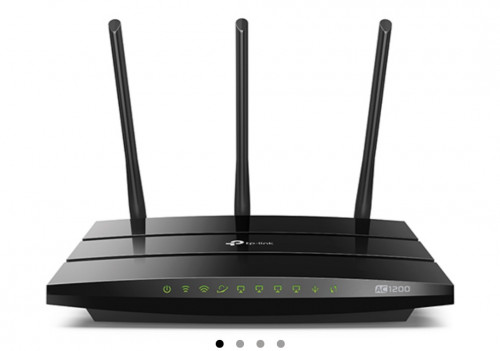 To those that got this Tp Link C1200 router and have connection issues(frequent d/c, or hard to connect after reboot/turning on router) , please login to the router page, under advance settings - IPV6, disable it. |
|
Topic ClosedOptions
|
| Change to: |  0.0233sec 0.0233sec
 0.41 0.41
 6 queries 6 queries
 GZIP Disabled GZIP Disabled
Time is now: 3rd December 2025 - 01:56 AM |
 Quote
Quote