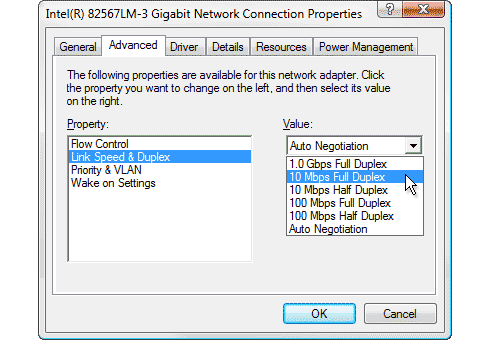
I just change my cable to Cat 6, my router only support 300mbps but my package 800mpbs. Now I only manage to get 100mbps even after change to Cat 6
Unifi Official TM UniFi High Speed Broadband Thread V37, READ 1ST PAGE FOR TURBO SPEED INFO!
Unifi Official TM UniFi High Speed Broadband Thread V37, READ 1ST PAGE FOR TURBO SPEED INFO!
|
|
 Feb 13 2019, 02:38 PM Feb 13 2019, 02:38 PM
Return to original view | Post
#1
|
 
Junior Member
23 posts Joined: Nov 2011 
|
I just change my cable to Cat 6, my router only support 300mbps but my package 800mpbs. Now I only manage to get 100mbps even after change to Cat 6
|
|
|
|
|
|
Feb 13 2019, 10:46 PM
Return to original view | Post
#2
|
|
Junior Member
23 posts Joined: Nov 2011
|
QUOTE(Wan @ Feb 13 2019, 08:38 PM) What router you're using? Router : tp-link wr841nAnd can you check your network/lan card? » Click to show Spoiler - click again to hide... «  my network card can support until 1 Gbps so right now i cant even full use my internet 800mbps, cant even reach 300mbps based on my router |
|
|
Feb 13 2019, 10:46 PM
Return to original view | Post
#3
|
|
Junior Member
23 posts Joined: Nov 2011
|
QUOTE(tomastan4134 @ Feb 13 2019, 03:30 PM) what router you are using ? hi there, im using tp-link wr841n |
|
|
Feb 15 2019, 11:39 AM
Return to original view | Post
#4
|
|
Junior Member
23 posts Joined: Nov 2011
|
Hi guys, just to update regarding my problem previously. TM come to my house and change my router that support 800mbps, in exchange of extend my contract for 1 year.
Now the problem is, when they used their laptop direct lan to my router, they can get 800mbps, but my desktop only manage to get to 5++. They have check my network card able to support 1gbps. they told me that probably because of my antivirus ? which I only use windows security. anyone know how to achieve 800mbps |
|
|
Feb 15 2019, 01:31 PM
Return to original view | Post
#5
|
|
Junior Member
23 posts Joined: Nov 2011
|
QUOTE(SilentVampire @ Feb 15 2019, 12:12 PM) Speedtest with Firefox or Edge. Try speedtest in safe mode with networking as well. It is probably throttled by the Spectre or Meltdown patch. tried both, only can get between 400-500 |
|
|
Feb 15 2019, 01:56 PM
Return to original view | Post
#6
|
|
Junior Member
23 posts Joined: Nov 2011
|
QUOTE(JohnLai @ Feb 15 2019, 01:35 PM) CPU model and operating system info? i5-6500 and windows 10 |
|
|
Feb 15 2019, 04:13 PM
Return to original view | Post
#7
|
|
Junior Member
23 posts Joined: Nov 2011
|
QUOTE(JohnLai @ Feb 15 2019, 03:54 PM) K, first, check if your I5-6500 has overheating issue when running speedtest via HWMonitor tool. win10 1803, no overheating issue on my CPU, thats the weird part. I cant get 800mbps on my desktop while TM test with their laptop manage to get 800.Second, which win10 version? There are many version...... 1709,1803 or 1809? |
|
Topic ClosedOptions
|
| Change to: |  0.1616sec 0.1616sec
 0.94 0.94
 7 queries 7 queries
 GZIP Disabled GZIP Disabled
Time is now: 10th December 2025 - 01:38 PM |
 Quote
Quote