

TIME down again zzzz
TIME [OFFICIAL] TIME Fibre Broadband™ v4, Experience the ONE TRUE 2Gbps
TIME [OFFICIAL] TIME Fibre Broadband™ v4, Experience the ONE TRUE 2Gbps
|
|
 Jul 31 2021, 11:51 AM Jul 31 2021, 11:51 AM
Show posts by this member only | IPv6 | Post
#7641
|
 
All Stars
14,901 posts Joined: Apr 2005 From: Kuala Lumpur & Selangor  
|
TIME down again zzzz
|
|
|
|
|
|
Jul 31 2021, 12:24 PM
Show posts by this member only | IPv6 | Post
#7642
|

Senior Member
4,816 posts Joined: Apr 2007 
|
QUOTE(wirelessbuyer @ Jul 31 2021, 09:36 AM) The 300Mbps package appear on my account too few days back, but today it's gone, only 100, 500 and 1gbps .. plus promo to upgrade package with free router but need 2yrs re-contracts, btw I've ended my contract long time ago Just rechecked - it's gone too   Oh well. Get to save rm10/month  |
|
|
Jul 31 2021, 03:28 PM
Show posts by this member only | IPv6 | Post
#7643
|

Junior Member
472 posts Joined: Apr 2019 From: Penang 
|
QUOTE(polarzbearz @ Jul 29 2021, 08:50 PM) https://www.time.com.my/loyalty-programmes jjj2 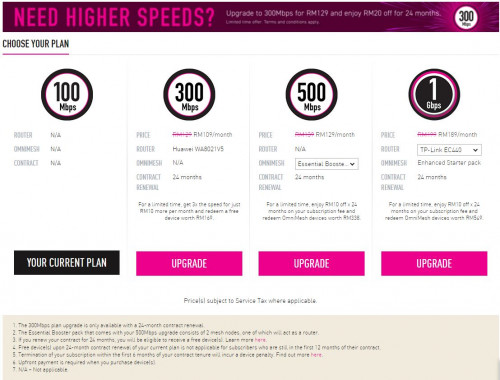  tempting to take the RM109 @ 300MBPS package (just downgraded from RM189 @ 1GBPS to RM99 @ 100MBPS package earlier this month without contract ) tempting to take the RM109 @ 300MBPS package (just downgraded from RM189 @ 1GBPS to RM99 @ 100MBPS package earlier this month without contract )how to get this loyalty programmes offer ? |
|
|
Jul 31 2021, 04:28 PM
Show posts by this member only | IPv6 | Post
#7644
|

Senior Member
3,836 posts Joined: Aug 2016
|
QUOTE(Vincent6596 @ Jul 31 2021, 03:28 PM) jjj2 Hello, you can check in your selfcare portal.how to get this loyalty programmes offer ? Thank you. |
|
|
Jul 31 2021, 05:24 PM
Show posts by this member only | IPv6 | Post
#7645
|

Senior Member
3,608 posts Joined: Feb 2006
|
QUOTE(Vincent6596 @ Jul 31 2021, 03:28 PM) jjj2 Please login to your selfcare portal, you need to be using TIME at least for 20 months or longer in order to be eligible for this.how to get this loyalty programmes offer ? Thanks. |
|
|
Jul 31 2021, 10:14 PM
Show posts by this member only | IPv6 | Post
#7646
|
|
Junior Member
472 posts Joined: Apr 2019 From: Penang
|
QUOTE(jjj2 @ Jul 31 2021, 05:24 PM) Please login to your selfcare portal, you need to be using TIME at least for 20 months or longer in order to be eligible for this. then i still need to wait for it since i just use less then 1 year only.Thanks. |
|
|
|
|
|
Aug 1 2021, 10:18 PM
Show posts by this member only | IPv6 | Post
#7647
|

Junior Member
37 posts Joined: May 2005
|
Hi folks, quick question anyone else in TTDI facing weirdness with Time speeds? Just got onboard two days ago n today, has been very erratic! On 300mbps plan but today has been crazy, sometimes streaming no problem at all then 5 minutes later it'll start to stutter, and buffer like connection lost! Just checking if anyone else in the area similar problem or if there's an issue with the installation! Cheers n thanks!
|
|
|
Aug 3 2021, 12:09 AM
|

Junior Member
309 posts Joined: Sep 2009 From: Petaling Jaya
|
Hi, need your view on the following issues:
Subscribed TIME 500mbps package. Was original 100mbps package, then upgraded (without any changes on devices, or technicians coming for setting). Using modem: Huawei H8240H (provided by TIME) Using Router: TPLINK AC1200 (Archer C50) - self bought in March 2021 LAN cable: cat5e x 3 units (1 from TIME, 2 bought new) Issue: Speed test below 100 mbps near router. Tested using android phone, and Mac PC. Called TIME. 1. They asked me buy cat6 cable 2. Called router supplier What I have done: I checked with other residents in my same condo, they are using cable 5e and speed test near to 500mbps. Tested 3 cat5e cable. What could be the reason? What should I do to achieve 500mbps (instead of 100mbps)? Thank you. |
|
|
Aug 3 2021, 12:28 AM
|

Junior Member
126 posts Joined: Jan 2003 From: Kuala Lumpur
|
hi sifus, i have recently gotten Huawei WA8021V5 from Time as complimentary devices (for re-contract 24 months). i don't have plan to use it since i already have the mesh system at home and very stable. my question is whether this Huawei onemesh can be used for Unifi - no IPTV connection, pure internet usage only.
|
|
|
Aug 3 2021, 10:52 AM
Show posts by this member only | IPv6 | Post
#7650
|

Senior Member
6,724 posts Joined: Aug 2008
|
QUOTE(mypagan_26 @ Aug 1 2021, 10:18 PM) Hi folks, quick question anyone else in TTDI facing weirdness with Time speeds? Just got onboard two days ago n today, has been very erratic! On 300mbps plan but today has been crazy, sometimes streaming no problem at all then 5 minutes later it'll start to stutter, and buffer like connection lost! Just checking if anyone else in the area similar problem or if there's an issue with the installation! Cheers n thanks! I’m in BU area, no issues so far. |
|
|
Aug 3 2021, 10:57 AM
|
 
Elite
8,421 posts Joined: Jul 2008 
|
QUOTE(research @ Aug 3 2021, 12:09 AM) Hi, need your view on the following issues: Archer C50 does not support more than 100MbpsSubscribed TIME 500mbps package. Was original 100mbps package, then upgraded (without any changes on devices, or technicians coming for setting). Using modem: Huawei H8240H (provided by TIME) Using Router: TPLINK AC1200 (Archer C50) - self bought in March 2021 LAN cable: cat5e x 3 units (1 from TIME, 2 bought new) Issue: Speed test below 100 mbps near router. Tested using android phone, and Mac PC. Called TIME. 1. They asked me buy cat6 cable 2. Called router supplier What I have done: I checked with other residents in my same condo, they are using cable 5e and speed test near to 500mbps. Tested 3 cat5e cable. What could be the reason? What should I do to achieve 500mbps (instead of 100mbps)? Thank you. Specs: 1× 10/100 Mbps WAN Port Get a router with Gigabit ports |
|
|
Aug 3 2021, 11:19 AM
|
|
Senior Member
6,724 posts Joined: Aug 2008
|
I am on 100mbps. When i do speed test, am I supposed to see the download and upload speed nearing around 100mbps as well?
Tested on phone app vs browser (browser seems to show lower speed as always) My iphone 12 pro seems to be able to get 100mbps but my PC with Wifi adapter only got about 10~15mbps? Wonder why this is happening? And yes the wifi adapter could handle up to 300mbps. Both devices tested on the same spot. This post has been edited by miyakochan89: Aug 3 2021, 11:43 AM |
|
|
Aug 3 2021, 12:13 PM
Show posts by this member only | IPv6 | Post
#7653
|

Junior Member
151 posts Joined: Apr 2014
|
Just saw 500mbps package eligible for 24 months x RM10 rebate every month from monthly fee rm139, free MESH wifi
I subscribed 500mbps end July and get 3 x RM10 rebate only. Kinda sienzzzz.. thinking of downgrade already. |
|
|
|
|
|
Aug 3 2021, 12:40 PM
|
|
Junior Member
309 posts Joined: Sep 2009 From: Petaling Jaya
|
QUOTE(blacktubi @ Aug 3 2021, 10:57 AM) Archer C50 does not support more than 100Mbps Thank you for your input. How come ya? The model description stated they supported up to 300mbps. Welcome your input.Specs: 1× 10/100 Mbps WAN Port Get a router with Gigabit ports |
|
|
Aug 3 2021, 12:54 PM
Show posts by this member only | IPv6 | Post
#7655
|
|
Senior Member
3,836 posts Joined: Aug 2016
|
QUOTE(bananabread @ Aug 3 2021, 12:13 PM) Just saw 500mbps package eligible for 24 months x RM10 rebate every month from monthly fee rm139, free MESH wifi Do you mean the RM99 x 3 months offer?I subscribed 500mbps end July and get 3 x RM10 rebate only. Kinda sienzzzz.. thinking of downgrade already. |
|
|
Aug 3 2021, 01:04 PM
|

Senior Member
4,790 posts Joined: Jan 2003
|
QUOTE(research @ Aug 3 2021, 12:40 PM) Thank you for your input. How come ya? The model description stated they supported up to 300mbps. Welcome your input. Model description on where?It says 10/100 ports for WAN and LAN here https://www.tp-link.com/my/home-networking/...#specifications. |
|
|
Aug 3 2021, 01:09 PM
|
|
Senior Member
2,613 posts Joined: Nov 2020
|
QUOTE(research @ Aug 3 2021, 12:40 PM) Thank you for your input. How come ya? The model description stated they supported up to 300mbps. Welcome your input. It's a bit of sly marketingby 300Mbps they mean Wi-Fi AC specs, so 300Mbps on 2.4Ghz and 867Mbps on 5Ghz So by that they mean the Wi-Fi can go up to say 1200Mbps "combined" So you could transfer files locally over Wi-Fi up to said speed. In reality you will never see those speeds but that's not the main issue here. The problem is the router has 10/100 WAN and LAN ports so between your modem and router only can go up to 100Mbps that's the bottleneck Basically like Fibre cable (2.4Gbit) -> Modem (1Gbit) -> Router (100Mbps) -> Wi-fi ("up to" 1200Mbps) Your slowest link is 100Mbps so, 100Mbps is all you get. Get a router with Gigabit WAN Ports. |
|
|
Aug 3 2021, 01:24 PM
|
|
Junior Member
309 posts Joined: Sep 2009 From: Petaling Jaya
|
QUOTE(kmrdeva @ Aug 3 2021, 01:04 PM) Model description on where? Thank you very much for your link. Now I understand. I saw "2.4 GHz: 300 Mbps (802.11n)"...It says 10/100 ports for WAN and LAN here https://www.tp-link.com/my/home-networking/...#specifications. |
|
|
Aug 3 2021, 01:29 PM
|
|
Junior Member
309 posts Joined: Sep 2009 From: Petaling Jaya
|
QUOTE(PRSXFENG @ Aug 3 2021, 01:09 PM) It's a bit of sly marketing Awesome-professional-swift-effective input. by 300Mbps they mean Wi-Fi AC specs, so 300Mbps on 2.4Ghz and 867Mbps on 5Ghz So by that they mean the Wi-Fi can go up to say 1200Mbps "combined" So you could transfer files locally over Wi-Fi up to said speed. In reality you will never see those speeds but that's not the main issue here. The problem is the router has 10/100 WAN and LAN ports so between your modem and router only can go up to 100Mbps that's the bottleneck Basically like Fibre cable (2.4Gbit) -> Modem (1Gbit) -> Router (100Mbps) -> Wi-fi ("up to" 1200Mbps) Your slowest link is 100Mbps so, 100Mbps is all you get. Get a router with Gigabit WAN Ports. Took me a week to figure out what happened (following TIME support person advices), risked myself going to 5 phone gadget shops to source new LAN cable (cat5e and cat6 copper). As TIME kept saying they detected it was LAN cable issue. Even though I have given them my router details. Terima kasih so much. Will keep this "Get a router with Gigabit WAN Ports" in mind. |
|
|
Aug 3 2021, 01:59 PM
|
|
Junior Member
49 posts Joined: Jun 2014
|
Damansara Perdana area apparently having 'splitter error' according to the Level 2 CS that called me. My 1Gbps plan only getting <100Mbps download and upload, tested on LAN. Is anyone else having similar speed degradations in the area?
|
| Change to: |  0.0233sec 0.0233sec
 0.57 0.57
 6 queries 6 queries
 GZIP Disabled GZIP Disabled
Time is now: 19th December 2025 - 04:37 AM |
 Quote
Quote