

QUOTE(kmrdeva @ Dec 13 2025, 01:25 AM)
Family members have a few wifi 6e and 7 devices so a wifi 7 mesh network would be nice to have 

bro, what is the plan u are using for time bb?TIME [OFFICIAL] TIME Fibre Broadband™ v4, Experience the ONE TRUE 2Gbps
|
|
 Yesterday, 10:14 AM Yesterday, 10:14 AM
Show posts by this member only | IPv6 | Post
#13361
|
 
All Stars
14,296 posts Joined: Jan 2011 
|
QUOTE(kmrdeva @ Dec 13 2025, 01:25 AM) Family members have a few wifi 6e and 7 devices so a wifi 7 mesh network would be nice to have bro, what is the plan u are using for time bb? |
|
|
|
|
|
Yesterday, 10:59 AM
|

Senior Member
1,556 posts Joined: Oct 2006 From: ugly kingdom   
|
QUOTE(joeblow @ Dec 11 2025, 10:53 PM) Hi can I check you got first month free and 9 months for rm89 or 10 months rm89 plus another month free? If it is the latter that means they give you rm500 + rm139 discount. Not bad at all. Not sure if you know, after 10 or 11 months you can then downgrade to 200Mbps rm99 for free, but need to sign up another 24 months contract. Hi,At the end, I finally decided that I don't need 600Mbps. So I 'withdraw' the application, and apply for the new packages which is their standard offer, 200Mbps for RM99 with two years contract, and free for the first month. I'll also submit the auto debit from CC for the 'additional' RM2 discount per month  Installation will be on 12pm today. Let's see how it goes... Hopefully everything will go smoothly because I still got the active Unifi account at my house, and will only proceed to relocate it to my brother house in early January 2026.  Because I heard that for residential account, you can't have two fibre line at one house. It's the rules set by MCMC if I'm not mistaken. This post has been edited by AjkR06: Yesterday, 11:01 AM |
|
|
Yesterday, 11:37 AM
|

Junior Member
382 posts Joined: May 2019
|
QUOTE(AjkR06 @ Dec 13 2025, 10:59 AM) Because I heard that for residential account, you can't have two fibre line at one house. It's the rules set by MCMC if I'm not mistaken. I think it’s allowed. I didn’t need to tell Time I have TM-Maxis installed. And another Allo user also installed Allo while waiting for TM contract to end. It’s only not allowed for having multiple ISPs on same infra. I think used to be able to have Unifi on LAN1, Maxis/CelcomDigi on LAN2 but that has changed now. |
|
|
Yesterday, 01:57 PM
|
|
Senior Member
1,556 posts Joined: Oct 2006 From: ugly kingdom
|
QUOTE(ChenKaiWen @ Dec 13 2025, 11:37 AM) I think it’s allowed. I didn’t need to tell Time I have TM-Maxis installed. And another Allo user also installed Allo while waiting for TM contract to end. Ya, before they change the rules, I've heard that you can have multiple fibre subscriptions on the same infra, like LAN 1 for Unifi, LAN 2 for Maxis etc. It’s only not allowed for having multiple ISPs on same infra. I think used to be able to have Unifi on LAN1, Maxis/CelcomDigi on LAN2 but that has changed now. BTW, installation went smoothly without any hiccup. Even the Time guy asked "Eh, ni you sudah ada unifi ya?" when they saw my the equipment. I simply replied "Ya.., nanti I want to pindah this to rumah adik I" No further question asked and they proceed with installation  Installation took less than hour and after testing everything works perfectly - my Tapo camera, my synology NAS. If I want to use back my own router, I need to make a request by calling their customer service? Usually how many days taken for them to set the Huawei stock router/onu to the bridge mode ya? After the settings has been changed to bridge mode, then I need: 1) Connect the LAN1 from huawei onu to WAN port of my router 2) Set the PPPOE username and password as usual (I already got it from the installer just now) Is that right? If I'm not mistaken, Time do not have any VLAN settings to the router like Unifi? |
|
|
Yesterday, 02:22 PM
|
|
Junior Member
382 posts Joined: May 2019
|
QUOTE(AjkR06 @ Dec 13 2025, 01:57 PM) If I want to use back my own router, I need to make a request by calling their customer service? Usually how many days taken for them to set the Huawei stock router/onu to the bridge mode ya? Yeah. Call them and they should do it on the spot. WiFi will still be enabled so disable it yourself after. After the settings has been changed to bridge mode, then I need: 1) Connect the LAN1 from huawei onu to WAN port of my router 2) Set the PPPOE username and password as usual (I already got it from the installer just now) Is that right? If I'm not mistaken, Time do not have any VLAN settings to the router like Unifi? No need VLAN. PPPoe and password can also be obtained on time self care website or the app AjkR06 liked this post
|
|
|
Yesterday, 02:40 PM
|

Senior Member
4,790 posts Joined: Jan 2003
|
QUOTE(westlife @ Dec 13 2025, 10:14 AM) bro, what is the plan u are using for time bb? The 600mbps/500mbps down/up package. |
|
|
|
|
|
Yesterday, 09:02 PM
|

All Stars
21,314 posts Joined: Jan 2003 From: Kuala Lumpur 
|
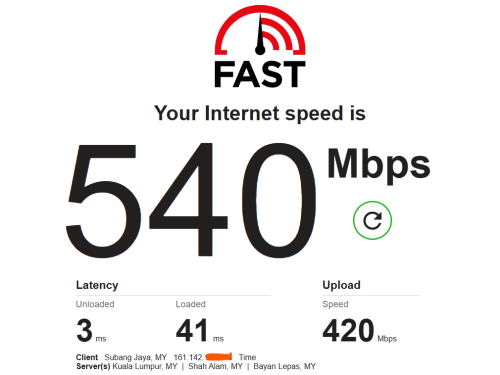 still looks good for 600Mbps plan |
|
|
Yesterday, 10:03 PM
|
|
All Stars
14,296 posts Joined: Jan 2011
|
QUOTE(kmrdeva @ Dec 13 2025, 02:40 PM) The 600mbps/500mbps down/up package. I can still hit above 600Mbps speed sometime so it showed that not my wifi mesh routers prob but probably the wifi interferences from my neighbours?That’s the reason I gave up the idea to upgrade my wifi mesh routers especially I am going to downgrade soon. No pt to upgrade to wifi 6 or 7 since the price is also not cheap. I also did a wired test from main mesh node to my laptop via wired (gagabitethernet), I can hit 600Mvps and above full speed as well. So to be fair, it is proven that not time’s prob. 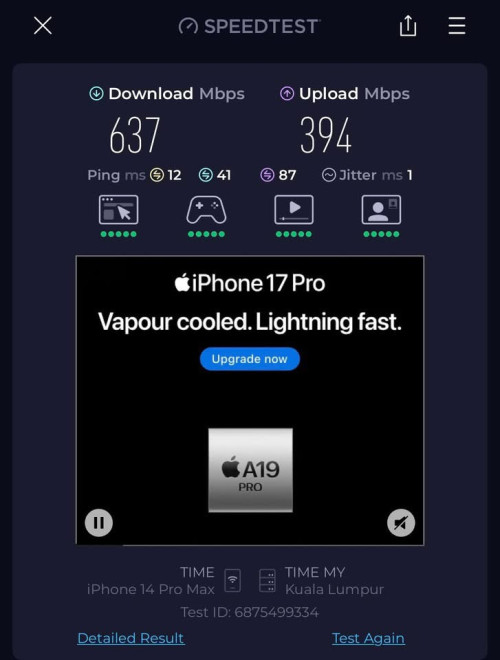 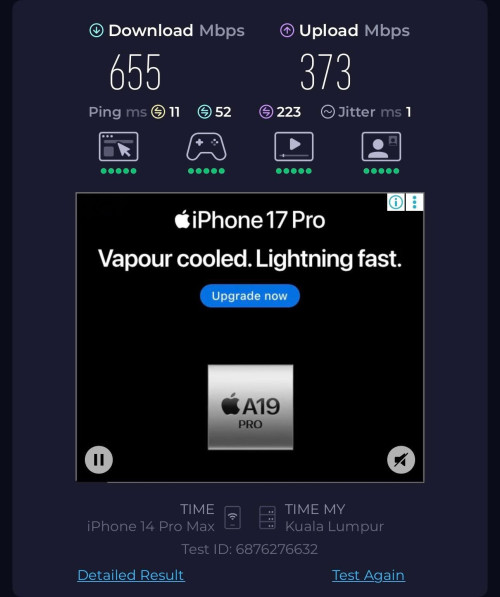 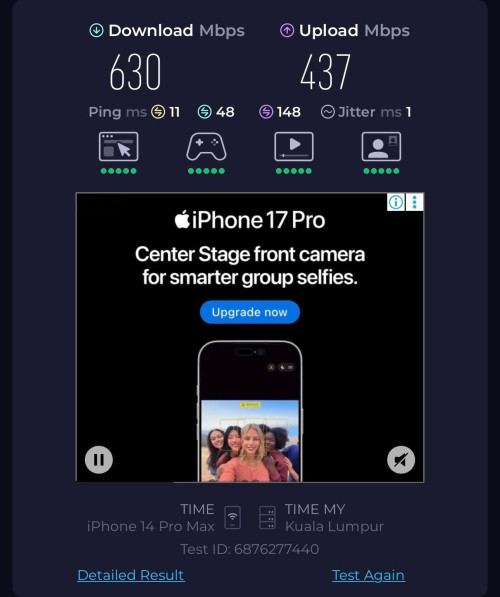 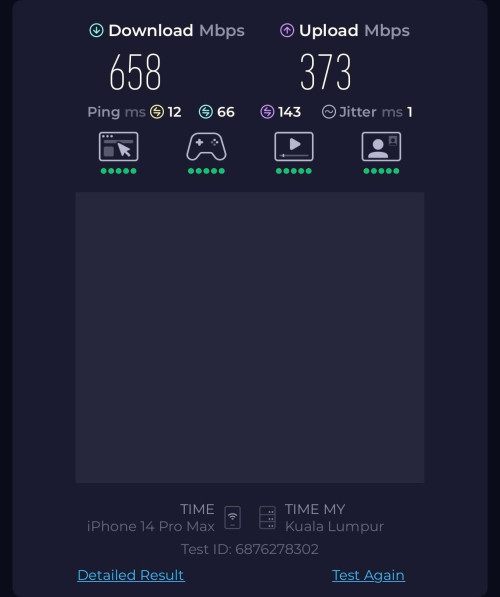 This post has been edited by westlife: Yesterday, 10:04 PM |
|
|
Yesterday, 11:09 PM
Show posts by this member only | IPv6 | Post
#13369
|
|
Senior Member
1,556 posts Joined: Oct 2006 From: ugly kingdom
|
Changed to my own router. It took only about 15 minutes for their CS to respond to my request.
Anyway, is it possible for me to make request for "public ip" even for 200Mbps package? I noticed that downloading my NAS content from Synology Quick Connect took so long compared to my Unifi that have "public ip" by default  |
|
|
Yesterday, 11:13 PM
Show posts by this member only | IPv6 | Post
#13370
|
|
Junior Member
382 posts Joined: May 2019
|
QUOTE(AjkR06 @ Dec 13 2025, 11:09 PM) Changed to my own router. It took only about 15 minutes for their CS to respond to my request. Yes you can try. I had no problem getting public ip on 600mbps. Initially someone also had success on 200mbps, but probably need a valid reason.Anyway, is it possible for me to make request for "public ip" even for 200Mbps package? I noticed that downloading my NAS content from Synology Quick Connect took so long compared to my Unifi that have "public ip" by default I requested mine thru live chat. Then technician team called me a few hours later to confirm. After they’re done, they called me again. |
|
|
Today, 02:08 AM
|
|
Senior Member
4,790 posts Joined: Jan 2003
|
QUOTE(westlife @ Dec 13 2025, 10:03 PM) I can still hit above 600Mbps speed sometime so it showed that not my wifi mesh routers prob but probably the wifi interferences from my neighbours? Yeah, don't really need to upgrade your mesh network since you plan to downgrade to a slower internet plan.That’s the reason I gave up the idea to upgrade my wifi mesh routers especially I am going to downgrade soon. No pt to upgrade to wifi 6 or 7 since the price is also not cheap. |
|
|
Today, 07:31 AM
Show posts by this member only | IPv6 | Post
#13372
|
|
All Stars
14,296 posts Joined: Jan 2011
|
QUOTE(AjkR06 @ Dec 13 2025, 11:09 PM) Changed to my own router. It took only about 15 minutes for their CS to respond to my request. Should be able to. I requested public up for my 600Mbps. And they responded very quickly also. Anyway, is it possible for me to make request for "public ip" even for 200Mbps package? I noticed that downloading my NAS content from Synology Quick Connect took so long compared to my Unifi that have "public ip" by default I am going to downgrade to 200Mbps and I hope this thing will stay which I do not need to call to request again. 🤪 |
|
|
Today, 07:43 AM
Show posts by this member only | IPv6 | Post
#13373
|
|
All Stars
14,296 posts Joined: Jan 2011
|
i think i will call them later at 8am to request for downgrade link. then i can do it at 12am sharp.
|
|
|
|
|
|
Today, 08:34 AM
Show posts by this member only | IPv6 | Post
#13374
|
|
All Stars
14,296 posts Joined: Jan 2011
|
QUOTE(kmrdeva @ Dec 14 2025, 02:08 AM) Yeah, don't really need to upgrade your mesh network since you plan to downgrade to a slower internet plan. yeah. PCs at study room connected to the mesh child node (via wired) can hit close to 400Mbps with low latency. considered not too bad also.playing LOL also no lag issue. will just stick to this to save money. haha. prefer to spend money on other things instead. 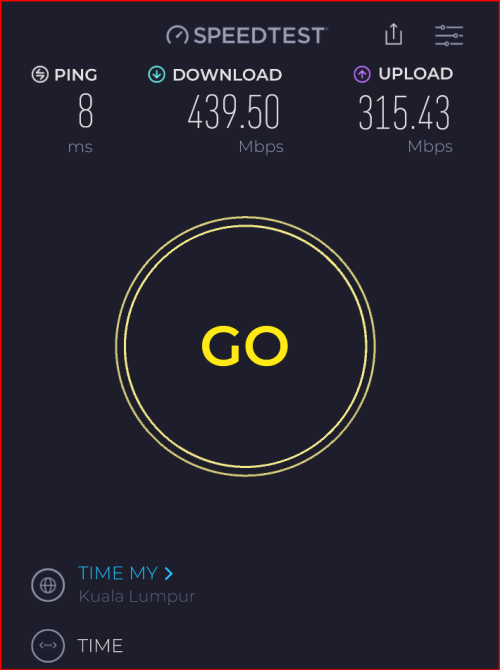 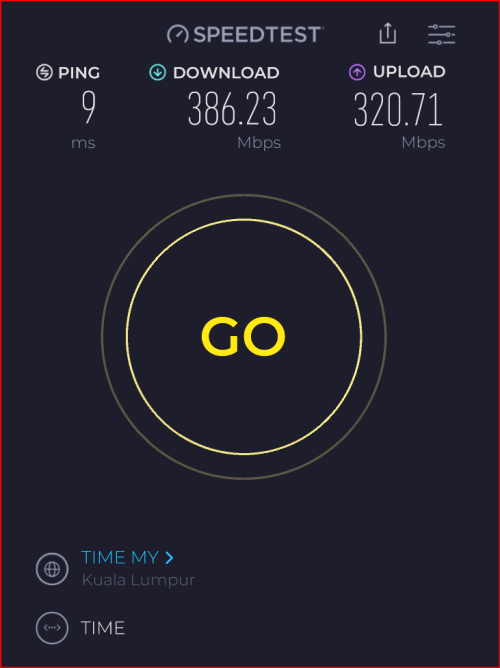 |
|
|
Today, 12:17 PM
|
|
Senior Member
1,556 posts Joined: Oct 2006 From: ugly kingdom
|
QUOTE(westlife @ Dec 14 2025, 07:31 AM) Should be able to. I requested public up for my 600Mbps. And they responded very quickly also. Took only 40 minutes for them to 'grant' my request to switch to public dynamic IP. I am going to downgrade to 200Mbps and I hope this thing will stay which I do not need to call to request again. 🤪 Some more, it's Sunday! Now I can access back my NAS from outside network without using synology quickconnect which is painfully slow to transfer and download the files to my NAS. ChenKaiWen liked this post
|
|
|
Today, 02:08 PM
|

Junior Member
273 posts Joined: Jan 2010
|
QUOTE(westlife @ Dec 13 2025, 10:03 PM) I can still hit above 600Mbps speed sometime so it showed that not my wifi mesh routers prob but probably the wifi interferences from my neighbours? I got close to 1 Gbps and above for 600 Mbps plan after some maintenance work. Switched over to PON stick and got 2 Gbps ++That’s the reason I gave up the idea to upgrade my wifi mesh routers especially I am going to downgrade soon. No pt to upgrade to wifi 6 or 7 since the price is also not cheap. I also did a wired test from main mesh node to my laptop via wired (gagabitethernet), I can hit 600Mvps and above full speed as well. So to be fair, it is proven that not time’s prob. |
|
|
Today, 02:37 PM
|

Senior Member
1,146 posts Joined: Dec 2015
|
QUOTE(AjkR06 @ Dec 14 2025, 12:17 PM) Took only 40 minutes for them to 'grant' my request to switch to public dynamic IP. That's very good considering you are on the 200Mbps plan. The sales person told me they only provide public IP for 1Gps subscription.Some more, it's Sunday! Now I can access back my NAS from outside network without using synology quickconnect which is painfully slow to transfer and download the files to my NAS. BTW mind if I ask you, did you ask for the login to the 2 in 1 Huawei router/onu? Because I am installing soon, I think I will just login to the portal in front of the technician and change the mode to "Bridge" in front of him to see if the internet can connect to my router (which I will change to PPPoe). Or is this something must change remotely? I talked to the Time CS she said it is up to the technician and no approval needed. |
| Change to: |  0.0223sec 0.0223sec
 0.57 0.57
 6 queries 6 queries
 GZIP Disabled GZIP Disabled
Time is now: 14th December 2025 - 03:08 PM |
 Quote
Quote