

QUOTE(faizyunus @ May 1 2021, 06:21 AM)
Can still use custom DNS server without DoT or DoH. Of course using own router and not TIME provided router.

So only the stock router does this or should we set up DoH anyway?TIME [OFFICIAL] TIME Fibre Broadband™ v4, Experience the ONE TRUE 2Gbps
|
|
 May 1 2021, 08:44 AM May 1 2021, 08:44 AM
Return to original view | IPv6 | Post
#1
|
 
Senior Member
2,611 posts Joined: Nov 2020  
|
QUOTE(faizyunus @ May 1 2021, 06:21 AM) Can still use custom DNS server without DoT or DoH. Of course using own router and not TIME provided router. So only the stock router does this or should we set up DoH anyway? |
|
|
|
|
|
May 7 2021, 08:26 PM
Return to original view | Post
#2
|
|
Senior Member
2,611 posts Joined: Nov 2020
|
QUOTE(Vinzcent @ May 7 2021, 07:40 PM) My PC is almost 5 Year and i'm not a gamer. Specs are a bit dated but eh is fine for XP but you should really get onto a more modern OS than XPMay i know what impact you are referring to ? intel® core™ i5-2310 cpu @ 2.90ghz NVidia Geforce GT520 3.49 GB RAM A larger issue would be the network adapter on the PC Say a 10/100 Mbps ethernet controller or a old b/g wifi card These would bottleneck your connection. ahrasis liked this post
|
|
|
May 8 2021, 09:03 AM
Return to original view | IPv6 | Post
#3
|
|
Senior Member
2,611 posts Joined: Nov 2020
|
QUOTE(ahrasis @ May 8 2021, 08:21 AM) Did you change the DNS IP in your router or just your PC? Looks like your browser is using DoH according to the last image, since the page mentions "secure transport"I changed mine in the router (TPLink EC230-G1) as well, and I do not have problems with that except may be encrypted SNI which is yet to be implemented by the browsers. Step 1 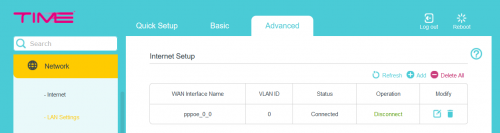 Step 2 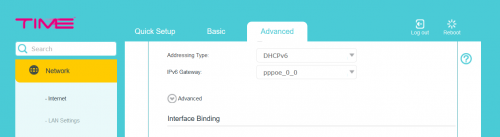 Step 3 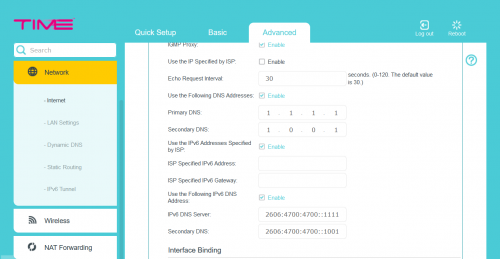 In Edge 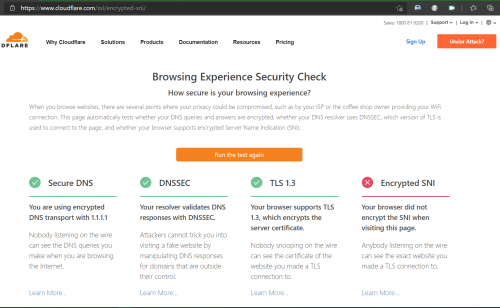 It is the same for firefox but I have to enable certain network settings as advised in https://techorbiter.com/how-to-enable-encry...n-firefox-esni/ Try 1.1.1.1/help and see if it says you're using DoH or DoT A lot of browsers nowdays are by default enabling DoH |
|
|
May 24 2021, 08:09 PM
Return to original view | Post
#4
|
|
Senior Member
2,611 posts Joined: Nov 2020
|
QUOTE(Sam Leong @ May 24 2021, 07:35 PM) Hi , i just get my TIME fibre 500Mbps installed today I don't use time so I dont really know but looking back at older posts it seems that your options are to eitherVery satisfied about the performance , tested with Ethernet Cable Almost full speed  With my own Tenda Router via 5GHz 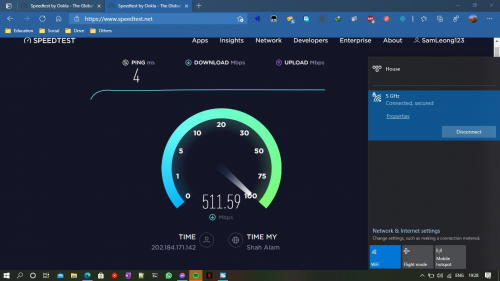 Just one question , can i change the DNS of the given Huawei HG8145V5 ONT? It seems to be hardcoded to TIME DNS server and intercepting the DNS request via UDP 53 from any DNS server (etc Google & Cloudflare , both replied a TM IP and apparently its MCMC IP) 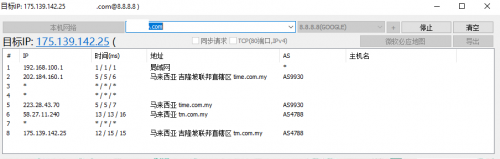 1. call CS to put ONT to bridge mode, then use your own router in PPPoE mode and set DNS there or 2. Use Encrypted DNS like DoH or DoT or maybe try logging into huawei ONT and see if there's any options there? telecomadmin/admintelecom worked for me on maxis but that's just an ONT with no WiFi, not sure how TIME has it setup |
|
|
Jun 1 2021, 07:04 PM
Return to original view | Post
#5
|
|
Senior Member
2,611 posts Joined: Nov 2020
|
QUOTE(voncrane @ Jun 1 2021, 06:38 PM) Nasty piece of work there.. To add to that, not just hard-coded, hijack too on port 53. Change the DNS on your device, it's gonna get hijacked back to TIME DNS. Have to use DNS Over HTTPS. |
|
|
Jun 2 2021, 11:56 AM
Return to original view | Post
#6
|
|
Senior Member
2,611 posts Joined: Nov 2020
|
QUOTE(mav3rick @ Jun 2 2021, 11:43 AM) I transfered from Astro IPTV to Time exclusive recently.. the installers took away my old time modem and replace with this ONT2 in 1 as well.. now I can't use my Asus AX3000 router. Is there anyway I can configure the ONT to function only as a modem?? I can't seem to do I from the menu. This ONT coverage not as good as my AX-3000 not to mention simultaneous device support. Have to contact CS to change mode. |
|
|
|
|
|
Jun 4 2021, 05:51 PM
Return to original view | Post
#7
|
|
Senior Member
2,611 posts Joined: Nov 2020
|
Well yes you can but why? It's not a good router, also you'll be advertising for Unifi as their stock firmware appends @unifi to the end of your wifi name.
|
|
|
Jun 4 2021, 09:39 PM
Return to original view | Post
#8
|
|
Senior Member
2,611 posts Joined: Nov 2020
|
Ah okay then for temporary use
|
|
|
Jun 10 2021, 04:13 PM
Return to original view | Post
#9
|
|
Senior Member
2,611 posts Joined: Nov 2020
|
QUOTE(fouzhi @ Jun 10 2021, 03:25 PM) Contacted CS and didn't help at all, just ask me to request for free Mesh under Selfcare Portal->Shop and said Huawei HG8145V5 is only given to new subscriber. The CS even said your existing Huawei HG8240H not support the free Mesh no problem at all, the free Mesh can be a router. Come on TIME, my intention is I want to expand my wifi coverage via this free Mesh but if this free Mesh is only to replace my existing TP-Link wifi router then it doesn't help me at all in expanding my wifi coverage, disappointed! This mesh replaces both the modem and router...Are you sure you want to do that? |
|
|
Jul 1 2021, 03:56 PM
Return to original view | Post
#10
|
|
Senior Member
2,611 posts Joined: Nov 2020
|
QUOTE(Kappest @ Jul 1 2021, 03:00 PM) Guyz, juz accepted TIME for 2 yrs extension and got my router changed to HUAWEI Edge ONT. The all in one?Now dunno how to change the DDNS to use google 8.8.8.8. Please advise. Old dee, didnt keep up with all modern protocols As far as I know, can't. They even hijack requests if you change on your machine |
|
|
Jul 2 2021, 11:37 AM
Return to original view | Post
#11
|
|
Senior Member
2,611 posts Joined: Nov 2020
|
QUOTE(NoobboyZzZ @ Jul 2 2021, 11:25 AM) hi all , just register new time and installed . All in one? ask cs to change to bridge mode so can use own routerhow to chg dns server and use self router? the supply router seem sucks .. huawei router dns, forget about changing it |
|
|
Jul 2 2021, 01:20 PM
Return to original view | Post
#12
|
|
Senior Member
2,611 posts Joined: Nov 2020
|
QUOTE(NoobboyZzZ @ Jul 2 2021, 12:07 PM) just chg my dir890l as ap , and log in to huawei router turn off the wifi setting hope the huawei will be stable.. That's probably your browser using DoHbut its seem time is using google dns also should be nice |
|
|
Aug 3 2021, 01:09 PM
Return to original view | Post
#13
|
|
Senior Member
2,611 posts Joined: Nov 2020
|
QUOTE(research @ Aug 3 2021, 12:40 PM) Thank you for your input. How come ya? The model description stated they supported up to 300mbps. Welcome your input. It's a bit of sly marketingby 300Mbps they mean Wi-Fi AC specs, so 300Mbps on 2.4Ghz and 867Mbps on 5Ghz So by that they mean the Wi-Fi can go up to say 1200Mbps "combined" So you could transfer files locally over Wi-Fi up to said speed. In reality you will never see those speeds but that's not the main issue here. The problem is the router has 10/100 WAN and LAN ports so between your modem and router only can go up to 100Mbps that's the bottleneck Basically like Fibre cable (2.4Gbit) -> Modem (1Gbit) -> Router (100Mbps) -> Wi-fi ("up to" 1200Mbps) Your slowest link is 100Mbps so, 100Mbps is all you get. Get a router with Gigabit WAN Ports. |
|
|
|
|
|
Sep 30 2021, 06:52 PM
Return to original view | Post
#14
|
|
Senior Member
2,611 posts Joined: Nov 2020
|
QUOTE(jackytiong @ Sep 30 2021, 06:47 PM) Someone said TIME cannot use own router? must use back the Huawei ? It's an all in one unit, but you can still use your own router, just ask to be setup for that modeEG8145V5 and dont provide the fibre modem like TM? |
|
|
Oct 14 2021, 07:52 AM
Return to original view | Post
#15
|
|
Senior Member
2,611 posts Joined: Nov 2020
|
QUOTE(Sumofwhich @ Oct 14 2021, 12:19 AM) Anyone using pi-hole and ads are blocked successfully with Huawei HG8145V5 router? Not sure for the other ones but somewhere in here is mentioned the TIME provided router hijacks all DNS and points it to TIME DNS instead of whatever you have set upPreviously using Unifi and it was working correctly, after changing to Time, even though pointing my phone/devices dns server to pi-hole ip address but none of the ads are being blocked. Also facing some laggy issues streaming tea tv movies, 30Mbps Unifi to 100Mbps Time macam no difference, pls help to advise? Thanks On a side note, tvbox chrome browser speedtest.net gives about 25Mbps but downloading the speedtest.net app shows 90Mbps, really puzzled. Replace with own router. Sumofwhich liked this post
|
|
|
Oct 15 2021, 07:37 PM
Return to original view | Post
#16
|
|
Senior Member
2,611 posts Joined: Nov 2020
|
QUOTE(lkg1207 @ Oct 15 2021, 05:16 PM) Hi, Deco E series ports max 100mbps, get M4I just subscribed TIME 500mbps package that comes with Huawei HV8145V5 modem and router WA8021V5. I would like to setup and use TP Link Deco E4R + M3W for mesh due to my house layout. Tried to setup by connecting the Deco E4R to huawei router in access point mode (doesn't work in router mode) however the speed is throttled down to only 90mbps. Called TIME CS on this and they advise same setup but speed was only 90mbps. Appreciate for any advise or help to setup Deco for full house coverage. Thanks. |
|
|
Oct 29 2021, 10:18 PM
Return to original view | Post
#17
|
|
Senior Member
2,611 posts Joined: Nov 2020
|
QUOTE(contestchris @ Oct 29 2021, 09:31 PM) I have an issue I hope someone would be able to help me out with. Not sure on the connections side of things but you should be able to merge em together by removing the _5g from the 5ghz oneInitially, when Time setup the Internet at home, there are two created: xxx_5g (5GHz only) xxx (2.4GHz only) However, now I see that xxx (which is supposed to be for 2.4GHz channel) also has a 5GHz version under the same name. I'm not sure if this has caused some issues as sometimes the xxx network has only 1 bar, when in the past should be higher. I assume it is because the device is connecting to the 5GHz band, and only to 2.4Ghz when it drops off. How can I solve this? I did not tinker with anything so not sure how come it's like that. I am also pretty sure that when the setup was done, there was no issue. This issue is more recent (last 2 weeks). Thanks! |
|
|
Dec 26 2021, 08:33 PM
Return to original view | IPv6 | Post
#18
|
|
Senior Member
2,611 posts Joined: Nov 2020
|
QUOTE(desmond1310 @ Dec 26 2021, 08:02 PM) Hi guys, I know my question is hardware related, but was hoping to get sifu advice here. I have also posted my question in the router thread, but am hoping for quick response, thus here i am as well. Sorry if my question is redundant. The router needs to change (WA8021V5)I am on TIME fiber 500mbps plan. Current router is Huawei WA8021V5. Current modem is Huawei HG8240H5. All the buzz around WIFI 6, i want to capitalize on the OFDMA and MU-MIMO tech and convinced to upgrade now. What needs to change? The router only? or both router + modem? May I have a recommendation of what brand and model? I have my TIME username and password with me. Is that enough to setup with when i get the new WIFI 6 hardware? Or do i need more info? Does my device needs to support WIFI 6 to make use of the OFDMA/MY-MINO tech? Main phones at home are iPhone XS, Mi 9T Pro, Redmi 10, Huawei Nova 3i (all support WIFI 5 only) Many thanks in advanced. Brands, personally would say TP-Link or Asus Asus more expensive but more features too Can't go wrong with any depending on vudget (skip TP-Link AX50 though, seems to have some heat related problems) If it's the PPPoE username + password then yes it seems Device wise, OFDMA seems to need wifi 6, MU-MIMO seems to be a wifi 5 thing. desmond1310 liked this post
|
|
|
Jan 14 2022, 05:10 PM
Return to original view | Post
#19
|
|
Senior Member
2,611 posts Joined: Nov 2020
|
QUOTE(jack2 @ Jan 14 2022, 03:29 PM) full speed can be obtained if you using LAN cable directly to the router/modem. What router and what devices?If you use WIFI, can get 25% speed only. How o resolve this ya? If you are using a USB Wifi card on a desktop/laptop, usually those are N150 (max 150Mbps) |
|
|
Feb 5 2022, 06:55 PM
Return to original view | Post
#20
|
|
Senior Member
2,611 posts Joined: Nov 2020
|
QUOTE(mieza @ Feb 5 2022, 03:43 PM) Hi. I would like to subscribe to Time. But 500mbs plan is giving router wifi 5. Can I use my existing router asus ax55 instead of huawei? Thank you. can, just ask them to set the huawei modem 2 in 1 thing to bridge mode and then you connect up your asus |
| Change to: |  0.0359sec 0.0359sec
 0.58 0.58
 7 queries 7 queries
 GZIP Disabled GZIP Disabled
Time is now: 15th December 2025 - 08:36 AM |
 Quote
Quote