

QUOTE(gin&tonic @ Oct 8 2018, 09:47 AM)
Between TP Link AC2300 and DLink DIR882, which one is better?. Both also almost same price.

C2300 perform better.Tested and benched.

TIME [OFFICIAL] TIME Fibre Broadband™ v4, Experience the ONE TRUE 2Gbps
|
|
 Oct 8 2018, 09:49 AM Oct 8 2018, 09:49 AM
Return to original view | Post
#1
|
 
Elite
8,418 posts Joined: Jul 2008  
|
QUOTE(gin&tonic @ Oct 8 2018, 09:47 AM) Between TP Link AC2300 and DLink DIR882, which one is better?. Both also almost same price. C2300 perform better.Tested and benched. |
|
|
|
|
|
Oct 8 2018, 10:10 AM
Return to original view | Post
#2
|
|
Elite
8,418 posts Joined: Jul 2008
|
QUOTE(idoblu @ Oct 8 2018, 09:58 AM) Really? I’m glad 😅 DIR-882 is only faster when you have a 4 stream capable client.I thought the specs of the D-Link is better Eg: Asus PCE-AC88. Else you are better off with C2300. |
|
|
Oct 8 2018, 10:11 AM
Return to original view | Post
#3
|
|
Elite
8,418 posts Joined: Jul 2008
|
QUOTE(dexth @ Oct 8 2018, 10:08 AM) Hi, Check this thread.I know this is going to sound stupid, but how do I get max speed through wireless for 500mbps? Right now I am able to get up to 100mbps only on wireless; LAN goes up to 500mbps. I guess I need to upgrade either the router (TPLink AC1200) or receiver (Asrock Z370M wifi, Intel 802.11ac WiFi). Any sifu pls advise with recommendation? thank you! https://forum.lowyat.net/topic/4658096 WiFi is subjected to interference and the speed will decrease as the signal is weaker. |
|
|
Oct 8 2018, 10:33 AM
Return to original view | Post
#4
|
|
Elite
8,418 posts Joined: Jul 2008
|
QUOTE(dexth @ Oct 8 2018, 10:30 AM) Nice info, so in other words not possible at this time? Best possible ~1300mbps/150mb/s only. Find ways to improve the signal strength.You can explore mesh solution like the Deco M5 or AiMesh. I am pretty sure you can get 500Mbps with dual RT-AC88U mesh setup.  |
|
|
Oct 8 2018, 11:38 AM
Return to original view | Post
#5
|
|
Elite
8,418 posts Joined: Jul 2008
|
QUOTE(gin&tonic @ Oct 8 2018, 11:28 AM) Ouch...... Was about to hunt for one. Looks like stock is very low now. C2300, C3150, C5400 and C5400X are pretty much out of stock in most places. I saw C2300 in LYP on Saturday, not sure is it still there. Can't remember which stock. |
|
|
Oct 8 2018, 12:27 PM
Return to original view | Post
#6
|
|
Elite
8,418 posts Joined: Jul 2008
|
QUOTE(wadthehellz @ Oct 8 2018, 12:26 PM) I've received email that I've upgraded to 1Gbps, but I've restarted both modem and router but still getting 2xx Mbps using LAN cable, my router is MI router that support Gigabit and using CAT 5e cable. are they still upgrading location by location? https://forum.lowyat.net/topic/4658096Read this thread. Your router probably cannot support the speed. |
|
|
|
|
|
Oct 8 2018, 12:34 PM
Return to original view | Post
#7
|
|
Elite
8,418 posts Joined: Jul 2008
|
QUOTE(aironiq @ Oct 8 2018, 12:32 PM) Hi guys, I'm using TP-Link Archer C5400 and my TIME internet has been upgraded to 1Gbps. Speedtest could achieve 936 Mbps / 502 Mbps using CAT5e but still the max speed over wifi is 512 Mbps / 496 MbpsRouter is on the latest firmware. Tested using Macbook Pro 2017 and iPhone X. Read this thread specifically post #2.The Archer C5400 is on the latest firmware and all the devices is located in the same room. Any sifu could advice me on how to achieve max speedtest over the wifi? » Click to show Spoiler - click again to hide... « https://forum.lowyat.net/topic/4658096 If your MBP is the non-touch bar variant, 500Mbps is the peak speed of the AC1200 WiFi card. This post has been edited by blacktubi: Oct 8 2018, 12:37 PM |
|
|
Oct 8 2018, 12:40 PM
Return to original view | Post
#8
|
|
Elite
8,418 posts Joined: Jul 2008
|
QUOTE(aironiq @ Oct 8 2018, 12:37 PM) I'm using MBP touch bar... I cannot remember the specs of the nTB variant.  Can you try enabling NAT boost in your router. It is hidden under the system parameters settings. |
|
|
Oct 8 2018, 12:44 PM
Return to original view | Post
#9
|
|
Elite
8,418 posts Joined: Jul 2008
|
QUOTE(aironiq @ Oct 8 2018, 12:43 PM) Already default.. Have to accept the fact that WiFi is not that fast. Not much you can do here.[attachmentid=10058766] |
|
|
Oct 8 2018, 12:52 PM
Return to original view | Post
#10
|
|
Elite
8,418 posts Joined: Jul 2008
|
QUOTE(CloudComputer @ Oct 8 2018, 12:44 PM) Shall we gather a list of routers that support 1 Gbps? Many posts on LYN here now are for UniFi up to 800 Mbps only https://forum.lowyat.net/index.php?showtopi...post&p=90291569Updated this list. Most 800 routers can do 1G anyways. |
|
|
Oct 8 2018, 01:02 PM
Return to original view | Post
#11
|
|
Elite
8,418 posts Joined: Jul 2008
|
QUOTE(nixuotan @ Oct 8 2018, 12:58 PM) Thanks. So there is no mesh system that can do full gigabit over wifi? AiMeshDual RT-AC5300 and LAN to your computer.  At that price I will hire a contractor to conceal a wire and repatch my wall and probably still be cheaper. |
|
|
Oct 8 2018, 01:45 PM
Return to original view | Post
#12
|
|
Elite
8,418 posts Joined: Jul 2008
|
QUOTE(CloudComputer @ Oct 8 2018, 01:32 PM) Actually there are many routers have bottleneck around 800 Mbps, their max is around 800-900 Mbps, cannot assume 800 Mbps routers also support 1000 Mbps I find it hard to classify beyond that point especially on some models that peak at 800Mbps with certain features enabled. That is why I placed a blanket exception that certain features will impact the speed.One example from my customer with TIME 1Gbps:  I do have an exception on models that are known to bottleneck at 800Mbps. |
|
|
Oct 9 2018, 12:16 AM
Return to original view | Post
#13
|
|
Elite
8,418 posts Joined: Jul 2008
|
QUOTE(tango1800 @ Oct 8 2018, 10:55 PM) Hi SilentVampire, It is a 4X4 device. Maximum speed with your typical phones and laptops with 2 antennas is still 867Mbps. After degradation and interference, it is around 500Mbps. Thanks for your recommendation for the C2300. However, since we can get a D-Link DIR-882 from Time for only RM550 and free installation, should I get this DIR-882 instead of the C2300? In your list of compatible routers, you have listed the D-Link DIR-882 can achieve up to 800mbps but the product features in Time selfcare only shows "Achievable speeds of up to 500Mbps over WiFi". (please refer to attachment). What is your take on this bro? Sorry for asking noob questions as I just want to make sure I am making the right decision before pulling the trigger. Thanks in advance |
|
|
|
|
|
Oct 9 2018, 10:40 AM
Return to original view | Post
#14
|
|
Elite
8,418 posts Joined: Jul 2008
|
QUOTE(FusionXY @ Oct 9 2018, 01:25 AM) Not I say that AC3150 is discontinued. C2300 is not replacing C3150 just that C3150 is out of stock now. C2300 is out of stock too. A friend of mine who is a reseller of TP-Link told me that AC2300 replaces AC3150. Also the AC5400X. AC5400X is using 1GB RAM while AC5400 is using 512MB RAM. For the AC2700. Got a lot of differences from AC2600? Archer C9 can consider. OOKAS selling latest version which is V5.1 Thanks C5400X is quad core vs C5400. Limited availability. |
|
|
Oct 9 2018, 10:54 AM
Return to original view | Post
#15
|
|
Elite
8,418 posts Joined: Jul 2008
|
QUOTE(chibyelong @ Oct 9 2018, 10:47 AM) wanted to ask Maybe we can pin this to the first post can get new free router ka?i aready use 1year....so after downgrade to 100m renew 2 years back...so can get free router or not ya? ezinger Attached thumbnail(s) 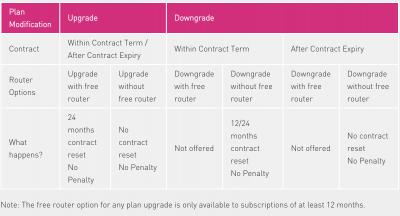
|
|
|
Oct 9 2018, 11:33 AM
Return to original view | Post
#16
|
|
Elite
8,418 posts Joined: Jul 2008
|
QUOTE(lyrilmaki @ Oct 9 2018, 11:23 AM) Anyone TPLink C1200 behave same as mine sometimes? TIME somehow have a limit on PPPOE session. If you disconnected, it takes a while until the next PPPOE session can be established.I power on the router and modem.. Modem everything is fine, but TPLink Internet icon is orange light.. Even after 5 to 10 minutes still orange, restart again then it get internet connection (green light) |
|
|
Oct 10 2018, 01:04 AM
Return to original view | Post
#17
|
|
Elite
8,418 posts Joined: Jul 2008
|
QUOTE(sparrowed @ Oct 9 2018, 10:51 PM) does anyone knows how to login to the Huawei HG 8240H GPON ? my Time technician told me the port configured incorrectly, thats why im getting 100mbps despite upgraded to 500. No one apart from TIME can login |
|
|
Oct 10 2018, 07:32 PM
Return to original view | Post
#18
|
|
Elite
8,418 posts Joined: Jul 2008
|
QUOTE(drunkonpiss @ Oct 10 2018, 07:09 PM) Can anyone recommend a good powerline that would work well with the Dlink DIR-850L router? I would want to utilize the up t 500 mbps speed. Can't get my PC to hook up directly to the router. No powerline can reach 500Mbps.Best case I have seen in super good condition is 180Mbps |
|
|
Oct 11 2018, 09:24 PM
Return to original view | Post
#19
|
|
Elite
8,418 posts Joined: Jul 2008
|
QUOTE(brandonkl @ Oct 10 2018, 11:29 PM) I just bought the AC5400X and set-up was easy by just entering the PPOE username and password. I am using a Cat7 cable as well. There is a firmware update which improve performance, make sure you update to that. Have been doing speedtests in the last hour and highest I achieved was about 600 Mbps. I am on the 1 Gbps plan. On the TP Link AC-1200, I was able to achieve up to 700-800+ Mbps a few times. All tests on wired. Any special settings in the AC5400X that I need to do to make sure I achieve the fastest speed on my AC5400X? Maybe later after midnight may be faster when less users are online. |
|
|
Oct 11 2018, 11:30 PM
Return to original view | Post
#20
|
|
Elite
8,418 posts Joined: Jul 2008
|
QUOTE(brandonkl @ Oct 11 2018, 10:10 PM) Thanks .. updated yesterday.. still haven't achieved 1,000 Mbps... Still max around 955 Mbps. Maximum speed possible is 949Mbps due to Ethernet TCP overhead.You get more than that is due to the inaccuracy with speedtest.net |
| Change to: |  0.0249sec 0.0249sec
 1.28 1.28
 7 queries 7 queries
 GZIP Disabled GZIP Disabled
Time is now: 16th December 2025 - 01:26 AM |
 Quote
Quote