Outline ·
[ Standard ] ·
Linear+
TIME [OFFICIAL] TIME Fibre Broadband™ v4, Experience the ONE TRUE 2Gbps
|
jjj2
|
 Jul 22 2021, 09:40 PM Jul 22 2021, 09:40 PM
|

|
QUOTE(ocyrus @ Jul 22 2021, 11:11 AM) I'm on the Time 100Mbps plan (using the TP-Link EC230-G1 router) and there are some dead spots in the bedrooms of my condo. Want to get sifus advise - should I buy TP-link mesh unit myself, or get Time Omnimesh? Kind of a noob when it comes to mesh, so appreciate any advise you guys can give. Hi, do send me your unit's layout plan & size... then we will be able to tell you which one to go for. Thanks. |
|
|
|
|
|
gnsumas
|
Jul 23 2021, 06:16 PM
|
|
|
Hi
I've been using TIME for a few months now, and the 2 in 1 modem is pretty horrible. Slightly over 1000sft with 2 TP Link M4 and my master bedroom only gets 20Mbps (out of 500) with frequent disconnections.
I've heard about asking CS to switch to bridge mode, but can anyone roughly explain how it'd work once I've gotten a new router? Do I just call them and install my new router myself, or do I have to set an appointment with an installation person?
|
|
|
|
|
|
FusionXY
|
Jul 23 2021, 06:26 PM
|
|
|
QUOTE(gnsumas @ Jul 23 2021, 06:16 PM) Hi I've been using TIME for a few months now, and the 2 in 1 modem is pretty horrible. Slightly over 1000sft with 2 TP Link M4 and my master bedroom only gets 20Mbps (out of 500) with frequent disconnections. I've heard about asking CS to switch to bridge mode, but can anyone roughly explain how it'd work once I've gotten a new router? Do I just call them and install my new router myself, or do I have to set an appointment with an installation person? After the CS set into bridge mode. You can setup the router with PPPOE. Make sure that you have the PPPOE details ready before you set up. |
|
|
|
|
|
gnsumas
|
Jul 23 2021, 06:35 PM
|
|
|
QUOTE(FusionXY @ Jul 23 2021, 06:26 PM) After the CS set into bridge mode. You can setup the router with PPPOE. Make sure that you have the PPPOE details ready before you set up. So I don't need an installation person over? Also, based on experience would this help much? My condo seems like it'd be small enough for any router that doesn't suck, but I don't know if its the router's fault or that the walls are full of lead or something. |
|
|
|
|
|
miyakochan89
|
Jul 23 2021, 06:37 PM
|
|
|
QUOTE(gnsumas @ Jul 23 2021, 06:35 PM) So I don't need an installation person over? Also, based on experience would this help much? My condo seems like it'd be small enough for any router that doesn't suck, but I don't know if its the router's fault or that the walls are full of lead or something. Yeah changing to better router does help in my case. I live in a condo too, about 2000 square feet and the default router can’t cover the entire unit as well. |
|
|
|
|
|
FusionXY
|
Jul 23 2021, 06:41 PM
|
|
|
QUOTE(gnsumas @ Jul 23 2021, 06:35 PM) So I don't need an installation person over? Also, based on experience would this help much? My condo seems like it'd be small enough for any router that doesn't suck, but I don't know if its the router's fault or that the walls are full of lead or something. You don't need. They can switch to bridge remotely. If you ask them to setup the router for you then they will charge you a small fee to setup. |
|
|
|
|
|
jjj2
|
Jul 23 2021, 10:46 PM
|
|
|
QUOTE(gnsumas @ Jul 23 2021, 06:35 PM) So I don't need an installation person over? Also, based on experience would this help much? My condo seems like it'd be small enough for any router that doesn't suck, but I don't know if its the router's fault or that the walls are full of lead or something. Hi, after you have switched to Bridge Mode, you may use your existing M4 to dial the PPPOE. Thanks. |
|
|
|
|
|
scFoong
|
Jul 25 2021, 03:10 PM
|
|
|
QUOTE(jjj2 @ Jul 23 2021, 10:46 PM) Hi, after you have switched to Bridge Mode, you may use your existing M4 to dial the PPPOE. Thanks. Hi, After its switched to bridge mode, do we need to change any settings at the Huawei HG8145V5? Example - remains the PPPOE details without removing it ? Thankyou  |
|
|
|
|
|
jjj2
|
Jul 25 2021, 08:47 PM
|
|
|
QUOTE(scFoong @ Jul 25 2021, 03:10 PM) Hi, After its switched to bridge mode, do we need to change any settings at the Huawei HG8145V5? Example - remains the PPPOE details without removing it ? Thankyou Hi, after you changed to bridge mode, you will need to configure PPPOE credentials on your own router. You can leave the existing settings in the Huawei ONT. Thanks. |
|
|
|
|
|
scFoong
|
Jul 25 2021, 09:19 PM
|
|
|
QUOTE(jjj2 @ Jul 25 2021, 08:47 PM) Hi, after you changed to bridge mode, you will need to configure PPPOE credentials on your own router. You can leave the existing settings in the Huawei ONT. Thanks. Thankyou |
|
|
|
|
|
jjj2
|
Jul 25 2021, 09:58 PM
|
|
|
QUOTE(scFoong @ Jul 25 2021, 09:19 PM) Thankyou Welcome |
|
|
|
|
|
anuj25
|
Jul 26 2021, 09:10 AM
|
Getting Started

|
Hello all,
I am a new Time User with 0 background in network set up.
I have been provided Huawei Echo Life HG8145V5.
Question- How can I change the DNS?
If i purchase a new router and request "bridge" mode will I be able to change the DNS?
I have read back quite a few pages on this forum, however, I am still not able to understand.
Hope someone can help! thanks in advance
|
|
|
|
|
|
anuj25
|
Jul 26 2021, 10:23 AM
|
Getting Started
|
QUOTE(anuj25 @ Jul 26 2021, 09:10 AM) Hello all, I am a new Time User with 0 background in network set up. I have been provided Huawei Echo Life HG8145V5. Question- How can I change the DNS? If i purchase a new router and request "bridge" mode will I be able to change the DNS? I have read back quite a few pages on this forum, however, I am still not able to understand. Hope someone can help! thanks in advance Case Closed!- Am happy to announce I was able to Change the DNS by contacting the online chat. I got a call back and they asked my preferred DNS and alternate DNS. And just like that it is done! |
|
|
|
|
|
gnsumas
|
Jul 26 2021, 05:21 PM
|
|
|
QUOTE(jjj2 @ Jul 23 2021, 10:46 PM) Hi, after you have switched to Bridge Mode, you may use your existing M4 to dial the PPPOE. Thanks. Hi thanks for the help, didn't know the M4 could work as a router as well. Unfortunately, my speeds are still unstable around the house. Is the M4 really that bad? Should I get a dedicated router instead? |
|
|
|
|
|
jjj2
|
Jul 27 2021, 10:55 AM
|
|
|
QUOTE(gnsumas @ Jul 26 2021, 05:21 PM) Hi thanks for the help, didn't know the M4 could work as a router as well. Unfortunately, my speeds are still unstable around the house. Is the M4 really that bad? Should I get a dedicated router instead? Hi, please send me your unit layout indicating the location you position your M4. Thanks. |
|
|
|
|
|
neskafeice
|
Jul 28 2021, 02:53 PM
|
New Member
|
i am unifi user at high-rise building (with VDSL) thinking of connecting / dual wan with timebroadband. dont ask why i want to keep unifi.
what kind of equipment typically time will provide nowadays. need to plan current mesh and connectivity.thanks...
This post has been edited by neskafeice: Jul 28 2021, 03:15 PM
|
|
|
|
|
|
jjj2
|
Jul 28 2021, 03:34 PM
|
|
|
QUOTE(neskafeice @ Jul 28 2021, 02:53 PM) i am unifi user at high-rise building (with VDSL) thinking of connecting / dual wan with timebroadband. dont ask why i want to keep unifi. what kind of equipment typically time will provide nowadays. need to plan current mesh and connectivity.thanks... Hi, Huawei HG8145V5 2-IN-1 ONT (100 & 500Mbps), Huawei HG8240H5 ONU + TP-link EC440-G5U Router for 1Gbps. Optional Items : Huawei WA8021V5 ONT & TP-Link HC420-G5W Router. |
|
|
|
|
|
1234kingbling
|
Jul 29 2021, 03:48 PM
|
|
|
Huawei WA8021V5 is this router any good? i have been using the black cylinder one since 2016.
|
|
|
|
|
|
ZzZzz...
|
Jul 29 2021, 04:03 PM
|
|
|
not sure can temporary stop the service not, since im away from PJ for many month due to MCO...
or just terminate my plan first, and subscribe the plan again after this MCO end...
btw, i ard finish my contract last year december 2020
|
|
|
|
|
|
polarzbearz
|
Jul 29 2021, 08:50 PM
|
|
|
|
|
|
|
|



 Quote
Quote




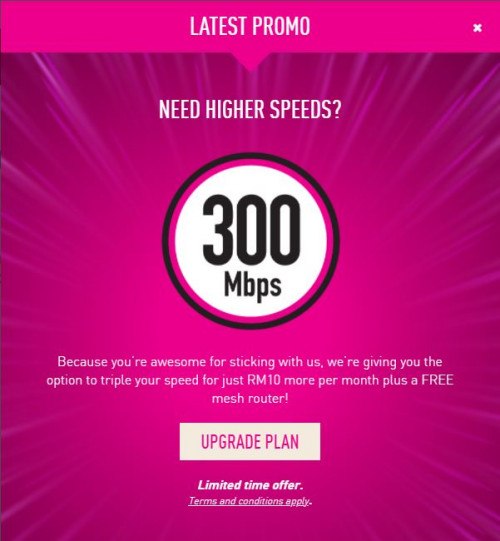
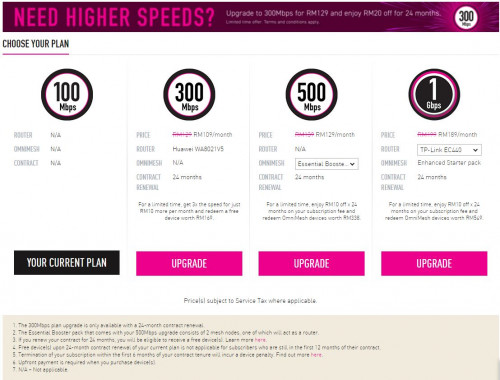
 tempting to take the RM109 @ 300MBPS package (just downgraded from RM189 @ 1GBPS to RM99 @ 100MBPS package earlier this month without contract
  )
)
 0.0377sec
 1.01
1.01
 6 queries
 GZIP Disabled