

Attached File(s)
 Workbook1_Sheet1.pdf ( 212.12k )
Number of downloads: 33
Workbook1_Sheet1.pdf ( 212.12k )
Number of downloads: 33Home Networking ASUS Malaysia Networking User & Technical Support, Managed by ASUS Malaysia Representative
|
|
 Dec 31 2014, 11:36 AM Dec 31 2014, 11:36 AM
|
 
Senior Member
1,138 posts Joined: May 2010 
|
|
|
|
|
|
|
Dec 31 2014, 01:06 PM
|

Senior Member
4,524 posts Joined: Oct 2007 From: ~Still finding the place~ 
|
Hi ASUSmy,
Would like to check with you. I'm using a RT-N14UHP, it got a very powerful wireless signal, do this router suitable for home use? Will the wireless strength produce too much radiation? Is there any problem if I sit very near with it for a long hours everyday? I'm putting it near to my workstation..  |
|
|
Dec 31 2014, 01:37 PM
|

Junior Member
475 posts Joined: Oct 2004 From: -Klang-Kelana Jaya- 
|
QUOTE(Lineage @ Dec 31 2014, 01:06 PM) Hi ASUSmy, using it at my home. signal very power. still can use even im outside my house. about radiation im not too sure.Would like to check with you. I'm using a RT-N14UHP, it got a very powerful wireless signal, do this router suitable for home use? Will the wireless strength produce too much radiation? Is there any problem if I sit very near with it for a long hours everyday? I'm putting it near to my workstation..  |
|
|
Dec 31 2014, 01:47 PM
Show posts by this member only | IPv6 | Post
#2224
|

Senior Member
1,182 posts Joined: Jan 2003
|
QUOTE(Khalid21 @ Dec 31 2014, 11:36 AM) some review the wireless signal strength, it should be larger is better instead of what is shown on the graphs.we are dealing with negative numbers here. -30 is larger than -70. |
|
|
Jan 2 2015, 01:12 PM
|
|
Senior Member
2,215 posts Joined: Nov 2007 From: Cheras, KL.
|
dear asus, currently using rtn10u, rtn56 and rtn14uhp.
1st previously spoiled rtn10u after few month of usage, rma new one and now its having intermittent disconnection of internet, it this a sign of router going to spoiled? the wireless connection with client is ok, just the internet. i am using as a repeater bridging with rtn56u. 2nd i just bought rtn14uhp to used. can we used two router together connected to one btu/unifi? rather than using the rtn14 as a repeater. as the speed will be halves. hope to maintain full speed. 3rd, after setting up ddns in the router, the internet become slightly slower/laggy. is this normal in rtn56u. i am using ddns to cater my cctv. thus i am thinking of using two router simultaneously. one with and one without ddns setting. tqvm |
 |
Jan 2 2015, 03:33 PM
|

Senior Member
2,319 posts Joined: Mar 2010
|
QUOTE(Eng_Tat @ Jan 2 2015, 01:12 PM) dear asus, currently using rtn10u, rtn56 and rtn14uhp. Hi Eng_Tat,1st previously spoiled rtn10u after few month of usage, rma new one and now its having intermittent disconnection of internet, it this a sign of router going to spoiled? the wireless connection with client is ok, just the internet. i am using as a repeater bridging with rtn56u. 2nd i just bought rtn14uhp to used. can we used two router together connected to one btu/unifi? rather than using the rtn14 as a repeater. as the speed will be halves. hope to maintain full speed. 3rd, after setting up ddns in the router, the internet become slightly slower/laggy. is this normal in rtn56u. i am using ddns to cater my cctv. thus i am thinking of using two router simultaneously. one with and one without ddns setting. tqvm 1. You can try update the firmware of the router to the latest and try again. Make make sure that when doing the repeater mode, the signal bar of the wifi you want to connect is at least 2 or 3 bars. This is to ensure that the connection between the RT-N10U and RT-N56U will not disconnected due to low wifi signal. http://www.asus.com/Networking/RTN10U_B/HelpDesk_Download/ 2. I think UNIFI only allow one account to each modem. You be able to connect to the UNIFI using another account. 3. You can try update the firmware for the RT-N56U also, see that it can solve your problem or not. http://www.asus.com/Networking/RTN56U/HelpDesk_Download/ Thank you |
|
|
|
|
|
Jan 2 2015, 03:45 PM
|
|
Senior Member
2,215 posts Joined: Nov 2007 From: Cheras, KL.
|
thanks for the reply, before this there is no issue. only recently. and for rt n10u i has updated to the latest one. yet the issue is still there. that why i bought the rtn14uhp. i will update rtn56u firmware when possible but currently it to tedious as i need to re setup the network at home. cctv, alarm and ddns. dont really want to touch is possible for time being coz not expert
 . .QUOTE(ASUSmy @ Jan 2 2015, 03:33 PM) Hi Eng_Tat, 1. You can try update the firmware of the router to the latest and try again. Make make sure that when doing the repeater mode, the signal bar of the wifi you want to connect is at least 2 or 3 bars. This is to ensure that the connection between the RT-N10U and RT-N56U will not disconnected due to low wifi signal. 2. I think UNIFI only allow one account to each modem. You be able to connect to the UNIFI using another account. 3. You can try update the firmware for the RT-N56U also, see that it can solve your problem or not. Thank you |
|
|
Jan 3 2015, 04:37 PM
|
|
Junior Member
17 posts Joined: Sep 2010
|
Hi Asus,
I currently using RT AC68U, and i just change to Maxis Fibre and also follow the guide on how to use custom router, it works fine but somehow my phone was not working, while i check on Maxis Technicolor router to troubleshoot the connectivity it gave me this error message that i unable contact to the DNS 1 and 2. Please refer the attachment. May i know what would likely be the issue? As i was able to ping the two DNS server IP as well. Thanks in advanced for all sifus Attached thumbnail(s) 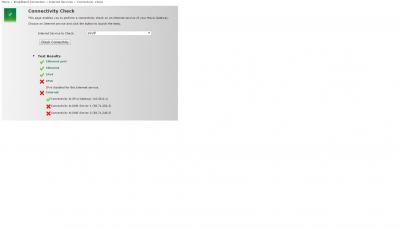
|
|
|
Jan 4 2015, 02:54 PM
|

Junior Member
257 posts Joined: Jan 2003 From: Dude, Where's My Country?
|
hi, im currently using RT-N12D1 with latest firmware 3.0.0.4.376_3602. my current setup is im using unifi business fixed ip 20mb. everything works well, when i connect my laptop to interfaces behind the asus router, i get the local lan ip and the internet works well. same if i connect via wireless, i get the lan ip and internet works well. my unifi fixed ip is used to access my asus router from my home.
Now, i have a server at my office. I would like to have my server eth1 interface to be assigned with my unifi fixed ip. i dont want to use the lan ip and NAT. how can i do that? my old office using tm own router, when we plug in a laptop or any device, i will get the unifi fixed ip via dhcp. how can i setup the asus router to do the same. automatically assign my server to get my unifi fixed ip. i dont want my server to initiate any dialing or connection. the asus router should help me connect to unifi and asign the fixed public ip to my server eth1. please help. thank you. |
|
|
Jan 4 2015, 03:07 PM
|

All Stars
14,908 posts Joined: Jul 2005 
|
ASUSmy this is the AC68U v2 with 1GHz processor I've mentioned to you & your boss when we had our lunch last time.
It seems ASUS rename the product as RT-AC68P. Do let me know once it arrives Malaysian shores. http://www.asus.com/Networking/RTAC68P/ Found out in SmallNetBuilder forum that the RT-AC68P is produced solely for Best Buy. Link: http://forums.smallnetbuilder.com/showthread.php?t=20297 |
|
|
Jan 5 2015, 09:28 AM
|
|
Senior Member
2,319 posts Joined: Mar 2010
|
QUOTE(jliewch2003 @ Jan 3 2015, 04:37 PM) Hi Asus, Hi jliewch2003,I currently using RT AC68U, and i just change to Maxis Fibre and also follow the guide on how to use custom router, it works fine but somehow my phone was not working, while i check on Maxis Technicolor router to troubleshoot the connectivity it gave me this error message that i unable contact to the DNS 1 and 2. Please refer the attachment. May i know what would likely be the issue? As i was able to ping the two DNS server IP as well. Thanks in advanced for all sifus May I ask, is there a LAN cable connected between Maxis Technicolor WAN port to the ASUS RT-AC68U LAN port 3? Thank you |
|
|
Jan 5 2015, 02:22 PM
|
|
Senior Member
2,319 posts Joined: Mar 2010
|
QUOTE(NightShyamalan @ Jan 4 2015, 02:54 PM) hi, im currently using RT-N12D1 with latest firmware 3.0.0.4.376_3602. my current setup is im using unifi business fixed ip 20mb. everything works well, when i connect my laptop to interfaces behind the asus router, i get the local lan ip and the internet works well. same if i connect via wireless, i get the lan ip and internet works well. my unifi fixed ip is used to access my asus router from my home. Hi NightShyamalan,Now, i have a server at my office. I would like to have my server eth1 interface to be assigned with my unifi fixed ip. i dont want to use the lan ip and NAT. how can i do that? my old office using tm own router, when we plug in a laptop or any device, i will get the unifi fixed ip via dhcp. how can i setup the asus router to do the same. automatically assign my server to get my unifi fixed ip. i dont want my server to initiate any dialing or connection. the asus router should help me connect to unifi and asign the fixed public ip to my server eth1. please help. thank you. Our router unable to do as the TM UNIFI router can do for the WAN IP address. You can use port forwarding if you want to access the server from outside the network. Thank you |
|
|
Jan 5 2015, 04:25 PM
|
|
Junior Member
17 posts Joined: Sep 2010
|
QUOTE(ASUSmy @ Jan 5 2015, 09:28 AM) Hi jliewch2003, Hi AsusMay I ask, is there a LAN cable connected between Maxis Technicolor WAN port to the ASUS RT-AC68U LAN port 3? Thank you Ya, i did connect the cable between the port3(asus) and wan(Maxis) however it was still not functioning, is there any way to troubleshoot? |
|
|
|
|
|
Jan 5 2015, 06:21 PM
|
|
Senior Member
2,319 posts Joined: Mar 2010
|
QUOTE(jliewch2003 @ Jan 5 2015, 04:25 PM) Hi Asus Hi jliewch2003,Ya, i did connect the cable between the port3(asus) and wan(Maxis) however it was still not functioning, is there any way to troubleshoot? May I know what is your current firmware version? Try update it to 3.0.0.4.376.3715 and do a factory reset after the update. http://www.asus.com/Networking/RTAC68U/HelpDesk_Download/ Thank you |
|
|
Jan 5 2015, 06:26 PM
|
|
Junior Member
17 posts Joined: Sep 2010
|
QUOTE(ASUSmy @ Jan 5 2015, 06:21 PM) Hi jliewch2003, Hi Asus May I know what is your current firmware version? Try update it to 3.0.0.4.376.3715 and do a factory reset after the update. http://www.asus.com/Networking/RTAC68U/HelpDesk_Download/ Thank you The firmware was same, so do i need to do factory reset on technicolor or my asus router? |
|
|
Jan 6 2015, 12:14 AM
|
|
Newbie
2 posts Joined: Aug 2006
|
Hi Asus,
I'm using the RT-N18U as a replacement for the Unifi Residential Gateway but I am unable to get Hypp TV to work reliably. When using the Unifi Residential Gateway Hypp TV works normally with no lags, however, when I use the RT-N18U with the IPTV setting on and connecting the set top box to LAN port 4, the connection seems to be very jerky and I get a very choppy video with very frequent and long dropouts. The router came pre-loaded with the latest firmware. Please advise if anyone else is having this problem and how it can be overcome. Thanks! |
|
|
Jan 6 2015, 09:22 AM
|
|
Senior Member
2,319 posts Joined: Mar 2010
|
QUOTE(jliewch2003 @ Jan 5 2015, 06:26 PM) Hi Asus Hi jliewch2003,The firmware was same, so do i need to do factory reset on technicolor or my asus router? Do the reset on the ASUS router. Thank you |
|
|
Jan 6 2015, 09:57 AM
|

Junior Member
430 posts Joined: Jan 2003 From: K.l Cheras
|
Dear All Sifu,
I;m planning to change unifi router to Asus N66U, i notice there is few people mention about N66U is not so stable however i saw the advertisement mention N66U is the best Wireless router 2014. MY requirement is such as -DDNS ( i notice Asus got FREE DDNS which is good for me, because for Free account DyDns require reconfigure every 30 days) so better got Asus FREE DDNS. -VPN Feature -Gigabit Port -All in One (Modem + Router + Wireless) - (do i still require Unifi Router?) -Guest Login -Netflow (i notice the standard firmware like not able to support Netflow ) -SNMP (For monitoring ) Lastly, anyone flash to DD-WRT firmware ? not sure worth it or not |
|
|
Jan 6 2015, 10:33 AM
|

Junior Member
199 posts Joined: Jan 2010
|
Hi there. Can you explain in layman terms the difference between High End WiFi product - 802.11ac & 802.11n series Wireless Router and Wireless Application Router / WiFi Storage / WiFi ADSL router?
I'm looking at the RT-N56U and the DSL-N55U. What I basically want is to use Sony's Remote Play feature in my daughter's room on the floor above my current modem + router setup. Did some reading and I plan to use the 5Ghz range for it. Currently using UniFi. This post has been edited by bendonarticx: Jan 6 2015, 10:48 AM |
|
|
Jan 6 2015, 10:42 AM
|

Senior Member
1,862 posts Joined: May 2013
|
QUOTE(lucklyghost @ Jan 6 2015, 09:57 AM) Dear All Sifu, Been using N66U without problems.I;m planning to change unifi router to Asus N66U, i notice there is few people mention about N66U is not so stable however i saw the advertisement mention N66U is the best Wireless router 2014. MY requirement is such as -DDNS ( i notice Asus got FREE DDNS which is good for me, because for Free account DyDns require reconfigure every 30 days) so better got Asus FREE DDNS. -VPN Feature -Gigabit Port -All in One (Modem + Router + Wireless) - (do i still require Unifi Router?) -Guest Login -Netflow (i notice the standard firmware like not able to support Netflow ) -SNMP (For monitoring ) Lastly, anyone flash to DD-WRT firmware ? not sure worth it or not Those who say otherwise may not even know what a router is let alone configure or set it up properly |
| Change to: |  0.0231sec 0.0231sec
 0.40 0.40
 6 queries 6 queries
 GZIP Disabled GZIP Disabled
Time is now: 5th December 2025 - 09:54 AM |
 Quote
Quote