Welcome Guest ( Log In | Register )

826 Pages « < 597 598 599 600 601 > » Bottom

Outline · [ Standard ] · Linear+

Home Networking ASUS Malaysia Networking User & Technical Support, Managed by ASUS Malaysia Representative

views
     
ideaplus
post Aug 15 2020, 09:40 AM

Enthusiast
*****
Junior Member
915 posts

Joined: Nov 2014
QUOTE(boxsystem @ Aug 15 2020, 09:15 AM)
I do have this kind of issue with my ax3000. But there's nothing wrong on my ONT suggesting any issues with the lines. I would suspect that the router itself is having issues. Especially if I enabled Dual WAN settings.
*
So does your issue solved after disabled Dual Wan? Btw, i didn't enabled Dual Wan function sad.gif
boxsystem
post Aug 15 2020, 11:33 AM

Legend
******
Senior Member
1,573 posts

Joined: Jan 2003
From: Nilai, Negeri Sembilan
QUOTE(ideaplus @ Aug 15 2020, 09:40 AM)
So does your issue solved after disabled Dual Wan? Btw, i didn't enabled Dual Wan function  sad.gif
*
Not really, at times it does happen. At the moment, I am shelving the AX3000 and using Mikrotik HAP AC2 to dial 2 PPPoE connections simultaneously while enabling VLANs segmentation for both my Maxis and Unifi connection.
blacktubi
post Aug 15 2020, 01:06 PM

-
Group Icon
Elite
8,414 posts

Joined: Jul 2008

QUOTE(boxsystem @ Aug 15 2020, 12:09 AM)
Hi,

I am seeing that AX86U has a 2.5Gb port that can also run as WAN. So, if  I purchase it, will be able to support multiple WAN with different VLAN settings?
*
ASUSWRT do not support multiple VLAN trunking for WAN
boxsystem
post Aug 15 2020, 02:48 PM

Legend
******
Senior Member
1,573 posts

Joined: Jan 2003
From: Nilai, Negeri Sembilan
QUOTE(blacktubi @ Aug 15 2020, 01:06 PM)
ASUSWRT do not support multiple VLAN trunking for WAN
*
Too bad then.
tharmaraj
post Aug 17 2020, 12:36 PM

Casual
***
Junior Member
312 posts

Joined: Apr 2015


any guide how to configure IPv6 with UNIFI connection. thanks and appreciate for your help.
TSASUSmy
post Aug 17 2020, 04:15 PM

Look at all my stars!!
*******
Senior Member
2,319 posts

Joined: Mar 2010
QUOTE(tharmaraj @ Aug 17 2020, 12:36 PM)
any guide how to configure IPv6 with UNIFI connection. thanks and appreciate for your help.
*
Hi tharmaraj,

You may refer to the link below on how to setup the IPv6.

https://www.asus.com/support/FAQ/113990/

Thank you
Zi-Tech
post Aug 17 2020, 09:18 PM

Eh, pangkat sudah tukar ka
*****
Senior Member
774 posts

Joined: Jun 2008
From: Shah Alam, Selangor/ Gambang, Kuantan, Pahang


Hi,

I just bought RT-AX3000 last month. I just checking the function for limiting the speed as i am shared the internet with my friend.

but when i am use speed limit, it seem all the connection are limited as well not as i am intended to. Example I limit 300mbps down and 50mbps up for one device, when i tried with the device that not listed on the client list, it just run fraction of total speed. It not like my previous tenda router where it does the job excellently...

here the speed at first without speed limit.
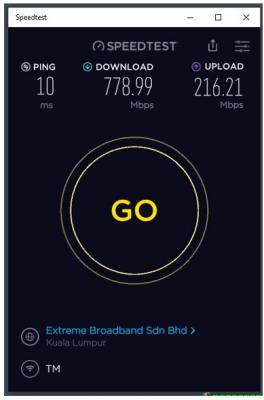
Attached Image

here i applied setting for speed limit for my friends router

Attached Image

running speed test again on same computer
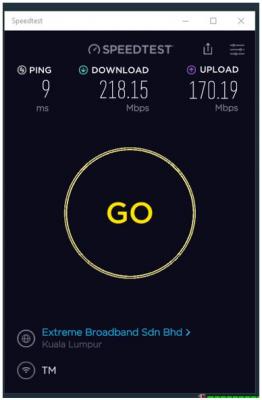
Attached Image

disabled back the setting, get back the speed (no 1, 2 and 3 is same as above)

Attached Image

Is it the router have bug or it is normal like that. (as my previous tenda router, when i limit the speed limit on my friend router, he only get up to my limit setting, and i can get full speed up to my unifi connection)

hope can get some clarification.

thanks

This post has been edited by Zi-Tech: Aug 17 2020, 09:19 PM
hojianming
post Aug 18 2020, 01:10 AM

New Member
*
Junior Member
27 posts

Joined: Mar 2010
Im using GT-AX11000 firmware Version 3.0.0.4.384.9566 as main router at second floor and one GT-AC2900 Version 3.0.0.4.384.81974 as aimesh node at ground floor and one more RP-AC55 Version 3.0.0.4.384.80710 aimesh node at the kitchen, connection between gt-ax11000 and gt-ac2900 seems stable but the RP-AC55 keep dropping connection and it wont connect back until i power it off and on again, is it a firmware problem?
tharmaraj
post Aug 18 2020, 07:33 AM

Casual
***
Junior Member
312 posts

Joined: Apr 2015


QUOTE(ASUSmy @ Aug 17 2020, 04:15 PM)
Hi tharmaraj,

You may refer to the link below on how to setup the IPv6.

https://www.asus.com/support/FAQ/113990/

Thank you
*
WAN >Internet Connection> WAN Connection Type set [PPPoE], please select IPv6 Connection type set [Native] - is this the correct connection for UNIFI?
TSASUSmy
post Aug 18 2020, 10:29 AM

Look at all my stars!!
*******
Senior Member
2,319 posts

Joined: Mar 2010
QUOTE(Zi-Tech @ Aug 17 2020, 09:18 PM)
Hi,

I just bought RT-AX3000 last month. I just checking the function for limiting the speed as i am shared the internet with my friend.

but when i am use speed limit, it seem all the connection are limited as well not as i am intended to. Example I limit 300mbps down and 50mbps up for one device, when i tried with the device that not listed on the client list, it just run fraction of total speed. It not like my previous tenda router where it does the job excellently...

here the speed at first without speed limit.

Attached Image

here i applied setting for speed limit for my friends router

Attached Image

running speed test again on same computer

Attached Image

disabled back the setting, get back the speed (no 1, 2 and 3 is same as above)

Attached Image

Is it the router have bug or it is normal like that. (as my previous tenda router, when i limit the speed limit on my friend router, he only get up to my limit setting, and i can get full speed up to my unifi connection)

hope can get some clarification.

thanks
*
Hi Zi-Tech,

May I know what is the firmware version you are using now?

The latest version now is 3.0.0.4.384.9505.

Thank you


junclj
post Aug 18 2020, 10:29 AM

Look at all my stars!!
*******
Senior Member
2,348 posts

Joined: Apr 2008


QUOTE(Zi-Tech @ Aug 17 2020, 09:18 PM)
Hi,

I just bought RT-AX3000 last month. I just checking the function for limiting the speed as i am shared the internet with my friend.

but when i am use speed limit, it seem all the connection are limited as well not as i am intended to. Example I limit 300mbps down and 50mbps up for one device, when i tried with the device that not listed on the client list, it just run fraction of total speed. It not like my previous tenda router where it does the job excellently...

here the speed at first without speed limit.

Attached Image

here i applied setting for speed limit for my friends router

Attached Image

running speed test again on same computer

Attached Image

disabled back the setting, get back the speed (no 1, 2 and 3 is same as above)

Attached Image

Is it the router have bug or it is normal like that. (as my previous tenda router, when i limit the speed limit on my friend router, he only get up to my limit setting, and i can get full speed up to my unifi connection)

hope can get some clarification.

thanks
*
There's no need to do limit if you really have 800mbps. Usually your friend won't keep download and upload for 24/7 unless they have 1,000PB harddisk and downloading like never ending. Usually a normal use user won't consume a lot of bandwidth, mostly just around 100~300mbps for doing some Youtube and online video streaming. Even gaming also not consuming bandwidth. Gaming is more depending on latency not bandwidth. Limiting a speed in your router will cause drop down your router performance. This will make your router performance getting even worse. So, just reset your router and don't touch anything in the QoS setting.

Be fair and everyone enjoy full speed download, there have really not neccessary to limit the speed with 800mbps. Mobile phones won't consume a lot of bandwidth, just leave it full speed. If you load a video for 5 secs with 800mbps by comparing 1 minutes for 100mbps after you limit your friend's bandwidth. Why don't just leave it 800mbps? 5 secs only won't cost you a lot. Besides that, not everyone will always getting 800mbps full speed on wifi. There is really wasting of time and wasting of performance to limit your router speed. As long as you need to get a good performance router, your router need a good CPU, more RAM but not to limit your friends wifi speed. Sometimes the reason why cause you no internet and need to keep restart that router, which is because your main router is not powerful enough. It's not about your friend keep downloading and using the internet.

My home has Unifi 500mbps too but I never limit my router speed. My parents all using the wifi on their phones and my mum also watching online video streaming and IPTV. I also download my games in epic games store for 40~50MB/s without any problem. They still able to stream their Youtube, facebook video, online streaming fluently. After half hour, I already done download my 50GB game. My home bandwidth get back to 500mbps full speed again. Fast and not necessarily to do QoS.

You should think positive way, bro. 800mbps is more about the problem of your PC running out of harddisk space fast, not about the problem of bandwidth issue. 800mbps is not a big issue as long as you get a powerful main router.

This post has been edited by junclj: Aug 18 2020, 11:22 AM

yongtjunkit
post Aug 18 2020, 11:31 AM

Look at all my stars!!
*******
Senior Member
2,516 posts

Joined: Mar 2016
Hi,, I’m having issue lately With my AX 92U rebooting out of nowhere

Currently running the latest stable firmware for AX92U

Running QOS as well

This post has been edited by yongtjunkit: Aug 18 2020, 11:43 AM
TSASUSmy
post Aug 18 2020, 12:00 PM

Look at all my stars!!
*******
Senior Member
2,319 posts

Joined: Mar 2010
QUOTE(hojianming @ Aug 18 2020, 01:10 AM)
Im using GT-AX11000 firmware Version 3.0.0.4.384.9566 as main router at second floor and one GT-AC2900 Version 3.0.0.4.384.81974 as aimesh node at ground floor and one more RP-AC55 Version 3.0.0.4.384.80710 aimesh node at the kitchen, connection between gt-ax11000 and gt-ac2900 seems stable but the RP-AC55 keep dropping connection and it wont connect back until i power it off and on again, is it a firmware problem?
*
Hi hojianming,

Can you try updating the RP-AC55 firmware from the link below. And which router or node that the RP-AC55 usually connect to?

https://drive.google.com/file/d/1HNXlJLK7ov...iew?usp=sharing

After the firmware update if the problem happen again, do send a feedback using the router GUI and PM me your email address once done.

Thank you
firdausbhari
post Aug 18 2020, 12:30 PM

Look at all my stars!!
*******
Senior Member
2,281 posts

Joined: Feb 2012


QUOTE(hojianming @ Aug 18 2020, 01:10 AM)
Im using GT-AX11000 firmware Version 3.0.0.4.384.9566 as main router at second floor and one GT-AC2900 Version 3.0.0.4.384.81974 as aimesh node at ground floor and one more RP-AC55 Version 3.0.0.4.384.80710 aimesh node at the kitchen, connection between gt-ax11000 and gt-ac2900 seems stable but the RP-AC55 keep dropping connection and it wont connect back until i power it off and on again, is it a firmware problem?
*
i got so many issues with RP-AC55. i abandon it. fail product.
TSASUSmy
post Aug 18 2020, 02:54 PM

Look at all my stars!!
*******
Senior Member
2,319 posts

Joined: Mar 2010
QUOTE(yongtjunkit @ Aug 18 2020, 11:31 AM)
Hi,, I’m having issue lately With my AX 92U rebooting out of nowhere

Currently running the latest stable firmware for AX92U

Running QOS as well
*
Hi yongtjunkit,

The reboot is happening on the router or the node.

Can send a feedback and PM email for checking.

Thank you
yongtjunkit
post Aug 18 2020, 02:55 PM

Look at all my stars!!
*******
Senior Member
2,516 posts

Joined: Mar 2016
QUOTE(ASUSmy @ Aug 18 2020, 02:54 PM)
Hi yongtjunkit,

The reboot is happening on the router or the node.

Can send a feedback and PM email for checking.

Thank you
*
I believe it’s the main router since the entire house WiFi went down and the system uptime got reset to 0 mins
kiawin
post Aug 18 2020, 04:43 PM

NOOBIE
****
Senior Member
680 posts

Joined: Jan 2003
From: Klang, Malaysia


QUOTE(ASUSmy @ Aug 13 2020, 02:27 PM)
Hi kiawin,

May I know is your modem is TM modem? If no, try selecting Maxis Fiber Special.

Reboot the ASUS router, Maxis router and the modem once done to let the phone detect the setting again.

Thank you
*
Hi Asus,

Yes, it's TM modem/BTU. I've rebooted them in sequence. The dial tone is different than usual, and cannot call in/out.
laksamana
post Aug 18 2020, 04:56 PM

Regular
******
Senior Member
1,356 posts

Joined: Nov 2006
From: An Illuminati organization ..


I currently have an AX-3000 (main) paired to a AC-68U (mesh node).

Am thinking of getting an AX-56U to serve as a mesh node on the ground floor.

Is there a reason why the AX-56U is a quad-core router vs. the AX-3000 tri-core??? Is it superior to the AX-3000?

This post has been edited by laksamana: Aug 18 2020, 04:56 PM
ameeyn
post Aug 18 2020, 05:23 PM

Amn85
***
Junior Member
394 posts

Joined: Dec 2007
From: Penang


I bought a ax3000 recently..I plan to mount my router but the Asus power connector is L shaped and can't go trough the hole in my wall..do anyone where I can get a straight connector power adapter?...or can I just cut and rejoin with insulation tape?

Pls advise
kskoay
post Aug 19 2020, 08:28 AM

On my way
****
Junior Member
659 posts

Joined: Nov 2007
QUOTE(ameeyn @ Aug 18 2020, 05:23 PM)
I bought a ax3000 recently..I plan to mount my router but the Asus power connector is L shaped and can't go trough the hole in my wall..do anyone where I can get a straight connector power adapter?...or can I just cut and rejoin with insulation tape?

Pls advise
*
Would like to ask you about warranty registration in asus website, you just register the product? Did you activate the service package? I bought the same product but only done the registration...in the website itself it didn’t mention the warranty period....to activate the service package it need to key in contract code and password, which I don’t have....

Thank you 🙏

826 Pages « < 597 598 599 600 601 > » Top
 

Change to:
| Lo-Fi Version
0.0313sec    0.48    6 queries    GZIP Disabled
Time is now: 10th December 2025 - 07:09 PM
