Welcome Guest ( Log In | Register )

5 Pages  1 2 3 > » Bottom

Outline · [ Standard ] · Linear+

Home Networking ASUS Malaysia Networking User & Technical Support, Managed by ASUS Malaysia Representative

views
     
junclj
post Oct 20 2015, 11:15 AM

Look at all my stars!!
*******
Senior Member
2,348 posts

Joined: Apr 2008


Actually if you feel that router is expensive, why don't just add an extra repeater to extend your WiFi signal? Since nowadays, all of that modem, router, repeater have 300Mbps. You no need to waste such a huge amount of money to buy the 5GHz 802.11ac router. Since I know 5Ghz has different band than others 2.4Ghz router. So has less distraction for 5GHz but, how about the price? Want a cheap router but excellent WiFi signal, why don't just buy an extra 300Mbps WiFi wall plug repeater? Put your router at upstair then put a repeater at downstair. So you can enjoy the full speed internet connection without worrying about losing signal of your phone, iPad and laptop.

This post has been edited by junclj: Oct 20 2015, 11:24 AM
junclj
post Mar 30 2016, 01:03 PM

Look at all my stars!!
*******
Senior Member
2,348 posts

Joined: Apr 2008


Dear Asus, I was bought a new router RT-AC55UHP at yesterday. However, my hypptv doesn't works. It just hang at a white screen with hypptv packages logo. I am keep waiting 5 minutes then comes out error code 108001 or 108005.

I was tried to switch the port 4, no luck at all. Usually it doesn't affect by port. I was set my router with Unifi-Home, Unifi-Business and insert my PPOE unifi username and password. I was tried anything as I can but still no luck to access my hypptv.

At the end, in the set to box, I go to settings, application manager, find Hypptv then clear data and cache. Then start hypptv again. Then it comes out a login screen. I login with my iptv account, it comes out with a message "You have exceeded the maximum (0) device limit. If you want to use the new STB, please call TM Call Center (100) for assistance."

I was dropped a report to TM but until now still no heard their reply.

This post has been edited by junclj: Mar 30 2016, 01:05 PM
junclj
post Mar 31 2016, 05:41 PM

Look at all my stars!!
*******
Senior Member
2,348 posts

Joined: Apr 2008


Can someone tell me besides from Asus router, any others brand of routers are providing free DDNS service? Since last time a CCTV technician was introduced me to use Asus brand. Reason 1 is easy to setup, reason 2 is very convenience to setup a lifetime free asuscomm.com DDNS.

So all my smartphone app was changed all the CCTV & alarm DDNS settings to xxx.asuscomm.com now. It's really nice feature, that's why I like asus router so much.

However, did somebody else here are using others brand of router which provide free lifetime DDNS too? Not dyndns.org or noip.com. That kind of free DDNS did not bind with my new IP after I restart my router.

This post has been edited by junclj: Mar 31 2016, 05:42 PM
junclj
post Apr 13 2016, 12:37 PM

Look at all my stars!!
*******
Senior Member
2,348 posts

Joined: Apr 2008


QUOTE(jojoe @ Apr 13 2016, 10:14 AM)
hi asus support..

i purchased a asus n14uhp router...... with flashed to latest 3.0.0.4.376_3754 firmware.
i have configure the router for port forwarding for my cctv and etc.
the open seem not open and not allow external access even after applied and reboot.
beside that i also tried put the ip address to DMZ. it still not working.

WHY ASUS firmware not function?? or additional configuration to make it work?

i have a n66u router at office... it have same behavior on port forwarding issue. i have to flashed with asus merlin firmware to make it work!
*
Got exclamation mark at the behind of your DDNS?
junclj
post Apr 18 2016, 12:40 PM

Look at all my stars!!
*******
Senior Member
2,348 posts

Joined: Apr 2008


I got Asus RT-AC55UHP, I want to set AiDisk to make my pendrive available to access through ftp.

However, I also set my DDNS to port forward with my CCTV and home alarm.

How can I use AiDisk ftp and CCTV with my asus DDNS at the same time? Is there different any http:// and https://? Why my internet browser block me to access my DDNS from internet? The browser is showing unsecure website.
junclj
post May 6 2016, 12:52 AM

Look at all my stars!!
*******
Senior Member
2,348 posts

Joined: Apr 2008


QUOTE(darksin_90 @ May 6 2016, 12:18 AM)
Among these models rt-n14uhp and rt-ac55uhp, which has better WiFi coverage?
*
RT-N14UHP should better in wifi coverage. However RT-AC55UHP is better in wifi speed and comes with dual-band - 2.4GHz 802.11n and 5GHz 802.11ac. Besides, it also has gigabit LAN speed.

RT-N14UHP is just a fast ethernet, its maximum LAN speed is 100mbps. However, RT-AC55UHP is supported up to 1000mbps (gigabit).

RT-N14UHP is a single band with only has 802.11n up to maximum speed of 300mbps. However, RT-AC55UHP has both 802.11n and 802.11ac up to 300mbps for 2.4GHz and 867mbps for 5GHz.
junclj
post May 20 2016, 10:02 AM

Look at all my stars!!
*******
Senior Member
2,348 posts

Joined: Apr 2008


QUOTE(liwei92 @ May 18 2016, 10:29 PM)
hmm the wifi signal is 2bar but the latency and the packet loss is huge
*
Do you have old wireless router or wireless adsl modem? Use them as access point. Remember to set the starting IP of your main router from 192.168.1.2 to 192.168.1.3. Then set your access point router IP to 192.168.1.2 then disable DHCP. Manually change your wireless bandwidth to 20mhz and set them all in band 1, 6, 11.

See my blog to know how to set wifi connection with 1 main router and 2 access points under same wifi name.
My Webpage

This post has been edited by junclj: May 20 2016, 10:09 AM
junclj
post May 22 2016, 02:05 PM

Look at all my stars!!
*******
Senior Member
2,348 posts

Joined: Apr 2008


Dear Asus,

Please fix your DDNS server, already two days can't login my CCTV and alarm.

I was post at Asus TW forum also and many others are facing the same problem but we wait until now still not get any official reply.

http://www.asus.com/tw/forum/forum/9?serialtag=47

This post has been edited by junclj: May 22 2016, 03:35 PM
junclj
post May 23 2016, 06:20 AM

Look at all my stars!!
*******
Senior Member
2,348 posts

Joined: Apr 2008


Finally can register DDNS already.
junclj
post Sep 28 2018, 02:29 PM

Look at all my stars!!
*******
Senior Member
2,348 posts

Joined: Apr 2008


QUOTE(silentkiller188 @ Sep 27 2018, 04:18 PM)
Hi

can asus RT-N12HP_B1 support current unifi 300mbps speed. im getting download speed 90 mbps upload 50mbps both wireless or wired cable.
*
see what are we discussing
https://forum.lowyat.net/topic/4617839

This post has been edited by junclj: Sep 28 2018, 02:30 PM
junclj
post Sep 29 2018, 11:37 AM

Look at all my stars!!
*******
Senior Member
2,348 posts

Joined: Apr 2008


QUOTE(skyfusion @ Sep 29 2018, 10:33 AM)
May I know max speed for Asus RT-N66U can support since now Unifi & Time are upgrading their speed? Thanks
*
with cable can support max speed but i'm afraid that your router at least should upgrade to RT-AC68U to support more that 100mbps wireless speed because you need to keep connecting with 5GHz.
junclj
post Oct 2 2018, 08:16 AM

Look at all my stars!!
*******
Senior Member
2,348 posts

Joined: Apr 2008


QUOTE(laihuhng @ Oct 2 2018, 07:18 AM)
Oh really? Luckily I bought a Malaysia set. If bought from Taobao, money burnt in just a month.
*
Malaysia set also got quality issue, the extra RM879 should worth to pay for warranty. Since China set only sell RM590 include shipping cost. At least China set have to spend RM590 to buy a new set again once broken down.

This post has been edited by junclj: Oct 2 2018, 08:23 AM
junclj
post Oct 2 2018, 08:20 AM

Look at all my stars!!
*******
Senior Member
2,348 posts

Joined: Apr 2008


QUOTE(stinky @ Oct 2 2018, 08:05 AM)
Taobao also got warranty.
1 to 1 exchange within first year. Not sure a new unit or refurbished la. Shipment to and fro about 80 kua.
*
China set is difficult to send them back from Malaysia. Unless you have to create a China forwarder account to ask the seller to send to your China address.
junclj
post Oct 2 2018, 08:48 AM

Look at all my stars!!
*******
Senior Member
2,348 posts

Joined: Apr 2008


QUOTE(ladiesman217 @ Sep 30 2018, 08:23 PM)
Hi guys,

I have seen a few ppl mentioning that their ac55uhp routers are only at 300mbps+/- on wired. I am facing such issue as well.  Is this hardware limitation?

Did change my cables as well. No luck.
*
Yes, my router is ac55uhp but my unifi only can get 300mbps as you can see my signature below. Currently is subscribed with Unifi turbo 500mbps.
You does not need to change cable as long as using cat5e, it should be enough to reach up to unifi turbo 800mbps without problem.

My new router will arrive soon, probably tonight or tomorrow. Will post feedback in here. See that is my router problem or Unifi problem.
junclj
post Oct 2 2018, 09:31 AM

Look at all my stars!!
*******
Senior Member
2,348 posts

Joined: Apr 2008


QUOTE(stinky @ Oct 2 2018, 09:09 AM)
I’m using 86u now and also tried with my ASUs 1200HP.
Both can reached only 150mbps on LAN with CAT7 cable with 500Mbps package. Already went to UNIFI to change to 100mbpsnpackage instead. At least saved rm50mth since I’m not getting full speed
*
Looks like its really unifi problem. May I know where do you live?
junclj
post Oct 2 2018, 10:11 AM

Look at all my stars!!
*******
Senior Member
2,348 posts

Joined: Apr 2008


QUOTE(laihuhng @ Oct 2 2018, 10:07 AM)
Smell like something burnt inside. But really, there isn't rain / lighting last night. Nothing went wrong with my BTU though. Temporary use back TM's router.
*
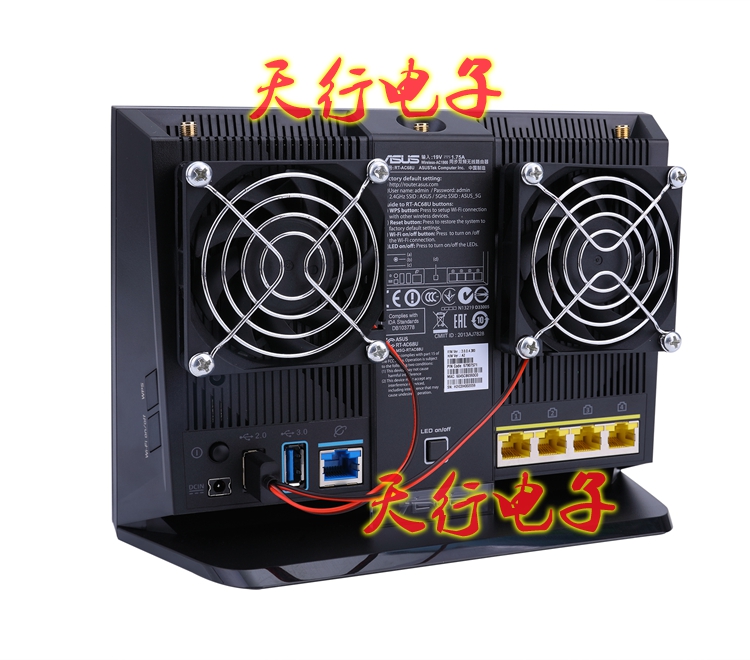
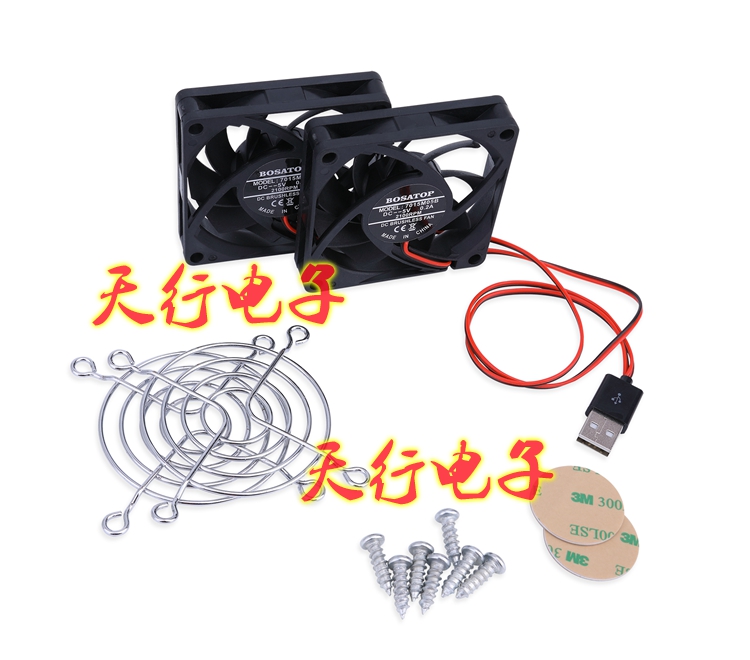
Probably is overheating issue.

https://item.taobao.com/item.htm?id=5487723...14aAik2EALw_wcB

user posted image

user posted image
junclj
post Oct 3 2018, 10:00 PM

Look at all my stars!!
*******
Senior Member
2,348 posts

Joined: Apr 2008


QUOTE(nitehawk @ Oct 3 2018, 08:51 PM)
I am using RT-AC55UHP too but I can't get 500Mbps when I run speedtest. What should I tweak to get full speed?
*
it is definitely the bottlenecking issue for this router. This is the speedtest result for RT-AC55UHP on wired.
Attached Image

I was noticed that, when my download speed reach up to around 300mbps, this router CPU usage will reach up to 99~100%. It was implied that this router was reached its maximum performance limit and can't speed up to further when its CPU usage reached up to 100%. My only advice is upgrade your router to solve this problem.

I was just received my new router at last night, RT-AC86U.
Attached Image

This router is powerful. What I only can describe is RT-AC86U is a beast. No more bottlenecking for speedtest. With it's dual core CPU in this router, it's performance just 1~2% CPU usage during speedtest reach up to 500mbps download.

My Unifi line is not so stable, sometimes 450mbps, sometimes 520mbps. The only best results what I can get is 521mbps so far. Which is the highest record I can get up to now.

speedtest result after I upgrade to RT-AC86U
Attached Image

You can read my feedback in here too.

This post has been edited by junclj: Oct 3 2018, 10:05 PM
junclj
post Oct 11 2018, 01:11 PM

Look at all my stars!!
*******
Senior Member
2,348 posts

Joined: Apr 2008


QUOTE(JohnLai @ Oct 11 2018, 01:08 PM)
Summoning junclj for him to check the new firmware with his AC55UHP.......

laugh.gif
*
I am using RT-AC86U now, anyway I will try with my RT-AC55UHP with this beta firmware tonight.
junclj
post Oct 11 2018, 08:25 PM

Look at all my stars!!
*******
Senior Member
2,348 posts

Joined: Apr 2008


QUOTE(ASUSmy @ Oct 11 2018, 10:27 AM)
Hi All,

For those who are using RT-AC58U or RT-AC55UHP router and have trouble getting the high speed using LAN, you can try updating the beta firmware below. Do let me know is you have any problem with the firmware.

https://www.asuswebstorage.com/navigate/s/B...8A1EEFE35D1B98Y

As for the RT-AC86U HyppTV problem, we are looking at the problem now. We will get back to you ASAP.

Thank you all for your patient.
*
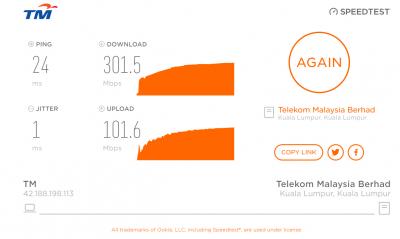
Thanks, finally my Asus RT-AC55UHP 300mbps speed cap issue was fixed after updated to this beta firmware.
Here is my speedtest results for both wifi on my phone and wired on my PC.

Asus RT-AC55UHP speedtest result with beta firmware version 9.0.0.4.382_51085
Attached Image

Attached Image

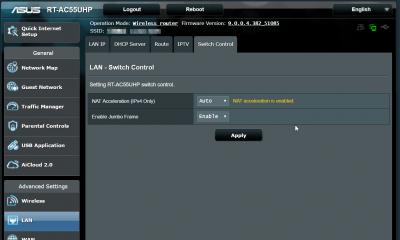
NAT Acceleration speed cap issue was fixed.
Attached Image
junclj
post Oct 12 2018, 02:50 PM

Look at all my stars!!
*******
Senior Member
2,348 posts

Joined: Apr 2008


QUOTE(alvinddm @ Oct 12 2018, 12:53 PM)
thanks for reply
but i want to keep the hostname due to cctv
*
so you need to replace new ddns for all your cctv and alarm apps.
I did that too after I replace to new rt-ac86u and ask my parents to change their settings on their phone.

5 Pages  1 2 3 > » Top
 

Change to:
| Lo-Fi Version
0.0445sec    0.35    7 queries    GZIP Disabled
Time is now: 6th December 2025 - 01:41 PM