

QUOTE(Ebony & Ivory @ Aug 29 2018, 03:01 AM)
If u don't need more than 4 ethernet port, get ac86u.
It have faster CPU, newer WLAN chip and is cheaper.

Ac86u > ac88u?It have faster CPU, newer WLAN chip and is cheaper.
Except for the lan ports?
Home Networking ASUS Malaysia Networking User & Technical Support, Managed by ASUS Malaysia Representative
|
|
 Aug 29 2018, 10:07 AM Aug 29 2018, 10:07 AM
Return to original view | Post
#1
|
 
Senior Member
1,573 posts Joined: Jan 2003 From: Nilai, Negeri Sembilan 
|
QUOTE(Ebony & Ivory @ Aug 29 2018, 03:01 AM) If u don't need more than 4 ethernet port, get ac86u. Ac86u > ac88u?It have faster CPU, newer WLAN chip and is cheaper. Except for the lan ports? |
|
|
|
|
|
Oct 6 2019, 06:04 PM
Return to original view | Post
#2
|
|
Senior Member
1,573 posts Joined: Jan 2003 From: Nilai, Negeri Sembilan
|
I used ASUSWrt-Merlin firmware and found the AIMesh network tend to be unstable for the node. Reverted back to original FW. Current setup as per picture follows.
I might invest in Wifi 6 later. is AX88u good enough? This post has been edited by boxsystem: Oct 6 2019, 06:06 PM Attached thumbnail(s) 
|
|
|
Oct 6 2019, 07:29 PM
Return to original view | Post
#3
|
|
Senior Member
1,573 posts Joined: Jan 2003 From: Nilai, Negeri Sembilan
|
QUOTE(nasilemaksedap @ Oct 6 2019, 06:40 PM) Better just go for the new ax92u. The problem is I think in malaysia sell only the x2kit try and get the single 1 should be around rm1k Running dual WAN at the moment. AX92u support it? |
|
|
Nov 5 2019, 07:19 PM
Return to original view | Post
#4
|
|
Senior Member
1,573 posts Joined: Jan 2003 From: Nilai, Negeri Sembilan
|
Hi guys,
Apparently I have 2 connections at home with one being Unifi and the other is Maxis. Currently, I am using AC86U as the main router whereby I still need Maxis Alminia router to dialup PPPoE and combined them together via Dual WAN settings. I am wondering whether is it possible to have both connections to be dialup by Asus router ONLY and how do I combine the VLAN IDs for the internet? FYI.. Unifi uses VLAN 500 Maxis uses VLAN 621 This post has been edited by boxsystem: Nov 5 2019, 10:18 PM |
|
|
Nov 5 2019, 10:20 PM
Return to original view | Post
#5
|
|
Senior Member
1,573 posts Joined: Jan 2003 From: Nilai, Negeri Sembilan
|
QUOTE(sHawTY @ Nov 5 2019, 07:52 PM) boxsystem hide your MAC addresses Removed the photos altogether .. haha.. thanksQUOTE(sHawTY @ Nov 5 2019, 09:19 PM) I thought that can be enabled through the LAN>IPTV>Manual Settings? I saw this option as well. but from my understanding that Lan Port 3 and Port 4 is more to output rather than input? or I might be wrong ..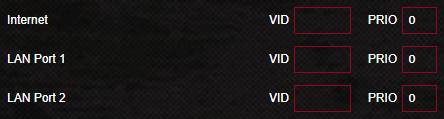 I really don't know because there is no way for me to test it out as I only have UniFi I will give this option a try later on... |
|
|
Mar 10 2020, 02:21 PM
Return to original view | Post
#6
|
|
Senior Member
1,573 posts Joined: Jan 2003 From: Nilai, Negeri Sembilan
|
QUOTE(kingkingyyk @ Mar 9 2020, 07:38 PM) Just jumped on ax bandwagon with PCE-AX58BT + RT-AX56U (was RT-N18U). How big is your house? Finally getting solid 100Mbps. Considering to jump into AX bandwagon as well. Current setup : AC86U AiMesh AC68U (Dual Wan with Mikrotik as Router) Worth it? |
|
|
|
|
|
Mar 27 2020, 08:34 PM
Return to original view | Post
#7
|
|
Senior Member
1,573 posts Joined: Jan 2003 From: Nilai, Negeri Sembilan
|
Waiting for my AX3000 to be integrated together with AC86u and AC68u. Hopefully, things will go well.
|
|
|
Mar 27 2020, 10:54 PM
Return to original view | Post
#8
|
|
Senior Member
1,573 posts Joined: Jan 2003 From: Nilai, Negeri Sembilan
|
QUOTE(yongtjunkit @ Mar 27 2020, 08:47 PM) This router Ai mesh function doesn't work with AC series of router yet? It does work but I can still get dead spots around my house, especially on 2nd floor. Also, I would love faster speeds on AX series.the AX86U has less gamer ish look... which I will definitely appreciate, my current router still works fine for now( other than the firmware bug) QUOTE(blacktubi @ Mar 27 2020, 09:35 PM) I have been trying out ASUS ZenWiFi XT8 lately. Needless to say, it is the fastest mesh WiFi system you can buy today. Will definitely look into this.700Mbps on an entire double storey house or a 1600 sq ft condo easily. 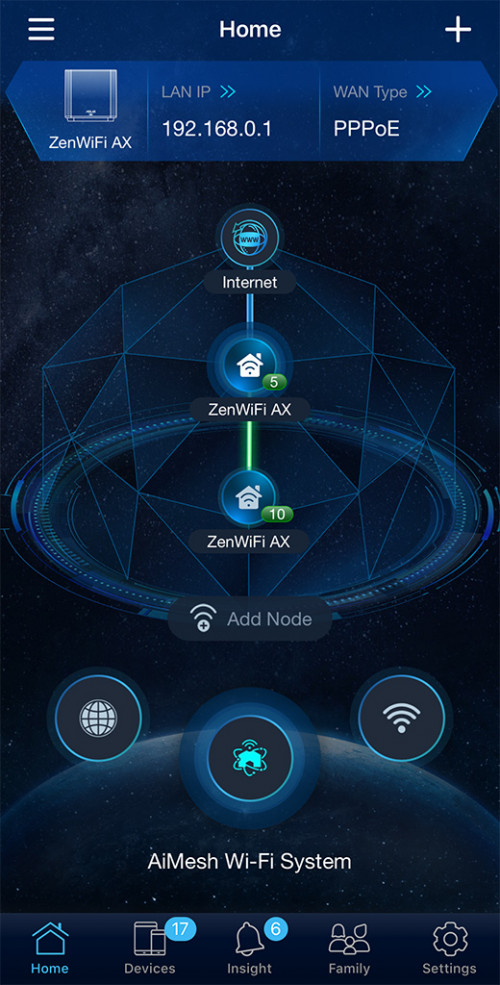 |
|
|
Mar 28 2020, 06:32 PM
Return to original view | Post
#9
|
|
Senior Member
1,573 posts Joined: Jan 2003 From: Nilai, Negeri Sembilan
|
Aiya, just got my ax3000. Can easily reach higher speeds alright. Mesh it with my other two AC series.
Looks like ZenWifi AX can't be used with other mesh router huh? |
|
|
Apr 30 2020, 08:59 AM
Return to original view | Post
#10
|
|
Senior Member
1,573 posts Joined: Jan 2003 From: Nilai, Negeri Sembilan
|
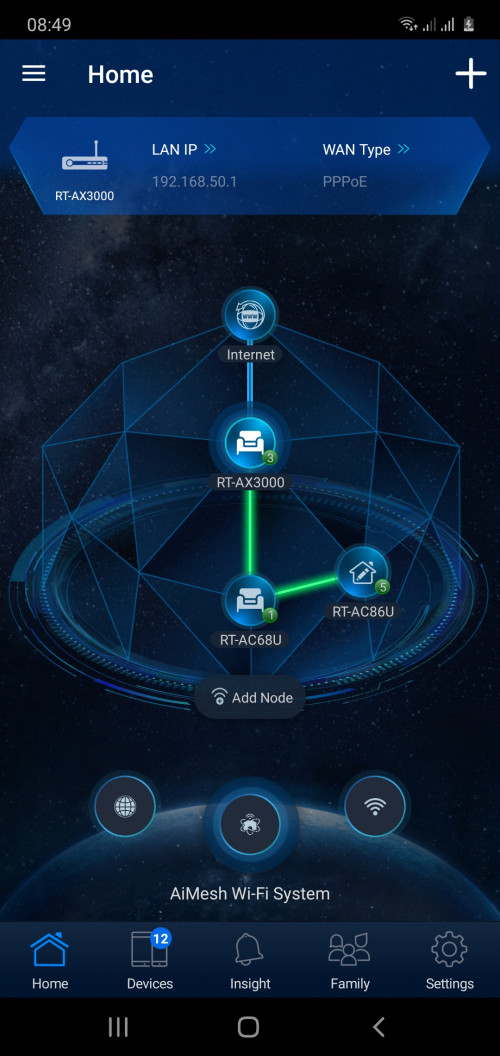 Hi ASUS Team, I am using AX3000 as main router and other 2 as nodes. I noticed that if I use single SSID, somehow the wifi connection become unstable. Nodes would often lose the connection to internet and I would have to turn off the nodes and be connected to the main and accessing internet. But, currently I am separating the 2.4GHz and 5GHz as two SSIDs, it works like a charm. Having no issues so far. Can you kindly advise or check? |
|
|
Apr 30 2020, 10:17 AM
Return to original view | Post
#11
|
|
Senior Member
1,573 posts Joined: Jan 2003 From: Nilai, Negeri Sembilan
|
QUOTE(ASUSmy @ Apr 30 2020, 09:30 AM) Hi boxsystem, Yup, all are updated to the latest firmware.Do you mind providing me the firmware version of these 3 devices. If your RT-AX3000 is latest on the website, try updating it with the following firmware. Model name is different but you can still update it. https://drive.google.com/open?id=1MZXHOxMW7...dIzaPIiZPnQwvKM Thank you 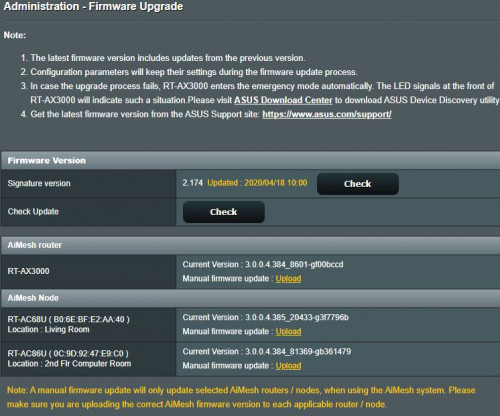 QUOTE(yed @ Apr 30 2020, 10:06 AM) Hi asus Only on the main router. On your nodes will get internet connection on all aimesh lan connection.If I’m using aimesh, can i connect my vlan unifi hyptv to aimesh node vlan4? |
|
|
May 2 2020, 09:03 AM
Return to original view | Post
#12
|
|
Senior Member
1,573 posts Joined: Jan 2003 From: Nilai, Negeri Sembilan
|
QUOTE(blacktubi @ Apr 30 2020, 10:20 AM) boxsystem Seems it is pretty much the same. Even worse, I would say, not only I have to separate the SSIDs now and the same problem happens to both SSIDs now.Your RT-AX3000 is not on the most updated firmware released. Install it manually here. https://drive.google.com/drive/folders/1MZX...?usp=drive_open I might have to revert to the previous firmware then. |
|
|
May 14 2020, 03:25 PM
Return to original view | Post
#13
|
|
Senior Member
1,573 posts Joined: Jan 2003 From: Nilai, Negeri Sembilan
|
QUOTE(maxgil05 @ May 14 2020, 12:07 PM) Using RT-AC86U router for unifi and also connect to hypptv in upper room. Only port 4 on main router...Planning to get RP-AC55 for living room, will I be able to watch hypptv if its connect to RP-AC55 via LAN cable? |
|
|
|
|
|
Jun 28 2020, 09:37 AM
Return to original view | IPv6 | Post
#14
|
|
Senior Member
1,573 posts Joined: Jan 2003 From: Nilai, Negeri Sembilan
|
QUOTE(ASUSmy @ Jun 24 2020, 01:24 PM) Hi, I have a ax3000 and considering to purchase either this ax86u or zen ax to cover for my whole double storey house, which is around 2000sqft.The RT-AX86U are estimated to be available around end of July 2020. And the SRP price is RM1388. Thank you Which one is more ideal? |
|
|
Jun 28 2020, 11:13 AM
Return to original view | IPv6 | Post
#15
|
|
Senior Member
1,573 posts Joined: Jan 2003 From: Nilai, Negeri Sembilan
|
QUOTE(eclectice @ Jun 28 2020, 10:26 AM) What is wrong with the current one? Got a bit deadspot because right now I am unable to place it at the mid of house. |
|
|
Jul 7 2020, 10:30 PM
Return to original view | Post
#16
|
|
Senior Member
1,573 posts Joined: Jan 2003 From: Nilai, Negeri Sembilan
|
QUOTE(cool.seabreeze @ Jul 7 2020, 05:24 PM) ASUSmy I had this problem as well back then. I had AX3000 as mesh router with AC86 and AC68 as nodes.At the moment I have 3 Asus routers: 1. RT-AX3000 with firmware 3.0.0.4.384_9354_g3352f39 2. RT-AC86U with firmware 3.0.0.4.384_81930_g946f76d 3. RT-AC66U B1 with firmware 3.0.0.4.384_20490-g57b06ea I have set up an AiMesh system with RT-AX3000 as the router and RT-AC86U as the node (RT-AC66U B1 not used). The problem with this set up is that I will lose internet access intermittently (actually quite often) whenever my devices (android tablet, android and android TV) are connected to the RT-AC86U in this AiMesh system. There is wifi connection to the RT-AC86U but no internet access. I don't see this internet access problem if my device is connected to the RT-AX3000 router. Thinking that maybe the RT-AC86U is faulty, I removed it from the AiMesh system and setup the RT-AC66U B1 as the node. The internet access problem is still there whenever my devices are connected to the node on this AiMesh system. To troubleshoot I have reset the RT-AX3000 router and is now a standalone, connected to the modem, and not a part of a AiMesh system. I then plug in the RT-AC86U (WAN port) to the RT-AX3000 (LAN 1 port) setting auto ip for internet access in the WAN section of the RT-AC86U. The RT-AC86U is then set up as a AiMesh router with the RT-AC66U as the node. For this RT-AC86U/RT-AC66U B1 AIMesh I do not have the internet access problem even if my devices are connected to the node instead of the router. I have been testing this setup for 3 days and so far I did not face any internet access problem like when I was using the RT-AX3000 router as a AiMesh router. So I suspect that there might be something wrong with the RT-AX3000 or its firmware. I would be grateful if ASUSmy can check this out. I ended up only using AX3000 and gave away the other 2 to my siblings. Wanted to buy XT8 series but I saw some issues occurring as well. Heading to Taiwan soon enough and might get myself a pair of XT8. |
|
|
Jul 26 2020, 05:33 PM
Return to original view | IPv6 | Post
#17
|
|
Senior Member
1,573 posts Joined: Jan 2003 From: Nilai, Negeri Sembilan
|
Hi @asusmy,
These new routers that have 2.5Gbps port is able to support dual WAN i assume? Does it support multi VLAN ID profilings as well? |
|
|
Aug 15 2020, 12:09 AM
Return to original view | IPv6 | Post
#18
|
|
Senior Member
1,573 posts Joined: Jan 2003 From: Nilai, Negeri Sembilan
|
QUOTE(ASUSmy @ Aug 14 2020, 11:29 AM) Hi firdausbhari, Hi,You may visit the link below and select Wireless as the product type for the service location. https://www.asus.com/my/support/Service-Center/Malaysia Thank you I am seeing that AX86U has a 2.5Gb port that can also run as WAN. So, if I purchase it, will be able to support multiple WAN with different VLAN settings? |
|
|
Aug 15 2020, 09:15 AM
Return to original view | IPv6 | Post
#19
|
|
Senior Member
1,573 posts Joined: Jan 2003 From: Nilai, Negeri Sembilan
|
QUOTE(ideaplus @ Aug 15 2020, 09:01 AM) I'm using AX56U and i'm encountered internet become red once a while. This issue happened twice in this morning. First i was wondered why the page was not moving. Then i checked my router and found out the intenet light became red but all 3 lights were blinking on ONU. After that, i chatted with unifi cs after the internet connection is back. Internet light became red again when i was describing the issue to unifi cs. End up she suggested to create a report but she highlighted will charge RM53 if problems not from TM. I do have this kind of issue with my ax3000. But there's nothing wrong on my ONT suggesting any issues with the lines. I would suspect that the router itself is having issues. Especially if I enabled Dual WAN settings.Anyone got idea on this kind of problem? |
|
|
Aug 15 2020, 11:33 AM
Return to original view | IPv6 | Post
#20
|
|
Senior Member
1,573 posts Joined: Jan 2003 From: Nilai, Negeri Sembilan
|
QUOTE(ideaplus @ Aug 15 2020, 09:40 AM) So does your issue solved after disabled Dual Wan? Btw, i didn't enabled Dual Wan function Not really, at times it does happen. At the moment, I am shelving the AX3000 and using Mikrotik HAP AC2 to dial 2 PPPoE connections simultaneously while enabling VLANs segmentation for both my Maxis and Unifi connection. |
| Change to: |  0.0422sec 0.0422sec
 1.05 1.05
 7 queries 7 queries
 GZIP Disabled GZIP Disabled
Time is now: 9th December 2025 - 08:13 PM |
 Quote
Quote