Outline ·
[ Standard ] ·
Linear+
Home Networking ASUS Malaysia Networking User & Technical Support, Managed by ASUS Malaysia Representative
|
Alviss00
|
 Jan 23 2020, 10:56 PM Jan 23 2020, 10:56 PM
|
New Member


|
Hi @ASUSmy, can u recommend a good firmware version for rt-ac68u? I bought it recently and upgraded the firmware directly, used for a few weeks and it start having modem hangup issue around once a week, unsure what's the issue.
This post has been edited by Alviss00: Jan 23 2020, 10:57 PM
|
|
|
|
|
|
Alviss00
|
Jan 24 2020, 07:56 AM
|
New Member
|
QUOTE(sHawTY @ Jan 24 2020, 12:22 AM) 1. Use Asuswrt-Merlin to see if you are still having the same issue. Also, you can check the router temperature with Asuswrt-Merlin 2. Use cooling fan to cool the router. RT-AC68U is known to have overheating issues Hey thanks for the advice, I will try to use it and see the result, I have been using a USB fan to try lower the temp for a while. |
|
|
|
|
|
Alviss00
|
Feb 4 2020, 10:16 PM
|
New Member
|
Hi, I need some advice, currently using asuswrt merlin firmware 384.14_2 on RT-AC68U, sometimes my desktop have random disconnect from wifi, other devices is fine, is there any settings i need to fine tune in order for it to work smoothly? I had switch off nat acceleration , change the 2.4G wireless mode to N only, wps off, qos off. The modem hangup some times too, it was more frequent when it was using the official firmware, which makes me switch to merlin now. The router had a usb fan beside it to regulate the heat. So far just not sure what else to tweak before i go for a waranty claim. I had the router around 1 month + 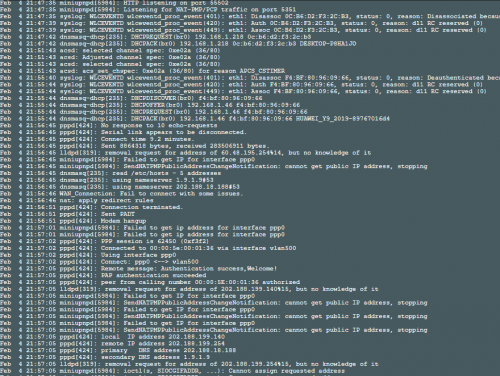 |
|
|
|
|
|
Alviss00
|
Feb 5 2020, 11:56 AM
|
New Member
|
QUOTE(blacktubi @ Feb 5 2020, 11:09 AM) Don’t switch off NAT Acceleration. Have you considered a new WiFi adapter? My desktop is assembled last year so I consider it to be quite new. I will try to open NAT acceleration tonight. |
|
|
|
|
|
Alviss00
|
Feb 15 2020, 10:53 AM
|
New Member
|
Hi blacktubi, previously i took your advice and switch on NAT acceleration, it was fine for 2 weeks, but its happening again  Any advice, should i upgrade to merlin 384.15 or its just a faulty router. 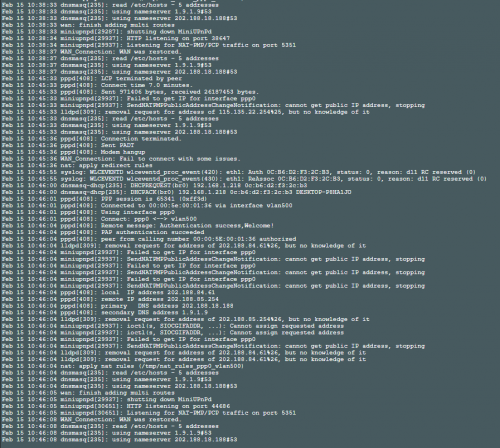 This post has been edited by Alviss00: Feb 15 2020, 10:58 AM This post has been edited by Alviss00: Feb 15 2020, 10:58 AM |
|
|
|
|
|
Alviss00
|
Feb 15 2020, 11:38 AM
|
New Member
|
QUOTE(sHawTY @ Feb 15 2020, 11:25 AM) Just becaue the desktop is new, doesn't mean it doesn't have issues. Manufacturing error can always happen in any factory line What is the model of WiFi adaptor used in your desktop? I would suggest Intel as I rarely have issues with Intel WiFi adapters You need to try everything. Not just flashing firmware, you also need to try changing the channel and bandwidth as well, can't just give up after 1 or 2 tries Also, have you tried replacing the Ethernet cable that's connecting the modem to the router And what is the CPU temperature on your RT-AC68U (you can only check the temperature if you are using Merlin. You can't see the temperatures with stock firmware). Install Merlin then check for the temperatures Eitherway, I would still advise you to install some fans at the back of the router as RT-AC68U is known to run hot. Even worse if the place the router in a very bad ventilation area with no airflow It wasn't just desktop disconnect currently, all device including IPTV affected, Ethernet cable used is from the router itself , tried the old ones too. Temperature is regulated with a USB fan. Currently using merlin 384.14_2. Changing channel hardly do anything. I bought this router since december last year, i have been trying since then This post has been edited by Alviss00: Feb 15 2020, 11:48 AM |
|
|
|
|



 Quote
Quote

 0.0322sec
 0.36
0.36
 7 queries
 GZIP Disabled