Outline ·
[ Standard ] ·
Linear+
Home Networking ASUS Malaysia Networking User & Technical Support, Managed by ASUS Malaysia Representative
|
SilentVampire
|
 Dec 15 2019, 11:42 PM Dec 15 2019, 11:42 PM
|

|
QUOTE(Singh93 @ Dec 15 2019, 05:15 PM) Currently having a s10 and spectre that support wifi 6, just hoping wifi coverage and be enough using one router,not need ap points/mesh I would recommend mesh if you have a bigger house, and mesh can be used with your existing router. |
|
|
|
|
|
jbmsia
|
Dec 16 2019, 02:31 AM
|
New Member

|
QUOTE(ASUSmy @ Dec 9 2019, 02:18 PM) Hi jbmsia, I will need to check with RD and get to you on this as so far we didn't receive any feedback on this problem you faced and it is related to Intel driver and Windows. Will let you know when extra information are needed. Thank you Hi ASUSmyI found a post in a forum that a user reported the same problem that I had, his AX200 based wireless network card has slow uplink when it is part of the HyperV virtual network switch. The post is here https://www.reddit.com/r/thinkpad/comments/...w_uplink_speed/ The Asus PCE-AX58BT PCIe is also based on the Intel AX200 chip right? |
|
|
|
|
|
eclectice
|
Dec 16 2019, 07:32 AM
|
|
|
Is the remote update server down since 1 week ago? Because I was checking the update button on my RT-AC88U's web browser and ASUS Router app (Android and Ipad) for fun, but it gave such a message "Temporarily unable to get the latest firmware information. Please try again later."
This post has been edited by eclectice: Dec 16 2019, 07:32 AM
|
|
|
|
|
|
kingkingyyk
|
Dec 17 2019, 07:14 PM
|
10k Club

|
QUOTE(jbmsia @ Dec 16 2019, 02:31 AM) Hi ASUSmyI found a post in a forum that a user reported the same problem that I had, his AX200 based wireless network card has slow uplink when it is part of the HyperV virtual network switch. The post is here https://www.reddit.com/r/thinkpad/comments/...w_uplink_speed/ The Asus PCE-AX58BT PCIe is also based on the Intel AX200 chip right? I would say, better off finding Intel on this.  |
|
|
|
|
|
cool.seabreeze
|
Dec 18 2019, 12:31 PM
|
New Member
|
QUOTE(kingkingyyk @ Dec 17 2019, 07:14 PM) I would say, better off finding Intel on this. Usually one should go back to the manufacturer of the product for support. In fact in Intel Network forum there's a guy who would tell you to do that if you mention that have problems with branded products using Intel parts. He sounds like a grumpy old fart  |
|
|
|
|
|
attap
|
Dec 19 2019, 11:13 PM
|
Getting Started
|
Is there any guide on setting up ZenWiFi AC CT8 for unifi home?
Going through the asus app few times, still not connecting to unifi host?
Trying to email asus, the product serial number is not recognized by their system? Any idea what is the email address for technical help?
This post has been edited by attap: Dec 19 2019, 11:17 PM
|
|
|
|
|
|
NightFelix
|
Dec 20 2019, 09:44 AM
|
|
|
Using UniFi 100MBps BizPlan at my office here. I need model suggestion to upgrade over the stock free wifi router from TM.
PC+Smartphone aprox 20 devices.
|
|
|
|
|
|
blacktubi
|
Dec 20 2019, 11:26 AM
|
-
|
QUOTE(attap @ Dec 19 2019, 11:13 PM) Is there any guide on setting up ZenWiFi AC CT8 for unifi home? Going through the asus app few times, still not connecting to unifi host? Trying to email asus, the product serial number is not recognized by their system? Any idea what is the email address for technical help? Just setup the first unit like how it was done in this video then use the add button to add the ZenWiFi AiMesh node. Remember to select the Unifi profile and insert the PPPOE username and password. QUOTE(NightFelix @ Dec 20 2019, 09:44 AM) Using UniFi 100MBps BizPlan at my office here. I need model suggestion to upgrade over the stock free wifi router from TM. PC+Smartphone aprox 20 devices. RT-AC86U and call it a day. This post has been edited by blacktubi: Dec 20 2019, 11:44 AM |
|
|
|
|
|
attap
|
Dec 20 2019, 12:25 PM
|
Getting Started
|
QUOTE(blacktubi @ Dec 20 2019, 11:26 AM) https://www.youtube.com/watch?v=uX49eC_y3xsJust setup the first unit like how it was done in this video then use the add button to add the ZenWiFi AiMesh node. Remember to select the Unifi profile and insert the PPPOE username and password. RT-AC86U and call it a day. Will try it again later tonight. |
|
|
|
|
|
SUSpakji
|
Dec 20 2019, 01:49 PM
|
|
|
QUOTE(NightFelix @ Dec 20 2019, 09:44 AM) Using UniFi 100MBps BizPlan at my office here. I need model suggestion to upgrade over the stock free wifi router from TM. PC+Smartphone aprox 20 devices. suitable Office router https://www.asus.com/my/Networking/BRT-AC828/ |
|
|
|
|
|
aldentan91 P
|
Dec 22 2019, 04:43 PM
|
New Member
|
QUOTE(ASUSmy @ Dec 10 2019, 09:59 AM) Hi Merlinboy, Can you try to check 1) Factory reset and redo the setup 2) QoS is turn off 3) The NAT Acceleration is enabled 3) Downgrade to older firmware version I can see that there is older firmware version from the link below. https://www.asus.com/Networking/RTAC55U/HelpDesk_Download/Thank you Pls help me ASUS my ,I had bought rt ac88u ,I was set up successfully and try connected with about 10 devise (all use the wifi) BUT the wifi very unstable and I’m sure my Maxis fiber 300Mbps working perfectly cause I was try the old router work very well. |
|
|
|
|
|
SUSCrimsonKing
|
Dec 22 2019, 04:56 PM
|
Getting Started
|
QUOTE(aldentan91 @ Dec 22 2019, 04:43 PM) Pls help me ASUS my ,I had bought rt ac88u ,I was set up successfully and try connected with about 10 devise (all use the wifi) BUT the wifi very unstable and I’m sure my Maxis fiber 300Mbps working perfectly cause I was try the old router work very well. Why did you buy an Asus RT-AC88U when your old router works very well?  |
|
|
|
|
|
geminii91
|
Dec 23 2019, 11:55 AM
|
New Member
|
Hi guys, someone please help why my rtac86u keep changing the wireless channel? this few days, feeling not stable/stuck and check router found is the problem caused? Wireless Dual band smart connect is enabled. firmware: merlin 384.13 Attached File(s) syslog.txt
 ( 334.16k )
Number of downloads: 9 |
|
|
|
|
|
aldentan91 P
|
Dec 23 2019, 12:10 PM
|
New Member
|
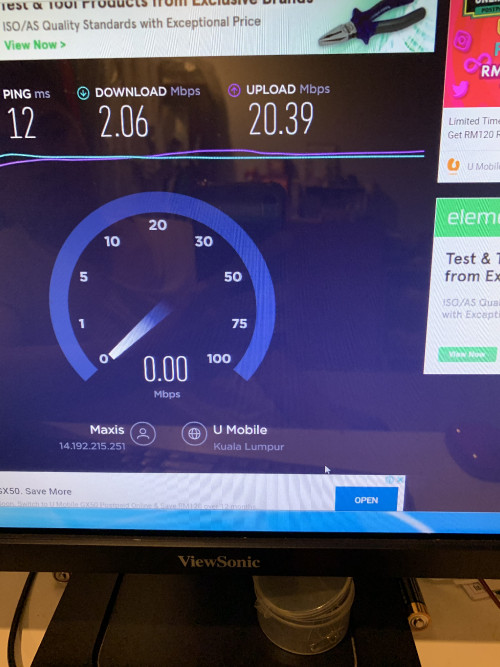 I’m using desktop with wireless, there few days my connection was unstable and with all connected devices after I use Rt-Ac88u .(Urgent) pls🙏🙏 |
|
|
|
|
|
geminii91
|
Dec 23 2019, 12:20 PM
|
New Member
|
QUOTE(aldentan91 @ Dec 23 2019, 12:10 PM) I’m using desktop with wireless, there few days my connection was unstable and with all connected devices after I use Rt-Ac88u .(Urgent) pls🙏🙏 can share how your wireless setup? |
|
|
|
|
|
blacktubi
|
Dec 23 2019, 12:25 PM
|
-
|
QUOTE(geminii91 @ Dec 23 2019, 11:55 AM) Hi guys, someone please help why my rtac86u keep changing the wireless channel? this few days, feeling not stable/stuck and check router found is the problem caused? Wireless Dual band smart connect is enabled. firmware: merlin 384.13 China unit or Malaysia unit? Could be due to high interference, fix the channel to channel 6 and channel 36. |
|
|
|
|
|
geminii91
|
Dec 23 2019, 12:31 PM
|
New Member
|
QUOTE(blacktubi @ Dec 23 2019, 12:25 PM) China unit or Malaysia unit? Could be due to high interference, fix the channel to channel 6 and channel 36. not sure buy from Singapore, already used above 8 months. dual band smart connect is enabled so only Auto channel, all the way no problem. but the smart connect better is disable or enable? any suggestion?  |
|
|
|
|
|
SUSraynman
|
Dec 23 2019, 12:56 PM
|
|
|
QUOTE(CrimsonKing @ Dec 22 2019, 04:56 PM) Why did you buy an Asus RT-AC88U when your old router works very well? Itchy backside. |
|
|
|
|
|
aldentan91 P
|
Dec 23 2019, 01:22 PM
|
New Member
|
QUOTE(geminii91 @ Dec 23 2019, 12:20 PM) can share how your wireless setup? You mean Asus wirelss setting? |
|
|
|
|
|
aldentan91 P
|
Dec 23 2019, 01:26 PM
|
New Member
|
QUOTE(blacktubi @ Dec 23 2019, 12:25 PM) China unit or Malaysia unit? Could be due to high interference, fix the channel to channel 6 and channel 36. is that normal if i have maxis 300mbps and im using D-link DW123 Wireless with my desktop, testing the speedtext just got 2mbps doowload speed? |
|
|
|
|



 Quote
Quote


 0.0266sec
 0.37
0.37
 6 queries
 GZIP Disabled