Welcome Guest ( Log In | Register )

826 Pages « < 535 536 537 538 539 > » Bottom

Outline · [ Standard ] · Linear+

Home Networking ASUS Malaysia Networking User & Technical Support, Managed by ASUS Malaysia Representative

views
     
AV_2018
post Dec 8 2019, 05:51 PM

Casual
***
Junior Member
451 posts

Joined: Apr 2018
QUOTE(FaezFarhan @ Dec 8 2019, 04:36 PM)
It has arrived.
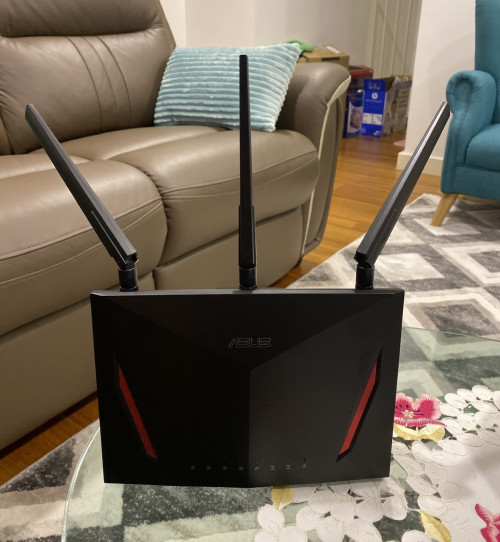
user posted image

Does antenna orientation matter? Now I’m waiting for the RT-AC66U to arrive.
*
Usually I just put the antennas about 45 degrees to each other like mentioned in the manual. Orientation affects the polarisation of the electromagnetic waves. When the waves are same polarisation direction as the antennas in the phone or laptop then the signal is optimal. Orientation will also affect the radiation pattern of the antenna and may change coverage. With a MIMO system, the multiple antennas should not be in the same orientation for optimal performance. So just put the antenna like the image below and you should get optimum MIMO/beamforming performance. Do refer to the manual/user guide recommendations incase some models are different due to a 4th built-in antenna.
user posted image

This post has been edited by AV_2018: Dec 8 2019, 06:08 PM
jimbet1337
post Dec 8 2019, 06:02 PM

meh
*******
Senior Member
2,671 posts

Joined: Sep 2006
QUOTE(FaezFarhan @ Dec 8 2019, 04:36 PM)
It has arrived.

user posted image

Does antenna orientation matter? Now I’m waiting for the RT-AC66U to arrive.
*
I'm happy with the performance, so I didn't bother about this since I got my unit for more than a year now. Gotta try to adjust the antennas tonight and see whether it makes any difference laugh.gif
touristking
post Dec 8 2019, 06:12 PM

Look at all my stars!!
*******
Senior Member
5,830 posts

Joined: Jun 2017
I have an Asus AC68 (latest firmware) and want to link a printer and having this problem.
1. I connect printer to Router via USB.
2. I log into router 192.168.1.1
3. Go to USB application, download the file. But when I want to run it, I keep getting this error. "to continue installation, you have to reboot your pc to complete the uninstall process first".

What uninstall is that about? I have reboot the pc and router numerous times and still same problem.

Anyone having any idea what went wrong? Thanks

MC_Amig0
post Dec 9 2019, 09:19 AM

Casual
***
Junior Member
456 posts

Joined: Nov 2005
From: KL-Dungun


hi guys,

getting replacement for my old tplink tm router,

does asus rt-ac1300uhp able to support 800mbs unifi?
jbmsia
post Dec 9 2019, 01:10 PM

New Member
*
Junior Member
37 posts

Joined: Aug 2017
QUOTE(blacktubi @ Dec 7 2019, 12:45 PM)
Sounds like a bug with the Hyper-V or the Intel driver.

I found a few users with similar issue.

https://social.technet.microsoft.com/Forums...=win10itprovirt

https://social.technet.microsoft.com/Forums...-all?forum=MVMC

*
blacktubi ASUSmy

I suspect it is the drivers. I also downloaded the latest drivers from Asus website which is older than the one I got from Intel website and the results were the same. The TX_RATE and RX_RATE were 866Mbps before and during testing.

This PCE-AX58BT card was to replace an older Asus PCE-AC56. I did not have any issue with the older PCE-AC56 card when I add it to the Hyper-V virtual switch. If there is no solution from ASUSmy I suppose I have to plug back the older PCE-AC56 and source a USB bluetooth V4 or V5.

And another negative for this card is that you will need a free USB header on your motherboard to plug in for the bluetooth to work.


TSASUSmy
post Dec 9 2019, 02:13 PM

Look at all my stars!!
*******
Senior Member
2,319 posts

Joined: Mar 2010
QUOTE(touristking @ Dec 8 2019, 06:12 PM)
I have an Asus AC68 (latest firmware) and want to link a printer and having this problem.
1. I connect printer to Router via USB.
2. I log into router 192.168.1.1
3. Go to USB application, download the file. But when I want to run it, I keep getting this error. "to continue installation, you have to reboot your pc to complete the uninstall process first".

What uninstall is that about? I have reboot the pc and router numerous times and still same problem.

Anyone having any idea what went wrong? Thanks
*
Hi touristking,

You may try use the step given on the link below to do the pairing.

https://www.asus.com/support/FAQ/114024

Thank you
TSASUSmy
post Dec 9 2019, 02:15 PM

Look at all my stars!!
*******
Senior Member
2,319 posts

Joined: Mar 2010
QUOTE(MC_Amig0 @ Dec 9 2019, 09:19 AM)
hi guys,

getting replacement for my old tplink tm router,

does asus rt-ac1300uhp able to support 800mbs unifi?
*
Hi MC_Amig0,

The router LAN are able to support 800Mbps, as for the WiFi it is around 500Mbps(depending the client you used).

Thank you
TSASUSmy
post Dec 9 2019, 02:18 PM

Look at all my stars!!
*******
Senior Member
2,319 posts

Joined: Mar 2010
QUOTE(jbmsia @ Dec 9 2019, 01:10 PM)
blacktubi ASUSmy

I suspect it is the drivers.  I also downloaded the latest drivers from Asus website which is older than the one I got from Intel website and the results were the same.  The TX_RATE and RX_RATE were 866Mbps before and during testing.

This PCE-AX58BT card was to replace an older Asus PCE-AC56.  I did not have any issue with the older PCE-AC56 card when I add it to the Hyper-V virtual switch.  If there is no solution from ASUSmy I suppose I have to plug back the older PCE-AC56 and source a USB bluetooth V4 or V5.

And another negative for this card is that you will need a free USB header on your motherboard to plug in for the bluetooth to work.
*
Hi jbmsia,

I will need to check with RD and get to you on this as so far we didn't receive any feedback on this problem you faced and it is related to Intel driver and Windows.

Will let you know when extra information are needed.

Thank you
jbmsia
post Dec 9 2019, 03:56 PM

New Member
*
Junior Member
37 posts

Joined: Aug 2017
QUOTE(ASUSmy @ Dec 9 2019, 02:18 PM)
Hi jbmsia,

I will need to check with RD and get to you on this as so far we didn't receive any feedback on this problem you faced and it is related to Intel driver and Windows.

Will let you know when extra information are needed.

Thank you
*
ASUSmy Thanks!
MC_Amig0
post Dec 9 2019, 04:47 PM

Casual
***
Junior Member
456 posts

Joined: Nov 2005
From: KL-Dungun


QUOTE(ASUSmy @ Dec 9 2019, 02:15 PM)
Hi MC_Amig0,

The router LAN are able to support 800Mbps, as for the WiFi it is around 500Mbps(depending the client you used).

Thank you
*
Hi can say that most of the asus router LAN (newer one) can support 800mbs?
MC_Amig0
post Dec 9 2019, 04:49 PM

Casual
***
Junior Member
456 posts

Joined: Nov 2005
From: KL-Dungun


Anyway.. thanks
Merlinboy P
post Dec 9 2019, 06:09 PM

New Member
*
Probation
7 posts

Joined: Dec 2019
Hello, I am from Europe Romania, and have an older ASUS model (RT-AC55U), which worked more than fine, even on 5GHZ (with its limitations, of course).

The thing is i upgraded (i don't know why to be honest) to the latest firmware version 3.0.0.4.382_51812 and then the LAN speed downgraded from 8-900 Mbps (we have real high speed internet here in Romania, and i have the 1 Gbps connection) to 300-320 Mbps. If I connect the cable directly to the huawei provider's I Have 900 Mbps, but if I connect it back to the Asus router, I can't seem to get more than 320 Mbps.

Again, last week everything was working normally.

I have looked through the settings, I have tried with the Jumbo Frames and NAT acceleration on AUTO, QOS is off...i don't know that to do anymore, so please if you can help me out with any suggestions ?

Thank you in advance! Alex
FaezFarhan
post Dec 9 2019, 09:06 PM

United till I die!
*******
Senior Member
3,435 posts

Joined: Oct 2008
From: Kota Bharu


QUOTE(Merlinboy @ Dec 9 2019, 06:09 PM)
Hello, I am from Europe Romania, and have an older ASUS model (RT-AC55U), which worked more than fine, even on 5GHZ (with its limitations, of course).

The thing is i upgraded (i don't know why to be honest) to the latest firmware version  3.0.0.4.382_51812 and then the LAN speed downgraded from 8-900 Mbps (we have real high speed internet here in Romania, and i have the 1 Gbps connection) to 300-320 Mbps. If I connect the cable directly to the huawei provider's I Have 900 Mbps, but if I connect it back to the Asus router, I can't seem to get more than 320 Mbps.

Again, last week everything was working normally.

I have looked through the settings, I have tried with the Jumbo Frames and NAT acceleration on AUTO, QOS is off...i don't know that to do anymore, so please if you can help me out with any suggestions ?

Thank you in advance! Alex
*
I’m on 800mbps internet here in Malaysia & I get 820-850mbps on speed test via lan. Weird how you’re on 1gbps & receiving 800 on LAN.

Merlinboy P
post Dec 9 2019, 09:21 PM

New Member
*
Probation
7 posts

Joined: Dec 2019
If you are reffering only to 800 - 820 Mbps, i think it is a limitation from the ISP, sometimes 900 Mbps, but never 1 Gbps, anyway if you are talking about this, well then this is not the problem I am complaining about, as I am OK with 800-820Mpbs and not with 300-320-maybe a max of 330 Mbps sad.gif
FaezFarhan
post Dec 9 2019, 10:06 PM

United till I die!
*******
Senior Member
3,435 posts

Joined: Oct 2008
From: Kota Bharu


QUOTE(Merlinboy @ Dec 9 2019, 09:21 PM)
If you are reffering only to 800 - 820 Mbps, i think it is a limitation from the ISP, sometimes 900 Mbps, but never 1 Gbps, anyway if you are talking about this, well then this is not the problem I am complaining about, as I am OK with 800-820Mpbs and not with 300-320-maybe a max of 330 Mbps sad.gif
*
Maybe it’s the firmware. Have you tried factory resetting the router?
Merlinboy P
post Dec 9 2019, 10:19 PM

New Member
*
Probation
7 posts

Joined: Dec 2019
I was thinking maybe trying a different firmware (al older one) but couldn't find any for sure, fortunately sad.gif
TSASUSmy
post Dec 10 2019, 09:59 AM

Look at all my stars!!
*******
Senior Member
2,319 posts

Joined: Mar 2010
QUOTE(Merlinboy @ Dec 9 2019, 10:19 PM)
I was thinking maybe trying a different firmware (al older one) but couldn't find any for sure, fortunately sad.gif
*
Hi Merlinboy,

Can you try to check

1) Factory reset and redo the setup
2) QoS is turn off
3) The NAT Acceleration is enabled
3) Downgrade to older firmware version

I can see that there is older firmware version from the link below.

https://www.asus.com/Networking/RTAC55U/HelpDesk_Download/

Thank you
jbmsia
post Dec 10 2019, 02:07 PM

New Member
*
Junior Member
37 posts

Joined: Aug 2017
ASUSmy

Is there any way to bypass the configuration wizard for a new Asus RT-AC66U_B1 router or a just reset to factory default Asus router?

TSASUSmy
post Dec 10 2019, 02:30 PM

Look at all my stars!!
*******
Senior Member
2,319 posts

Joined: Mar 2010
QUOTE(jbmsia @ Dec 10 2019, 02:07 PM)
ASUSmy

Is there any way to bypass the configuration wizard for a new Asus RT-AC66U_B1 router or a just reset to factory default Asus router?
*
Hi jbmsia,

You can do the setup even without the cable plug in to the WAN port.

You will be in the main page after the setup.

Resetting the router will always bring you to the setup wizard.

Thank you
bug_vengeance
post Dec 10 2019, 03:04 PM

: Juve's Historic Battle :
*******
Senior Member
7,131 posts

Joined: Jan 2003

my Asus AC55uhp got problem nowdays

seems not stable

wifi & hypptv will lost connection occasionally

i need to reboot the router

im using unifi 500mbps

anybody got advise for this problem ?

826 Pages « < 535 536 537 538 539 > » Top
 

Change to:
| Lo-Fi Version
0.0305sec    0.69    6 queries    GZIP Disabled
Time is now: 12th December 2025 - 03:55 AM