Welcome Guest ( Log In | Register )

Outline · [ Standard ] · Linear+

Home Networking ASUS Malaysia Networking User & Technical Support, Managed by ASUS Malaysia Representative

views
     
cool.seabreeze
post Dec 18 2019, 12:31 PM

New Member
*
Junior Member
45 posts

Joined: Dec 2019
QUOTE(kingkingyyk @ Dec 17 2019, 07:14 PM)
I would say, better off finding Intel on this. laugh.gif
*
Usually one should go back to the manufacturer of the product for support.

In fact in Intel Network forum there's a guy who would tell you to do that if you mention that have problems with branded products using Intel parts.

He sounds like a grumpy old fart smile.gif


cool.seabreeze
post Dec 26 2019, 01:07 PM

New Member
*
Junior Member
45 posts

Joined: Dec 2019
Rebooting AiMesh Node


AUSUmy

Hi is there a way to reboot an AiMesh node using the webGUI or AsusRouter app?
Or is the only way is to power off and power on the AiMesh node?

I plan to put a AiMesh node in the ceiling so if I can reboot the node remotely would be great.


cool.seabreeze
post Jan 6 2020, 12:13 AM

New Member
*
Junior Member
45 posts

Joined: Dec 2019
QUOTE(blacktubi @ Dec 29 2019, 03:28 PM)
cool.seabreeze

Use ASUS Router app. The app has improved massively lately.

blacktubi thanks for the tip.
cool.seabreeze
post May 28 2020, 11:54 AM

New Member
*
Junior Member
45 posts

Joined: Dec 2019
Alternate Asus Customer Service phone number - non 1300 number

Hi ASUSmy does Asus Customer Service have a alternate number to call which is a non 1300 number?
Or any email to send enquiry to?

Thanks

cool.seabreeze
post May 31 2020, 03:29 PM

New Member
*
Junior Member
45 posts

Joined: Dec 2019
DNS Settings in Asus RT-AC86U

In my Asus RT-AC86U there are 2 places where I can set the ip address for DNS. They are at:

LAN > DHCP Server >DNS and WINS Server Setting - Only can set 1 ip address for the DNS

or at

WAN > Internet Connection > WAN DNS Setting - Here there are settings for 2 ip address for the DNS, DNS Server 1 and DNS Server 2


What are the differences between these 2 places for setting DNS?

When I set my network card on auto ip, it seem to pick up the DNS settings from "DNS and WINS Server Setting". So is there anyway I can type in 2 ip addresses for DNS servers at "DNS and WINS Server Setting"?


cool.seabreeze
post May 31 2020, 10:57 PM

New Member
*
Junior Member
45 posts

Joined: Dec 2019
QUOTE(isr25 @ May 31 2020, 03:57 PM)
I leave the first one (DNS and WINS Server Setting) blank, or put in the router IP address. This DNS IP address will be assigned to all devices connected to the router via DHCP - it is best if the router does the DNS caching.

The second one is for your router to query the DNS server. Put your preferred DNS ip address here, rather than in the first one.
*
Thanks isr25 for the explanation. I undertsand better now the DNS settings in the Asus router.


cool.seabreeze
post Jun 30 2020, 05:41 PM

New Member
*
Junior Member
45 posts

Joined: Dec 2019
Hello All

I have a Asus AX3000 router and I am subscribed to maxis fibre on maxis infrastructure. After choosing maxis special requirements, LAN3 is set as a VOIP port. I do not use the provided maxis VOIP telephone.

So is there anyway to configure LAN3 as a normal port so that I can plug in other network devices, like CCTV or Android TV or networked printer. Where do I config the LAN3 ports and whats details should I key in?

Thanks.
cool.seabreeze
post Jul 1 2020, 11:21 PM

New Member
*
Junior Member
45 posts

Joined: Dec 2019
QUOTE(ASUSmy @ Jun 30 2020, 06:05 PM)
Hi cool.seabreeze,

You can go to LAN->IPTV->ISP Profile and select Manual Setting. Set the Internet VID:621.

You may refer to the image below on how it is done.

Thank you
*
Thanks, it is working for me now. Except for maxis fibre using maxis infrastructure, the VID is 11.


cool.seabreeze
post Jul 7 2020, 04:45 PM

New Member
*
Junior Member
45 posts

Joined: Dec 2019
QUOTE(blacktubi @ Jul 7 2020, 04:21 PM)
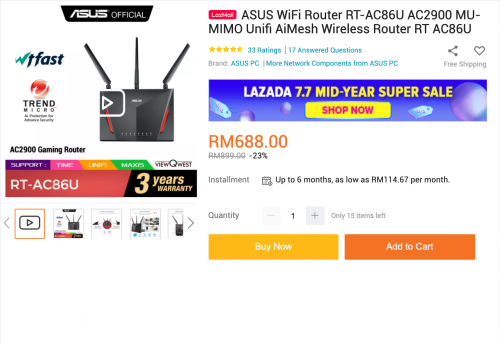
Good deal for RT-AC86U wireless router found on Lazada  biggrin.gif

https://www.lazada.com.my/products/asus-wif...s637770195.html

user posted image
*
I paid about RM1,100.00+ about 1.5 years ago !!!
cool.seabreeze
post Jul 7 2020, 05:24 PM

New Member
*
Junior Member
45 posts

Joined: Dec 2019
ASUSmy

At the moment I have 3 Asus routers:

1. RT-AX3000 with firmware 3.0.0.4.384_9354_g3352f39
2. RT-AC86U with firmware 3.0.0.4.384_81930_g946f76d
3. RT-AC66U B1 with firmware 3.0.0.4.384_20490-g57b06ea


I have set up an AiMesh system with RT-AX3000 as the router and RT-AC86U as the node (RT-AC66U B1 not used). The problem with this set up is that I will lose internet access intermittently (actually quite often) whenever my devices (android tablet, android and android TV) are connected to the RT-AC86U in this AiMesh system. There is wifi connection to the RT-AC86U but no internet access. I don't see this internet access problem if my device is connected to the RT-AX3000 router.

Thinking that maybe the RT-AC86U is faulty, I removed it from the AiMesh system and setup the RT-AC66U B1 as the node. The internet access problem is still there whenever my devices are connected to the node on this AiMesh system.

To troubleshoot I have reset the RT-AX3000 router and is now a standalone, connected to the modem, and not a part of a AiMesh system.

I then plug in the RT-AC86U (WAN port) to the RT-AX3000 (LAN 1 port) setting auto ip for internet access in the WAN section of the RT-AC86U.
The RT-AC86U is then set up as a AiMesh router with the RT-AC66U as the node. For this RT-AC86U/RT-AC66U B1 AIMesh I do not have the internet access problem even if my devices are connected to the node instead of the router. I have been testing this setup for 3 days and so far I did not face any internet access problem like when I was using the RT-AX3000 router as a AiMesh router.

So I suspect that there might be something wrong with the RT-AX3000 or its firmware.

I would be grateful if ASUSmy can check this out.


cool.seabreeze
post Dec 17 2020, 01:49 PM

New Member
*
Junior Member
45 posts

Joined: Dec 2019
Anyone here know how to configure a AiMesh node to reboot on schedule? Can this be done?
cool.seabreeze
post Oct 24 2021, 10:06 AM

New Member
*
Junior Member
45 posts

Joined: Dec 2019
Router RT-AX3000 with firmware 3.0.0.4.386_45898-gfa90458 failed to update DDNS (domain.asuscomm.com)

Recently I have reused my RT-AX3000 and found that it has failed to update the DDNS when the WAN IP changes. Before reusing the RT-AX3000, I have updated the firmware and reset it to factory default. Then reconfigure to use it for internet access.

Any insight on how to solve the DDNS update problems would be apprreciated.

part of the log:

May 5 13:05:26 start_ddns: update WWW.ASUS.COM update@asus.com, wan_unit 0
May 5 13:05:26 inadyn[1745]: In-a-dyn version 2.8.1 -- Dynamic DNS update client.
May 5 13:05:26 inadyn[1745]: Update forced for alias xxxxxxx.asuscomm.com, new IP# 14.192.xxx.xxx
May 5 13:05:28 WAN Connection: WAN was restored.
Oct 21 04:01:33 inadyn[1745]: Failed connecting to ns1.asuscomm.com: Operation now in progress
Oct 21 04:01:33 inadyn[1745]: [send_update, 622]http_init fail. rc=13


Oct 24 04:01:21 start_ddns: update WWW.ASUS.COM update@asus.com, wan_unit 0
Oct 24 04:01:21 inadyn[2430]: In-a-dyn version 2.8.1 -- Dynamic DNS update client.
Oct 24 04:01:21 inadyn[2430]: Update forced for alias xxxxxxx.asuscomm.com, new IP# 14.192.xxx.xxx
Oct 24 04:01:29 inadyn[2430]: [send_update, 622]http_init fail. rc=33


ASUSmy
cool.seabreeze
post Oct 26 2021, 12:22 PM

New Member
*
Junior Member
45 posts

Joined: Dec 2019
QUOTE(ASUSmy @ Oct 25 2021, 11:09 AM)
Hi cool.seabreeze,

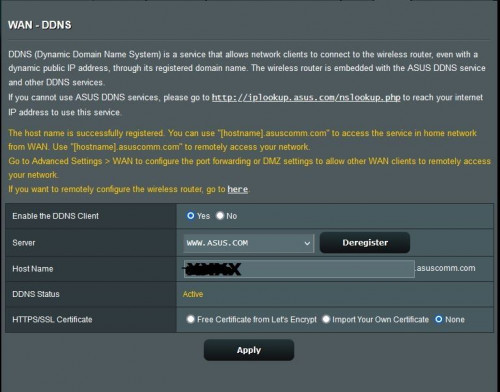
Can you show us the image of the DDNS page? If the DDNS is created successfully, it will mention there. Same if the registration has problem.

Is the DDNS name used on other ASUS router before?

Thank you
*
The DDNS name was not used in other Asus router.

Pic of the DDNS page :

user posted image

ASUSmy
cool.seabreeze
post May 2 2023, 12:35 PM

New Member
*
Junior Member
45 posts

Joined: Dec 2019
Hi All

I am on Maxis Fibre broadband in a taman with Maxis infrastructure.

My setup at the moment is

[Huawei EchoLife HG8240H5 GPON]-->[Maxis Amina DL4480V1 router]-->[Asus RT-AX3000 router]

Maxis Amina DL4480V1 router
- wifi turned off
- provides VOIP
- has USB G4 backup
- one of LAN port is cannected to WAN port of Asus RT-AX3000 router

Asus RT-AX3000 router
- wifi is on. Devices at home are connected to this router
- WAN port is plugged into one of Maxis Amina DL4480V1 router
LAN port and WAN ip set to dynamic, so WAN port gets ip from Maxis
Amina router
- firmware is 3.0.0.4.388_22525-gd35b8fe

My Maxis broadband has a disconnection problem. Once or twice per week
on a hot day the LOS LED on the Huawei EchoLife GPON starts blinking red
and I will lose internet access. The WAN LED on the Asus router will
also shows red. The loss of signal will last for about 3 minutes to maybe
half an hour. Mostly around 3 minutes to 10 minutes.

The USB G4 backup will restore internet access while the GPON LOS LED is blinking
red but the USB G4 backup will take some minutes to be up.

While this is happening the WAN LED on the Asus router is also red indicating
no internet access. Once the Asus WAN LED is red, I can no longer access the
Maxis Amina web interface using devices connected to the Asus router. But if
I plug a network cable from my pc directly into the LAN port of the Maxis Amina
route I can access the webpage.

Is there anyway to configure the Asus router such that I can access the Maxis Amina
router even when the Asus router WAN LED is showing red?


cool.seabreeze
post May 2 2023, 03:06 PM

New Member
*
Junior Member
45 posts

Joined: Dec 2019
QUOTE(ASUSmy @ May 2 2023, 02:18 PM)
Hi cool.seabreeze,

May I ask, are you getting WAN IP for the ASUS router when the problem happen and the 4G is up?

Is reboot the ASUS router help when the 4G is up?

Thank you
*
Sorry I do not remember checking if the Asus router is getting WAN IP from the Maxis router when the issue happens.
Initial I did set the Asus WAN IP on static IP. I set it on dynamic IP to see if this will solve the problem, but it did not.

Thing is once the 4G is up, the WAN LED of the Asus router still shows red. Have to wait for a while, maybe some
5 minutes before the WAN LED shows white. So I could access the internet on my pc plugged directly into the LAN
port of the Maxis router with the 4G up, but not on my mobile phone and tablet connected by wifi to the Asus router.

After 5 or 10 minutes after the 4G is up, then devices connected by wifi to the Asus router can access the internet.

I also did check if rebooting the router helps but it did not. Have to wait for a while before the Asus router can
start accessing the after the 4G is up.

Seem like the Asus is checking for internet access before it allows devices connected by to it to access the Maxis
router web interface.

cool.seabreeze
post May 3 2023, 11:53 AM

New Member
*
Junior Member
45 posts

Joined: Dec 2019
QUOTE(blacktubi @ May 2 2023, 09:09 PM)
You might be able to use the USB 4G modem backup on your ASUS router instead of using it on the Maxis Router. In fact, it's actually better to use the ASUS Router as the main router as well.

You always want to have the faster router as the main router.
*
As mentioned by PRSXFENG the USB 4G modem is locked. When I first got it, it did work on the Asus I had at that time. After a few months it stopped working with
the Asus router but it did still work with the Maxis router.

With my fibre connection not so stable recently, I had to bring out the Maxis router for the 4G backup.
cool.seabreeze
post May 3 2023, 12:01 PM

New Member
*
Junior Member
45 posts

Joined: Dec 2019
QUOTE(ASUSmy @ May 2 2023, 04:03 PM)
Hi cool.seabreeze,

Can you help check whether the ASUS router are getting WAN IP address from the Maxis router when the problem happen?

You cannot access to the Maxis router through ASUS Router is there is no WAN IP.

And by rebooting the ASUS router, it allow the router to detect the connection after reboot.

I don't have Maxis router with 4G with me, but I tested 2 ASUS router and I am able to access to the main router through the second router with the WAN is disconnected.

Thank you
*
I did a few test this morning. With internet disconnected on the Maxis router, the Asus router internet status is shown as "Disconnected" and the detailed Internet status does show WAN ip from the Maxis router.

I have now unchecked DNS Query at administration -> system -> network monitoring

and

tick NO at WAN -> Dual WAN -> auto USB Backup WAN

and that seem to solve the problem.

Thanks everyone
cool.seabreeze
post May 3 2023, 12:03 PM

New Member
*
Junior Member
45 posts

Joined: Dec 2019
QUOTE(PRSXFENG @ May 3 2023, 10:00 AM)
The 4G Backup is locked to the stock router and refuses to work on other devices afaik
though it may work if you set the hostname of the asus to "Maxis_Archer_C5v"

guessing based on this
https://forum.lowyat.net/index.php?showtopi...post&p=98295735
*
Thanks for the headup. But at the moment I have a external hdd plug into the only USB port on the router sad.gif
cool.seabreeze
post Aug 24 2023, 01:20 PM

New Member
*
Junior Member
45 posts

Joined: Dec 2019
Hi All

I am on maxis fibre on maxis infrastructure. My maxis fibre connection disconnect quite frequently, usually between 12noon to 2pm, on hot sunny days.

Recently Maxis has provided me a ZTE 4G wireless router MF283V, so I plan to use this as a backup to plug into the 2nd WAN port of a Asus router.

What's the cheapest Asus router that has 2 WAN ports, with one acting as a backup WAN? I know there is a RT-AX86U Pro but that's about RM1400.

How quick will a Asus router use the backup WAN if the main WAN is disconnected? Or is this configurable in the Asus router?
Would be great if the router will use the backup WAN in 2 to 3 minutes if the main WAN is disconnected.


cool.seabreeze
post Aug 25 2023, 11:17 AM

New Member
*
Junior Member
45 posts

Joined: Dec 2019
QUOTE(ASUSmy @ Aug 24 2023, 02:32 PM)
Hi cool.seabreeze,

You may refer to the link below on how to setup the Dual WAN and how to check with router support Dual WAN.


You may refer to the demoui on how the setting looks like.


Thank you
Thank you for the links.

I have now configured my my RT-A X3000 for Dual WAN. I did not realised that the normal LAN ports can be configured as WAN port.
I powered off the Huawei ONT and the switch to backup WAN2 was quite fast.

Thanks again!

2 Pages  1 2 >Top
 

Change to:
| Lo-Fi Version
0.0487sec    0.25    7 queries    GZIP Disabled
Time is now: 8th December 2025 - 02:18 AM