Outline ·
[ Standard ] ·
Linear+
Home Networking ASUS Malaysia Networking User & Technical Support, Managed by ASUS Malaysia Representative
|
Merlinboy P
|
 Dec 10 2019, 04:35 PM Dec 10 2019, 04:35 PM
|
New Member


|
Hello Asus, Thank you for your help. I have contacted Merlin and he gave me a beta version of this firmware, I will try and install it and see what I can do. Unfortunately, on the link you gave me it's the same version I have installed (without NAT acceleration, "Merlin" says ... and btw - it's just a very big coincidence that we use the same nickname!!!) -> https://www.asus.com/Networking/RTAC55U/HelpDesk_Download/ ASUS RT-AC55U Firmware version 3.0.0.4.382.51812 with the version from the web interface from my router -> Operation Mode:Wireless router Firmware Version:3.0.0.4.382_51812 Anyway, 2 and 3 were already made, with the exception that NAT Acceleration may not be working probably... |
|
|
|
|
|
Merlinboy P
|
Dec 10 2019, 04:37 PM
|
New Member
|
Of course, didn't take any factory reset, I though that maybe it can work without any...
|
|
|
|
|
|
Merlinboy P
|
Dec 10 2019, 04:52 PM
|
New Member
|
LE: with the firmware that Merlin send me, it worked!!! Without any factory reset. Hmm...so...the question could be? why did you release an official firmware without NAT acceleration ?  |
|
|
|
|
|
FaezFarhan
|
Dec 10 2019, 05:17 PM
|
|
|
My RT-AC66U is arriving tomorrow. Planning to use it as an aimesh node but an ethernet backhaul seems possible now.
What do I do? Connect the ethernet cable first and set as aimesh node? Or insert cable later. Do I still have to factory reset a new router?
|
|
|
|
|
TSASUSmy
|
Dec 11 2019, 10:37 AM
|
|
|
QUOTE(Merlinboy @ Dec 10 2019, 04:52 PM) LE: with the firmware that Merlin send me, it worked!!! Without any factory reset. Hmm...so...the question could be? why did you release an official firmware without NAT acceleration ? Hi Merlinboy, From the unit that I have, there is NAT Acceleration in our firmware. Thank you Attached thumbnail(s)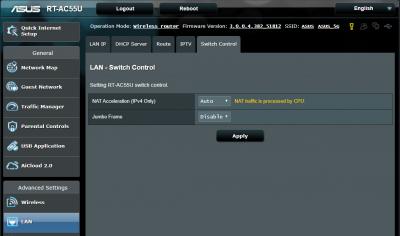
|
|
|
|
|
|
TSASUSmy
|
Dec 11 2019, 10:40 AM
|
|
|
QUOTE(FaezFarhan @ Dec 10 2019, 05:17 PM) My RT-AC66U is arriving tomorrow. Planning to use it as an aimesh node but an ethernet backhaul seems possible now. What do I do? Connect the ethernet cable first and set as aimesh node? Or insert cable later. Do I still have to factory reset a new router? Hi FaezFarhan, Make sure the firmware is the latest and factory reset before adding it wirelessly as a node. After adding the RT-AC66U as a node, you can change the connection type of the node to "Ethernet" when you click the icon node in the router GUI. Thank you |
|
|
|
|
|
FaezFarhan
|
Dec 11 2019, 01:22 PM
|
|
|
QUOTE(ASUSmy @ Dec 11 2019, 10:40 AM) Hi FaezFarhan, Make sure the firmware is the latest and factory reset before adding it wirelessly as a node. After adding the RT-AC66U as a node, you can change the connection type of the node to "Ethernet" when you click the icon node in the router GUI. Thank you So after updating, I’d still have to factory reset it even tho it’s new? |
|
|
|
|
|
TSASUSmy
|
Dec 11 2019, 01:58 PM
|
|
|
QUOTE(FaezFarhan @ Dec 11 2019, 01:22 PM) So after updating, I’d still have to factory reset it even tho it’s new? Hi FaezFarhan, When you do the updating of firmware, it mean that you have setup the router to update the firmware. In order for AiMesh router to detect the node, the node must be in non-setup condition. Like new or after factory reset. If the node in setup condition, you won't be able to scan the node. Thank you This post has been edited by ASUSmy: Dec 11 2019, 02:24 PM |
|
|
|
|
|
Merlinboy P
|
Dec 11 2019, 09:08 PM
|
New Member
|
QUOTE(ASUSmy @ Dec 11 2019, 04:37 AM) Hi Merlinboy, From the unit that I have, there is NAT Acceleration in our firmware. Thank you I know there is, there was also an option for NAT Acceleration, the thing is ...it just didn't work, probably had a bug in the firmware. Please release a new one, maybe it can also help for some other users. Thank you and goodluck ! |
|
|
|
|
|
FaezFarhan
|
Dec 12 2019, 01:32 PM
|
|
|
QUOTE(ASUSmy @ Dec 11 2019, 01:58 PM) Hi FaezFarhan, When you do the updating of firmware, it mean that you have setup the router to update the firmware. In order for AiMesh router to detect the node, the node must be in non-setup condition. Like new or after factory reset. If the node in setup condition, you won't be able to scan the node. Thank you Alright thanks! Finally done with the aimesh setup last night. Everything works well & I finally can get decent internet in the room on the first floor. Btw, woke up to my main router not having internet. Had to restart it & it’s working again. Is it normal or something is wrong with the settings? |
|
|
|
|
|
junclj
|
Dec 13 2019, 02:11 PM
|
|
|
QUOTE(Merlinboy @ Dec 10 2019, 04:35 PM) Hello Asus, Thank you for your help. I have contacted Merlin and he gave me a beta version of this firmware, I will try and install it and see what I can do. Unfortunately, on the link you gave me it's the same version I have installed (without NAT acceleration, "Merlin" says ... and btw - it's just a very big coincidence that we use the same nickname!!!) -> https://www.asus.com/Networking/RTAC55U/HelpDesk_Download/ ASUS RT-AC55U Firmware version 3.0.0.4.382.51812 with the version from the web interface from my router -> Operation Mode:Wireless router Firmware Version:3.0.0.4.382_51812 Anyway, 2 and 3 were already made, with the exception that NAT Acceleration may not be working probably... I still remember that last time ASUSmy did share RT-AC55UHP (but not RT-AC55U) beta firmware to fix that unifi 500mbps issue. I have no longer using this router for my home Unifi turbo 500mbps. My RT-AC55UHP was now being used as AP. I already upgraded to RT-AC86U since my home upgraded to Unifi Turbo 500mbps and recently I was bought another RT-AC86U to build aimesh in my home. So the extra RT-AC55UHP was still remaining as AP and put to basement ground floor of my 3-storey house. The rest two RT-AC86U was put to living room and upstairs outside of bedrooms. |
|
|
|
|
|
TSASUSmy
|
Dec 13 2019, 03:49 PM
|
|
|
QUOTE(FaezFarhan @ Dec 12 2019, 01:32 PM) Alright thanks! Finally done with the aimesh setup last night. Everything works well & I finally can get decent internet in the room on the first floor. Btw, woke up to my main router not having internet. Had to restart it & it’s working again. Is it normal or something is wrong with the settings? Hi FaezFarhan, By default the router Internet connection should be always on. Try login to the router can save the General Log and share to me if the problem happen again. Thank you |
|
|
|
|
|
shenmui
|
Dec 13 2019, 09:38 PM
|
Getting Started
|
ASUSmy
I recently purchased an ASUS USB-AC53 Nano but my desktop only can detect 2.4Ghz . I downloaded the drivers from both the CD included and the ASUS website, but still only can detect 2.4Ghz.
Any advice? Thanks!
My router model is RT-AC59u.
Just change 5Ghz band channel and problem solved...TQ
This post has been edited by shenmui: Dec 13 2019, 10:22 PM
|
|
|
|
|
|
Jegane
|
Dec 15 2019, 12:16 PM
|
Getting Started
|
Hi guys, I recently got a AX88U as my main Aimesh Router and retire my AC86U as Aimesh node, heres the problem, the AX88U keeps disconnecting randomly from my Unifibiz and won't reconnect back, have to reboot manually to have it connected back, sometimes it takes a few days for it to happen, sometimes one day 2-3 times, I have no idea what triggered it to disconnect, I have the fans running on it and all, so overheating shouldn't be an issue. It can be very annoying during business hours as my accounting software requires to keep connected to the internet.
I've tried swapping back the AC86U as Aimesh router and the AX88U as node, the disconnecting stops, so I suspect its the problem with the AX88U, I even tried AsusWRT merlin on both, or either one of the routers, same result also, now using the latest official firmware back as I feel the Aimesh on merlinWRT sucks.
so ASUSmy, is it a problem with my unit? or is there some setting I missed with unifibiz on this AX88U? Can claim warranty or something if its unit problem?
This post has been edited by Jegane: Dec 15 2019, 12:20 PM
|
|
|
|
|
|
jusbella
|
Dec 15 2019, 12:31 PM
|
|
|
QUOTE(Jegane @ Dec 15 2019, 12:16 PM) Hi guys, I recently got a AX88U as my main Aimesh Router and retire my AC86U as Aimesh node, heres the problem, the AX88U keeps disconnecting randomly from my Unifibiz and won't reconnect back, have to reboot manually to have it connected back, sometimes it takes a few days for it to happen, sometimes one day 2-3 times, I have no idea what triggered it to disconnect, I have the fans running on it and all, so overheating shouldn't be an issue. It can be very annoying during business hours as my accounting software requires to keep connected to the internet. I've tried swapping back the AC86U as Aimesh router and the AX88U as node, the disconnecting stops, so I suspect its the problem with the AX88U, I even tried AsusWRT merlin on both, or either one of the routers, same result also, now using the latest official firmware back as I feel the Aimesh on merlinWRT sucks. so ASUSmy, is it a problem with my unit? or is there some setting I missed with unifibiz on this AX88U? Can claim warranty or something if its unit problem? MTU size? |
|
|
|
|
|
Jegane
|
Dec 15 2019, 02:01 PM
|
Getting Started
|
QUOTE(jusbella @ Dec 15 2019, 12:31 PM) the default 1492, which the AC86U also using. |
|
|
|
|
|
Singh93
|
Dec 15 2019, 03:22 PM
|
Getting Started
|
Planning to get ax-88u for better wifi coverage,currently on dlink 878 turbo 500mbps +unifitv ,any advise?
|
|
|
|
|
|
SilentVampire
|
Dec 15 2019, 05:08 PM
|
|
|
QUOTE(Singh93 @ Dec 15 2019, 03:22 PM) Planning to get ax-88u for better wifi coverage,currently on dlink 878 turbo 500mbps +unifitv ,any advise? You can try, but it probably won't make that much difference. You will need devices that have AX support to fully utilize it. |
|
|
|
|
|
Singh93
|
Dec 15 2019, 05:15 PM
|
Getting Started
|
QUOTE(SilentVampire @ Dec 15 2019, 06:08 PM) You can try, but it probably won't make that much difference. You will need devices that have AX support to fully utilize it. Currently having a s10 and spectre that support wifi 6, just hoping wifi coverage and be enough using one router,not need ap points/mesh |
|
|
|
|



 Quote
Quote





 0.0252sec
 0.61
0.61
 6 queries
 GZIP Disabled