Welcome Guest ( Log In | Register )

826 Pages « < 539 540 541 542 543 > » Bottom

Outline · [ Standard ] · Linear+

Home Networking ASUS Malaysia Networking User & Technical Support, Managed by ASUS Malaysia Representative

views
     
SUSCrimsonKing
post Dec 29 2019, 09:56 PM

Getting Started
**
Junior Member
262 posts

Joined: Oct 2019
QUOTE(Eterman @ Dec 29 2019, 11:22 AM)
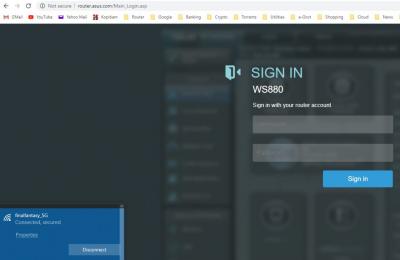
this is weird, do you know of any other setting that might affect this GUI page access?
update: i managed to login using 192.168.1.1 through wifi,  router.asus.com doesn't work though, but now at least i can assess the GUI page through wifi
*
router.asus.com works via Wifi for me. smile.gif


Attached thumbnail(s)
Attached Image
Eterman
post Dec 29 2019, 10:37 PM

Casual
***
Junior Member
490 posts

Joined: Aug 2006


QUOTE(blacktubi @ Dec 29 2019, 03:28 PM)
router.asus.com will only be redirected to the router firmware dashboard page if you are using DNS from the router.

If you changed your DNS of your wifi interface, it wouldn't redirect properly to the firmware dashboard.
*
QUOTE(CrimsonKing @ Dec 29 2019, 09:56 PM)
router.asus.com works via Wifi for me.  smile.gif
*
yes, as mentioned by blacktubi , need to use router DNS, then i am able to use router.asus.com. Thanks guys biggrin.gif


-----------------------------------------

btw, i just noticed, asus router shows that i somehow have 2 wan ip addresses, and 2 subnet masks ip, but 1 gateway ip. 1 of the wan ip is an actual wan ip and can be checked through net like iplocation.net, but the other wan ip is stated as private ip, is this normal for unifi?


This post has been edited by Eterman: Dec 29 2019, 11:31 PM
long2292
post Dec 30 2019, 12:04 AM

New Member
*
Junior Member
34 posts

Joined: Oct 2007


Hi all,

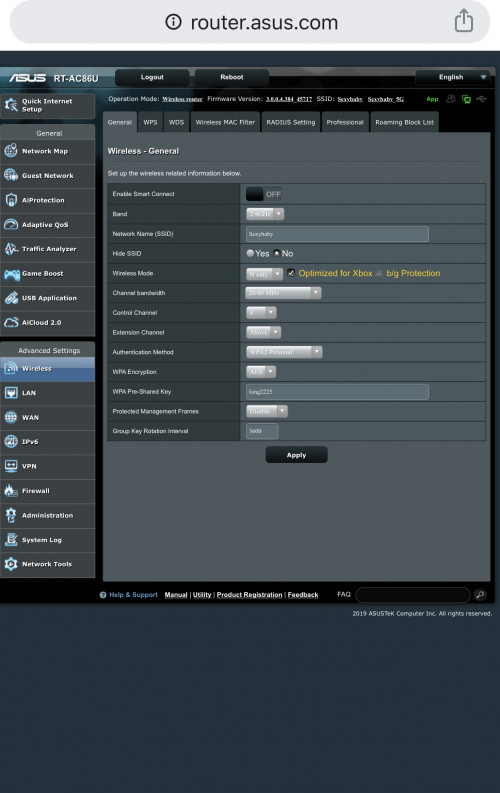
My router is Asus RT-AC86U. Please advice how to disable b/g protection in wireless.

user posted image
junclj
post Jan 2 2020, 09:49 AM

Look at all my stars!!
*******
Senior Member
2,348 posts

Joined: Apr 2008


Hi ASUSmy, asuscomm DDNS is down now? I can't access alarm and CCTV.
TSASUSmy
post Jan 2 2020, 10:02 AM

Look at all my stars!!
*******
Senior Member
2,319 posts

Joined: Mar 2010
QUOTE(junclj @ Jan 2 2020, 09:49 AM)
Hi ASUSmy, asuscomm DDNS is down now? I can't access alarm and CCTV.
*
Hi junclj,

I tested my DDNS and it is working, are you able to access the router using the DDNS?

Thank you
TSASUSmy
post Jan 2 2020, 10:08 AM

Look at all my stars!!
*******
Senior Member
2,319 posts

Joined: Mar 2010
QUOTE(long2292 @ Dec 30 2019, 12:04 AM)
Hi all,

My router is Asus RT-AC86U. Please advice how to disable b/g protection in wireless.

user posted image
*
Hi long2292,

I saw that you have select N only, this will disable the b/g devices from connecting to your router.

You may click on the wording on the router GUI for description.

Thank you
junclj
post Jan 2 2020, 10:08 AM

Look at all my stars!!
*******
Senior Member
2,348 posts

Joined: Apr 2008


QUOTE(ASUSmy @ Jan 2 2020, 10:02 AM)
Hi junclj,

I tested my DDNS and it is working, are you able to access the router using the DDNS?

Thank you
*
IPlookup server is up but the ddns is not usable.
Only works for home network but can't connect from outside through 4G or from my office internet.

This post has been edited by junclj: Jan 2 2020, 10:49 AM
TSASUSmy
post Jan 2 2020, 10:16 AM

Look at all my stars!!
*******
Senior Member
2,319 posts

Joined: Mar 2010
QUOTE(th3game @ Dec 29 2019, 09:32 PM)
hi all..

i have asus rt-ac86u and would like to make it work as an AP. I already setup it using quick setup mode to work as an AP. It will be connected to my router (mikrotik)

my question is ..the connection coming from the router LAN should be connected to LAN port or WAN port of the Asus?

thanks in advance
*
Hi th3game,

Please connect the LAN cable to the WAN port of the ASUS router.

Thank you
TSASUSmy
post Jan 2 2020, 10:21 AM

Look at all my stars!!
*******
Senior Member
2,319 posts

Joined: Mar 2010
QUOTE(yed @ Dec 27 2019, 05:36 PM)
How to delete list of devices connected to router?  Some if them are no longer in service..AC86U
*
Hi yed,

May I know what devices do you mean?

Thank you
yed
post Jan 2 2020, 12:32 PM

Casual
***
Junior Member
375 posts

Joined: Mar 2008
From: Selangor


QUOTE(ASUSmy @ Jan 2 2020, 10:21 AM)
Hi yed,

May I know what devices do you mean?

Thank you
*
Hi

Mostly mobile phones which are no longer used
junclj
post Jan 2 2020, 03:40 PM

Look at all my stars!!
*******
Senior Member
2,348 posts

Joined: Apr 2008


QUOTE(yed @ Jan 2 2020, 12:32 PM)
Hi

Mostly mobile phones which are no longer used
*
Asus router will automatic remove (no longer showing) from the network status when the certain devices are no longer connected to the router.

This post has been edited by junclj: Jan 2 2020, 03:41 PM
th3game
post Jan 3 2020, 08:34 PM

Getting Started
**
Junior Member
235 posts

Joined: Sep 2014


QUOTE(ASUSmy @ Jan 2 2020, 10:16 AM)
Hi th3game,

Please connect the LAN cable to the WAN port of the ASUS router.

Thank you
*
tq ASUSmy..that’s work now.
shankar_dass93
post Jan 4 2020, 02:11 PM

Look at all my stars!!
*******
Senior Member
2,955 posts

Joined: Sep 2009


Hi guys so I just bought an ASU’s Rt Ac68u router and followed the instructions to set it up. However after setting it up, I am able to connect my Mac and other devices to the router but can’t seem to surf the net as it comes out as my internet status is disconnect as seen in the picture above. Could anyone pls help me ?

Attached Image
SilentVampire
post Jan 4 2020, 02:49 PM

Networking Enthusiast
*******
Senior Member
5,714 posts

Joined: Mar 2007


QUOTE(shankar_dass93 @ Jan 4 2020, 02:11 PM)
Hi guys so I just bought an ASU’s Rt Ac68u router and followed the instructions to set it up. However after setting it up, I am able to connect my Mac and other devices to the router but can’t seem to surf the net as it comes out as my internet status is disconnect as seen in the picture above. Could anyone pls help me ?

Attached Image
*
VLAN tagged correctly? See #6 on this link here: https://www.blacktubi.com/guide/setup-asus-router-for-unifi/

Or see this link here: https://www.asus.com/us/support/FAQ/1034366/

Either will work.

This post has been edited by SilentVampire: Jan 4 2020, 02:50 PM
shankar_dass93
post Jan 4 2020, 03:55 PM

Look at all my stars!!
*******
Senior Member
2,955 posts

Joined: Sep 2009


QUOTE(SilentVampire @ Jan 4 2020, 02:49 PM)
VLAN tagged correctly? See #6 on this link here: https://www.blacktubi.com/guide/setup-asus-router-for-unifi/

Or see this link here: https://www.asus.com/us/support/FAQ/1034366/

Either will work.
*
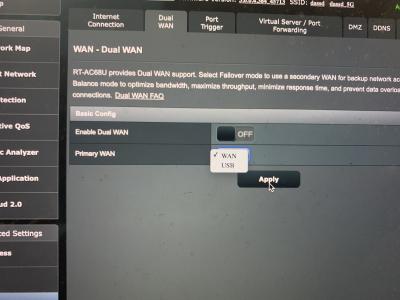
Sadly I’m stuck at step 4 of the second link

Attached Image
SilentVampire
post Jan 4 2020, 04:18 PM

Networking Enthusiast
*******
Senior Member
5,714 posts

Joined: Mar 2007


QUOTE(shankar_dass93 @ Jan 4 2020, 03:55 PM)
Sadly I’m stuck at step 4 of the second link

Attached Image
*
Yours won’t be dual WAN. You can continue.
shankar_dass93
post Jan 4 2020, 06:21 PM

Look at all my stars!!
*******
Senior Member
2,955 posts

Joined: Sep 2009


QUOTE(SilentVampire @ Jan 4 2020, 04:18 PM)
Yours won’t be dual WAN. You can continue.
*
You are a life saver man. It works perfectly fine now!
whtrader
post Jan 5 2020, 01:53 AM

Getting Started
**
Junior Member
297 posts

Joined: May 2005
From: Mainland, Penang


Hi guys,

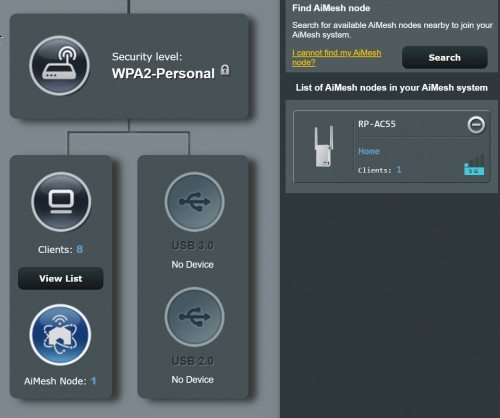
So i have setup AI Mesh. Works well for the 5G rclxms.gif rclxms.gif
My ques, can the RP-AC55 ethernet port used for PC to surf internet?
Plug in seem cannot?

user posted image

This post has been edited by whtrader: Jan 5 2020, 03:11 AM
pierrechoong
post Jan 5 2020, 09:45 PM

Getting Started
**
Junior Member
233 posts

Joined: Sep 2005


Hi Asusmy,


I have just purchased an Asus ac86u router. I have setup the unit as a router for my unifi and all is working great.

Only issue is that when I connect my alarm to it via lan cable in order to give my alarm Internet access, none of the 4 ports work. The led for lan does not light up nor have any Internet connection. I have tried to disable AiProtection and Firewall, reset the unit, re-setup the unit, upgrade the firmware and nothing seem to work.

However, when I connect the same cable (alarm lan cable) to another router (dlink), the unit's led lights up and has Internet connection. All working great on dlink.

Then again, I connect the Asus ac86u router to a PC via lan cable and it works. All 4 ports works without any issue.

So what seem to be the problem here? As far as I know, i don't think there is any issue with the lan cable or not it won't work on dlink router. Or is it that Asus router is picky on lan cable?

If it's a settings issue at least the lan led will light up?

Hope you can help me out on this!

Thanks.
cool.seabreeze
post Jan 6 2020, 12:13 AM

New Member
*
Junior Member
45 posts

Joined: Dec 2019
QUOTE(blacktubi @ Dec 29 2019, 03:28 PM)
cool.seabreeze

Use ASUS Router app. The app has improved massively lately.

blacktubi thanks for the tip.

826 Pages « < 539 540 541 542 543 > » Top
 

Change to:
| Lo-Fi Version
0.0251sec    0.51    6 queries    GZIP Disabled
Time is now: 9th December 2025 - 10:56 AM