Welcome Guest ( Log In | Register )

Bump Topic Topic Closed RSS Feed
495 Pages « < 33 34 35 36 37 > » Bottom

Outline · [ Standard ] · Linear+

Unifi Official TM UniFi High Speed Broadband Thread V42, READ 1ST PAGE FOR RELEVANT WIFI INFO!

views
     
soonwai
post Jan 8 2024, 05:55 PM


********
All Stars
11,459 posts

Joined: Oct 2007
From: KL


QUOTE(YoungMan @ Jan 8 2024, 03:10 PM)
If they change you to new ONR should be able to get 1gbps right?
*
Unfortunately not. Current 1+1Gbps ONR is still 1Gbps ports. If running bridge mode on one ethernet port, it transforms into 1Gbps ONU so no difference from our old Alcatel/Huawei/Nokia modems.

Only hope is if TM give us ONU/ONR with 2.5Gbps port.

This post has been edited by soonwai: Jan 8 2024, 05:57 PM
cHiLdHo0drEaMz
post Jan 8 2024, 06:37 PM

#DBAP
******
Senior Member
1,031 posts

Joined: Jun 2011
From: #KajangTop


QUOTE(soonwai @ Jan 8 2024, 12:21 PM)
user posted image

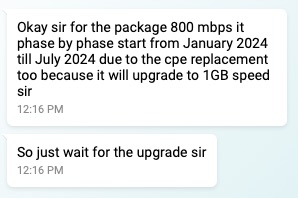
Good news for 800Mbps. 7 more months or less to go for upgrade. Looking forward to the 268% increase in speed.
*
Waiting game 🙄. If no major difference, will get 2Gbps instead 😅
digita1tech
post Jan 8 2024, 07:54 PM

Casual
***
Junior Member
307 posts

Joined: Dec 2007
From: Land Of The UnDead!!!!


QUOTE(cHiLdHo0drEaMz @ Jan 8 2024, 06:37 PM)
Waiting game 🙄. If no major difference, will get 2Gbps instead 😅
*
At this point, if you're power user....better focus on the upload speed...200mbps to 500mbps upload more than double....for 2Gbps would be 1 Gbps...a dream for homelab enthusiast..
YoungMan
post Jan 8 2024, 08:02 PM

Look at all my stars!!
*******
Senior Member
6,825 posts

Joined: Oct 2008
From: Kuala Lumpur


QUOTE(go626201 @ Jan 8 2024, 03:49 PM)
You need to change your router and device to newer one that can support more than 1Gbps.
2.5G WAN/LAN Port router + PC / Wifi6 Supported Device.

2.5G BTU/ONR <2.5G> Router/+Switch <2.5G>PC
Or
2.5G BTU/ONR <2.5G> Wifi 6 Router <More Than 1G>Wireless Device

Otherwise if still using 1G port router
The max throughput speed will still be 940+-mbps
*
Definitely, but I believe those who subs this plan usually won't use/won't have much older devices that cannot utilise the high speed connection.

QUOTE(soonwai @ Jan 8 2024, 05:55 PM)
Unfortunately not. Current 1+1Gbps ONR is still 1Gbps ports. If running bridge mode on one ethernet port, it transforms into 1Gbps ONU so no difference from our old Alcatel/Huawei/Nokia modems.

Only hope is if TM give us ONU/ONR with 2.5Gbps port.
*
or use custom ONU instead.
rjb123
post Jan 8 2024, 08:10 PM

Regular
******
Senior Member
1,820 posts

Joined: May 2010
From: Kuala Lumpur


Any connection issues today? Getting crazy high pings to everywhere, even closest AWS / 8.8.8.8 between 300-600ms!
msrazi
post Jan 8 2024, 08:59 PM

Getting Started
**
Junior Member
112 posts

Joined: Sep 2009


QUOTE(digita1tech @ Jan 8 2024, 07:54 PM)
At this point, if you're power user....better focus on the upload speed...200mbps to 500mbps upload more than double....for 2Gbps would be 1 Gbps...a dream for homelab enthusiast..
*
I prefer lease line such as metro-E 1Gbps/1Gbps if someone sponsor me.. 😁
Jjuggler
post Jan 8 2024, 09:57 PM

Narcissistic Genius
******
Senior Member
1,342 posts

Joined: Dec 2016
QUOTE(theeastdevil @ Jan 8 2024, 05:12 PM)
if you dont mind.. .. how do i set for auto reboot? im on dlink DIR-X1860Z
*
Look at the management tab on your router. You should find schedule reboot something there. You can pick the time and days there.
Omochao
post Jan 8 2024, 10:16 PM

Enthusiast
*****
Junior Member
835 posts

Joined: Nov 2007
From: Land of Forgotten
since they are going to bump 800mbps users to 1Gbps

is safe to assume that current 500mbps users also will see x2 speed in maybe the next 1 or 2 years ???haha...another round of upgrade current routers/mesh ...oh man
countingcrows
post Jan 8 2024, 10:28 PM

Getting Started
**
Junior Member
259 posts

Joined: Feb 2023
QUOTE(Omochao @ Jan 8 2024, 10:16 PM)
since they are going to bump 800mbps users to 1Gbps
Damn. I'd like 1G up and down then.
Else, I'd like a RM20 price reduction. 😁

Treating 800M users like orphans.

Last ones to receive and so little given? 😠


AxelcG
post Jan 8 2024, 10:56 PM

New Member
*
Newbie
9 posts

Joined: Dec 2012


Did everyone gotten their free upgrade of speed? My 30mbps still haven't update to 100mbps
Omochao
post Jan 8 2024, 11:04 PM

Enthusiast
*****
Junior Member
835 posts

Joined: Nov 2007
From: Land of Forgotten
QUOTE(countingcrows @ Jan 8 2024, 10:28 PM)
Damn. I'd like 1G up and down then.
Else, I'd like a RM20 price reduction. 😁

Treating 800M users like orphans.

Last ones to receive and so little given? 😠
*
i would like it to be symmetrical down and up, but according to general study by scientist at TM, most users actually down more than up, so yeah, no no 100/100
PRSXFENG
post Jan 8 2024, 11:41 PM

Look at all my stars!!
*******
Senior Member
2,613 posts

Joined: Nov 2020


QUOTE(Omochao @ Jan 8 2024, 11:04 PM)
i would like it to be  symmetrical down and up, but according to general study by scientist at TM, most users actually down more than up, so yeah, no no 100/100
*
That's just an excuse, we should be given it even if we use it less

The real reason is simply GPON is asymmetrical, with 2.4Gbps down and 1.2Gbps max on a fiber line

Still though, they could have offered half and not like 800/200
Oltromen Ripot
post Jan 9 2024, 12:49 PM

👍 999999 person Likes this member
*******
Senior Member
4,034 posts

Joined: Dec 2019
QUOTE(AxelcG @ Jan 8 2024, 10:56 PM)
Did everyone gotten their free upgrade of speed? My 30mbps still haven't update to 100mbps
*
are you eligible for upgrade in the first place?
lukemanz
post Jan 9 2024, 01:37 PM

Getting Started
**
Junior Member
250 posts

Joined: Aug 2009
QUOTE(PRSXFENG @ Jan 8 2024, 11:41 PM)
That's just an excuse, we should be given it even if we use it less

The real reason is simply GPON is asymmetrical, with 2.4Gbps down and 1.2Gbps max on a fiber line

Still though, they could have offered half and not like 800/200
*
Thats not an excuse, its a fact for all ISP in Malaysia.
Also, uplink bandwidth cost is 10x higher than downlink, especially to China.
The only problem is TM top management is stubborn.
There has been multiple request to introduce higher upload speed as VAS since 100Mbps was introduce, but TM do not want to incur deployment cost.
So they just simply provide a workaround upgrade to higher package speed to get higher upload speed. sweat.gif
crazyissac
post Jan 9 2024, 01:52 PM

Regular
******
Senior Member
1,457 posts

Joined: May 2009
From: In front of my laptop


Sorry All Sifu i got a noob newbie question
Currently im using old TM unifi huawei modem+ Asus router for 500mbps plan
New 1gbps plan come with brand new single device combo (modem+router)
do we required to change that to enjoy higher speed ??
can i still keep using my old TM modem + asus router setup ?
if no , is there any guide to set the new tplink ONU to be able to link with my old asus router ?
any help are appreciated !
msrazi
post Jan 9 2024, 02:05 PM

Getting Started
**
Junior Member
112 posts

Joined: Sep 2009


QUOTE(lukemanz @ Jan 9 2024, 01:37 PM)
Thats not an excuse, its a fact for all ISP in Malaysia.
Also, uplink bandwidth cost is 10x higher than downlink, especially to China.
The only problem is TM top management is stubborn.
There has been multiple request to introduce higher upload speed as VAS since 100Mbps was introduce, but TM do not want to incur deployment cost.
So they just simply provide a workaround upgrade to higher package speed to get higher upload speed. sweat.gif
*
From ur reply seem like u are tm guy.. DOME is the solution for upload speed. Am I right bro? 100%/100% plus main & backup link.
iphone
post Jan 9 2024, 02:32 PM

Getting Started
**
Junior Member
191 posts

Joined: Oct 2007
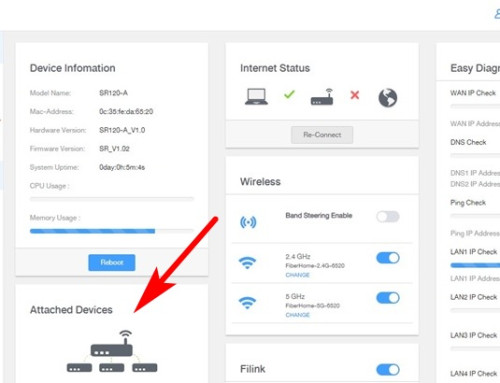
Previously in my Fiberhome router page I can see "Attached Devices", but now I cannot find this anymore. Can Fiberhome users here help to check if yours still have it?

user posted image
Omochao
post Jan 9 2024, 02:38 PM

Enthusiast
*****
Junior Member
835 posts

Joined: Nov 2007
From: Land of Forgotten
QUOTE(iphone @ Jan 9 2024, 02:32 PM)
Previously in my Fiberhome router page I can see "Attached Devices", but now I cannot find this anymore.  Can Fiberhome users here help to check if yours still have it?

user posted image
*
Check side bar, under status it should be there.

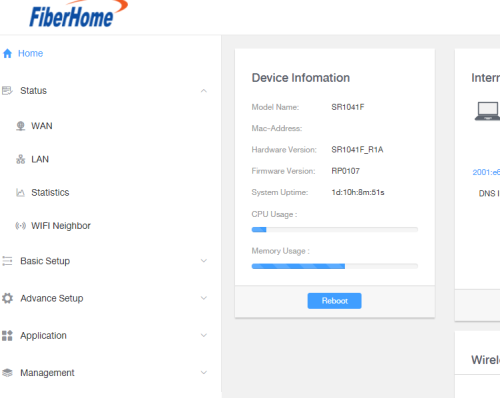
Although I'm using the latest one which is SR1041F but generally should be same UI. I do notice that you have Filink, where else Sr1041f , no such thing appearing.

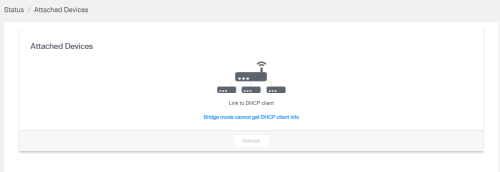
Are you on bridge mode? if the router is set to bridge mode, it wont be able to show attached devices.

user posted image
iphone
post Jan 9 2024, 03:09 PM

Getting Started
**
Junior Member
191 posts

Joined: Oct 2007
QUOTE(Omochao @ Jan 9 2024, 02:38 PM)
Check side bar, under status it should be there.

Although I'm using the latest one which is SR1041F but generally should be same UI. I do notice that you have Filink, where else Sr1041f , no such thing appearing.

Are you on bridge mode? if the router is set to bridge mode, it wont be able to show attached devices.

Oh sorry about that Filink, because my router page no longer show that "Attached Devices" so I took the image from the net. That is not my router page. Sorry for the confusion.
As for bridge mode? Nope, never change any setting after Unifi tech installed both router units, 3 months ago (SWU3.0).
I love that feature because I can see how many devices are connected and which router they are connected to.


The below is my router page, sidebar Status do not have "Attached Devices". I have check every items, don't see that feature anymore. sad.gif

user posted image
msrazi
post Jan 9 2024, 03:16 PM

Getting Started
**
Junior Member
112 posts

Joined: Sep 2009


QUOTE(Omochao @ Jan 9 2024, 02:38 PM)
Check side bar, under status it should be there.

Although I'm using the latest one which is SR1041F but generally should be same UI. I do notice that you have Filink, where else Sr1041f , no such thing appearing.

Are you on bridge mode? if the router is set to bridge mode, it wont be able to show attached devices.

user posted image
*
SR1041F, that Filink u can see it as an option to set the device as Agent or Controller.

SR120-A, disable repeater & u'll back to normal. If it was mesh subrouter, need to reset as mentioned

495 Pages « < 33 34 35 36 37 > » Top
Topic ClosedOptions
 

Change to:
| Lo-Fi Version
0.0202sec    0.73    6 queries    GZIP Disabled
Time is now: 18th December 2025 - 04:57 AM