

QUOTE(Anime4000 @ Dec 22 2023, 12:35 AM)
Finally. With working VoIP 💪💪💪Unifi Official TM UniFi High Speed Broadband Thread V42, READ 1ST PAGE FOR RELEVANT WIFI INFO!
Unifi Official TM UniFi High Speed Broadband Thread V42, READ 1ST PAGE FOR RELEVANT WIFI INFO!
|
|
 Dec 22 2023, 01:26 PM Dec 22 2023, 01:26 PM
Return to original view | Post
#1
|
 
Senior Member
1,031 posts Joined: Jun 2011 From: #KajangTop  
|
QUOTE(Anime4000 @ Dec 22 2023, 12:35 AM) Finally. With working VoIP 💪💪💪 |
|
|
|
|
|
Jan 8 2024, 06:37 PM
Return to original view | Post
#2
|
|
Senior Member
1,031 posts Joined: Jun 2011 From: #KajangTop
|
QUOTE(soonwai @ Jan 8 2024, 12:21 PM) 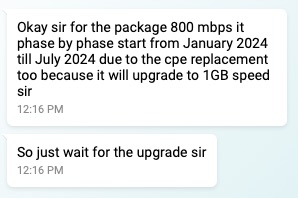 Good news for 800Mbps. 7 more months or less to go for upgrade. Looking forward to the 268% increase in speed.  |
|
|
Jan 16 2024, 05:29 PM
Return to original view | Post
#3
|
|
Senior Member
1,031 posts Joined: Jun 2011 From: #KajangTop
|
QUOTE(aniq8676 @ Jan 15 2024, 10:59 PM) Unifi suddenly reduced the price for 1Gbps plan. 🤩🤩🤩 ini kalilahBefore & After 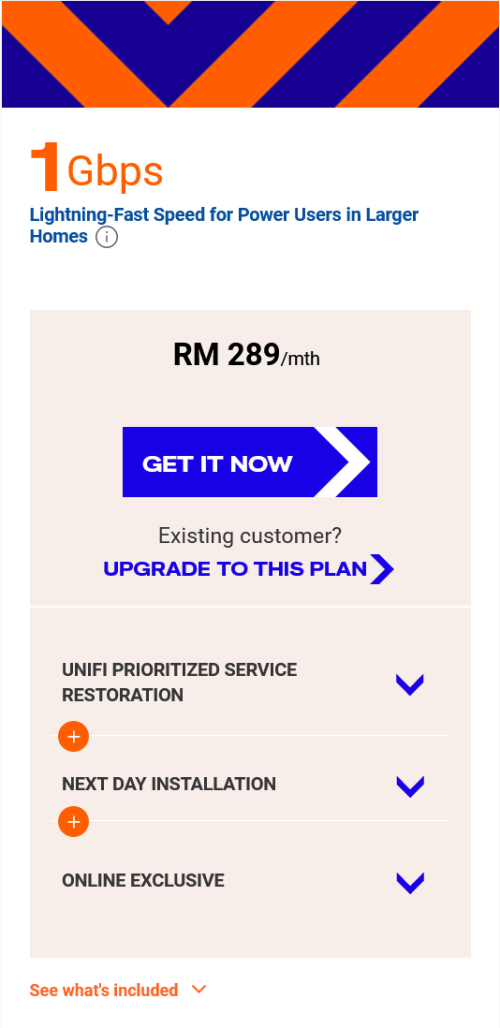 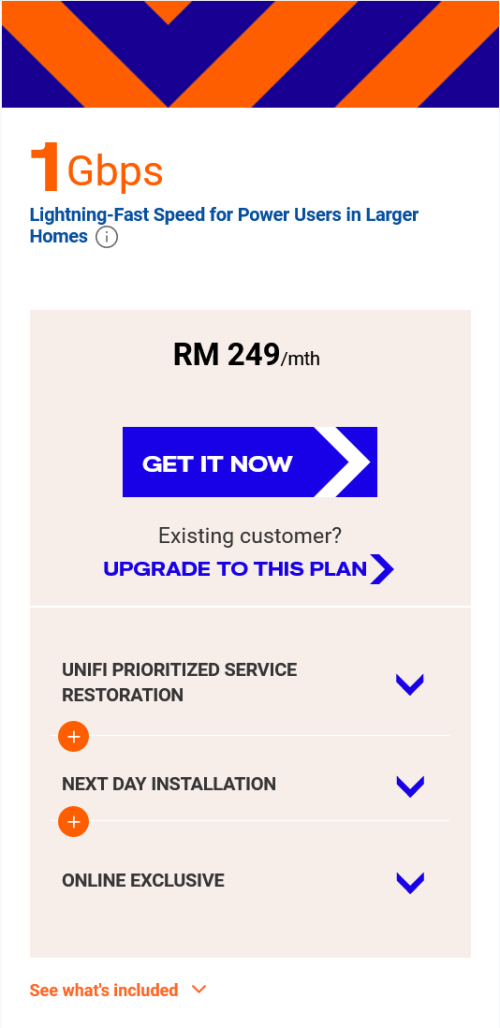 |
|
|
Feb 27 2024, 04:12 PM
Return to original view | Post
#4
|
|
Senior Member
1,031 posts Joined: Jun 2011 From: #KajangTop
|
Still no sign of upgrade for 800Mbps users 💀
|
|
|
Mar 15 2024, 11:47 AM
Return to original view | IPv6 | Post
#5
|
|
Senior Member
1,031 posts Joined: Jun 2011 From: #KajangTop
|
TM already start contacting 800Mbps customer for speed upgrade. Only 1Gbps 🤦♂️ Still undecided 😅
This post has been edited by cHiLdHo0drEaMz: Mar 15 2024, 12:31 PM |
|
|
Mar 15 2024, 02:33 PM
Return to original view | Post
#6
|
|
Senior Member
1,031 posts Joined: Jun 2011 From: #KajangTop
|
QUOTE(laihuhng @ Mar 15 2024, 12:53 PM) I believe got. This is mine. But, there is no one contacted me for the speed upgrade. My plan 1gbps SWU3.0. Mine contacted. The technician need to come to change equipment it seems.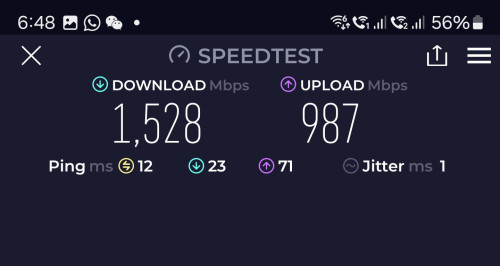 This post has been edited by cHiLdHo0drEaMz: Mar 15 2024, 02:34 PM |
|
|
|
|
|
May 4 2024, 03:33 PM
Return to original view | IPv6 | Post
#7
|
|
Senior Member
1,031 posts Joined: Jun 2011 From: #KajangTop
|
QUOTE(Anime4000 @ May 2 2024, 01:39 PM) here Will the new ONR be available for 800Mbps - 1Gbps free upgrade users as well ? Or 2 Gbps only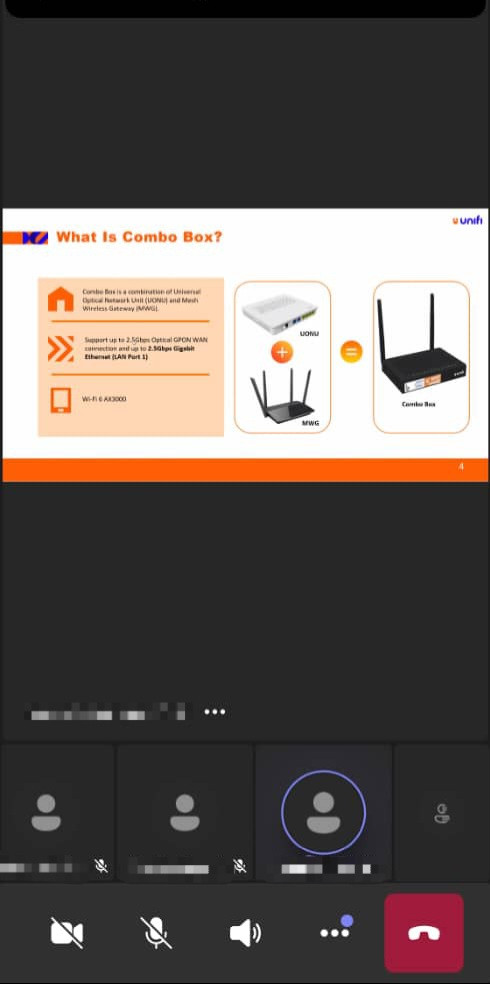 it appears currently ONR is capable of 2.5G, I did reverse engineer on V1.1.0 and it has command to enable, but firmware wont let usable: There will be Firmware Update for existing, what I been told. Hopefully got. my experience helping people using 2.5G PON Stick is quite horrible because hard to get it right at certain OLT's not all OLT give same OMCI Info (ME 84, 171, 277) also, TM held this 2.5G because some OLT especially Fiberhome OLT have performance issue on LAN 1 (Bridge and Router Mode) I hope this fix performance issue on Fiberhome OLT I believe DSCP and Priority Queue not reliable on non Fiberhome ONT Note: PM me if want to delete the leak screenshot |
|
|
May 5 2024, 11:07 PM
Return to original view | IPv6 | Post
#8
|
|
Senior Member
1,031 posts Joined: Jun 2011 From: #KajangTop
|
QUOTE(zeronehza @ May 5 2024, 10:48 PM) not latest ONR 2.5 port ? I also have the same question. Have they rolled out the new ONR ?This post has been edited by cHiLdHo0drEaMz: May 5 2024, 11:08 PM |
|
|
May 6 2024, 08:23 AM
Return to original view | IPv6 | Post
#9
|
|
Senior Member
1,031 posts Joined: Jun 2011 From: #KajangTop
|
QUOTE(sHawTY @ May 6 2024, 08:01 AM) No. I spoke with the onsite contractor regarding the ONR with a 2.5Gb/s LAN 1 port. He mentioned that they just completed training on that specific hardware last week. I guess we just have to wait thenHowever, the hardware is not expected to be released until the earliest by the first week of June 2024. Oh, and the new ONR is actually a completely different hardware, and it comes in black. He showed me a photo of it on his phone. |
|
|
May 6 2024, 08:31 AM
Return to original view | IPv6 | Post
#10
|
|
Senior Member
1,031 posts Joined: Jun 2011 From: #KajangTop
|
QUOTE(sHawTY @ May 6 2024, 08:01 AM) No. I spoke with the onsite contractor regarding the ONR with a 2.5Gb/s LAN 1 port. He mentioned that they just completed training on that specific hardware last week. D-Link again ?However, the hardware is not expected to be released until the earliest by the first week of June 2024. Oh, and the new ONR is actually a completely different hardware, and it comes in black. He showed me a photo of it on his phone. |
|
|
May 6 2024, 12:10 PM
Return to original view | IPv6 | Post
#11
|
|
Senior Member
1,031 posts Joined: Jun 2011 From: #KajangTop
|
QUOTE(sHawTY @ May 6 2024, 09:10 AM) Not quite sure as the photo doesn't display the brand. Thanks for the update |
|
|
May 10 2024, 08:39 PM
Return to original view | IPv6 | Post
#12
|
|
Senior Member
1,031 posts Joined: Jun 2011 From: #KajangTop
|
QUOTE(NagaK @ May 10 2024, 03:50 PM) New Router as per technician from this week they start getting this new unit. Sadly I'm stick with my old Fiberhome ONU and Tp link router so I can't test the performance of it It's time to contact TM again for upgrade 😁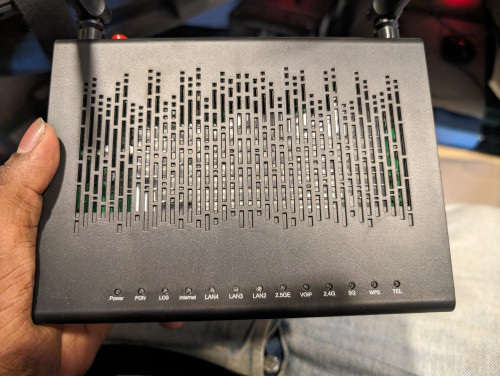 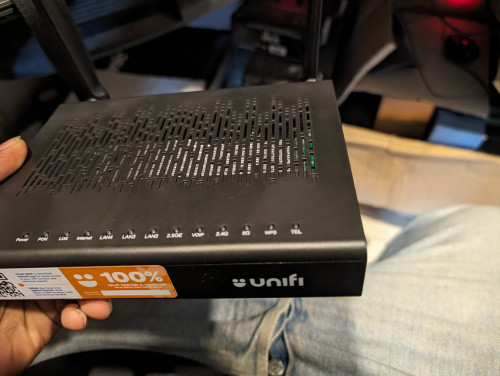 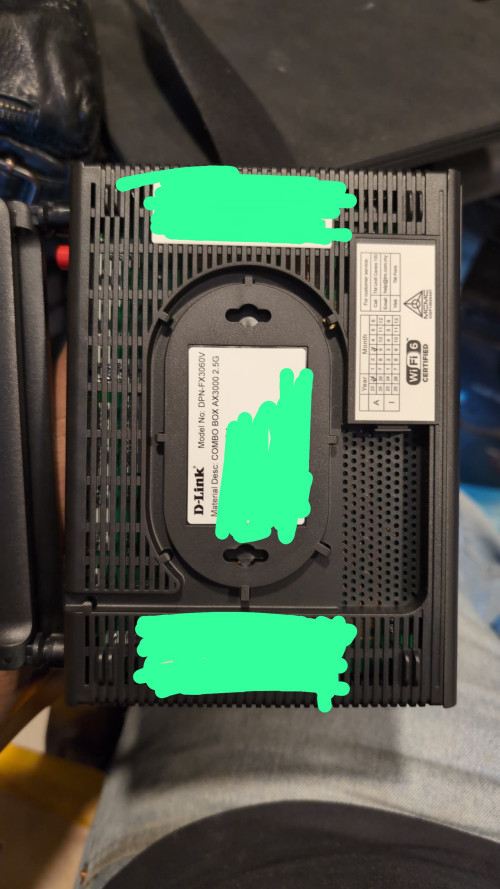 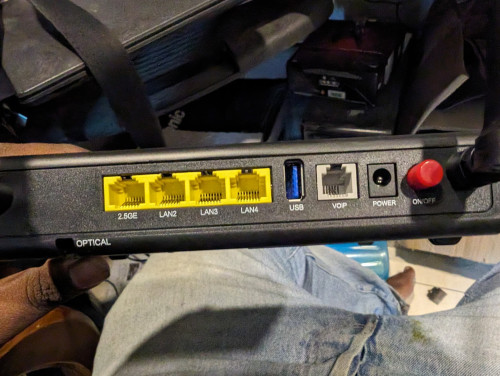 NagaK liked this post
|
|
|
May 13 2024, 08:47 AM
Return to original view | IPv6 | Post
#13
|
|
Senior Member
1,031 posts Joined: Jun 2011 From: #KajangTop
|
QUOTE(Anime4000 @ May 12 2024, 11:33 PM) Yes, lifetime warranty including Unifi 10G PON (XGSPON) in the future. This going to be interesting 😈All Unifi will migrate to 10G Fiber meanwhile other ISP on TM will stay on GPON |
|
|
|
|
|
May 14 2024, 06:33 PM
Return to original view | IPv6 | Post
#14
|
|
Senior Member
1,031 posts Joined: Jun 2011 From: #KajangTop
|
QUOTE(Mazda9 @ May 14 2024, 11:04 AM) Finally connection was upgraded to 1GBPS plan this morning. Received the white colour combo box and the Instalaltion care crew showed me the WhatsApp group message from TM that the black box will only be officially available mid of June onwards and currently 500 black boxes are out in the market with users for testing phase purpose. If June, then I guess just wait abit longer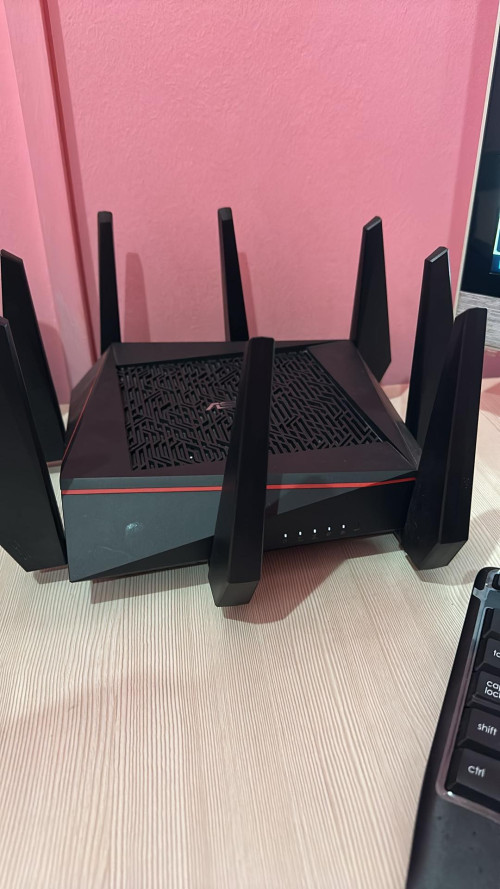  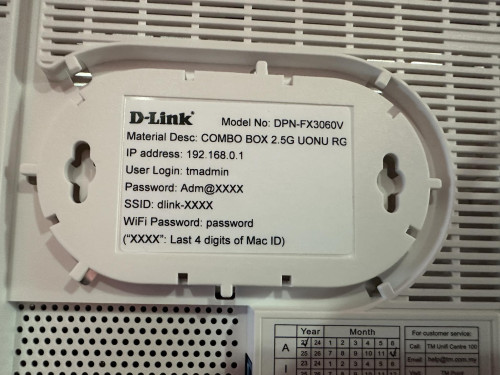 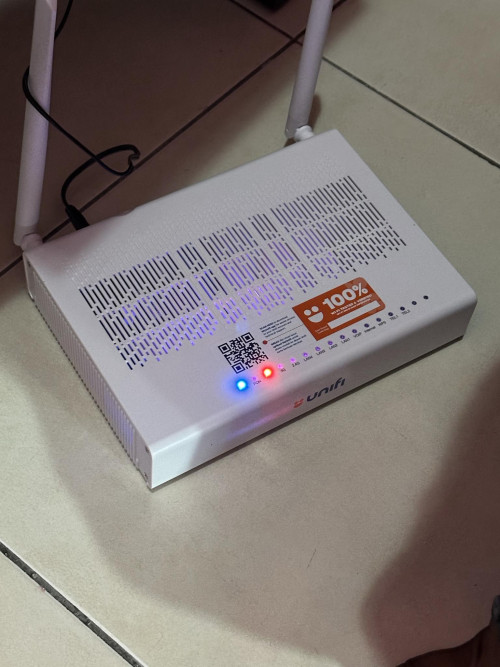 |
|
|
May 15 2024, 04:58 PM
Return to original view | IPv6 | Post
#15
|
|
Senior Member
1,031 posts Joined: Jun 2011 From: #KajangTop
|
QUOTE(Anime4000 @ May 15 2024, 03:57 PM) there is news 21st on-wards, Installer need to clear up RG6 Router and ONU, then use new stock: for 100 - 800Mbps will be using ZTE AX3000 Combo-Box like D-Link counter-part. No more ONU + Router ONU + Router will always be a better option IMO 😅 |
|
|
May 15 2024, 05:17 PM
Return to original view | IPv6 | Post
#16
|
|
Senior Member
1,031 posts Joined: Jun 2011 From: #KajangTop
|
QUOTE(Anime4000 @ May 15 2024, 05:03 PM) Yes, existing ONU simple bridge, live longer, smaller, easier to to use custom Router with PPPoE Agreed. Especially on the live longer part. My Huawei still going strong 💪💪💪.I bet after this, people use Custom Router with DHCP, Double NAT. but this only way make internet cheaper 🤣 |
|
|
May 16 2024, 07:15 PM
Return to original view | IPv6 | Post
#17
|
|
Senior Member
1,031 posts Joined: Jun 2011 From: #KajangTop
|
QUOTE(NagaK @ May 16 2024, 04:32 PM) I'm using Fiberhome modem + TP LINK AX73 with 1G Lan port max I can reach was 930 to 950mbps. Keep Dlink Black ONR as backup option If they said your Huawei Modem can support just stay with it keep your new modem+router for future use QUOTE(jiaen0509 @ May 16 2024, 05:29 PM) You will receive the ONR combo box. After installation, simply unplug the fiber cable and connect it to your existing modem (ZTE/HUAWEI/FIBERHOME or others brand). Keep the D-Link combo box as a backup. You can set the Wi-Fi name and password to match your existing ones, so you won't need to reconnect any IoT devices. In case your modem spoiled, you can cucuk balik D-Link and use. Does this apply to 2Gbps plan as well? |
|
|
May 16 2024, 09:03 PM
Return to original view | IPv6 | Post
#18
|
|
Senior Member
1,031 posts Joined: Jun 2011 From: #KajangTop
|
QUOTE(jiaen0509 @ May 16 2024, 07:32 PM) You can do this, but Wi-Fi and LAN speeds will be capped at ~940 Mbps. If you are using the TM-provided ONR for a 2 Gbps plan, you might use that method since it the LAN port is 1 Gbps. No matter which method, LAN speed is 1gbps, unless you are on the black variant ONR where it provides 2.5G LAN. However, it’s better to use the provided ONR if you are on a 2 Gbps plan because Wi-Fi speeds are higher compared to using the old modem, where both Wi-Fi and LAN are limited to 1 Gbps. Thank you very much for the detailed explanation. Appreciate it alot 🙏🙏🙏 |
|
|
May 17 2024, 07:15 AM
Return to original view | IPv6 | Post
#19
|
|
Senior Member
1,031 posts Joined: Jun 2011 From: #KajangTop
|
QUOTE(Anime4000 @ May 17 2024, 01:00 AM) Today I received new ONR and straight away Reverse Engineer, this B1 hardware quite different layout but still using same SoC Bug On Bridge Mode 🤦♂️. Hope they can release a patch to resolve it. Thanks Chief for your effort 🙏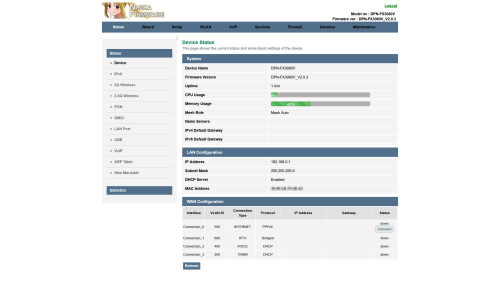 Also, I managed to extract out and repackage as firmware file, change the Theme to Lowyat Blue Theme  planning to add Proprietary Huawei ME from my PON Stick, so, TIME and Maxis can use this ONR Inside D-Link ONR B1 Firmware File: DPN-FX3060V-B1_V2.0.3_20240516_NIJIKA.bin Size: 27.7 MB (29,112,320 bytes) MD5: 2A8FE8991D673F8ED2CEFF5FC15E9CEC SHA2: F89F4E78D8EB9007FF1AAFA94CD0426BB2A635D2DEE038D9308CB337ACB1AE31 This for B1 hardware, since my old D-Link no longer with me, can't test it, this has disable HW Check, before flash, please enable SSH just in case Logo Sauce: Pixiv Id 103567703 This post has been edited by cHiLdHo0drEaMz: May 17 2024, 08:03 AM |
|
|
May 20 2024, 12:21 AM
Return to original view | IPv6 | Post
#20
|
|
Senior Member
1,031 posts Joined: Jun 2011 From: #KajangTop
|
QUOTE(NagaK @ May 19 2024, 11:46 PM) Only 1Gbps and 2gbps getting better combo box it seems. It's good when all in one box instead seperate Hope we can have some info from their technical team on this matter.But one negative is either TM is allow to use bridge mode or not is question mark now |
|
Topic ClosedOptions
|
| Change to: |  0.0311sec 0.0311sec
 0.40 0.40
 7 queries 7 queries
 GZIP Disabled GZIP Disabled
Time is now: 18th December 2025 - 08:27 AM |
 Quote
Quote