

QUOTE(Oltromen Ripot @ Dec 12 2023, 03:16 PM)
That F710 subscription is such a joke
RM9 X 24 = 216
Can get one off shopee for like rm153 ish
Or other shops are around 179
Unifi Official TM UniFi High Speed Broadband Thread V42, READ 1ST PAGE FOR RELEVANT WIFI INFO!
|
|
 Dec 12 2023, 10:50 PM Dec 12 2023, 10:50 PM
Return to original view | IPv6 | Post
#1
|
 
Senior Member
2,611 posts Joined: Nov 2020  
|
QUOTE(Oltromen Ripot @ Dec 12 2023, 03:16 PM) That F710 subscription is such a jokeRM9 X 24 = 216 Can get one off shopee for like rm153 ish Or other shops are around 179 |
|
|
|
|
|
Dec 21 2023, 02:36 PM
Return to original view | IPv6 | Post
#2
|
|
Senior Member
2,611 posts Joined: Nov 2020
|
QUOTE(failed.hashcheck @ Dec 21 2023, 12:44 PM) is it possible to terminate the voip outside ONU? There is this thread but it is for Maxis Fiber, probably can still use some info there, but substitute for TM's infoi.e. use my own voip phone connected via ethernet I have an high end ip phone laying around unused that have lots of valuable features I could benefit from. Would be great i I could use this for unifi. also how do I enable call forwarding on no reply?  https://forum.lowyat.net/topic/5243640 But Anime4000 did change to Unifi recently so maybe it's time for a new guide?  |
|
|
Dec 29 2023, 02:14 PM
Return to original view | IPv6 | Post
#3
|
|
Senior Member
2,611 posts Joined: Nov 2020
|
QUOTE 🔔 #UnifiCares: It’s time to upgrade to Unifi High Speed Broadband Hi [name]. I’m Maya, your Unifi Digital friend. I wish to inform you that on November 2023, TM network facility that is serving your [number] service was involved in a Repeated Incidents of Cable Theft. 😔 To ensure you stay connected, I would like to recommend you to upgrade your Fixed Line service to our Unifi High Speed Broadband. ⚡ You can upgrade to Unifi High Speed Broadband today via any of these touchpoints below: 📍 Unifi portal ➡️ i.unifi.my/portal 📍 MyUnifi app 📍 Live chat ➡️ https://maya.unifi.com.my/ 📍 Unifi Contact Centre at 100 (press 4) 📍 TMpoint/Unifi Store ➡️ i.unifi.my/findtmpoint 📍 Unifi Authorised dealers Thank you and have a nice day. 🌻 So recently got this whatsapp the service they are referring to in the whatsapp is my grandparents place they only have plain old fashioned landline telephone only, no internet It's not actually incidents of cable theft, just monkeys playing around on the cables and causing damage Do I have to take any action or can I just ignore this message? |
|
|
Dec 31 2023, 02:42 PM
Return to original view | IPv6 | Post
#4
|
|
Senior Member
2,611 posts Joined: Nov 2020
|
QUOTE(kwokwah @ Dec 31 2023, 01:11 PM)  That's the reason for SWU 4.0 |
|
|
Jan 4 2024, 09:29 AM
Return to original view | IPv6 | Post
#5
|
|
Senior Member
2,611 posts Joined: Nov 2020
|
QUOTE(aa123aa @ Jan 4 2024, 12:04 AM) Currently using all asus router (main router and 2 mesh router); very convenient cz can use app to control and monitor everything. If switch to dlink, afraid can’t use anymore. Read that the given dlink quality is also bad as usual la... wonder is there like similar ONR but it’s asus brand out there?? Asus doesn't make professional tier hardware (well there is ExpertWiFi series but it doesn't really count)Your best bet is an independent 3rd party 2.5Gbps modem connected to the 2.5Gbps port of your Asus router to fully take advantage of a 2Gbps subscription (Similar to your current setup except with 2.5Gbps ports) Since, it's quite disappointing that TM did not provide one and instead gave an all in one dlink I believe Maxis does, but the usual Maxis on TM Infra downsides apply And also price differences since you're getting free speed upgrade from TM Also refer to Anime4000's Ditch ONU thread |
|
|
Jan 5 2024, 09:08 AM
Return to original view | IPv6 | Post
#6
|
|
Senior Member
2,611 posts Joined: Nov 2020
|
QUOTE(Khan92 @ Jan 5 2024, 03:15 AM) Any idm type app in android that I can try? I like ADM, Advanced Download Managerhttps://play.google.com/store/apps/details?id=com.dv.adm |
|
|
|
|
|
Jan 5 2024, 06:19 PM
Return to original view | IPv6 | Post
#7
|
|
Senior Member
2,611 posts Joined: Nov 2020
|
QUOTE(failed.hashcheck @ Jan 5 2024, 04:18 PM) I don't even know where is this speed cap misinfo coming from I think it's real that there was a intentional speed cap, just that they stopped doing it in the recent years, so new sign ups get expected speeds . One person didn't get full speed for whatever reason, spawn a hypothesis that tm capped the speed for non unifi. How about the rest 99% that get advertised speed without any problem? . One person didn't get full speed for whatever reason, spawn a hypothesis that tm capped the speed for non unifi. How about the rest 99% that get advertised speed without any problem?Disclaimer: Based on personal observations and guessing You can find many old posts of Maxis Fiber 30Mbps plans only getting a consistent 28Mbps despite using LAN cable and everything A relative of mine is still on 30Mbps Maxis and it never exceeds 28Mbps I'm sure there's others here that also have similar experience |
|
|
Jan 5 2024, 10:31 PM
Return to original view | IPv6 | Post
#8
|
|
Senior Member
2,611 posts Joined: Nov 2020
|
QUOTE(blibala @ Jan 5 2024, 10:10 PM) is it possible to 'subscribe' public IP for unifi 100mbps or 300mbps like Maxis? Contact them with a GOOD reason and provide proof of said reasonThey will come ONSITE to verify your needs before approving the public ip for you |
|
|
Jan 8 2024, 11:41 PM
Return to original view | IPv6 | Post
#9
|
|
Senior Member
2,611 posts Joined: Nov 2020
|
QUOTE(Omochao @ Jan 8 2024, 11:04 PM) i would like it to be symmetrical down and up, but according to general study by scientist at TM, most users actually down more than up, so yeah, no no 100/100 That's just an excuse, we should be given it even if we use it lessThe real reason is simply GPON is asymmetrical, with 2.4Gbps down and 1.2Gbps max on a fiber line Still though, they could have offered half and not like 800/200 |
|
|
Jan 9 2024, 06:30 PM
Return to original view | IPv6 | Post
#10
|
|
Senior Member
2,611 posts Joined: Nov 2020
|
QUOTE(msrazi @ Jan 9 2024, 02:05 PM) From ur reply seem like u are tm guy.. DOME is the solution for upload speed. Am I right bro? 100%/100% plus main & backup link. No, I don't work for any isps |
|
|
Jan 25 2024, 05:24 PM
Return to original view | IPv6 | Post
#11
|
|
Senior Member
2,611 posts Joined: Nov 2020
|
QUOTE(go626201 @ Jan 25 2024, 05:05 PM) I think the free upgrade for 800mbps will come at around March,as they might need to wait for the 2.5G ONU production after new year in China? If we look over at Maxis's offering of the 2Gbps plans, they are giving a (rebranded by local company?) Skyworth 2.5Gbps ONUSince the product is made in China,so they have to wait for the production cycle. (All above is my guessing only,maybe they still haven't decided the device specification yet  ) )OEM with ZTE or Fiberhome or else(non-famous factory similar to VSOL etc)?  So, maybeeeeee TM customers will get that as well? This post has been edited by PRSXFENG: Jan 25 2024, 05:24 PM |
|
|
Jan 27 2024, 12:57 PM
Return to original view | IPv6 | Post
#12
|
|
Senior Member
2,611 posts Joined: Nov 2020
|
QUOTE(p1p @ Jan 27 2024, 10:25 AM) Talking about phone numbers, when one of your friends who has your phone number uses TruCaller, or similar apps, the whole phone book is uploaded and shared. It's in the terms and conditions / privacy policy that no one readsYou don't have to do anything. Your friends have helped you share your personal details out. How else would they get a database of phone numbers and names With that said, for whoever that wants to opt out and unlist yourself from Truecaller https://www.truecaller.com/unlisting kiritoffx liked this post
|
|
|
Feb 1 2024, 11:29 AM
Return to original view | Post
#13
|
|
Senior Member
2,611 posts Joined: Nov 2020
|
QUOTE(GrandElf @ Jan 30 2024, 05:34 PM) any1 already go and claim the mystery gift? what are those?? https://twitter.com/Ierfanlah/status/1752610374883631418 |
|
|
|
|
|
Feb 5 2024, 07:47 PM
Return to original view | IPv6 | Post
#14
|
|
Senior Member
2,611 posts Joined: Nov 2020
|
QUOTE(D.gRave @ Feb 5 2024, 05:25 PM) Anybody had issue with asus ax53u? Is this a fresh new from the box RT AX53U?So, this happen, change router, setup everything, call tm for ppoe, TM said need reset ppoe so received new one, put in, and no internet. But using stock with new ppoe work somehow. Any tips Factory preloaded firmware has broken PPPoE Please manually download latest firmware from Asus site then manually install the update Then afterwards it should be fine Source: used to use said router, sold it off later on This post has been edited by PRSXFENG: Feb 5 2024, 07:48 PM |
|
|
Feb 6 2024, 02:36 PM
Return to original view | Post
#15
|
|
Senior Member
2,611 posts Joined: Nov 2020
|
QUOTE(laihuhng @ Feb 6 2024, 12:11 PM) Any idea if speed information is hard-coded to the ONU? I've upgraded to 1gbps from 800. And, I've gotten myself a new Asus TUF-AX6000 to replace the router provided by Unifi. Reason I'm doing so is because I need the parental control feature. you are not supposed to reuse old hardware, since provisioning is based on the details of the ont as far as I know (serial number, ploam credentials)When I'm using the Dlink DPN-FX3060Z, I managed to get full 1gpbs++ DL, 500gbps++ UL (wireless). However, when I'm using the old Huawei ONU + ASUS AX6000, I'm getting only 800+ DL and 200+ UL. Any idea why? Can anyone help? Im surprised the huawei even worked at all and they didnt disable it after you got the dlink it is very frustrating that tm gave that crappy dlink, while also making it that you are not intended to replace it / use your own device either you got a few options 1. use dlink 2. use dlink, connect asus via lan and disable wifi on dlink cons double nat max speed of roughly 940mbps 3. get your current setup working but it will also get about 940mbps due to gigabit lan port limitation 4. replacement onu stick from Anime4000 on this forum, with 2.5g ports so you can get true 1gbps and also be future ready for 2gbps i suppose you could try copying details from the dlink to the huawei or contact tm laihuhng liked this post
|
|
|
Feb 6 2024, 10:50 PM
Return to original view | IPv6 | Post
#16
|
|
Senior Member
2,611 posts Joined: Nov 2020
|
QUOTE(laihuhng @ Feb 6 2024, 09:49 PM) Changed to Bridge per instruction, ohers left untouched. Nothing works, even the 5G. Can't access the Dlink even with LAN. Please help. Factory resetting it to default mayyyyyyyy work as the device will probably request and get sent the configuration from the server via TR069/CWMPBut not sure if it needs more configuration manually or not |
|
|
Feb 8 2024, 08:49 PM
Return to original view | IPv6 | Post
#17
|
|
Senior Member
2,611 posts Joined: Nov 2020
|
QUOTE(The.Lucas.DaY @ Feb 8 2024, 08:44 PM) Accidentally crushed my Unifi fiber optic cable, but luckily internet access still working fine. You could check the signal strength on the modemNot sure if it will get worse and what if i wanna replace it when it is, can i replace myself or call for TM technician support? 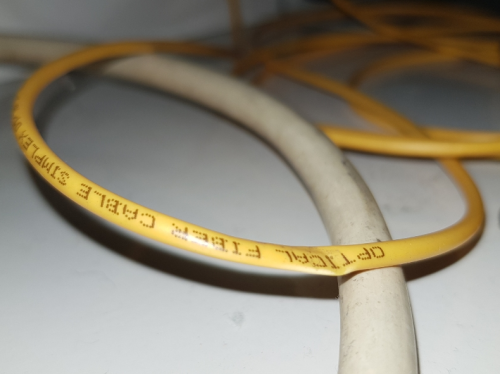 Fiber splicing requires expensive hardware, so... probably contact TM |
|
|
Feb 9 2024, 03:27 PM
Return to original view | IPv6 | Post
#18
|
|
Senior Member
2,611 posts Joined: Nov 2020
|
QUOTE(The.Lucas.DaY @ Feb 9 2024, 01:50 PM) You mean check thru speedtest? It is able to run at full speed. How much costs if to be replace by TM technician? No, if you login to the modem (not router) there is usually a section somewhere to check fiber readingIt should be a negative number like -18dBm -25 to 28 ish is considered bad The.Lucas.DaY liked this post
|
|
|
Feb 9 2024, 08:38 PM
Return to original view | IPv6 | Post
#19
|
|
Senior Member
2,611 posts Joined: Nov 2020
|
QUOTE(PJng @ Feb 9 2024, 04:08 PM) mean direct pc to fibre modem? what id and pw log in? it depends on the ISP and modem, im not sure for TM but some models were really complicated to get intonever try that befor for Huawei ones, root/adminHW or telecomadmin/admintelecom may be worth a shot trying or try and google and see if it some other password was ever mentioned in the forums also the modem doesn't have DHCP enabled so you will need to assisgn yourself a static ip I think there are also youtube videos out there on how to login to unifi provided modems |
|
|
Feb 13 2024, 07:23 PM
Return to original view | IPv6 | Post
#20
|
|
Senior Member
2,611 posts Joined: Nov 2020
|
QUOTE(Alert_RaZO @ Feb 13 2024, 03:48 PM) I just bought tplink deco X50 Ok soI unplug the old router and plug the deco. the deco become red and no internet. Reset few times still not success. Frustrated, I connect back the old router. Since then, no internet... Called to Unifi, restart back end, reset password, still no internet. What went wrong? The CS did told me if for mesh wifi I have to call to different number. And it is unclear the cs mention new router plug in will mess the configuration? When I connect the wifi, it says sign in to wifi network [attachmentid=11491087] Firstly, you have a modem, should be the one without WiFi antennas, and usually a white box, Huawei fiberhome ZTE Nokia Alcatel branded Then you got the router, could be TP-Link D-Link fiberhome and other brands Factory reset the deco and Connect LAN cable from LAN1 of MODEM to a port on the deco Setup Deco and select PPPoE mode Ask TM for the username and password Then, tap on VLAN SETTINGS and select Malaysia TM Unifi Then continue It is not as simple as plug and play It would be helpful if you send photos of your setup as well in case you messed up any connections This post has been edited by PRSXFENG: Feb 13 2024, 07:23 PM |
|
Topic ClosedOptions
|
| Change to: |  0.0798sec 0.0798sec
 0.63 0.63
 7 queries 7 queries
 GZIP Disabled GZIP Disabled
Time is now: 15th December 2025 - 12:36 PM |
 Quote
Quote