Outline ·
[ Standard ] ·
Linear+
Unifi Official TM UniFi High Speed Broadband Thread V42, READ 1ST PAGE FOR RELEVANT WIFI INFO!
|
xsoon17
|
 Jan 8 2024, 10:36 AM Jan 8 2024, 10:36 AM
|
Getting Started


|
Anyone encounter this before? On last night,the BTU is working nicely. And the issue happened in the morning. The issue is that the BTU unit didn't have any lights light up,except the TM logo light.I have already unplugged the LAN1 ethernet. When I call customer service,they say there is an outage at my area.And I need to wait for them to restore the service before they can call their technician to my house. I don't know if the BTU is faulty+outage or just outage only.Because if there is no link,shouldn't the LINK LED be red color instead of blank? The below is the attachment of the photo of the BTU unit Attached thumbnail(s)
|
|
|
|
|
|
kwss
|
Jan 8 2024, 11:38 AM
|
|
|
|
|
|
|
|
|
soonwai
|
Jan 8 2024, 11:46 AM
|
|
|
QUOTE(xsoon17 @ Jan 8 2024, 10:36 AM) Anyone encounter this before? On last night,the BTU is working nicely. And the issue happened in the morning. The issue is that the BTU unit didn't have any lights light up,except the TM logo light.I have already unplugged the LAN1 ethernet. When I call customer service,they say there is an outage at my area.And I need to wait for them to restore the service before they can call their technician to my house. I don't know if the BTU is faulty+outage or just outage only.Because if there is no link,shouldn't the LINK LED be red color instead of blank? The below is the attachment of the photo of the BTU unit LAN1 lights up if you connect back the cable? If not maybe modem problem. Check PSU first by trying another 12V/1A acdc adapter. Check with neighbour if they also have fibre outage. Not sure about LED colours on your modem. On mine, if outage only, LOS blinks or lights up & PON goes off. |
|
|
|
|
|
xsoon17
|
Jan 8 2024, 11:56 AM
|
Getting Started
|
QUOTE(soonwai @ Jan 8 2024, 11:46 AM) LAN1 lights up if you connect back the cable? If not maybe modem problem. Check PSU first by trying another 12V/1A acdc adapter. Check with neighbour if they also have fibre outage. Not sure about LED colours on your modem. On mine, if outage only, LOS blinks or lights up & PON goes off. Yes,the LAN1 do lights up if I connect back the cable I haven’t try check PSU voltage,but am already using a 12v power supply for it as the original kaput already.Haven’t check with neighbor yet. If I remember correctly,if outage one time that some technician caput out the fibre outside the white box.It LINK light would turn red.If it is working,the LINK light would stay solid white |
|
|
|
|
|
soonwai
|
Jan 8 2024, 12:21 PM
|
|
|
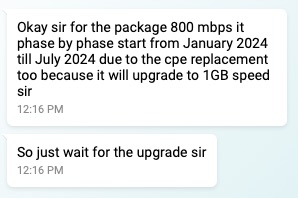 Good news for 800Mbps. 7 more months or less to go for upgrade. Looking forward to the 268% increase in speed. This post has been edited by soonwai: Jan 8 2024, 12:23 PM |
|
|
|
|
|
L3SME
|
Jan 8 2024, 12:27 PM
|
New Member
|
Anyone know if maxis wifi6 router can be use to connect unifi? Or have to buy 3rd party brand router like tplink, Asus etc..
|
|
|
|
|
|
go626201
|
Jan 8 2024, 12:32 PM
|
|
|
QUOTE(soonwai @ Jan 8 2024, 12:21 PM) Good news for 800Mbps. 7 more months or less to go for upgrade. Looking forward to the 268% increase in speed. So now confirmed upgrade to 1Gbps?  1.05Gbps DL and 525Mbps UP  Better than nothing,since some of us already paying cheaper monthly price for 800mbps for years. This post has been edited by go626201: Jan 8 2024, 12:37 PM |
|
|
|
|
|
countingcrows
|
Jan 8 2024, 12:51 PM
|
Getting Started
|
QUOTE(xsoon17 @ Jan 8 2024, 10:36 AM) Anyone encounter this before?
Because if there is no link,shouldn't the LINK LED be red color instead of blank?
My BTU looks similar. During my recent outage. Link + Tel 1 + VOIP LEDs were off (not red). |
|
|
|
|
|
yenchenje
|
Jan 8 2024, 12:56 PM
|
|
|
Still waiting for TM to flip a switch for the 1 to 2 upgrade here  Don’t tell me gotta wait till July |
|
|
|
|
|
xsoon17
|
Jan 8 2024, 01:22 PM
|
Getting Started
|
QUOTE(countingcrows @ Jan 8 2024, 12:51 PM) My BTU looks similar. During my recent outage. Link + Tel 1 + VOIP LEDs were off (not red). Oh,that’s strange.Normally the BTU would be LINK in red if it is fibre disconnected. Mine have none of the lights,but if I plugged back my router.I do get the LAN1 LED blinking.But that was it So yours is just outage,not BTU spoil? |
|
|
|
|
|
unknown
|
Jan 8 2024, 01:27 PM
|
|
|
QUOTE(xsoon17 @ Jan 8 2024, 10:36 AM) Anyone encounter this before? On last night,the BTU is working nicely. And the issue happened in the morning. The issue is that the BTU unit didn't have any lights light up,except the TM logo light.I have already unplugged the LAN1 ethernet. When I call customer service,they say there is an outage at my area.And I need to wait for them to restore the service before they can call their technician to my house. I don't know if the BTU is faulty+outage or just outage only.Because if there is no link,shouldn't the LINK LED be red color instead of blank? The below is the attachment of the photo of the BTU unit I have same problem before, faulty power adapter. |
|
|
|
|
|
Yluxion
|
Jan 8 2024, 01:39 PM
|
|
|
QUOTE(soonwai @ Jan 8 2024, 12:21 PM) Good news for 800Mbps. 7 more months or less to go for upgrade. Looking forward to the 268% increase in speed. Okay. Expect mine to be upgraded by August.  800 Mbps to 1 Gbps really wouldn't feel much difference. |
|
|
|
|
|
soonwai
|
Jan 8 2024, 01:48 PM
|
|
|
QUOTE(Yluxion @ Jan 8 2024, 01:39 PM) Okay. Expect mine to be upgraded by August. 800 Mbps to 1 Gbps really wouldn't feel much difference. Yeah, usually we get around 820. So increase to 940Mbps only a paltry +120Mbps. Maybe I just resell the 120Mbps to my neighbour for RM49/mth.  This post has been edited by soonwai: Jan 8 2024, 01:50 PM This post has been edited by soonwai: Jan 8 2024, 01:50 PM |
|
|
|
|
|
countingcrows
|
Jan 8 2024, 01:57 PM
|
Getting Started
|
QUOTE(xsoon17 @ Jan 8 2024, 01:22 PM) Oh,that’s strange.Normally the BTU would be LINK in red if it is fibre disconnected. Mine have none of the lights,but if I plugged back my router.I do get the LAN1 LED blinking.But that was it So yours is just outage,not BTU spoil? I don't know about LINK LED being red when fiber disconnected. Yes, mine was outage, not BTU problem. Your BTU powers on properly and displays the LAN LEDs correctly so I don't think it's a power brick issue. |
|
|
|
|
|
surianti
|
Jan 8 2024, 02:15 PM
|
Getting Started
|
Is there a method to find details of a certain past case we logged, say older than 90 days? Must only via Live Chat able to?
|
|
|
|
|
|
msrazi
|
Jan 8 2024, 02:56 PM
|
Getting Started
|
QUOTE(soonwai @ Jan 8 2024, 01:48 PM) Yeah, usually we get around 820. So increase to 940Mbps only a paltry +120Mbps. Maybe I just resell the 120Mbps to my neighbour for RM49/mth. I put my old router as repeater capped 100mbps at surau near my home for free. Auto on/off 4pm-11pm, protected by OpenDNS Family Shield & set wifi with low tx power.. |
|
|
|
|
|
ahlong
|
Jan 8 2024, 02:57 PM
|
|
|
QUOTE(msrazi @ Jan 8 2024, 02:56 PM) I put my old router as repeater capped 100mbps at surau near my home for free. Auto on/off 4pm-11pm, protected by OpenDNS Family Shield & set wifi with low tx power.. semoga Allah membalas kebaikan kau bang insyaallah, aamiin. |
|
|
|
|
|
YoungMan
|
Jan 8 2024, 03:10 PM
|
|
|
QUOTE(soonwai @ Jan 8 2024, 01:48 PM) Yeah, usually we get around 820. So increase to 940Mbps only a paltry +120Mbps. Maybe I just resell the 120Mbps to my neighbour for RM49/mth. If they change you to new ONR should be able to get 1gbps right? |
|
|
|
|
|
go626201
|
Jan 8 2024, 03:49 PM
|
|
|
QUOTE(YoungMan @ Jan 8 2024, 03:10 PM) If they change you to new ONR should be able to get 1gbps right? You need to change your router and device to newer one that can support more than 1Gbps. 2.5G WAN/LAN Port router + PC / Wifi6 Supported Device. 2.5G BTU/ONR <2.5G> Router/+Switch <2.5G>PC Or 2.5G BTU/ONR <2.5G> Wifi 6 Router <More Than 1G>Wireless Device Otherwise if still using 1G port router The max throughput speed will still be 940+-mbps This post has been edited by go626201: Jan 8 2024, 03:50 PM |
|
|
|
|
|
theeastdevil
|
Jan 8 2024, 05:12 PM
|
|
|
QUOTE(Jjuggler @ Dec 31 2023, 09:51 PM) Just set the router to auto-reboot everyday. Most router supplied by TM should have this feature. I set my stock TM router to reboot everyday @ 4.00AM. if you dont mind.. .. how do i set for auto reboot? im on dlink DIR-X1860Z |
|
|
|
|



 Quote
Quote


 0.0275sec
 0.95
0.95
 6 queries
 GZIP Disabled