Welcome Guest ( Log In | Register )

Bump Topic Topic Closed RSS Feed
495 Pages « < 34 35 36 37 38 > » Bottom

Outline · [ Standard ] · Linear+

Unifi Official TM UniFi High Speed Broadband Thread V42, READ 1ST PAGE FOR RELEVANT WIFI INFO!

views
     
Omochao
post Jan 9 2024, 03:19 PM

Enthusiast
*****
Junior Member
835 posts

Joined: Nov 2007
From: Land of Forgotten
QUOTE(iphone @ Jan 9 2024, 03:09 PM)
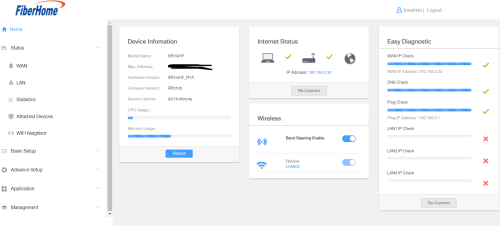
Oh sorry about that Filink, because my router page no longer show that "Attached Devices" so I took the image from the net. That is not my router page. Sorry for the confusion.
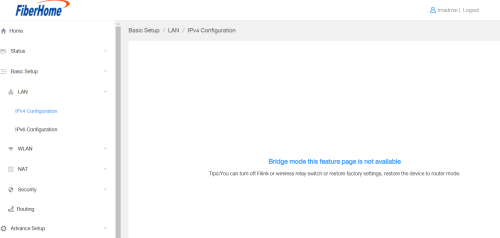
As for bridge mode? Nope, never change any setting after Unifi tech installed both router units, 3 months ago (SWU3.0). 
I love that feature because I can see how many devices are connected and which router they are connected to.
The below is my router page, sidebar Status do not have "Attached Devices". I have check every items, don't see that feature anymore.  sad.gif 
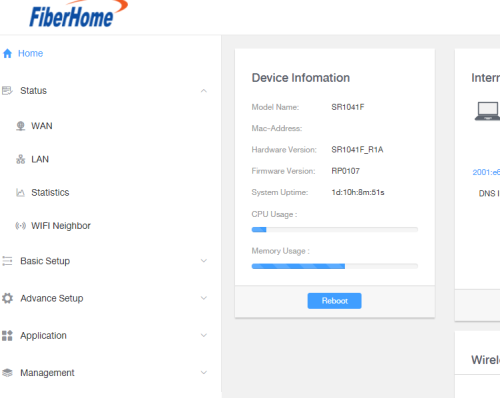
user posted image
*
I notice your firmware version is RP0107 where else mine is still at RP0105, seems like they released a new firmware silently and pushed it through TR-069 or remotely.

Yes, by right it is supposed to be at the Status menu bar.

Worry not, can you try go to playstore or appstore and look for Fiberhome:Light up your life app, see if you can connect through the app first.

Because on that app you can see attached devices too.

user posted image


Also kindly take note, whether are you accessing the right mesh or not, because if you have 2 fiberhome mesh router, the main node ip address will be at 192.168.0.1, while the mesh you can access through 192.168.1.1 or its Local IP address assigned by the main.

This post has been edited by Omochao: Jan 9 2024, 03:24 PM
Omochao
post Jan 9 2024, 03:22 PM

Enthusiast
*****
Junior Member
835 posts

Joined: Nov 2007
From: Land of Forgotten
QUOTE(msrazi @ Jan 9 2024, 03:16 PM)
SR1041F, that Filink u can see it as an option to set the device as Agent or Controller.

SR120-A, disable repeater & u'll back to normal. If it was mesh subrouter, need to reset as mentioned
*
Nope, can't see anywhere the option for Filink, buggy firmware.

But is okay, can function as how I want it to be then is fine.
user posted image
msrazi
post Jan 9 2024, 03:25 PM

Getting Started
**
Junior Member
112 posts

Joined: Sep 2009


QUOTE(iphone @ Jan 9 2024, 03:09 PM)
Oh sorry about that Filink, because my router page no longer show that "Attached Devices" so I took the image from the net. That is not my router page. Sorry for the confusion.
As for bridge mode? Nope, never change any setting after Unifi tech installed both router units, 3 months ago (SWU3.0). 
I love that feature because I can see how many devices are connected and which router they are connected to.
The below is my router page, sidebar Status do not have "Attached Devices". I have check every items, don't see that feature anymore.  sad.gif 

user posted image
*
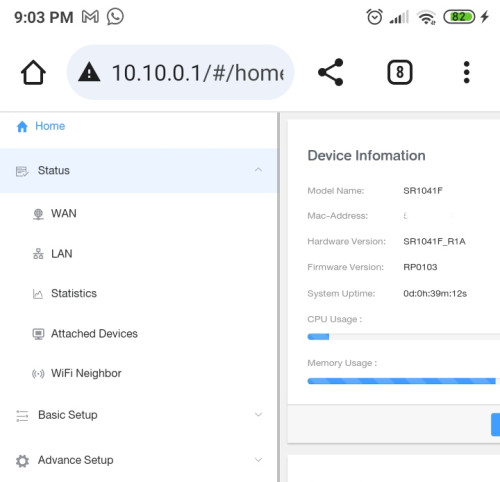
It ain't SR120A.. damn it. SR1041F.. status>lan.

If u just need to see all clients..use Fiberhome app

msrazi
post Jan 9 2024, 03:26 PM

Getting Started
**
Junior Member
112 posts

Joined: Sep 2009


QUOTE(Omochao @ Jan 9 2024, 03:22 PM)
Nope, can't see anywhere the option for Filink, buggy firmware.

But is okay, can function as how I want it to be then is fine.
user posted image
*
Wlan bro not lan

This post has been edited by msrazi: Jan 9 2024, 03:26 PM
iphone
post Jan 9 2024, 03:32 PM

Getting Started
**
Junior Member
191 posts

Joined: Oct 2007
QUOTE(Omochao @ Jan 9 2024, 03:19 PM)
I notice your firmware version is RP0107 where else mine is still at RP0105, seems like they released a new firmware silently and pushed it through TR-069 or remotely.

Yes, by right it is supposed to be at the Status menu bar.

Worry not, can you try go to playstore or appstore and look for Fiberhome:Light up your life app, see if you can connect through the app first.

Because on that app you can see attached devices too.
Ahh okay I notice the firmware different from yours. They must have remotely pushed the firmware update.
No wonder recently my phones wifi keep disconnecting, will losses wifi and then show "Can't connect to this network.." but a quick tap will reconnect back. Dang hate this new firmware. Its buggy doh.gif
Omochao
post Jan 9 2024, 03:36 PM

Enthusiast
*****
Junior Member
835 posts

Joined: Nov 2007
From: Land of Forgotten
QUOTE(msrazi @ Jan 9 2024, 03:26 PM)
Wlan bro not lan
*
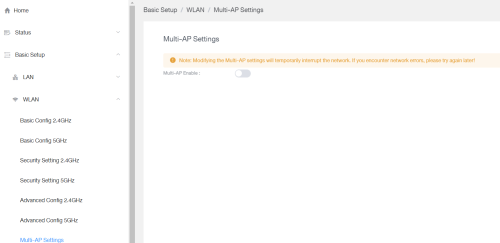
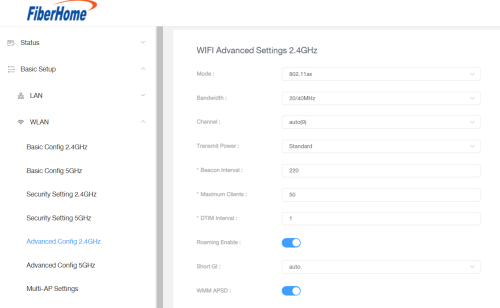
I know, but I've already turned off the Multi ap mode , as I need to manually adjust some settings on the 2.4ghz and 5ghz. If multi ap is enabled, the options won't show up on my fiberhome settings.


user posted image

If i turned on multi-ap, I wont get this options
Beacon Interval :
Maximum Clients :
DTIM Interval :
WMM APSD
Enabled Roaming

user posted image


QUOTE(iphone @ Jan 9 2024, 03:32 PM)
Ahh okay I notice the firmware different from yours. They must have remotely pushed the firmware update.
No wonder recently my phones wifi keep disconnecting, will losses wifi and then show "Can't connect to this network.." but a quick tap will reconnect back. Dang hate this new firmware. Its buggy  doh.gif
*
Have you try to do a force reset and try see if the option comes back out?

I have no way or idea on how to extract the current firmware, if not, it would be great, since we can share it among ourself.

either way, try download that app and see if it works for you or not.


This post has been edited by Omochao: Jan 9 2024, 03:37 PM
alvinv
post Jan 9 2024, 03:37 PM

Getting Started
**
Junior Member
69 posts

Joined: Mar 2006
From: Seremban, N9

is there any link to download and manual update this sr1041f?

bcz mine still in 0103


This post has been edited by alvinv: Jan 9 2024, 03:38 PM
Omochao
post Jan 9 2024, 03:50 PM

Enthusiast
*****
Junior Member
835 posts

Joined: Nov 2007
From: Land of Forgotten
QUOTE(alvinv @ Jan 9 2024, 03:37 PM)
is there any link to download and manual update this sr1041f?

bcz mine still in 0103
*
What???

And I thought the basic one was at RP0105.

Nope, I did try to contact live chat with TM, they can't or even know about this fiberhome firmware. Unless someone knows insider technician maybe can get and try.
iphone
post Jan 9 2024, 04:06 PM

Getting Started
**
Junior Member
191 posts

Joined: Oct 2007
QUOTE(Omochao @ Jan 9 2024, 03:36 PM)

Have you try to do a force reset and try see if the option comes back out?

I have no way or idea on how to extract the current firmware, if not, it would be great, since we can share it among ourself.

either way, try download that app and see if it works for you or not.
*
Restarted router few times already. Confirmed firmware RP0107 no longer show Attached Device on laptop/PC browser.

Yes the Fiberhome phone app can see "Attached Devices".
Omochao
post Jan 9 2024, 04:09 PM

Enthusiast
*****
Junior Member
835 posts

Joined: Nov 2007
From: Land of Forgotten
QUOTE(iphone @ Jan 9 2024, 04:06 PM)
Restarted router few times already. Confirmed firmware RP0107 no longer show Attached Device on laptop/PC browser.

Yes the Fiberhome phone app can see "Attached Devices".
*
That is a disappointment, that is like a very basic function that every router should have.

Maybe you can try to lodge a report with TM and ask their engineers to see if they can get it back?

What about logging in through mobile browser? Will attached devices still show up at the same menu?

I'm also curious on new firmware stability and usage functions. Wonder what else did they changed?
YoungMan
post Jan 9 2024, 04:11 PM

Look at all my stars!!
*******
Senior Member
6,818 posts

Joined: Oct 2008
From: Kuala Lumpur


QUOTE(Omochao @ Jan 8 2024, 10:16 PM)
since they are going to bump 800mbps users to 1Gbps

is safe to assume that current 500mbps users also will see  x2 speed in maybe the next 1 or 2 years ???haha...another round of upgrade current routers/mesh ...oh man
*
Not too fast though. The MSAP need to be agreeable by telcos in 2026, similar to what happen last year.
iphone
post Jan 9 2024, 04:35 PM

Getting Started
**
Junior Member
191 posts

Joined: Oct 2007
QUOTE(Omochao @ Jan 9 2024, 04:09 PM)
That is a disappointment, that is like a very basic function that every router should have.

Maybe you can try to lodge a report with TM and ask their engineers to see if they can get it back?

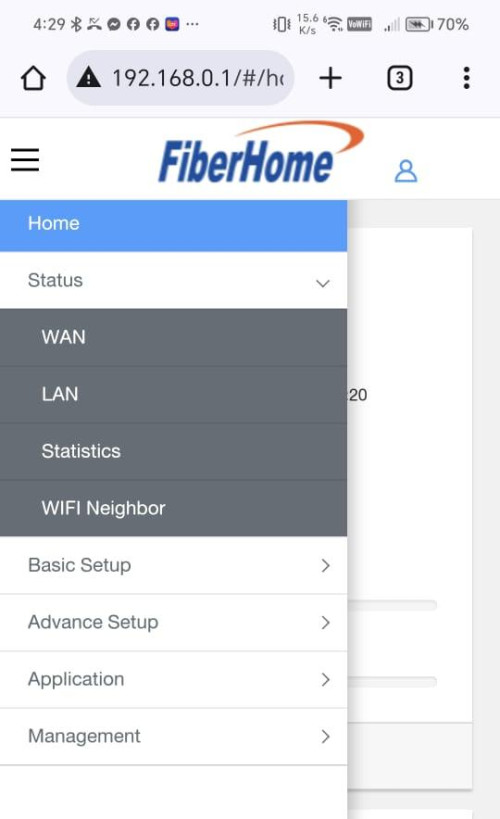
What about logging in through mobile browser? Will attached devices still show up at the same menu?

I'm also curious on new firmware stability and usage functions. Wonder what else did they changed?
*
phone Chrome browser, nope no more "Attached Devices" feature.

user posted image
mikey8811
post Jan 9 2024, 04:53 PM

Getting Started
**
Junior Member
125 posts

Joined: Jul 2008


Hi

A bit of confusion with my account after switching to Stay With Unifi 3.0.

My package says Unifi 500 Mbps - Home BB Stay With Unifi 3.0 (M6)

The monthly package is meant to be RM 119 with 6 months free.

On this month's bill it says RM 159 waived.

Does anyone else have the same issue?
MyProLife
post Jan 9 2024, 05:15 PM

I bully wumao & MPKL
*******
Senior Member
2,075 posts

Joined: Sep 2021
From: nowhere

QUOTE(mikey8811 @ Jan 9 2024, 04:53 PM)
Hi

A bit of confusion with my account after switching to Stay With Unifi  3.0.

My package says Unifi 500 Mbps - Home BB Stay With Unifi  3.0 (M6)

The monthly package is meant to be RM 119 with 6 months free.

On this month's bill it says RM 159 waived.

Does anyone else have the same issue?
*
159 is full price actually

since first six months is all waived, so will stated as that, afterwards 7th month and following months will show that discount according to swu offer (rm 40 or 20 discount depending on swu version)
Omochao
post Jan 9 2024, 06:00 PM

Enthusiast
*****
Junior Member
835 posts

Joined: Nov 2007
From: Land of Forgotten
QUOTE(iphone @ Jan 9 2024, 04:35 PM)
phone Chrome browser, nope no more "Attached Devices" feature.

user posted image
*
you mind taking screenshot of everything on basic setup and advanced setup settings and pm me? I'm just curious what kind of settings they've changed
PRSXFENG
post Jan 9 2024, 06:30 PM

Look at all my stars!!
*******
Senior Member
2,611 posts

Joined: Nov 2020


QUOTE(msrazi @ Jan 9 2024, 02:05 PM)
From ur reply seem like u are tm guy.. DOME is the solution for upload speed. Am I right bro? 100%/100% plus main & backup link.
*
No, I don't work for any isps

msrazi
post Jan 9 2024, 09:08 PM

Getting Started
**
Junior Member
112 posts

Joined: Sep 2009


QUOTE(Omochao @ Jan 9 2024, 06:00 PM)
you mind taking screenshot of everything on basic setup and advanced setup settings and pm me? I'm just curious what kind of settings they've changed
*
user posted image

It wasn't in Home page like SR120-A... any browsers,fyi.
AoiB
post Jan 9 2024, 10:32 PM

New Member
*
Junior Member
24 posts

Joined: Mar 2022
Need some guidance from sifus about setting up my modem. For some reason, my ports are closed, the usual suspects of 80, 433, 443, 3478, 3479, 5060, 5062, 5222, 6250, and 12000-65000.

I tried adding the inbound and outbound rule, but not working. I've tried messing around with the fiberhome settings, but can't find anything that directly blocks ports, i think?
Omochao
post Jan 9 2024, 10:51 PM

Enthusiast
*****
Junior Member
835 posts

Joined: Nov 2007
From: Land of Forgotten
QUOTE(AoiB @ Jan 9 2024, 10:32 PM)
Need some guidance from sifus about setting up my modem. For some reason, my ports are closed, the usual suspects of 80, 433, 443, 3478, 3479, 5060, 5062, 5222, 6250, and 12000-65000.

I tried adding the inbound and outbound rule, but not working. I've tried messing around with the fiberhome settings, but can't find anything that directly blocks ports, i think?
*
try searching in this sub forum, someone got mentioned and shared before here in one of the unifi threads.

If you are looking to do port forwarding for mainly remote control of the router, I suggest download fiberhome app from playstore.

If for other means, good luck, this router UI is not user friendly.
AoiB
post Jan 9 2024, 10:56 PM

New Member
*
Junior Member
24 posts

Joined: Mar 2022
QUOTE(Omochao @ Jan 9 2024, 10:51 PM)
try searching in this sub forum, someone got mentioned and shared before here in one of the unifi threads.

If you are looking to do port forwarding for mainly remote control of the router, I suggest download fiberhome app from playstore.

If for other means, good luck, this router UI is not user friendly.
*
nah. Im not trying to remote control. I'm just trying to play Elden Ring, but in the process of troubleshooting, I found i couldn't ping the epic games server. Which turned out to be the fact that several of my ports are closed?

495 Pages « < 34 35 36 37 38 > » Top
Topic ClosedOptions
 

Change to:
| Lo-Fi Version
0.0177sec    0.68    6 queries    GZIP Disabled
Time is now: 15th December 2025 - 09:15 PM