Outline ·
[ Standard ] ·
Linear+
Unifi Official TM UniFi High Speed Broadband Thread V42, READ 1ST PAGE FOR RELEVANT WIFI INFO!
|
Jjuggler
|
 Dec 16 2023, 02:23 PM Dec 16 2023, 02:23 PM
|

|
Good afternoon, fellow forumers. Just a quick question. For RAHMAH package, what wireless class or brand of the router provided to the customer? Is it comes in mesh unit 2x stock isp router or single unit? Thanks.
This post has been edited by Jjuggler: Dec 16 2023, 02:24 PM
|
|
|
|
|
|
Jjuggler
|
Dec 17 2023, 12:47 AM
|
|
|
QUOTE(MyProLife @ Dec 16 2023, 04:26 PM) 30 mbps and new 100mbps now still ac1200 class Possible candidate including 1. Tp link C5v/ec221-g3v 2. Dlink DVG f2452 None of these are mesh capable afaik Atleast they should be giving the fiberhome ax1800 as standard. We dont know if the customer will upgrade the speed in the future. QUOTE(BenYeeHua @ Dec 16 2023, 06:44 PM) It is 30M, if you need, go buy those SWU 3.0 mesh unit, a lot are selling.  I am already using TUF-Gaming AX6000. I was eyeing on 30M package due to the price is reasonable, and I am subscribed to Unifi Air 5G currently with 24months contract. So thought of setting dual wan config for my home by making the fiber as main, and 5G as backup / secondary. Thinking of adding another asus aimesh compatible (2nd hand unit) for my lab / home office. |
|
|
|
|
|
Jjuggler
|
Dec 24 2023, 01:20 PM
|
|
|
QUOTE(countingcrows @ Dec 24 2023, 01:07 PM) Package: 800Mbps Location: Sri Serdang Status: Online (line OK) |
|
|
|
|
|
Jjuggler
|
Dec 31 2023, 09:51 PM
|
|
|
QUOTE(alexander3133 @ Dec 31 2023, 06:39 PM) Thanks guys. The router is TM provided, and yes that seems causing the slowness issue.
Rebooted the router and everything seems ok for now.
I think after long period of uptime the router may made the connection unstable again.
Looks like I will need to invest in a good router to ensure stable connection even after long routet up time.Just set the router to auto-reboot everyday. Most router supplied by TM should have this feature. I set my stock TM router to reboot everyday @ 4.00AM. |
|
|
|
|
|
Jjuggler
|
Jan 8 2024, 09:57 PM
|
|
|
QUOTE(theeastdevil @ Jan 8 2024, 05:12 PM) if you dont mind.. .. how do i set for auto reboot? im on dlink DIR-X1860Z Look at the management tab on your router. You should find schedule reboot something there. You can pick the time and days there. |
|
|
|
|
|
Jjuggler
|
Jan 21 2024, 09:38 AM
|
|
|
Finally downgraded from 800Mbps to 30Mbps. Reason: Not fully utilizing 800Mbps for parents house & using Unifi Air 5G for myself. 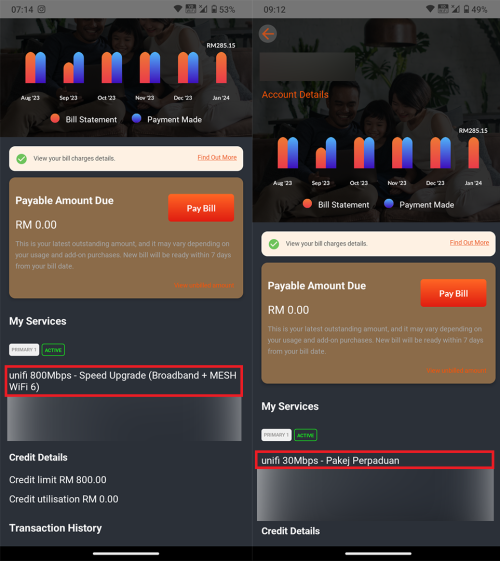 |
|
|
|
|
|
Jjuggler
|
Feb 16 2024, 12:57 PM
|
|
|
QUOTE(PJng @ Feb 16 2024, 12:56 PM) Haha, repeated reply, using TM crappy router Let him shine.  |
|
|
|
|
|
Jjuggler
|
Feb 21 2024, 06:13 PM
|
|
|
QUOTE(yenchenje @ Feb 21 2024, 05:08 PM) We're here begging for free upgrade for the price we've already paid Look at our neighbour https://www.channelnewsasia.com/singapore/b...ps-imda-4138006Also side note, has anyone encountered their MyUnifi account showing "Whoopsie! Looks like you have not updated your ID number to enable us to get your account details" Account is under my mom's name, already added IC number, just haven't added passport/organization number. Which both is not needed if it was never in the database to begin with right? . Ignore nokia/Alcatel and huawei ONT/ONU. Those two are the best. |
|
|
|
|
|
Jjuggler
|
Mar 13 2024, 12:09 PM
|
|
|
QUOTE(eclectice @ Mar 13 2024, 11:45 AM) 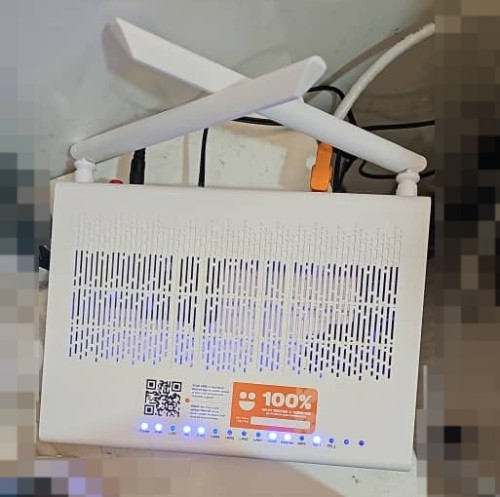 "DPN-FX3060V COMBO BOX 2.5G UONU RG" The QR code is just a link to the MyUnifi app 2.5Gbps GPON WAN interface with 4x1Gbps LAN ports. I would rather subscribe to low speed and having control over my equipment (wired/wireless router) rather than stuck with some crap equipment provided by TM at least for now, double-NAT is possible, but not worth it. |
|
|
|
|
|
Jjuggler
|
Mar 20 2024, 01:42 PM
|
|
|
QUOTE(eclectice @ Mar 13 2024, 12:17 PM) The UONU RG provides three modes: pure GPON Router, GPON-Bridge, and another mode whose name I cannot recall. It would be great if it supports bridging to avoid the double-NAT issue, which essentially converts the RG from fiber to Ethernet media converter. This would enable our third-party router to take over the PPPoE configuration. However, I am not entirely sure about the meaning of "GPON-bridge". QUOTE(yenchenje @ Mar 13 2024, 12:23 PM) You can use it as a pure GPON ONU like the lower speeds ZTE/Huawei/Fibrehome ONU, just have to set it up by yourself, and you’ll be limited to 940Mbps since GBe port overhead is a thing, I’ve used it in that mode before for a bit before going to GPON ONU SFP Router Mode, GPON Bridge, RG Mode, RG is only for ATA from what it seems for now. My FX3060V is currently only in ATA mode serving pure VoIP mode I agree with you two. But, I don't prefer to subscribe highest speed at the moment. Even if the telco provides XGPON or XGPONS CPE (which highly unlikely for now), I refrain myself from going above 1Gbps package. I prefer to stick with 500Mbps. That's the sweet spot. That's the reason why I sub for Unifi Air 5G for my home office. Able to hit 500-550Mbps solid at non-peak hour and 350-400Mbps during peak hour, and downgrade fiber from 800Mbps to rahmah plan. This post has been edited by Jjuggler: Mar 20 2024, 01:48 PM |
|
|
|
|
|
Jjuggler
|
Mar 20 2024, 02:21 PM
|
|
|
QUOTE(yenchenje @ Mar 20 2024, 02:13 PM) I went from 30Mbps to 1G, only reason I didn’t go 2G cuz it was aggregated when SWU3.0 first came out I’m not even utilizing 10% of it like 80% of the time, can defo go lower but I like to have the extra bandwidth at my disposal. And I’m looking to change out my NAS for a lower power one and hit the 1G more frequently instead of letting it idle NAS... sweet old buddy. My Asustor NAS went kaput after lightning. Thinking of investing into Synology NAS. Then do the do doing.  |
|
|
|
|
|
Jjuggler
|
Mar 20 2024, 04:47 PM
|
|
|
QUOTE(yenchenje @ Mar 20 2024, 02:33 PM) I have Xpenology in a Hypervisor, now testing unRAID. But also have Minecraft server running so my downgrade has to be to something recent like 9th gen intel or smth How much bandwidth you are using monthly lol? 9th Gen? i5 or i7? Express review on unRAID? QUOTE(failed.hashcheck @ Mar 20 2024, 03:29 PM) dont do like this waste money. buy n100 with enclosure then install plain linux and install only services that you actually going to use. cheaper, faster and more energy effieicent. I get'cha man. That is another next level customization and of course, and better flexibility. This post has been edited by Jjuggler: Mar 20 2024, 04:59 PM |
|
|
|
|
|
Jjuggler
|
Mar 20 2024, 09:41 PM
|
|
|
QUOTE(yenchenje @ Mar 20 2024, 05:19 PM) Currently looking at nStat on OPNSense.. about 5-10TB monthly? I think Probably i9-9700K + Supermicro X11SCA-F from current E5-2680 v4 + Gigabyte MU70-SU0 I bought unRAID but I haven’t started using it fully yet as I’m still ordering HDD slowly (20 bays x 18TB possibly) to populate RAID6 in there. Also possibly upgrade my synology to full 18TB as well from the currently 8+6+4 mix of HDD, not sure when it will be fully done as I just bought the Unifi Pro Max 24 PoE for about 4.2K, so maybe next month or the month after the next Still have my WiFi to upgrade to full WiFi 7 for fun as well, that’s another pit of money LOL Networking admin or hobbyist? Bukan calang calang.  |
|
|
|
|
|
Jjuggler
|
Mar 21 2024, 11:55 PM
|
|
|
QUOTE(yenchenje @ Mar 20 2024, 10:00 PM) Hobbyist, even my customers doesn't use stuff this expensive  Just checked back my stat on my router 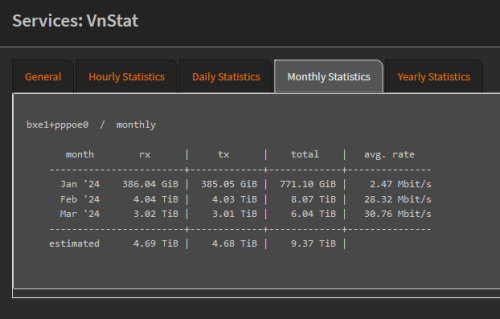 Dud hardcore user la you. Even my monthly usage hardly reach 1TB. hahaha |
|
|
|
|
|
Jjuggler
|
Mar 22 2024, 12:14 PM
|
|
|
QUOTE(PJng @ Mar 22 2024, 12:11 AM)  my yearly also cannot reach, btw is new pc, i only track per pc, router no such function Dude, eversince my NAS kaput, the monthly bandwidth usage reduced drastically. Hahaha. The lowest I hit is around 180GB++, highest is 700GB as per current time. QUOTE(yenchenje @ Mar 22 2024, 07:28 AM) Exactly, which is why I’m waiting for my 2G upgrade to use even more The fcuk. Hahaha. But I believe there will be some user who maybe reach over 10TB and above. I am still light user lorh. QUOTE(yenchenje @ Mar 22 2024, 11:48 AM) Tbf I do torrent on my NAS box so.. That's the beauty of NAS. Little buddy do the work. Just set a VPN, that's it. This post has been edited by Jjuggler: Mar 22 2024, 12:15 PM |
|
|
|
|
|
Jjuggler
|
Mar 22 2024, 07:20 PM
|
|
|
QUOTE(yenchenje @ Mar 22 2024, 03:37 PM) I don’t even use a VPN tbh, I should! But I’m still too lazy to set it up My private trackers don’t like VPN as well afaik  need to check and balance it according to torrenting use-case (if any) lor. I prefer to setup hide my NAS behind a VPN. Just let it run. That's how I did previously for my NAS. |
|
|
|
|
|
Jjuggler
|
Mar 23 2024, 04:09 PM
|
|
|
QUOTE(yenchenje @ Mar 22 2024, 11:22 PM) I plan to air gap my outgoing Xpenology NAS and it won’t reach inside my network, so any traffic that comes through won’t affect my network so I don’t need to worry about opening up ports. Got my Pro Max 24 PoE fully setup, gonna tinker with some L3 routing stuff later or tmr hopefully Not bad man. Impressed. |
|
|
|
|
|
Jjuggler
|
May 15 2024, 05:20 PM
|
|
|
QUOTE(Anime4000 @ May 15 2024, 03:57 PM) there is news 21st on-wards, Installer need to clear up RG6 Router and ONU, then use new stock: for 100 - 800Mbps will be using ZTE AX3000 Combo-Box like D-Link counter-part. No more ONU + Router  Any idea how the ZTE AX3000 ONR looks like? I saw a few people already selling D-Link ONR (white) at a good price. Feeling like wanna buy one unit to test it out. |
|
|
|
|
|
Jjuggler
|
May 16 2024, 12:10 AM
|
|
|
Just got this unit for RM70. Happy loot.   Unfortunately, I am unable to test 2Gbps connection since I am using 30Mbps fibre only at the moment. Will be useful for me to explore the features of the router lor. |
|
|
|
|
|
Jjuggler
|
May 16 2024, 12:51 AM
|
|
|
QUOTE(karenzayn @ May 16 2024, 12:16 AM) Try run with your OLT and pppoe details and see if TM allows it coz im consider getting one (or more) to swap out my mom's homestay and her siblings that i managed to a single box setup for ease of maintenance hehe. Convenience heh.. hahahaha. Agree with you. Single unit. Easy maintenance. Worst part, its D-Link. |
|
|
|
|



 Quote
Quote

 0.0845sec
 0.57
0.57
 7 queries
 GZIP Disabled