

Unifi Official TM UniFi High Speed Broadband Thread V42, READ 1ST PAGE FOR RELEVANT WIFI INFO!
Unifi Official TM UniFi High Speed Broadband Thread V42, READ 1ST PAGE FOR RELEVANT WIFI INFO!
|
|
 Jan 9 2024, 02:32 PM Jan 9 2024, 02:32 PM
Return to original view | IPv6 | Post
#1
|
 
Junior Member
191 posts Joined: Oct 2007 
|
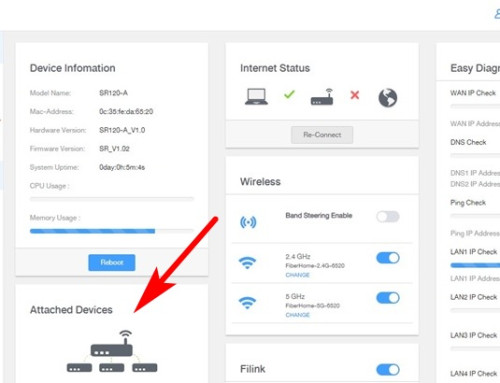
Previously in my Fiberhome router page I can see "Attached Devices", but now I cannot find this anymore. Can Fiberhome users here help to check if yours still have it?
|
|
|
|
|
|
Jan 9 2024, 03:09 PM
Return to original view | IPv6 | Post
#2
|
|
Junior Member
191 posts Joined: Oct 2007
|
QUOTE(Omochao @ Jan 9 2024, 02:38 PM) Check side bar, under status it should be there. Oh sorry about that Filink, because my router page no longer show that "Attached Devices" so I took the image from the net. That is not my router page. Sorry for the confusion.Although I'm using the latest one which is SR1041F but generally should be same UI. I do notice that you have Filink, where else Sr1041f , no such thing appearing. Are you on bridge mode? if the router is set to bridge mode, it wont be able to show attached devices. As for bridge mode? Nope, never change any setting after Unifi tech installed both router units, 3 months ago (SWU3.0). I love that feature because I can see how many devices are connected and which router they are connected to. The below is my router page, sidebar Status do not have "Attached Devices". I have check every items, don't see that feature anymore.  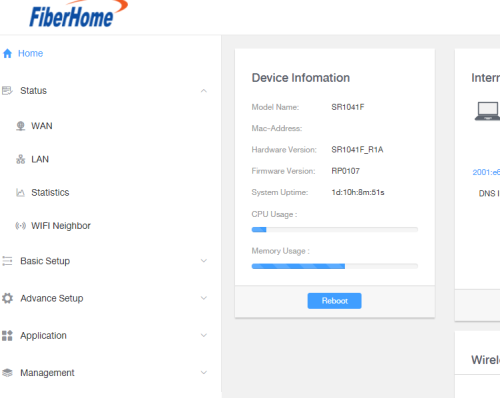 |
|
|
Jan 9 2024, 03:32 PM
Return to original view | IPv6 | Post
#3
|
|
Junior Member
191 posts Joined: Oct 2007
|
QUOTE(Omochao @ Jan 9 2024, 03:19 PM) I notice your firmware version is RP0107 where else mine is still at RP0105, seems like they released a new firmware silently and pushed it through TR-069 or remotely. Ahh okay I notice the firmware different from yours. They must have remotely pushed the firmware update.Yes, by right it is supposed to be at the Status menu bar. Worry not, can you try go to playstore or appstore and look for Fiberhome:Light up your life app, see if you can connect through the app first. Because on that app you can see attached devices too. No wonder recently my phones wifi keep disconnecting, will losses wifi and then show "Can't connect to this network.." but a quick tap will reconnect back. Dang hate this new firmware. Its buggy  |
|
|
Jan 9 2024, 04:06 PM
Return to original view | IPv6 | Post
#4
|
|
Junior Member
191 posts Joined: Oct 2007
|
QUOTE(Omochao @ Jan 9 2024, 03:36 PM) Have you try to do a force reset and try see if the option comes back out? I have no way or idea on how to extract the current firmware, if not, it would be great, since we can share it among ourself. either way, try download that app and see if it works for you or not.  Yes the Fiberhome phone app can see "Attached Devices". |
|
|
Jan 9 2024, 04:35 PM
Return to original view | IPv6 | Post
#5
|
|
Junior Member
191 posts Joined: Oct 2007
|
QUOTE(Omochao @ Jan 9 2024, 04:09 PM) That is a disappointment, that is like a very basic function that every router should have. phone Chrome browser, nope no more "Attached Devices" feature.Maybe you can try to lodge a report with TM and ask their engineers to see if they can get it back? What about logging in through mobile browser? Will attached devices still show up at the same menu? I'm also curious on new firmware stability and usage functions. Wonder what else did they changed? 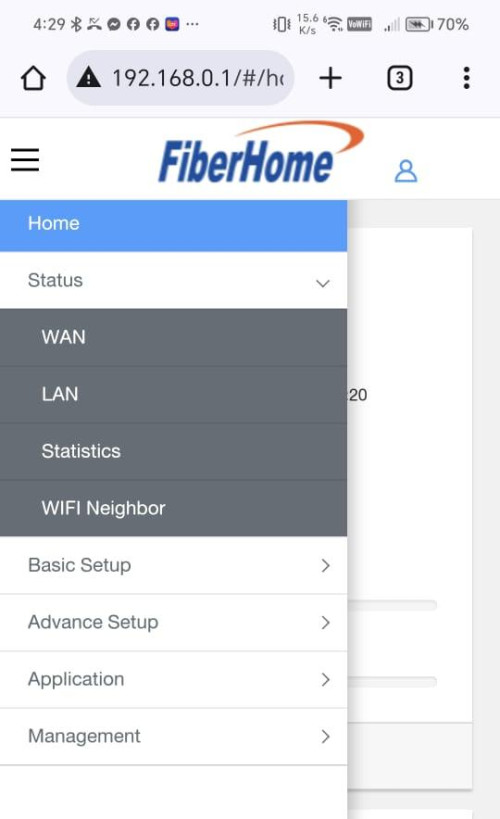 |
|
|
Jan 10 2024, 07:56 PM
Return to original view | IPv6 | Post
#6
|
|
Junior Member
191 posts Joined: Oct 2007
|
QUOTE(nite_eif @ Jan 10 2024, 05:35 PM) is it only me or anybody else experience this? Recently my Unifi 300mbps same very frequent disconnection. Keep dropping, network unstable. i am on rm89 unifi package, 30mb free upgraded to 100mbs WAN connection will often disconnect and renewing connection every now and then, like 2-3 times a day..it is disconnect without any reason..irregardless of weather / thunderstorm or other reason..it occur from shortest 5 mins to max half/an hour .. never happened before during days of before free upgrade.. tm fibre port / line haywired already or some connection issue deliberately occur? |
|
Topic ClosedOptions
|
| Change to: |  0.0624sec 0.0624sec
 1.01 1.01
 7 queries 7 queries
 GZIP Disabled GZIP Disabled
Time is now: 14th December 2025 - 02:41 PM |
 Quote
Quote