Welcome Guest ( Log In | Register )

Bump Topic Topic Closed RSS Feed
495 Pages « < 35 36 37 38 39 > » Bottom

Outline · [ Standard ] · Linear+

Unifi Official TM UniFi High Speed Broadband Thread V42, READ 1ST PAGE FOR RELEVANT WIFI INFO!

views
     
tng55
post Jan 9 2024, 11:07 PM

Regular
******
Senior Member
1,443 posts

Joined: Sep 2021


QUOTE(AoiB @ Jan 9 2024, 10:56 PM)
nah. Im not trying to remote control. I'm just trying to play Elden Ring, but in the process of troubleshooting, I found i couldn't ping the epic games server. Which turned out to be the fact that several of my ports are closed?
*
fiberhome wont work port forward due crappy
buy you own router then set port forward settle
mine ASUS Router i can set port forward no problem works
AoiB
post Jan 10 2024, 12:30 AM

New Member
*
Junior Member
24 posts

Joined: Mar 2022
QUOTE(tng55 @ Jan 9 2024, 11:07 PM)
fiberhome wont work port forward due crappy
buy you own router then set port forward settle
mine ASUS Router i can set port forward no problem works
*
Aite. I'll probably just do that. It's honestly easier than dealing with TM's nonsense
msrazi
post Jan 10 2024, 03:27 AM

Getting Started
**
Junior Member
112 posts

Joined: Sep 2009


QUOTE(AoiB @ Jan 10 2024, 12:30 AM)
Aite. I'll probably just do that. It's honestly easier than dealing with TM's nonsense
*
All router brands.

1) Set computer with static/fixed ip (not auto by dhcp).
2) DMZ the fixed ip u set before.

Updated!

Forgot to mention solution above only for ipv4. Btw u need to set ipv4 (not ipv4/v6) for ur pppoe, then do ur port fwd thing.Test again.. it may work plus no more cloudflare SG server but MY server.

I'm not interested with ipv6 pppoe WAN.. 1st thing I set in router is ipv4. BUT ipv6 /64 more than ok because I ain't use million computers. Failed to remote cctv,port fwd etc never related to /64 prefix but just need knowledge to make the ipv6 as dedicated ip.


This post has been edited by msrazi: Jan 10 2024, 01:55 PM
drpsyko
post Jan 10 2024, 08:48 AM

Casual
***
Junior Member
447 posts

Joined: Feb 2011
From: Planet Animu


QUOTE(kwss @ Jan 8 2024, 11:38 AM)
How did they've made it into the list if they're still giving /64 for biz users?! vmad.gif
TongCN
post Jan 10 2024, 01:43 PM

Look ma, I have lots stars :D
*******
Senior Member
6,681 posts

Joined: Aug 2008
From: Malaysia


So the New Netflix x Unifi Plan doesnt give those bundle pack? (Unifi broadband + TV Pack, Unifi all in One)
darachan
post Jan 10 2024, 03:46 PM

Getting Started
**
Junior Member
87 posts

Joined: Jul 2022
Currently Unifi lowest package is it still 30mbps for RM89? Or is this plan obsoleted now?
jhleo1
post Jan 10 2024, 03:59 PM

Look at all my stars!!
*******
Senior Member
4,382 posts

Joined: Jan 2003
How come I can check all packages in unifi website and you can't but asked here?

QUOTE(darachan @ Jan 10 2024, 03:46 PM)
Currently Unifi lowest package is it still 30mbps for RM89? Or is this plan obsoleted now?
*
YoungMan
post Jan 10 2024, 04:03 PM

Look at all my stars!!
*******
Senior Member
6,817 posts

Joined: Oct 2008
From: Kuala Lumpur


QUOTE(darachan @ Jan 10 2024, 03:46 PM)
Currently Unifi lowest package is it still 30mbps for RM89? Or is this plan obsoleted now?
*
100mbps for rm89 now. If you fall under the category of Household with B40 income, Warga Emas, OKU, and Veteran of Army, Police & APMM Officers, there is 30mbps plan perpaduan for rm69. Take note the rm69 is only for the first 2 years, after that will revert to rm89.

This post has been edited by YoungMan: Jan 10 2024, 04:08 PM
crazyissac
post Jan 10 2024, 04:52 PM

Regular
******
Senior Member
1,457 posts

Joined: May 2009
From: In front of my laptop


QUOTE(crazyissac @ Jan 9 2024, 01:52 PM)
Sorry All Sifu i got a noob newbie question
Currently im using old TM unifi huawei modem+ Asus router for 500mbps plan
New 1gbps plan come with brand new single device combo (modem+router)
do we required to change that to enjoy higher speed ??
can i still keep using my old TM modem + asus router setup ?
if no , is there any guide to set the new tplink ONU to be able to link with my old asus router ?
any help are appreciated !
*
any help please how to use 3th party router on TM 1gbps onu ?
wsian
post Jan 10 2024, 05:29 PM

Getting Started
**
Junior Member
73 posts

Joined: Mar 2007
DEL

This post has been edited by wsian: Jan 11 2024, 03:04 PM
nite_eif
post Jan 10 2024, 05:35 PM

Casual
***
Junior Member
482 posts

Joined: Apr 2010
is it only me or anybody else experience this?

i am on rm89 unifi package, 30mb free upgraded to 100mbs

WAN connection will often disconnect and renewing connection every now and then, like 2-3 times a day..it is disconnect without any reason..irregardless of weather / thunderstorm or other reason..it occur from shortest 5 mins to max half/an hour ..

never happened before during days of before free upgrade..

tm fibre port / line haywired already or some connection issue deliberately occur?

This post has been edited by nite_eif: Jan 10 2024, 05:37 PM
yenchenje
post Jan 10 2024, 06:39 PM

Enthusiast
*****
Junior Member
932 posts

Joined: Dec 2019
QUOTE(crazyissac @ Jan 10 2024, 04:52 PM)
any help please how to use 3th party router on TM 1gbps onu ?
*
Are you already using new ONR?

If so, go to Setup > Ethernet WAN > Connection_0 - Edit > PPPoE drop down change to bridge > to whichever router you want (From ETH port 1 to another router WAN)

You’ll turn the ONR into basically ONU again, it’s just handling VLAN segregation from TM (209,400,500) and ATA (VoIP), you can also leave the 5GHz WiFi band turned on so that you can connect to the WiFi to configure whenever when needed and no need to use any LAN cable

I’d find my post of screenshots but should be quite easily understandable

Also a reminder that doing this will limit your top speed to 940mbps due to TCP/IP transport overhead due to the presence of 1G port instead of 2.5G, so you won’t get the up to 1030Mbps limit of DL speed if you’re on 1Gbps plan and was expecting that

This post has been edited by yenchenje: Jan 10 2024, 06:45 PM

iphone
post Jan 10 2024, 07:56 PM

Getting Started
**
Junior Member
191 posts

Joined: Oct 2007
QUOTE(nite_eif @ Jan 10 2024, 05:35 PM)
is it only me or anybody else experience this?

i am on rm89 unifi package, 30mb free upgraded to 100mbs

WAN connection will often disconnect and renewing connection every now and then, like 2-3 times a day..it is disconnect without any reason..irregardless of weather / thunderstorm or other reason..it occur from shortest 5 mins to max half/an hour ..

never happened before during days of before free upgrade..

tm fibre port / line haywired already or some connection issue deliberately occur?
*
Recently my Unifi 300mbps same very frequent disconnection. Keep dropping, network unstable. doh.gif
theeastdevil
post Jan 10 2024, 11:08 PM

Casual
***
Junior Member
300 posts

Joined: Jan 2003


QUOTE(darachan @ Jan 10 2024, 03:46 PM)
Currently Unifi lowest package is it still 30mbps for RM89? Or is this plan obsoleted now?
*
i renewed my contract with 100mbps for RM79 monthly.. the package is called swu 4.0 extra

This post has been edited by theeastdevil: Jan 10 2024, 11:09 PM
The.Lucas.DaY
post Jan 10 2024, 11:41 PM

On my way
****
Junior Member
671 posts

Joined: May 2019


crazyissac
post Jan 11 2024, 02:08 AM

Regular
******
Senior Member
1,457 posts

Joined: May 2009
From: In front of my laptop


QUOTE(yenchenje @ Jan 10 2024, 06:39 PM)
Are you already using new ONR?

If so, go to Setup > Ethernet WAN > Connection_0 - Edit > PPPoE drop down change to bridge > to whichever router you want (From ETH port 1 to another router WAN)

You’ll turn the ONR into basically ONU again, it’s just handling VLAN segregation from TM (209,400,500) and ATA (VoIP), you can also leave the 5GHz WiFi band turned on so that you can connect to the WiFi to configure whenever when needed and no need to use any LAN cable

I’d find my post of screenshots but should be quite easily understandable

Also a reminder that doing this will limit your top speed to 940mbps due to TCP/IP transport overhead due to the presence of 1G port instead of 2.5G, so you won’t get the up to 1030Mbps limit of DL speed if you’re on 1Gbps plan and was expecting that
*
Thank you so much for our reply !! New device just give me so much headache
Alpha_Tay
post Jan 11 2024, 09:40 AM

Beware The Spammer Star!
******
Senior Member
1,725 posts

Joined: Jan 2003
#UnifiAlerts

Some Unifi web and app users might be having trouble logging in to the selfcare dashboard at the moment, we are currently rectifying this and the selfcare dashboard will be back online by 11.00am today.

In the meantime, do reach out to us for assistance.

Sorry for the inconvenience and we thank you for your patience.

https://www.facebook.com/weareunifi/posts/p...9gKZTzao7aPpfYl

https://twitter.com/unifi/status/1745249431480631613
xcess
post Jan 11 2024, 11:27 AM

Casual
***
Junior Member
460 posts

Joined: Sep 2005


QUOTE(Alpha_Tay @ Jan 11 2024, 09:40 AM)
#UnifiAlerts

Some Unifi web and app users might be having trouble logging in to the selfcare dashboard at the moment, we are currently rectifying this and the selfcare dashboard will be back online by 11.00am today.

In the meantime, do reach out to us for assistance.

Sorry for the inconvenience and we thank you for your patience.

https://www.facebook.com/weareunifi/posts/p...9gKZTzao7aPpfYl

https://twitter.com/unifi/status/1745249431480631613
*
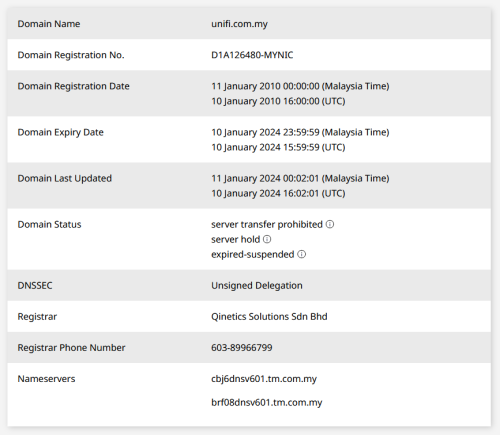
Someone forgot the renew the domain...

user posted image
soonwai
post Jan 11 2024, 06:22 PM


********
All Stars
11,458 posts

Joined: Oct 2007
From: KL


QUOTE(nite_eif @ Jan 10 2024, 05:35 PM)
is it only me or anybody else experience this?

i am on rm89 unifi package, 30mb free upgraded to 100mbs

WAN connection will often disconnect and renewing connection every now and then, like 2-3 times a day..it is disconnect without any reason..irregardless of weather / thunderstorm or other reason..it occur from shortest 5 mins to max half/an hour ..

never happened before during days of before free upgrade..

tm fibre port / line haywired already or some connection issue deliberately occur?
*
I had this happen to my office Unifi many years ago. I checked the emails that my router sent me when it reconnected and the worst day was 12 times in a space of 8 hrs. PPPoE gets disconnected or lease renewed from a few mins to a few hours. IIRC, it happened for about a week. Reported to TM but before they even understood the problem enough to escalate the case, it stopped.
msrazi
post Jan 11 2024, 07:02 PM

Getting Started
**
Junior Member
112 posts

Joined: Sep 2009


user posted image
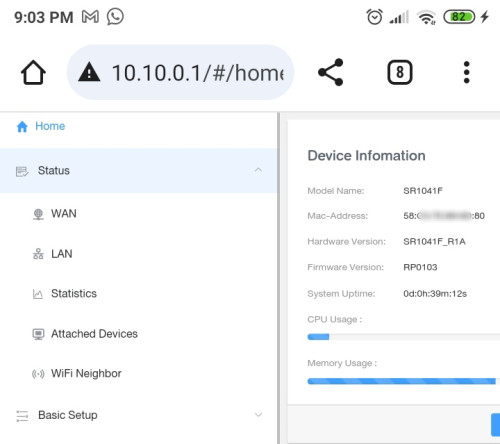
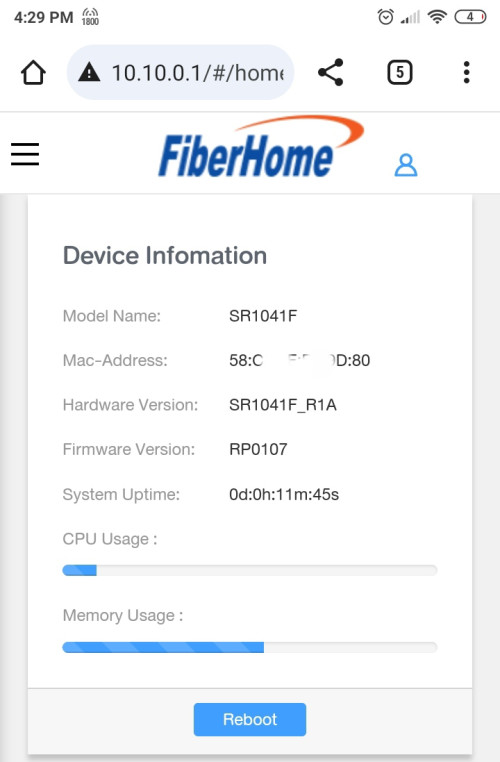
I request for firmware update yesterday & today they call me to inform about pushing update after call.

Now

user posted image

495 Pages « < 35 36 37 38 39 > » Top
Topic ClosedOptions
 

Change to:
| Lo-Fi Version
0.2288sec    0.52    6 queries    GZIP Disabled
Time is now: 14th December 2025 - 02:56 AM