Welcome Guest ( Log In | Register )

Bump Topic Topic Closed RSS Feed

Outline · [ Standard ] · Linear+

Unifi Official TM UniFi High Speed Broadband Thread V42, READ 1ST PAGE FOR RELEVANT WIFI INFO!

views
     
lukemanz
post Jan 9 2024, 01:37 PM

Getting Started
**
Junior Member
249 posts

Joined: Aug 2009
QUOTE(PRSXFENG @ Jan 8 2024, 11:41 PM)
That's just an excuse, we should be given it even if we use it less

The real reason is simply GPON is asymmetrical, with 2.4Gbps down and 1.2Gbps max on a fiber line

Still though, they could have offered half and not like 800/200
*
Thats not an excuse, its a fact for all ISP in Malaysia.
Also, uplink bandwidth cost is 10x higher than downlink, especially to China.
The only problem is TM top management is stubborn.
There has been multiple request to introduce higher upload speed as VAS since 100Mbps was introduce, but TM do not want to incur deployment cost.
So they just simply provide a workaround upgrade to higher package speed to get higher upload speed. sweat.gif
lukemanz
post Sep 13 2024, 09:23 PM

Getting Started
**
Junior Member
249 posts

Joined: Aug 2009
QUOTE(saffron @ Sep 13 2024, 06:00 PM)
Of course not lol.

I did requested a new username/password but still unable to login, when the crew came over they requested a new password as well. But they still unable to fix it.

Not sure does it related to my modem & router because the unstable electricity cause intermittent power loss recently
*
Last month I face the same problem. So the technician come, requested a new password also failed. Then he call the TM HSBB NOC to clear the cache & open blockage and finally the connection successful on the same day.
So yours I think the technician has limited skillset or did not know how to call the TM HSBB NOC. Pity You sweat.gif

lukemanz
post Sep 26 2024, 05:16 PM

Getting Started
**
Junior Member
249 posts

Joined: Aug 2009
QUOTE(peter32 @ Sep 26 2024, 02:28 PM)
Advice needed.

I have Unifi 300Mbps service installed at office, with TPLink  DIR-X3060Z as router as provided by Unifi. After speed upgrade I noticed that the network cable speed is slowed at less than 100, whereas wifi can go up to 300Mbps no issue.
Although it can well be the cable quality etc, and for most cable I do fix one or two switches (auto) in between. I haven't done direct cable test but seems to me to be too much of a difference. All cables are Cat6, and switches are also gigabyte switch.
What should I look at ? Is there any setting I can do on the router to see if its the router issue eg. aging hardware (its about 2-3 years old), or others.

Thank you.
*
Definitely cable or switch issue. Double check your switch, the ports are Fast Ethernet (FE) or Gigabit Ethernet (GE)? Also one of the cable might be auto downgraded to FE instead of GE due to aging RJ45 connector issue.
lukemanz
post Nov 3 2024, 11:25 AM

Getting Started
**
Junior Member
249 posts

Joined: Aug 2009
Looks like unifi change something about their ipv6, some block website no longer working with google dns. disable ipv6 only able to browse the block website. took 4 hours to re-configure rclxub.gif

This post has been edited by lukemanz: Nov 3 2024, 11:25 AM
lukemanz
post Dec 14 2024, 11:40 AM

Getting Started
**
Junior Member
249 posts

Joined: Aug 2009
QUOTE(sadlyfalways @ Dec 13 2024, 07:26 PM)
Any UNIFI people having issues with Netflix and unencrypted dns since the dns hijack in September?

In September I had this Netflix tagging my home network as a vpn or proxy.

Kept coming back everyday, I needed to reset and change ip of home network for it to work.

I’m using maxis public ip fibre on tm infra with google dns

I noticed this issue started when the government did the force dns switch. After revert same issue kept persist.

I then set the deco to access point and put my asus as main router with encrypted nextdns dns.

3 months no issue and now I put back deco because asus was blocking google home devices and the issue has come back ??

I have no idea what is causing the issue, or if the nextdns tracker blocking prevented my ip from being tagged as vpn

Any advice would be great please
*
I dont know about nextdns.
But TM certainly tweak something about their DNS settings.
Previously, I setup Google DNS ipv4 only on DHCP, its working without any issues even on ipv6 website.
One morning suddenly its no longer working.
So now need to setup Google DNS ipv4 and ipv6 on WAN then only the Google DNS is working.
Every now and then I will browse to https://browserleaks.com/dns to check whether the Google DNS stick or not
lukemanz
post Jan 19 2025, 11:22 AM

Getting Started
**
Junior Member
249 posts

Joined: Aug 2009
QUOTE(Moogle Stiltzkin @ Jan 19 2025, 08:27 AM)
for tmnut 100 mbps fiber?

thats weird. I ordered before you did, they gave me the fiberhome ONT  hmm.gif

they did not give a phone... they said buy yourself. any good cheap recommendations?  confused.gif
*
You can try this: https://www.lazada.com.my/products/pashapho...3261214745.html?
I bought this recently and the ringing is loud and clear thumbsup.gif
lukemanz
post Feb 10 2025, 08:33 AM

Getting Started
**
Junior Member
249 posts

Joined: Aug 2009
QUOTE(Rudd @ Feb 9 2025, 11:59 PM)
Any recommended affordable router with better coverage to replace SKYWORTH GN630V?

Cannot get 50Mbps with the provided router when in 2nd floor or back room. Router is in living room.
*
I buy 2 set of Xiaomi Router AX3000T, 1 located on lower floor + 1 located upper floor, mesh using LAN cable. So far no issue and working great with 300Mbps unifi and unifiTV on LAN: https://www.lazada.com.my/products/i4097333...lFlag=true&mp=1
lukemanz
post Feb 11 2025, 08:29 AM

Getting Started
**
Junior Member
249 posts

Joined: Aug 2009
QUOTE(Rudd @ Feb 10 2025, 11:30 PM)
Only 100Mbps and underutilized. The problem I have with Skyworth is the coverage.
almost similar price with TP Link, still deciding between AX3000T vs AX53.
*
I always recommend 2 set of routers for 2 story house (1 for each floor) and mesh using LAN cable for best experience
The way I see it AX3000T RM170 is cheaper than AX53 RM250.
Either buy 2 set of AX3000T/AX53 or buy 1 set AX3000T/AX53 and mesh with existing SKYWORTH GN630V.
Mesh using wifi also can, but the speed/experience may degrade according to your house wifi congestion/obstacles
lukemanz
post Feb 18 2025, 01:37 PM

Getting Started
**
Junior Member
249 posts

Joined: Aug 2009
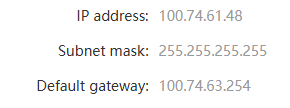
After complete name change to portal and bill 1+year after FSU, TMshit force me get private ip

user posted image

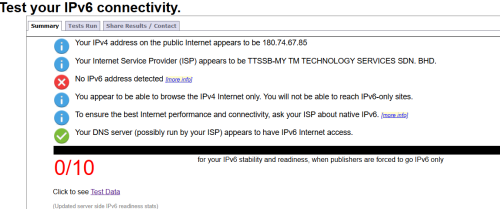
Now, their ipv6 settings also bricked

user posted image

Useless TMshit ranting.gif

This post has been edited by lukemanz: Feb 18 2025, 01:38 PM
lukemanz
post Feb 18 2025, 02:04 PM

Getting Started
**
Junior Member
249 posts

Joined: Aug 2009
QUOTE(go626201 @ Feb 18 2025, 01:44 PM)
Try reboot your router 1st and reboot your PC and devices.
IPv6 should not be affect with CGNAT.
*
Already reboot router a couple of times in a couple of days.
Private IP persist rclxub.gif
IPv6 not working since last night.
PC not yet reboot coz chrome multiple tabs, lazy to setting back 1 by 1 sweat.gif

QUOTE(hsbb @ Feb 18 2025, 01:58 PM)
100mbps or 300mbps?
*
300mbps
lukemanz
post Feb 18 2025, 02:20 PM

Getting Started
**
Junior Member
249 posts

Joined: Aug 2009
QUOTE(hsbb @ Feb 18 2025, 02:13 PM)
Oic unifi 300mbps now use cgnat also?
*
Already implemented by phases I think

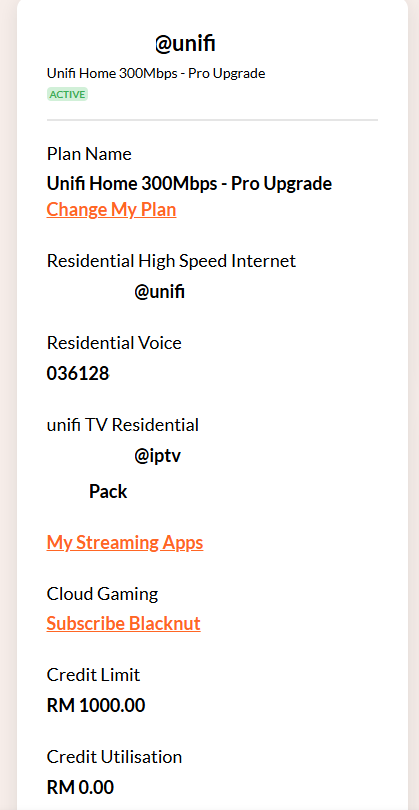
user posted image
lukemanz
post Feb 18 2025, 03:37 PM

Getting Started
**
Junior Member
249 posts

Joined: Aug 2009
QUOTE(go626201 @ Feb 18 2025, 01:44 PM)
Try reboot your router 1st and reboot your PC and devices.
IPv6 should not be affect with CGNAT.
*
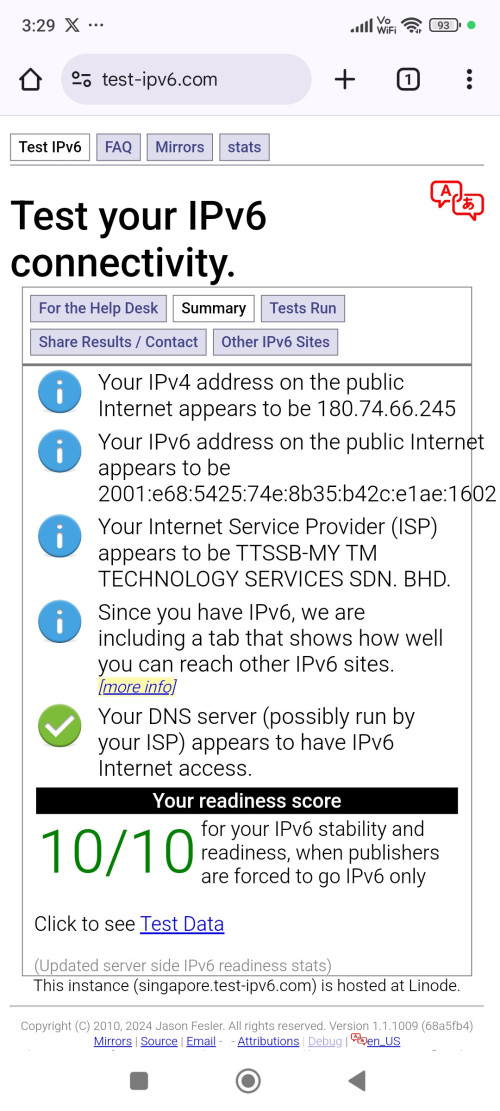
Orait, got ipv6 working on my phone.
So definitely need to restart my PC to fix the ipv6 issue

user posted image

Thanks @go626201 thumbup.gif

Topic ClosedOptions
 

Change to:
| Lo-Fi Version
0.0300sec    0.33    7 queries    GZIP Disabled
Time is now: 14th December 2025 - 12:27 AM