Welcome Guest ( Log In | Register )

Bump Topic Topic Closed RSS Feed
495 Pages « < 189 190 191 192 193 > » Bottom

Outline · [ Standard ] · Linear+

Unifi Official TM UniFi High Speed Broadband Thread V42, READ 1ST PAGE FOR RELEVANT WIFI INFO!

views
     
blacktubi
post Jul 12 2024, 12:36 AM

-
Group Icon
Elite
8,400 posts

Joined: Jul 2008

QUOTE(Verblassen @ Jul 11 2024, 11:40 PM)
user posted image

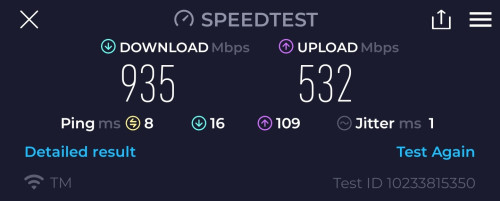
Still okay on my end. Except my potentially stewpid 940mbps cap as what Blacktubi mentioned earlier. 🥲
*
user posted image

Look at my speed, similar to what you're getting although I am on a different ISP tongue.gif

From what I'm told, this is how it's configured by that one particular OLT vendor for 1Gbps users on TM Infra

Let me know if you manage to get your full 1Gbps speed eventually sad.gif
jonathanwhm
post Jul 12 2024, 03:10 AM

Getting Started
**
Junior Member
87 posts

Joined: Jun 2011
QUOTE(Mazda9 @ Jul 11 2024, 08:32 PM)
Hi,

I’m on 1Gbps Unifi plan. The issue is when I’m using the 2.5gb Unifi black combo box paired with my Asus rtac5300 router or with my tp-link ge800 router as bridge,  my download speed will drop after few days from 950mbps to 300-450mbps after few days.

I’ll call Unifi technical support, they will eventually reset the port and the issue will be solved for few days then back to square one again.

TM engineer came to give me spare fiberhome white box to test and see but surprisingly the issue doesn’t happen with white fiberhome ONU box.

Any idea what’s wrong?
*
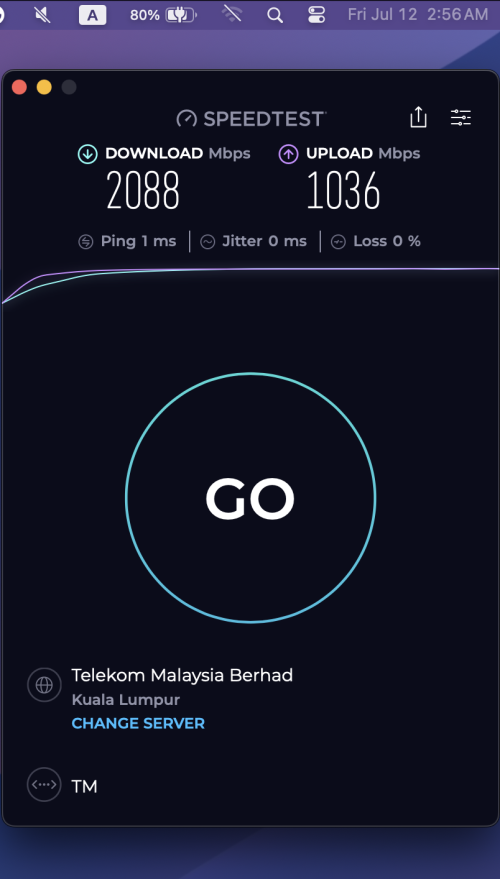
I'm currently using the 2.5G black ONU and have not encountered any speed issues to date. My connection is still maintained at speeds of up to 2Gbps. However, some users have reported experiencing a drop in their speed down to 300Mbps.

user posted image
hirota
post Jul 12 2024, 09:28 AM

Look at all my stars!!
*******
Senior Member
2,386 posts

Joined: Jun 2005
Hi, my unifi contract expired, is there any STAYWITHUNIFI plan worth to get now?
Might thinking switch to maxis fiber now
jiaen0509
post Jul 12 2024, 09:39 AM

Look at all my stars!!
*******
Senior Member
3,305 posts

Joined: Dec 2012
QUOTE(Verblassen @ Jul 11 2024, 07:07 PM)
Hi all, quick question:

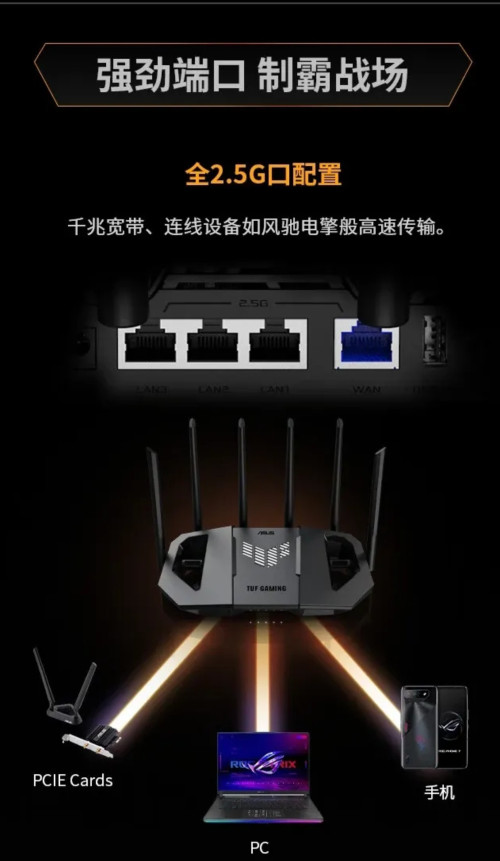
1. I have the D-link Black box set to bridge mode. Cat 8 cable (Vention - if this helps) from the 2.5Gbe port to my router's WAN (2.5Gbe as well). Router is an Asus TUF BE6500 (launched in China only), got it from Shopee and setup accordingly. I've had AC86u's in the past from Taobao as well so setup was quite seamless.

This router has 4 2.5Gbe ports per spec sheet.

However,  I'm only getting 940mbps download (seemed capped as though I was using a gigabit port). I have yet to move into my house so limited to phones so far. Tested with an iPhone 14 pro max, Samsung s24 ultra and Samsung note 10+ Any ideas? 🥲

user posted image

user posted image

2. *After* setting the Dlink black box into bridge mode, is there any way to "access" it's setup page? 🤭🤭

Thank you in advance!!!
*
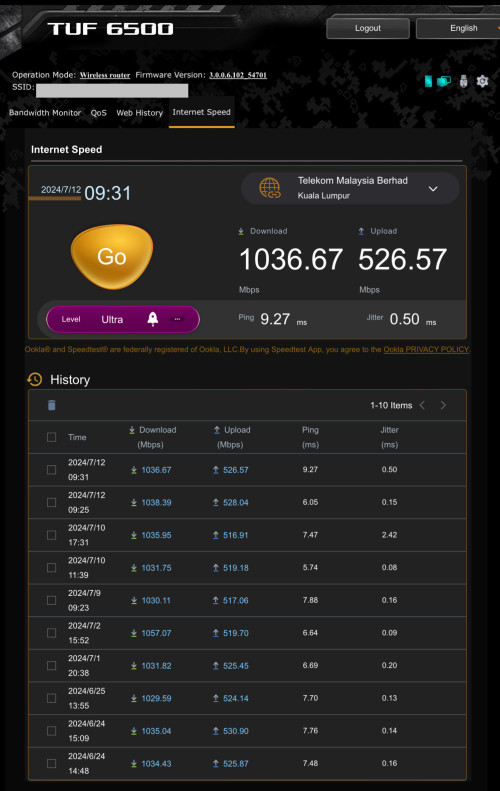
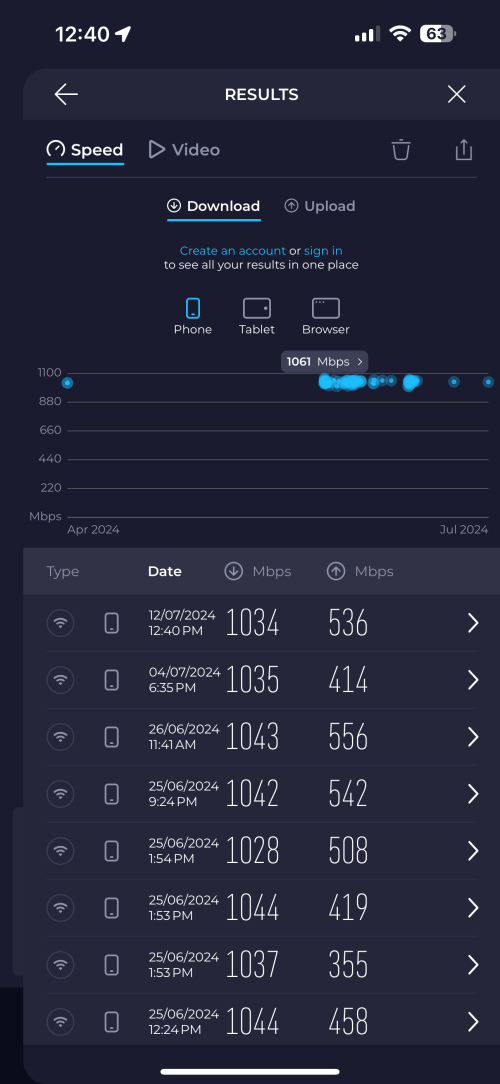
Try running the speed test at ‘WebUI > Adaptive QoS > Internet Speed.’ If it still shows 940 Mbps, maybe it is the OLT limitations as others have claimed.

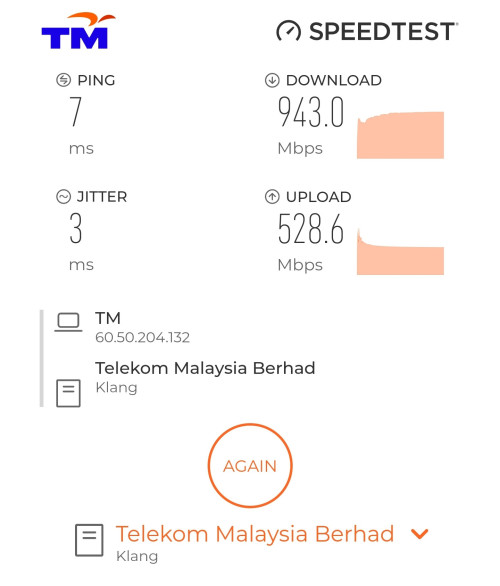
I have the same setup as you: Black ONR, CAT8 Lan cable, and Asus TUF BE6500 China versjon. My speed is consistently 1 Gbps/500 Mbps without any drops.

user posted image
(Historical Speed Test Result via ASUS Router - LAN)

user posted image
(Historical Speed Test Result via iPhone 15 Pro Max, 5Ghz, Channel 64, 80 Mhz)

Also, for this model, don’t upgrade to the latest firmware as I encountered issues with it—2.4 GHz no speed, WiFi radio auto-disabling after a day, etc. I reverted to the initial release firmware, which is the most stable ever.

To answer your question about accessing the WebUI after enabling bridge mode, there’s a button on the left of the black ONR to enable the WiFi radio. Press it a few times or hold it down to connect to the black ONR WiFi. Then you’ll know what to do next.


This post has been edited by jiaen0509: Jul 12 2024, 12:45 PM
cHiLdHo0drEaMz
post Jul 12 2024, 10:34 AM

#DBAP
******
Senior Member
1,030 posts

Joined: Jun 2011
From: #KajangTop


QUOTE(soonwai @ Jul 11 2024, 11:09 AM)
chong83
Decided to prod TM a bit. Livechat with them on 7/7. Today got the call for the 1Gbps upgrade. CS just read out the terms of the upgrade - 800-1000/500, new modem/router (1-yr warranty), no charge for technician visit, no re-contract, price, UnifiTV & call package remains the same. Now wait for technician to set appointment.

The only thing I find strange is that, even though I was given a report number after the live chat, there's no sign of the ticket in either My Activities or My Orders.
*
You spoke to technical department or sales ?
RViN
post Jul 12 2024, 11:13 AM

There Is Only One United
*******
Senior Member
5,827 posts

Joined: Jan 2003
From: Selayang, Selangor


QUOTE(Mazda9 @ Jul 11 2024, 07:32 PM)
Hi,

I’m on 1Gbps Unifi plan. The issue is when I’m using the 2.5gb Unifi black combo box paired with my Asus rtac5300 router or with my tp-link ge800 router as bridge,  my download speed will drop after few days from 950mbps to 300-450mbps after few days.

I’ll call Unifi technical support, they will eventually reset the port and the issue will be solved for few days then back to square one again.

TM engineer came to give me spare fiberhome white box to test and see but surprisingly the issue doesn’t happen with white fiberhome ONU box.

Any idea what’s wrong?
*
Yeah mine drops to 300mbps by the end of the day. In my case though restarting the black ONR fixes it. So my "solution" is to restart the ONR every night.

I don't recall having the same issue with my white ONU but in my case I can't test it since if I switch to any other ONU/ONR I get blocked and can't get connected.

I suspect I'm on some shit OLT that has issues with 2.5gbe connections as anime4000 mentioned here there's some OLT that behaves funny. I assume this problematic OLT also requires hardware binds on the ONU side. It could also be an issue with the ONR, but until they have another 2.5gbe capable ONR we can't really test thag hypothesis.

I've changed different cables and the same happens. Didn't have any slowdowns while on 800mbps before on the same router.

This post has been edited by RViN: Jul 12 2024, 11:14 AM
TubeNRibbon
post Jul 12 2024, 11:26 AM

Getting Started
**
Junior Member
175 posts

Joined: May 2008
QUOTE(RViN @ Jul 12 2024, 11:13 AM)
Yeah mine drops to 300mbps by the end of the day. In my case though restarting the black ONR fixes it. So my "solution" is to restart the ONR every night.

I don't recall having the same issue with my white ONU but in my case I can't test it since if I switch to any other ONU/ONR I get blocked and can't get connected.

I suspect I'm on some shit OLT that has issues with 2.5gbe connections as anime4000 mentioned here there's some OLT that behaves funny. I assume this problematic OLT also requires hardware binds on the ONU side. It could also be an issue with the ONR, but until they have another 2.5gbe capable ONR we can't really test thag hypothesis.

I've changed different cables and the same happens. Didn't have any slowdowns while on 800mbps before on the same router.
*
Mine having same issue till now no solution from the technician. At first happened to white ONR but after I requested change to black ONR the issue not solve

YoungMan
post Jul 12 2024, 02:36 PM

Look at all my stars!!
*******
Senior Member
6,793 posts

Joined: Oct 2008
From: Kuala Lumpur


QUOTE(rex82 @ Jul 11 2024, 10:56 PM)
Hi guys, just want to ask. I'm unifi member since Vip5 until now unifi 500mbps.

On year 2022 want to port to Maxis, but unifi counter offer me RM129 with 300mbps.

Reason want to change to maxis, almost every night I need to access to other country url server or download data but very slow. And after that I connect to my maxis hotspot, and straight I can access the url and download the data.

But I understand my area is under tm Infra, if I apply maxis Internet, the routing will be better? Cuz I understand Maxis is riding on tm Infra.
*
Routing will follow Maxis own routing. Only the last mild is using TM infra.

QUOTE(hirota @ Jul 12 2024, 09:28 AM)
Hi, my unifi contract expired, is there any STAYWITHUNIFI plan worth to get now?
Might thinking switch to maxis fiber now
*
Just apply to transfer to Maxis, TM will counter offer and by then you can decide to accept TM's offer or proceed with the switching.
jhleo1
post Jul 12 2024, 03:43 PM

Look at all my stars!!
*******
Senior Member
4,381 posts

Joined: Jan 2003
Bear in mind, you must be ready to port out if TM not give any counter offer. biggrin.gif

QUOTE(YoungMan @ Jul 12 2024, 02:36 PM)
Just apply to transfer to Maxis, TM will counter offer and by then you can decide to accept TM's offer or proceed with the switching.
*
YoungMan
post Jul 12 2024, 03:49 PM

Look at all my stars!!
*******
Senior Member
6,793 posts

Joined: Oct 2008
From: Kuala Lumpur


QUOTE(jhleo1 @ Jul 12 2024, 03:43 PM)
Bear in mind, you must be ready to port out if TM not give any counter offer.  biggrin.gif
*
Well he already think of porting out to Maxis anyway.
NimalKumar
post Jul 12 2024, 03:49 PM

Getting Started
**
Junior Member
272 posts

Joined: Sep 2020


Can anyone please show me the SWU 4.0 package list
jhleo1
post Jul 12 2024, 04:15 PM

Look at all my stars!!
*******
Senior Member
4,381 posts

Joined: Jan 2003
Hahaha sorry Friday.... no proper read. How can I missed it.

QUOTE(YoungMan @ Jul 12 2024, 03:49 PM)
Well he already think of porting out to Maxis anyway.
*
Verblassen
post Jul 12 2024, 07:26 PM

Getting Started
**
Junior Member
87 posts

Joined: Feb 2013
From: Wilayah Persekutuan, KL


QUOTE(blacktubi @ Jul 12 2024, 12:36 AM)
user posted image

Look at my speed, similar to what you're getting although I am on a different ISP tongue.gif

From what I'm told, this is how it's configured by that one particular OLT vendor for 1Gbps users on TM Infra

Let me know if you manage to get your full 1Gbps speed eventually  sad.gif
*
Will keep everyone updated bro. Just brought this up to TM yesterday via Livechat. They of course claimed that there is no such speed capping by OLT haha. Didn't want to quote your name so I just said LY Forum mentioned that some OLT vendors cap their speed. 🤭🤭🤭.

QUOTE(jiaen0509 @ Jul 12 2024, 09:39 AM)
Try running the speed test at ‘WebUI > Adaptive QoS > Internet Speed.’ If it still shows 940 Mbps, maybe it is the OLT limitations as others have claimed.

I have the same setup as you: Black ONR, CAT8 Lan cable, and Asus TUF BE6500 China versjon. My speed is consistently 1 Gbps/500 Mbps without any drops.
user posted image
(Historical Speed Test Result via ASUS Router - LAN)
user posted image
(Historical Speed Test Result via iPhone 15 Pro Max, 5Ghz, Channel 64, 80 Mhz)

Also, for this model, don’t upgrade to the latest firmware as I encountered issues with it—2.4 GHz no speed, WiFi radio auto-disabling after a day, etc. I reverted to the initial release firmware, which is the most stable ever.

To answer your question about accessing the WebUI after enabling bridge mode, there’s a button on the left of the black ONR to enable the WiFi radio. Press it a few times or hold it down to connect to the black ONR WiFi. Then you’ll know what to do next.
*
Awesome to find someone else with the same router! Any other tips and tricks bro? Haha. What region did you set yours to, Aus or China?

I also noticed that the router would not give my work laptop an IP address. I log on to a VPN as required by my company for WFH. My Ac86u (also from the China market) has no issues. Only the laptop has this problem. All other clients are fine. My wife's note 10+ occasionally cannot detect the 5GHz band. Otherwise a pretty decent router for the price.

So for work, I'll need to connect my phone to WiFi and then connect my work laptop via mobile hot-spot. 😅😅

Epic_winner091
post Jul 12 2024, 10:20 PM

Casual
***
Junior Member
333 posts

Joined: Mar 2010
From: Shah Alam


I must be real lucky or something because I never had problems with Shopee, on the web or mobile.
tng55
post Jul 12 2024, 10:43 PM

Regular
******
Senior Member
1,433 posts

Joined: Sep 2021


QUOTE(evilhomura89 @ Jul 11 2024, 11:49 PM)
Shopee mobile can't load smoothly every night - TM's fault or shopee fault?

https://smokeping.mywebping.com/smokeping/?...erceMY-Shopee-4

See the 10/30 days graph, notice the spike on a nightly basis
*
me no issue shopee its TM fault because ip range very bad
mine ip range 175.xxx all fine night shopee noting problem
before mine was stuck ip range 42.189.xxx that very slow shopee
i had reported then settle i got ip range 175.xxx no more problem shopee every night
coolguy_0925
post Jul 12 2024, 11:15 PM

Look at all my stars!!
*******
Senior Member
4,538 posts

Joined: Jan 2003
QUOTE(Epic_winner091 @ Jul 12 2024, 10:20 PM)
I must be real lucky or something because I never had problems with Shopee, on the web or mobile.
*
Touch wood me too

Occasionally there will be few minutes of slowness loading certain websites or stream buffering but that's all

Nevertheless, hopefully the experience for all will improve a-s-a-p
WaNaWe900
post Jul 12 2024, 11:21 PM

చąហ ąచҽ™
******
Senior Member
1,397 posts

Joined: Feb 2012
From: sOuL SoCiETY.. iSKaNDaRPuTeRi.. JB.. JDT


QUOTE(NimalKumar @ Jul 12 2024, 03:49 PM)
Can anyone please show me the SWU 4.0 package list
*
got new again hmm.gif
Azusa_San
post Jul 12 2024, 11:49 PM

Casual
***
Junior Member
309 posts

Joined: Mar 2015
QUOTE(tng55 @ Jul 12 2024, 10:43 PM)
me no issue shopee its TM fault because ip range very bad
mine ip range 175.xxx all fine night shopee noting problem
before mine was stuck ip range 42.189.xxx that very slow shopee
i had reported then settle i got ip range 175.xxx no more problem shopee every night
*
after you reboot router, still get IP 175 or back to 42 ?

42.188 range very bad indeed, most of the time only can get assigned this IP and most site also lagging, it is a public IP but it perform like private IP doh.gif

This post has been edited by Azusa_San: Jul 12 2024, 11:52 PM
aniq8676
post Jul 13 2024, 12:22 AM

Regular
******
Senior Member
1,524 posts

Joined: Dec 2020
From: Perak


QUOTE(Epic_winner091 @ Jul 12 2024, 10:20 PM)
I must be real lucky or something because I never had problems with Shopee, on the web or mobile.
*
Me too, IP Address 42.190.x.x
tng55
post Jul 13 2024, 12:29 PM

Regular
******
Senior Member
1,433 posts

Joined: Sep 2021


QUOTE(Azusa_San @ Jul 12 2024, 11:49 PM)
after you reboot router, still get IP 175 or back to 42 ?

42.188 range very bad indeed, most of the time only can get assigned this IP and most site also lagging, it is a public IP but it perform like private IP doh.gif
*
still get IP 175 no more back to 42.189 no longer biggrin.gif really trash ip 42.189 lol

495 Pages « < 189 190 191 192 193 > » Top
Topic ClosedOptions
 

Change to:
| Lo-Fi Version
0.0230sec    1.07    6 queries    GZIP Disabled
Time is now: 1st December 2025 - 11:48 PM