

jilake unifi... 3 minggu berturut dah line ko problem... dah apesal....
Unifi Official TM UniFi High Speed Broadband Thread V42, READ 1ST PAGE FOR RELEVANT WIFI INFO!
Unifi Official TM UniFi High Speed Broadband Thread V42, READ 1ST PAGE FOR RELEVANT WIFI INFO!
|
|
 Jul 11 2024, 08:44 PM Jul 11 2024, 08:44 PM
|
 
Senior Member
5,511 posts Joined: Jun 2006 From: On Earth.   
|
jilake unifi... 3 minggu berturut dah line ko problem... dah apesal....
|
|
|
|
|
|
Jul 11 2024, 09:05 PM
|

Senior Member
4,538 posts Joined: Jan 2003
|
QUOTE(soonwai @ Jul 11 2024, 11:09 AM) chong83 ha ha drag you until can't drag liao but anyway congrates Decided to prod TM a bit. Livechat with them on 7/7. Today got the call for the 1Gbps upgrade. CS just read out the terms of the upgrade - 800-1000/500, new modem/router (1-yr warranty), no charge for technician visit, no re-contract, price, UnifiTV & call package remains the same. Now wait for technician to set appointment. The only thing I find strange is that, even though I was given a report number after the live chat, there's no sign of the ticket in either My Activities or My Orders.   hope to hear your update after the technician's visit  |
|
|
Jul 11 2024, 09:06 PM
|

Junior Member
670 posts Joined: May 2019
|
QUOTE(soulfly @ Jul 11 2024, 08:38 PM) 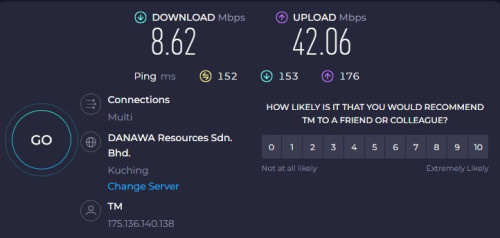 speed is suddenly really slow in the last half an hour ago or so. anyone else have similar issue?  |
|
|
Jul 11 2024, 09:09 PM
|
 
VIP
15,903 posts Joined: Jan 2003 From: Miri 
|
QUOTE(The.Lucas.DaY @ Jul 11 2024, 09:06 PM) I got 250 for 300mbps plan, selangor to kuching server, still good weird thing is youtube speed looks fine (checked with stas for nerds), but everything else like websites are laggy |
|
|
Jul 11 2024, 09:15 PM
|

Senior Member
1,897 posts Joined: Jan 2003 From: Kuala Lumpur
|
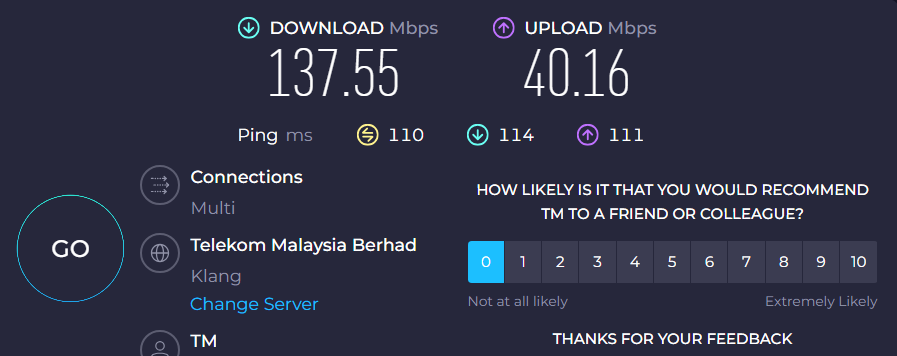 fuken tm. on 500mb |
|
|
Jul 11 2024, 09:20 PM
|
|
VIP
15,903 posts Joined: Jan 2003 From: Miri
|
QUOTE(NickedAsy @ Jul 11 2024, 09:15 PM) fuken tm. on 500mb |
|
|
|
|
|
Jul 11 2024, 09:20 PM
|
|
Senior Member
1,897 posts Joined: Jan 2003 From: Kuala Lumpur
|
QUOTE(soulfly @ Jul 11 2024, 09:20 PM) look at the ping... really bad right? Extremely bad. Even local to local also lagging like crazy |
|
|
Jul 11 2024, 09:21 PM
|
|
Junior Member
670 posts Joined: May 2019
|
QUOTE(soulfly @ Jul 11 2024, 09:09 PM) weird thing is youtube speed looks fine (checked with stas for nerds), but everything else like websites are laggy It's quite common nowadays especially at night, mine is slow loading videos on reddit and twitter..yt and twitch so far haven't experience slow loading.. haizz |
|
|
Jul 11 2024, 09:28 PM
|
|
Senior Member
1,897 posts Joined: Jan 2003 From: Kuala Lumpur
|
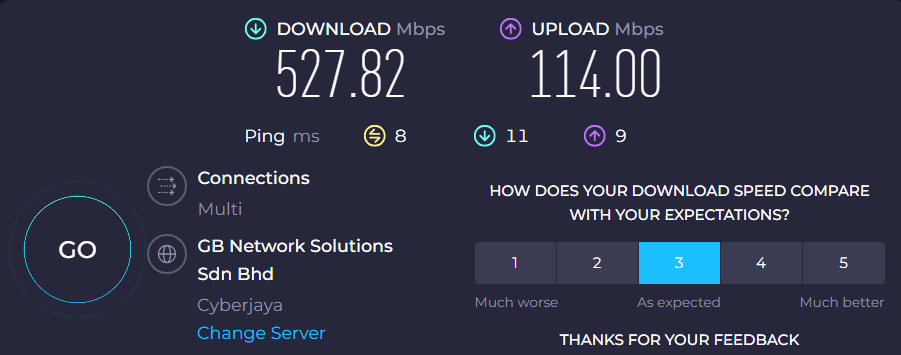 Ping back to normal. What the techs do around the same time every night? Divert nationwide traffic to their porn streaming?  |
|
|
Jul 11 2024, 09:36 PM
Show posts by this member only | IPv6 | Post
#3790
|
 
Elite
8,402 posts Joined: Jul 2008
|
QUOTE(Verblassen @ Jul 11 2024, 07:27 PM) Does this only apply to only wifi clients? When the installer came to setup he was able to get 1.2gbps on Fast.com with his Macbook. Fast.com can be inaccurate on default settingsI'm based in Old Klang road if anyone is facing something similar. Speedtest.net is the most accurate speedtest out there QUOTE(Mazda9 @ Jul 11 2024, 07:32 PM) Hi, A bit of backstory on TM equipmentI’m on 1Gbps Unifi plan. The issue is when I’m using the 2.5gb Unifi black combo box paired with my Asus rtac5300 router or with my tp-link ge800 router as bridge, my download speed will drop after few days from 950mbps to 300-450mbps after few days. I’ll call Unifi technical support, they will eventually reset the port and the issue will be solved for few days then back to square one again. TM engineer came to give me spare fiberhome white box to test and see but surprisingly the issue doesn’t happen with white fiberhome ONU box. Any idea what’s wrong? Back then, the ONU model given will depends on the OLT model at your location. So, if it's Fiberhome OLT, you will get Fiberhome ONU. Similarly, if it's ZTE OLT then you will get ZTE ONU. In simple layman terms, the OLT is like a router or server at your nearest TM exchange that connect to every users. Then, TM start to roll out universal ONU and it seems like the compatibility is not great with certain OLT model. There's other forumers reporting this issue and you are certainly not alone. |
|
|
Jul 11 2024, 10:36 PM
|
|
Senior Member
1,437 posts Joined: Sep 2021
|
QUOTE(The.Lucas.DaY @ Jul 11 2024, 08:14 PM) Oh really? Fancy speedtest simpan jer la same to me i also received too but not much different |
|
|
Jul 11 2024, 10:46 PM
Show posts by this member only | IPv6 | Post
#3792
|

Junior Member
272 posts Joined: Sep 2020
|
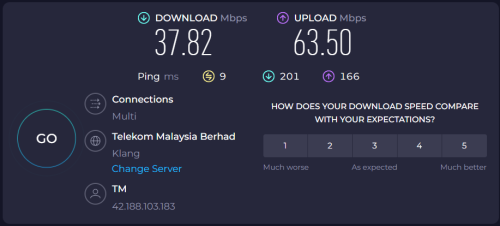 Same here what happened la aiyoo ... I'm on SWU 3.0 @ 500Mbps |
|
|
Jul 11 2024, 10:56 PM
|

Junior Member
164 posts Joined: Nov 2008
|
Hi guys, just want to ask. I'm unifi member since Vip5 until now unifi 500mbps.
On year 2022 want to port to Maxis, but unifi counter offer me RM129 with 300mbps. Reason want to change to maxis, almost every night I need to access to other country url server or download data but very slow. And after that I connect to my maxis hotspot, and straight I can access the url and download the data. But I understand my area is under tm Infra, if I apply maxis Internet, the routing will be better? Cuz I understand Maxis is riding on tm Infra. |
|
|
|
|
|
Jul 11 2024, 11:40 PM
Show posts by this member only | IPv6 | Post
#3794
|

Junior Member
87 posts Joined: Feb 2013 From: Wilayah Persekutuan, KL
|
QUOTE(NimalKumar @ Jul 11 2024, 10:46 PM) Same here what happened la aiyoo ... I'm on SWU 3.0 @ 500Mbps 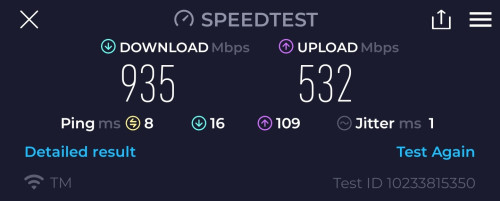 Still okay on my end. Except my potentially stewpid 940mbps cap as what Blacktubi mentioned earlier. 🥲 |
|
|
Jul 11 2024, 11:49 PM
Show posts by this member only | IPv6 | Post
#3795
|

Senior Member
5,886 posts Joined: Jan 2003 From: BM
|
Shopee mobile can't load smoothly every night - TM's fault or shopee fault?
https://smokeping.mywebping.com/smokeping/?...erceMY-Shopee-4 See the 10/30 days graph, notice the spike on a nightly basis |
|
|
Jul 11 2024, 11:49 PM
Show posts by this member only | IPv6 | Post
#3796
|

Senior Member
1,397 posts Joined: Feb 2012 From: sOuL SoCiETY.. iSKaNDaRPuTeRi.. JB.. JDT
|
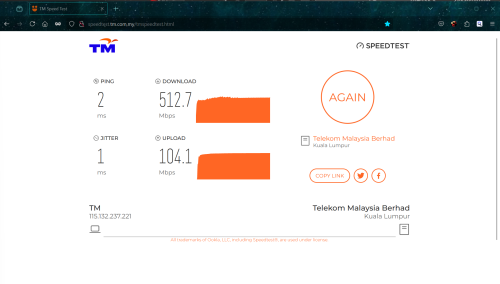
so far ok in Kota Damansara
 |
|
|
Jul 11 2024, 11:55 PM
Show posts by this member only | IPv6 | Post
#3797
|

Junior Member
16 posts Joined: Jul 2010
|
QUOTE(blacktubi @ Jul 11 2024, 09:36 PM) Fast.com can be inaccurate on default settings I'm having the same symptom, 2gbps package.Speedtest.net is the most accurate speedtest out there A bit of backstory on TM equipment Back then, the ONU model given will depends on the OLT model at your location. So, if it's Fiberhome OLT, you will get Fiberhome ONU. Similarly, if it's ZTE OLT then you will get ZTE ONU. In simple layman terms, the OLT is like a router or server at your nearest TM exchange that connect to every users. Then, TM start to roll out universal ONU and it seems like the compatibility is not great with certain OLT model. There's other forumers reporting this issue and you are certainly not alone. Dlink combo Black, bridge mode: -after few hours the speed seems 'throttled' to 200-300mbps download & 100mbps upload. -once reset (by calling 100 or off-on modem) speed back to normal but only last for few hours. given old fiberhome onu by TM tech to test: -no issue so far. -speed stabe at 9xx down/9xx up for more than 3 days. now am waiting for solution from them  . . OLT is fiberhome (checked with nijika fw). cHiLdHo0drEaMz liked this post
|
|
|
Jul 12 2024, 12:03 AM
Show posts by this member only | IPv6 | Post
#3798
|
|
Elite
8,402 posts Joined: Jul 2008
|
QUOTE(evilhomura89 @ Jul 11 2024, 11:49 PM) Shopee mobile can't load smoothly every night - TM's fault or shopee fault? Can you post your MTR result cause your smokeping to Equinix SG is fine. Shopee hosted in Equinix SG btwhttps://smokeping.mywebping.com/smokeping/?...erceMY-Shopee-4 See the 10/30 days graph, notice the spike on a nightly basis Can confirm this issue is not happening on Maxis QUOTE(cpt7 @ Jul 11 2024, 11:55 PM) I'm having the same symptom, 2gbps package. You get 9xx up? That's really screwed up but a good one.Dlink combo Black, bridge mode: -after few hours the speed seems 'throttled' to 200-300mbps download & 100mbps upload. -once reset (by calling 100 or off-on modem) speed back to normal but only last for few hours. given old fiberhome onu by TM tech to test: -no issue so far. -speed stabe at 9xx down/9xx up for more than 3 days. now am waiting for solution from them . OLT is fiberhome (checked with nijika fw). This post has been edited by blacktubi: Jul 12 2024, 12:03 AM |
|
|
Jul 12 2024, 12:15 AM
Show posts by this member only | IPv6 | Post
#3799
|

Junior Member
584 posts Joined: May 2013
|
QUOTE(evilhomura89 @ Jul 12 2024, 12:49 AM) Shopee mobile can't load smoothly every night - TM's fault or shopee fault? Not Shopee fault. I had similar issues as well. 9pm+ ping 500ms.https://smokeping.mywebping.com/smokeping/?...erceMY-Shopee-4 See the 10/30 days graph, notice the spike on a nightly basis Network team mentioned routing issues to me but on-going to resolve. not ETA given. |
|
|
Jul 12 2024, 12:17 AM
|
|
Senior Member
1,882 posts Joined: Sep 2017
|
QUOTE(blacktubi @ Jul 12 2024, 12:03 AM) Can you post your MTR result cause your smokeping to Equinix SG is fine. Shopee hosted in Equinix SG btw Target Name: server-18-155-68-62.sin52.r.cloudfront.netCan confirm this issue is not happening on Maxis IP: 18.155.68.62 Date/Time: 11/07/2024 11:45:30 pm - 12/07/2024 12:15:30 am Hop Sent PL% Min Max Avg Host Name / [IP] 1 69 0 0.07 0.94 0.29 192.168.88.1 [192.168.88.1] 2 69 0 2.27 12.20 5.21 147.158.255.254 [147.158.255.254] 3 69 0 11.47 74.47 24.28 10.55.106.9 [10.55.106.9] 4 69 0 9.88 17.64 12.20 10.55.100.84 [10.55.100.84] 5 69 0 9.70 16.95 11.99 10.55.208.91 [10.55.208.91] 6 68 6 11.41 34.26 14.30 10.55.208.122 [10.55.208.122] 7 68 49 11.77 61.65 20.46 16509.sgw.equinix.com [27.111.228.87] 8 69 0 11.80 41.47 17.44 52.93.10.174 [52.93.10.174] 9 69 0 10.85 26.45 13.40 52.93.8.23 [52.93.8.23] 10 68 100 0 0 0 [-] 11 68 100 0 0 0 [-] 12 68 100 0 0 0 [-] 13 68 100 0 0 0 [-] 14 68 100 0 0 0 [-] 15 69 0 12.24 17.46 14.16 15.230.200.4 [15.230.200.4] 16 69 0 10.48 14.35 12.24 server-18-155-68-62.sin52.r.cloudfront.net [18.155.68.62] Target Name: server-18-67-181-112.kul50.r.cloudfront.net IP: 18.67.181.112 Date/Time: 11/07/2024 11:45:37 pm - 12/07/2024 12:15:37 am Hop Sent PL% Min Max Avg Host Name / [IP] 1 62 0 0.00 0.65 0.28 192.168.88.1 [192.168.88.1] 2 62 0 2.17 21.03 4.93 147.158.255.254 [147.158.255.254] 3 62 0 6.66 38.71 10.90 10.55.106.9 [10.55.106.9] 4 62 0 6.77 48.64 17.19 10.55.50.110 [10.55.50.110] 5 62 0 6.81 12.62 8.90 10.55.41.0 [10.55.41.0] 6 62 0 6.65 13.24 8.79 10.55.48.86 [10.55.48.86] 7 62 0 7.18 11.80 9.09 72.21.221.148 [72.21.221.148] 8 61 100 0 0 0 [-] 9 61 100 0 0 0 [-] 10 61 100 0 0 0 [-] 11 61 100 0 0 0 [-] 12 61 100 0 0 0 [-] 13 62 0 7.65 11.52 9.62 server-18-67-181-112.kul50.r.cloudfront.net [18.67.181.112] Target Name: server-18-161-180-106.kul50.r.cloudfront.net IP: 18.161.180.106 Date/Time: 11/07/2024 11:45:44 pm - 12/07/2024 12:15:44 am Hop Sent PL% Min Max Avg Host Name / [IP] 1 53 0 0.00 0.38 0.28 192.168.88.1 [192.168.88.1] 2 53 0 2.43 10.24 4.97 147.158.255.254 [147.158.255.254] 3 53 0 6.65 43.71 12.71 10.55.106.9 [10.55.106.9] 4 53 0 6.75 41.28 13.84 10.55.50.110 [10.55.50.110] 5 53 0 6.87 12.23 8.74 10.55.41.0 [10.55.41.0] 6 53 0 6.69 20.11 9.03 10.55.48.86 [10.55.48.86] 7 53 0 7.18 11.82 9.00 72.21.221.148 [72.21.221.148] 8 53 100 0 0 0 [-] 9 53 100 0 0 0 [-] 10 53 100 0 0 0 [-] 11 53 100 0 0 0 [-] 12 53 100 0 0 0 [-] 13 53 0 7.52 11.21 9.42 server-18-161-180-106.kul50.r.cloudfront.net [18.161.180.106] The last one ip is the same with google dns resolver. (18.161.180.X) |
|
Topic ClosedOptions
|
| Change to: |  0.0210sec 0.0210sec
 0.37 0.37
 6 queries 6 queries
 GZIP Disabled GZIP Disabled
Time is now: 3rd December 2025 - 06:15 AM |
 Quote
Quote