

Waa new thread .. Ignore this just posting for attendance.
Unifi Official TM UniFi High Speed Broadband Thread V42, READ 1ST PAGE FOR RELEVANT WIFI INFO!
Unifi Official TM UniFi High Speed Broadband Thread V42, READ 1ST PAGE FOR RELEVANT WIFI INFO!
|
|
 Dec 6 2023, 11:39 PM Dec 6 2023, 11:39 PM
Return to original view | IPv6 | Post
#1
|
 
Junior Member
272 posts Joined: Sep 2020  
|
Waa new thread .. Ignore this just posting for attendance.
|
|
|
|
|
|
Dec 26 2023, 12:24 AM
Return to original view | IPv6 | Post
#2
|
|
Junior Member
272 posts Joined: Sep 2020
|
I'm having the same concern. The bill keep reflecting wrong amount. Although there's a waiver I'm still worrieed.
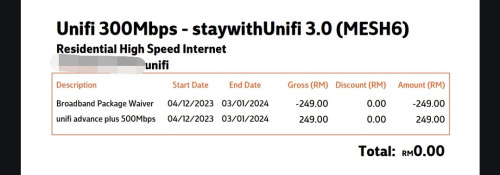 This one is even more confusing... 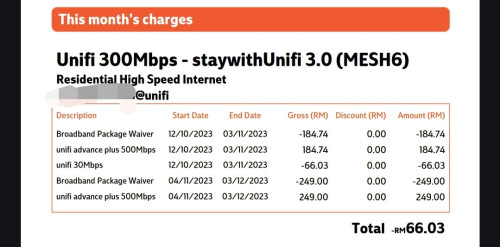 Please help me explain this mess. I switched to SWU 3.0 RM119 @ 500 Mbps in October. |
|
|
Dec 26 2023, 04:48 PM
Return to original view | IPv6 | Post
#3
|
|
Junior Member
272 posts Joined: Sep 2020
|
QUOTE(pu27 @ Dec 26 2023, 10:41 AM) Fortunately unfortunately, we're in the same ship, let's hope it's not a leaky one. I'm using internet only. No unifi tv whatsoever. Very the confuse la I right now :')Wait yours is 249?? What add-ons do you have? Mine's internet only. My old plan was 139 before the change, so this is right*, (88.03/19 days)x30=139 which only makes it more concerning, showing the right numbers for the old plan but not the new plan?  * because why does it show 15/11-03/12 and not 04/11-14/11 (before the change), which is what I still need to pay (or maybe not)? I'm so confused man. Aren't there a lot of people who already made the change long before us who did it in Oct or Nov? Is there anyone who's already at the 7th month or beyond?  |
|
|
Jan 4 2024, 07:20 PM
Return to original view | IPv6 | Post
#4
|
|
Junior Member
272 posts Joined: Sep 2020
|
Can anyone who owns an ONR show us how it looks? Never seen one.
|
|
|
Jan 5 2024, 01:01 AM
Return to original view | IPv6 | Post
#5
|
|
Junior Member
272 posts Joined: Sep 2020
|
TM just installed a whole new DP literally in front of my house (the pole is parallel to my outer wall) yesterday evening. Mine is stretched from a pole 200 meters away.
Can TM swap a connection from one DP to another DP? Asking with curiosity. |
|
|
Jan 5 2024, 02:22 AM
Return to original view | IPv6 | Post
#6
|
|
Junior Member
272 posts Joined: Sep 2020
|
QUOTE(soonwai @ Jan 5 2024, 01:10 AM) Can. There’re 2 blocks of 4 houses where I live. When I did my Unifi, the DP behind my house was full so they pulled the cable from the DP of the other block. A few years later, I saw that my cable was relocated back to the DP behind my house. Didn’t even notice when they moved it. Hoping they would do that for me. It would nake sense to move me to a DP literally in front of my house haha. |
|
|
|
|
|
Jan 21 2024, 11:40 PM
Return to original view | IPv6 | Post
#7
|
|
Junior Member
272 posts Joined: Sep 2020
|
I'm facing issues too. Ping 138ms. Takes at least 15 seconds to load a page.
Reporting from Seremban, Negeri Sembilan. |
|
|
Jan 23 2024, 01:21 AM
Return to original view | IPv6 | Post
#8
|
|
Junior Member
272 posts Joined: Sep 2020
|
QUOTE(azhar75 @ Jan 22 2024, 07:25 AM) Are we having the same billing breakdown for the 2nd month? Me I think we are in the same thing. Mine has 600 mins of free calls too. The billing still haunts me tho.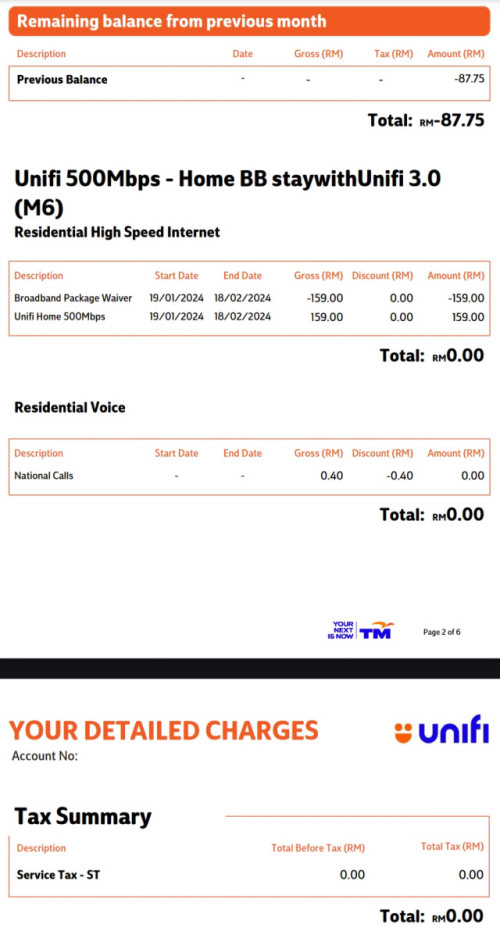 |
|
|
Feb 6 2024, 02:59 AM
Return to original view | IPv6 | Post
#9
|
|
Junior Member
272 posts Joined: Sep 2020
|
QUOTE(NagaK @ Feb 5 2024, 10:42 AM) I had unifi at home and Maxis in both office and restaurant both are reliable. But technical support wise unifi far better they guarantee 24 hours fix if I report last night about my internet down next day they showed up but Maxis took sweet about 2-4days to come fix I think unifi would be a good bet. Service wise, unifi will be the one providing you with stable network with swift technical help such as 24 hour service restoration. Besides, unifi also does great 'counter-offer' in case you feel like switching to Maxis by the end of your contract period (faster speed with cheaper price, a way to keep and reward their loyal customers). Not saying Maxis is bad but you get more with unifi. Consider Maxis only if you are using any postpaid plans or if you're already using Maxis as they do offer perks respectively. |
|
|
Feb 14 2024, 11:40 PM
Return to original view | Post
#10
|
|
Junior Member
272 posts Joined: Sep 2020
|
Why is unifi lagging so badly all of a sudden?
|
|
|
Jul 10 2024, 09:22 PM
Return to original view | IPv6 | Post
#11
|
|
Junior Member
272 posts Joined: Sep 2020
|
QUOTE(xCryptik @ Jul 9 2024, 11:18 PM) Anyone else facing high ping for Shopee around 9pm++? YESS I'm facing the same issue as well. Ard 8pm+ up until morning. |
|
|
Jul 11 2024, 10:46 PM
Return to original view | IPv6 | Post
#12
|
|
Junior Member
272 posts Joined: Sep 2020
|
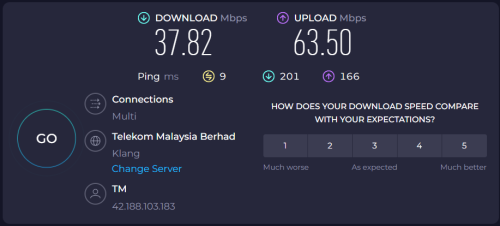 Same here what happened la aiyoo ... I'm on SWU 3.0 @ 500Mbps |
|
|
Jul 12 2024, 03:49 PM
Return to original view | IPv6 | Post
#13
|
|
Junior Member
272 posts Joined: Sep 2020
|
Can anyone please show me the SWU 4.0 package list
|
|
|
|
|
|
Sep 6 2024, 01:23 AM
Return to original view | IPv6 | Post
#14
|
|
Junior Member
272 posts Joined: Sep 2020
|
QUOTE(Anime4000 @ Sep 6 2024, 01:10 AM) during test DNS to BGP route, had to break DoH session and Mikrotik spew this: Damn no wonder my network dropped and my private DNS server not working anymore.CODE DoH server connection error: SSL: ssl: name verification failed for: "C=MY, S=Kuala Lumpur, L=Kuala Lumpur, O=Telekom Malaysia Berhad, CN=dns.tm.net.my" (6) Now Seremban is dead |
|
|
Sep 6 2024, 01:26 AM
Return to original view | IPv6 | Post
#15
|
|
Junior Member
272 posts Joined: Sep 2020
|
I was using 9.9.9.9 and yes can confirm. Tried testing on cornhub. Not getting through.
|
|
|
Sep 6 2024, 01:36 AM
Return to original view | IPv6 | Post
#16
|
|
Junior Member
272 posts Joined: Sep 2020
|
I kinda lost on this. Actually why are they doing this? Are they trying to control our internet or smtg? I was using Quad9 due to how good the latency was. Plus adblock private dns to block ads. Now its a whole mess. Ads everywhere. Lozy liked this post
|
|
|
Sep 6 2024, 02:28 AM
Return to original view | IPv6 | Post
#17
|
|
Junior Member
272 posts Joined: Sep 2020
|
What kind of d**k move is this crippling internet for all? Extremely disappointing seeing where this is going.
|
|
|
Sep 6 2024, 02:45 AM
Return to original view | IPv6 | Post
#18
|
|
Junior Member
272 posts Joined: Sep 2020
|
My god I hate seeing my internet ping going from 9ms to 25ms. Not much but I'm still irritated.
|
|
|
Sep 27 2024, 03:06 AM
Return to original view | IPv6 | Post
#19
|
|
Junior Member
272 posts Joined: Sep 2020
|
Anyone experiencing sudden slow down in Unifi ? mine is barely reaching 70 mbps ... (500 mbps plan) ... upload failing too
|
|
|
Oct 10 2024, 02:49 AM
Return to original view | Post
#20
|
|
Junior Member
272 posts Joined: Sep 2020
|
Guys I wanna ask how to use the VoIP in unifi? Thought of buying a cheap wireless dect phone to use as home line. Can anyone help me on setting it up? Or is it just plug n pay to the TM modem? Thanks.
Edit: I did check my TPLink settings.. it states LAN4 as VoIP ... Confuse where to connect the phone. Modem or Router This post has been edited by NimalKumar: Oct 10 2024, 02:54 AM |
|
Topic ClosedOptions
|
| Change to: |  0.1018sec 0.1018sec
 0.57 0.57
 7 queries 7 queries
 GZIP Disabled GZIP Disabled
Time is now: 16th December 2025 - 10:26 PM |
 Quote
Quote