Welcome Guest ( Log In | Register )

Bump Topic Topic Closed RSS Feed

Outline · [ Standard ] · Linear+

Unifi Official TM UniFi High Speed Broadband Thread V42, READ 1ST PAGE FOR RELEVANT WIFI INFO!

views
     
jonathanwhm
post May 22 2024, 01:33 AM

Getting Started
**
Junior Member
87 posts

Joined: Jun 2011
QUOTE(Anime4000 @ May 21 2024, 11:04 PM)
Update
I have manage to port OLT page from my PON Stick project into D-Link ONR on both hardware (A1 & B1)

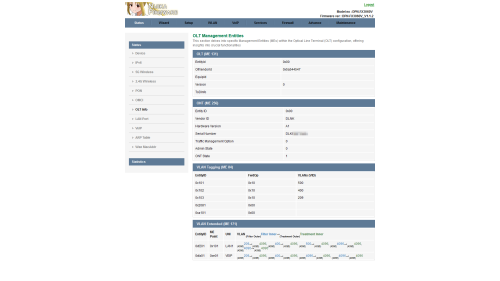
OLT Info
Alcatel-Lucent/Nokia (ALCL/414c434c)
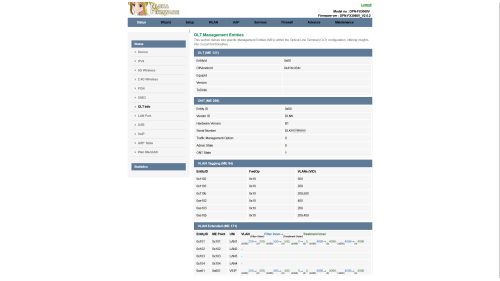
user posted image

ZTE (ZTEG/5a544547)
user posted image

As you can see, every OLT give different VLAN Bridging, EVEN on same OLT!

OLT VLAN
On my experience during PON Stick deployment, there are many ME 171 to map. Rank from top (most troublesome)
1. Fiberhome (FHTT)
2. Alcatel-Lucent/Nokia (ALCL)
3. Huawei (HWTC)
4. ZTE (ZTEG)
If you ask me, FHTT is crap to work with! I hate FHTT Priority Queue so much!

Nijika Firmware A PON Stick Project

user posted image
D-Link DPN-FX3060V, Hardware A1 (White):
DPN-FX3060V-A1_V1.1.2_20240521_NIJIKA.bin

D-Link DPN-FX3060V, Hardware B1 (Black):
DPN-FX3060V-B1_V2.0.2_20240521_NIJIKA.bin

What Changed:
CODE

Revision 20240521
1. Add OLT Status page at Status Menu
2. Add fix WebGUI being killed, at least it works on me (ALCL)


Share OLT Status Page
Please update the firmware to correct Hardware A1 or B1, and share your OLT Info just like screenshot above,
This way we here can know which OLT are you on, either troublesome FHTT or awesome ZTEG

Here some Known TM OLT Vendor Id:
ASCII HEX
ALCL  414c434c
FHTT  46485454
FHTT  0x00*   
HWTC  48575443
UBNT  55424e54
ZTEG  5a544547
-    0x00** 
* FHTT send 0x00 to ONT as allowing other ONT work on FHTT OLT
** Sometime TM use off-brand OLT on Kampung/under-develop area

At least we know how ME 171 used on your place

One thing, force refresh after update the firmware to take effect new Theme!

Should I make new post for Dedicated to D-Link DPN-FX3060V ? hmm.gif

Possible Bridge Fix
If you have access to UART, try this:

Look your ME 84 in Router Mode, then set to bridge mode

CODE

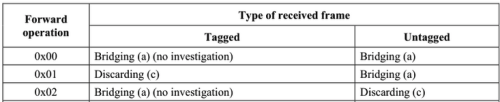
omcicli mib set 84 <EntityID> FwdOp 0x02

FwdOp 0x02 mean:
user posted image
Bridge as is without investigate or modify

This works on me, ALCL disallow to enter WebGUI/Telnet/SSH, only access is via UART
*
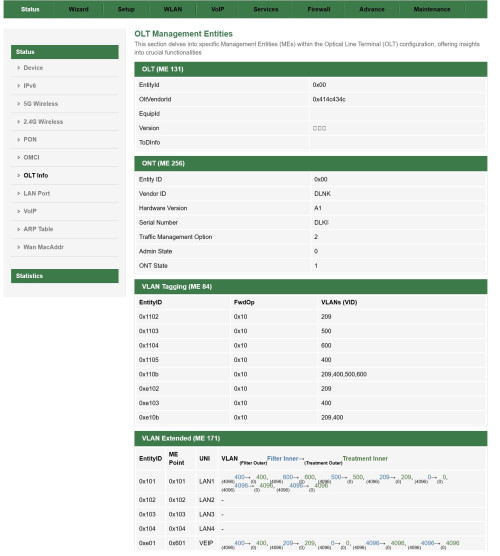
Thank you for the fantastic work! Here is my OLT info.

user posted image
jonathanwhm
post May 22 2024, 01:55 AM

Getting Started
**
Junior Member
87 posts

Joined: Jun 2011
QUOTE(Anime4000 @ May 22 2024, 02:45 AM)
Nice! You on Alcatel Lucent/Nokia OLT just like me!

Even same OLT, you have VoIP (VLAN400) on the LAN1 but not me
*
Interesting! I'm eagerly anticipating the arrival of the 2.5Gbe ONU. Meanwhile, one of my neighbors is already using the Maxis 2Gbps, Skyworth model. sad.gif sad.gif sad.gif
jonathanwhm
post Jun 11 2024, 08:05 PM

Getting Started
**
Junior Member
87 posts

Joined: Jun 2011
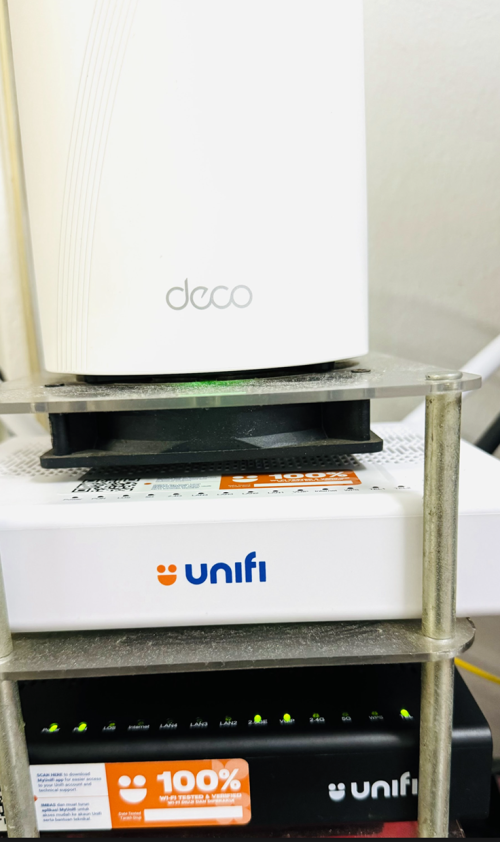
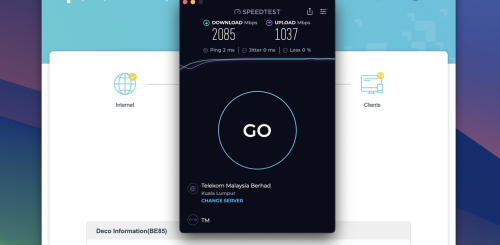
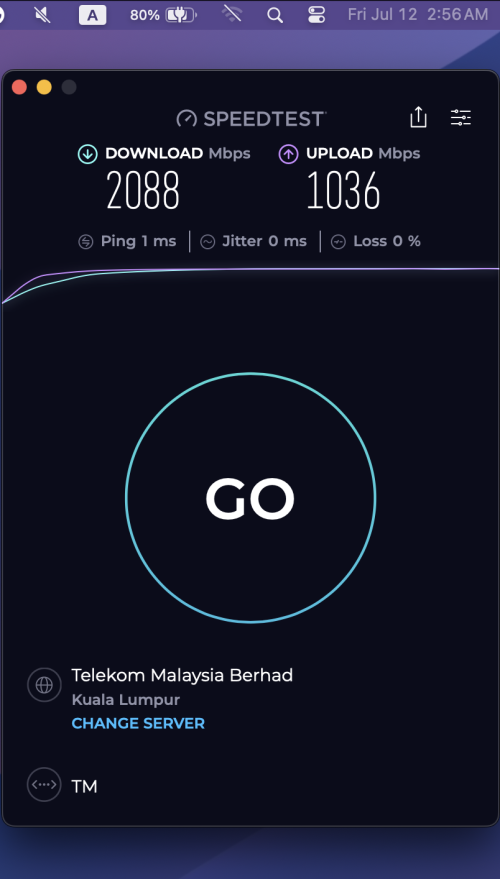
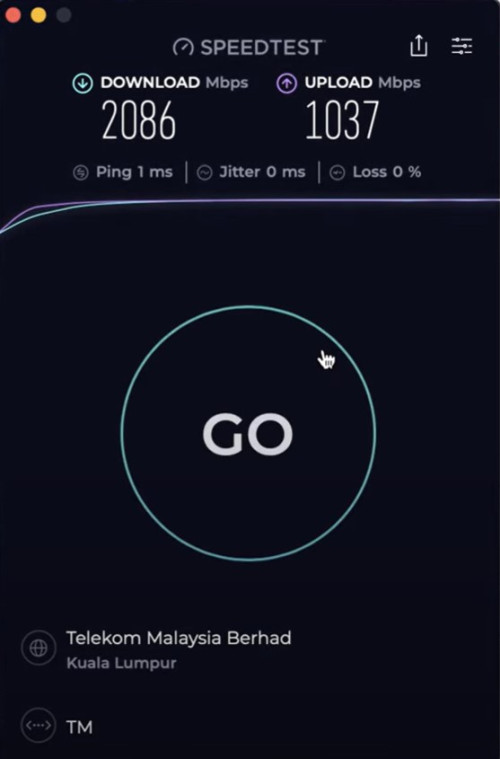
I just got the ONU replaced by TM this evening, from model A1 to B1. I'm running on Bridge Mode and using my Deco BE85 as a router. I managed to get around 2085Mbps DL and 1037Mbps UL.

user posted image

user posted image
jonathanwhm
post Jun 11 2024, 10:09 PM

Getting Started
**
Junior Member
87 posts

Joined: Jun 2011
QUOTE(NagaK @ Jun 11 2024, 10:12 PM)
Great to speed something deserves for pay. Those router modem rack set by yourself?
*
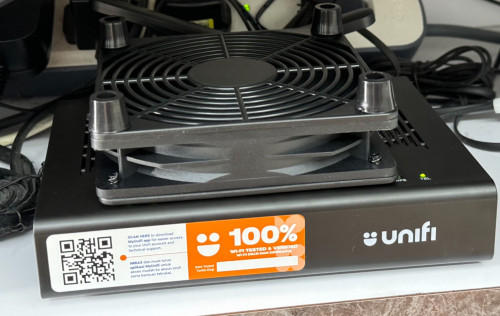
I bought the router rack few years ago, and it came with 3 fans. The fans have been really helpful in reducing the heat as I monitor the ONU daily. The temperature typically stays around 17.5 to 19°C at the maximum, even though I never turn off the ONU and router.
jonathanwhm
post Jun 11 2024, 10:12 PM

Getting Started
**
Junior Member
87 posts

Joined: Jun 2011
QUOTE(jiaen0509 @ Jun 11 2024, 10:30 PM)
Apple Wi-Fi Diagnostics.
Yes.
Nice. Another A1 is mesh or they didn’t collect back.
Hope one day there is free upgrade again for my 1gbps package hahaha
*
Yeah, that's the mesh unit. The technician didn't want to take it. He said it's totally fine not to collect it.
jonathanwhm
post Jun 11 2024, 10:54 PM

Getting Started
**
Junior Member
87 posts

Joined: Jun 2011
QUOTE(cHiLdHo0drEaMz @ Jun 11 2024, 11:16 PM)
May I know why the ONR was replaced ?
*
2 weeks ago, I contacted TM to request a change from the A1 model to the B1. They sent 3 technicians to my home the day after I made the request, but they refused to change the model, claiming that the A1 was still working perfectly. The initial report was closed, but I called TM again last Friday to follow up on the CLOSED report biggrin.gif biggrin.gif . The CS created a new report stating that I requested the B2 model as I am a 2Gbps subscriber. On Saturday morning, a technician called to inform me that he didn't have the B2 model in stock and asked me to wait until today as they will receive the B2 model today in their TM storeroom.
jonathanwhm
post Jun 11 2024, 10:56 PM

Getting Started
**
Junior Member
87 posts

Joined: Jun 2011
QUOTE(Oltromen Ripot @ Jun 11 2024, 11:55 PM)
is the contract refreshed?
*
Nope. But an additional RM53 on the next bill.
jonathanwhm
post Jun 11 2024, 11:06 PM

Getting Started
**
Junior Member
87 posts

Joined: Jun 2011
QUOTE(cHiLdHo0drEaMz @ Jun 12 2024, 12:02 AM)
Thank god they did not extend the contract. What important they changed it to the latest one

Oltromen Ripot, you too should try your luck and see
*
Indeed! The technician who came this time is quite knowledgeable. He asked about whether I preferred to use my own router so that he could set up the bridge mode on the ONU for me.
jonathanwhm
post Jun 16 2024, 03:33 AM

Getting Started
**
Junior Member
87 posts

Joined: Jun 2011
QUOTE(Maxieos @ Jun 15 2024, 11:42 PM)
Do you really need 2GB internet connection ? what did you use it for ?
Even mine after upgrade also facing issue with slow internet to oversea , now even apps can't load , website slow and etc.
Now , almost all website ping over 100-1k ms.
*
I subscribed to the 2Gbps plan to take advantage of the 1Gbps upload speed as I often upload large content to multiple platforms simultaneously and for some digital marketing purposes across various social media platforms. Additionally, the home internet bill can be fully claimed from the company.
jonathanwhm
post Jun 17 2024, 01:16 PM

Getting Started
**
Junior Member
87 posts

Joined: Jun 2011
QUOTE(jiaen0509 @ Jun 16 2024, 07:23 PM)
I just bought this from Shopee with RM6.12 including shipping. So far use more than 2 weeks and the speed still constantly more than 1gbps.
user posted image
*
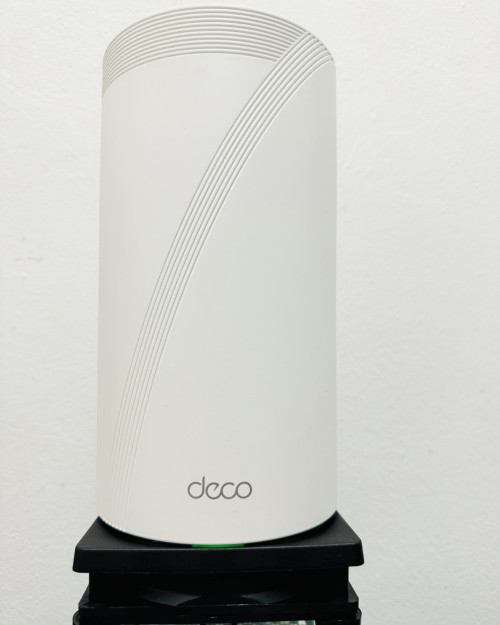
Using a similar fan for my other two deco mesh units. tongue.gif tongue.gif

user posted image
jonathanwhm
post Jun 17 2024, 09:04 PM

Getting Started
**
Junior Member
87 posts

Joined: Jun 2011
QUOTE(NagaK @ Jun 17 2024, 03:48 PM)
Someone share shoppee link? I'm not fan of rack fans just another mess
*
https://shopee.com.my/YOHESO-12CM-Router-Mo...2015.7380199432


jonathanwhm
post Jun 18 2024, 06:31 PM

Getting Started
**
Junior Member
87 posts

Joined: Jun 2011
QUOTE(kwss @ Jun 18 2024, 07:17 PM)
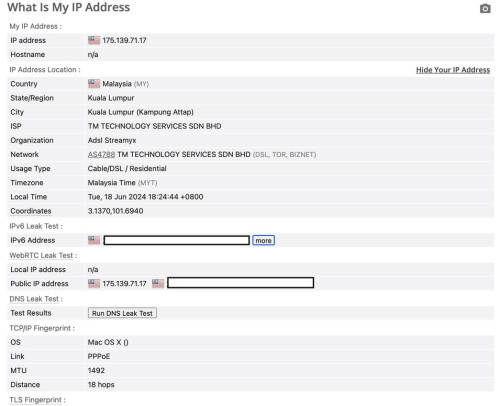
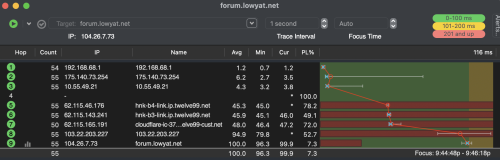
I get 18 hop! Waiting for expert to teach me how to interpret this.
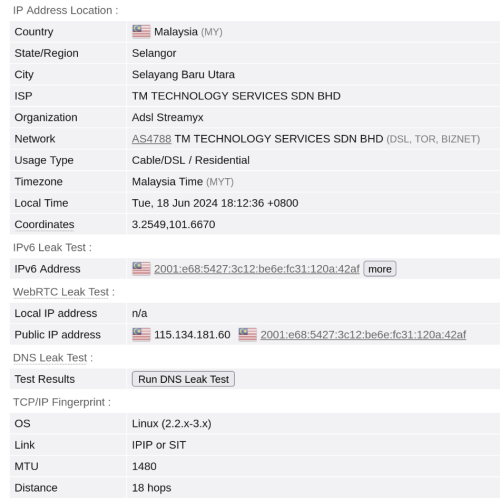
I give screenshot complete with full location and IP address to help with interpretation.

user posted image
*
18 hops too, from KL.
user posted image
jonathanwhm
post Jul 12 2024, 03:10 AM

Getting Started
**
Junior Member
87 posts

Joined: Jun 2011
QUOTE(Mazda9 @ Jul 11 2024, 08:32 PM)
Hi,

I’m on 1Gbps Unifi plan. The issue is when I’m using the 2.5gb Unifi black combo box paired with my Asus rtac5300 router or with my tp-link ge800 router as bridge,  my download speed will drop after few days from 950mbps to 300-450mbps after few days.

I’ll call Unifi technical support, they will eventually reset the port and the issue will be solved for few days then back to square one again.

TM engineer came to give me spare fiberhome white box to test and see but surprisingly the issue doesn’t happen with white fiberhome ONU box.

Any idea what’s wrong?
*
I'm currently using the 2.5G black ONU and have not encountered any speed issues to date. My connection is still maintained at speeds of up to 2Gbps. However, some users have reported experiencing a drop in their speed down to 300Mbps.

user posted image
jonathanwhm
post Aug 30 2024, 02:06 PM

Getting Started
**
Junior Member
87 posts

Joined: Jun 2011
QUOTE(OKLY @ Aug 30 2024, 02:39 PM)
Guys, usually which speedtest.net server you guys use to test a 1-2gbps connection?

My 1gbps usually hitting around 870-880mbps on most servers. Only off peak and certain hours I will see it above 900mbps closer to my 1GBe limitation.
*
I used the KL server (auto-detect).

user posted image
jonathanwhm
post Sep 6 2024, 06:41 PM

Getting Started
**
Junior Member
87 posts

Joined: Jun 2011
user posted image

Still ok from my side. BTHO, Kajang.

This post has been edited by jonathanwhm: Sep 6 2024, 06:43 PM
jonathanwhm
post Sep 19 2024, 09:48 PM

Getting Started
**
Junior Member
87 posts

Joined: Jun 2011
QUOTE(Oltromen Ripot @ Sep 19 2024, 08:46 PM)
this forum board is suddenly responding very slowly for past 2hrs. on maxis mobile and on unifi.
*
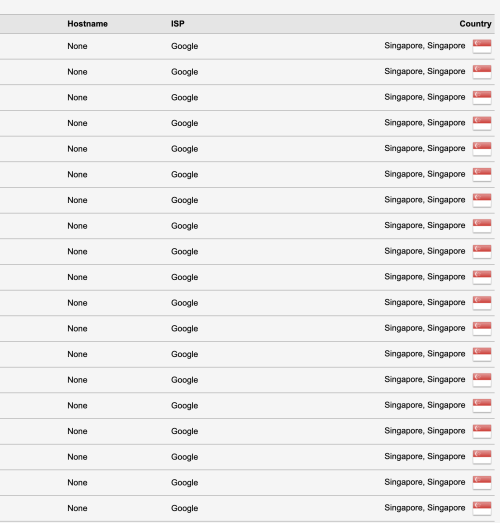
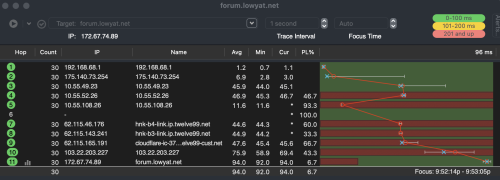
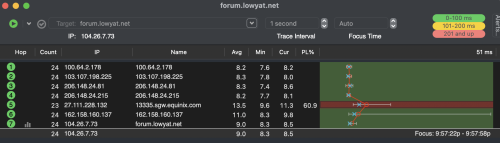
Experiencing the slowdown as well! Is TM messing with their routing?

On Unifi:

user posted image

user posted image

On VPN:

user posted image

This post has been edited by jonathanwhm: Sep 19 2024, 09:59 PM


Attached thumbnail(s)
Attached Image Attached Image
jonathanwhm
post Oct 2 2024, 10:38 AM

Getting Started
**
Junior Member
87 posts

Joined: Jun 2011
QUOTE(afif92 @ Oct 2 2024, 08:44 AM)
I noticed my speed from 1Gbps would drop to 300Mbps after I connect VPN using Wireguard 443.. Every time I connect using this method, the speed would drop. Unless I used UDP 443, it stays full speed. This all happen with Black Dlink FX3060V in bridge mode. How can VPN in PC affect ONU to behave like this?  How could this happen and how to  prevent them?
*
I had the same issue with my 2Gbps plan. After connecting to the VPN, my speed dropped to 300Mbps. Even after disconnecting from the VPN, the speed remained at 300Mbps. It only returned to full speed after I rebooted the ONU. This problem only occurs every time I connect to the VPN.
jonathanwhm
post Oct 2 2024, 10:39 AM

Getting Started
**
Junior Member
87 posts

Joined: Jun 2011
QUOTE(Icehart @ Oct 2 2024, 11:09 AM)
Does anybody know what is TM DNS server? I need to use their DNS server to check domain resolution.
*
202.188.18.188
1.9.1.9
jonathanwhm
post Oct 22 2024, 06:03 PM

Getting Started
**
Junior Member
87 posts

Joined: Jun 2011
QUOTE(kwss @ Oct 18 2024, 12:57 PM)
Firmware v2.0.3 for black D-Link ONR.
Thanks to MarcoFromTropoja

Download link:
https://www.mediafire.com/file/4s9bfvbco0hw...flowid.bin/file

SHA-256 sum:
e91b8b93b3bf93a5836631179f8404443abccb328369a34f90f8ea47c0dba81a
*
Thanks for the 2.0.3 firmware! No speed drop after four days of usage, including with VPN. Will keep monitoring it.
jonathanwhm
post Nov 5 2024, 02:09 PM

Getting Started
**
Junior Member
87 posts

Joined: Jun 2011
QUOTE(rayfoo @ Nov 5 2024, 10:47 AM)
anyone having issues with their unifi line today?
*
I received this from my vendor this morning.

-----------------------
Dear customer, if your on-premise/office is using TM ISP or TIME ISP. Currently, there is a Myix route issue from TM to TIME, the whole of Malaysia. We have already escalated the respective to check further.
---------------------------


2 Pages  1 2 >Top
Topic ClosedOptions
 

Change to:
| Lo-Fi Version
0.2202sec    0.38    7 queries    GZIP Disabled
Time is now: 9th December 2025 - 02:20 AM