Welcome Guest ( Log In | Register )

Bump Topic Topic Closed RSS Feed
495 Pages « < 53 54 55 56 57 > » Bottom

Outline · [ Standard ] · Linear+

Unifi Official TM UniFi High Speed Broadband Thread V42, READ 1ST PAGE FOR RELEVANT WIFI INFO!

views
     
cenkudu
post Feb 6 2024, 08:06 PM

Regular
******
Senior Member
1,206 posts

Joined: Jan 2008
Unifi technician came today to install new wifi router for SWU 4.0 extra. so my timeline:

31/1: submit application to migrate to Maxis
1/2: received call from Unifi sales and counter offer for SWU 4.0 extra
6/2 morning: order created and chat with Unifi to reconfirm the package for SWO 4.0
6/2 afternoon: Technician call and came for wifi 6 installation

all together about 6 days

eclectice
post Feb 6 2024, 08:19 PM

Look at all my stars!!
*******
Senior Member
2,734 posts

Joined: Mar 2008
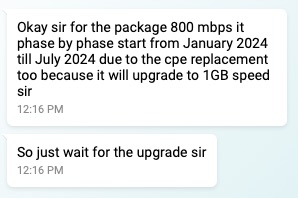
QUOTE(soonwai @ Feb 5 2024, 11:22 PM)
July. Can't wait. I'm so excited. Already prepared many torrents to download with new speed.
user posted image
*
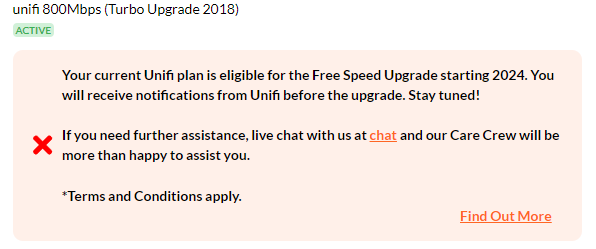
I realized that Unifi no longer shows the free upgrade notification as before for the current 800 Mbps plans eligible for free upgrade.

user posted image

last discussions:
https://forum.lowyat.net/index.php?showtopi...ost&p=108265766
https://forum.lowyat.net/index.php?showtopi...ost&p=108250635

This post has been edited by eclectice: Feb 6 2024, 09:07 PM
westlife
post Feb 6 2024, 09:03 PM

10k Club
********
All Stars
14,312 posts

Joined: Jan 2011
anyone of u still has the copper fixed line active now?

user posted image

QUOTE(cenkudu @ Feb 6 2024, 08:06 PM)
Unifi technician came today to install new wifi router for SWU 4.0 extra. so my timeline:

31/1: submit application to migrate to Maxis
1/2: received call from Unifi sales and counter offer for SWU 4.0 extra
6/2 morning: order created and chat with Unifi to reconfirm the package for SWO 4.0
6/2 afternoon: Technician call and came for wifi 6 installation

all together about 6 days
*
what is ur package for SWU 4.0?

This post has been edited by westlife: Feb 6 2024, 09:03 PM
countingcrows
post Feb 6 2024, 09:24 PM

Getting Started
**
Junior Member
259 posts

Joined: Feb 2023
QUOTE(westlife @ Feb 6 2024, 09:03 PM)
anyone of u still has the copper fixed line active now?
My copper line is still active.
laihuhng
post Feb 6 2024, 09:49 PM

On my way
****
Junior Member
603 posts

Joined: Jun 2005


QUOTE(yenchenje @ Feb 6 2024, 06:22 PM)
biggrin.gif For the ppl on D-Link ONR
*
Changed to Bridge per instruction, ohers left untouched. Nothing works, even the 5G. Can't access the Dlink even with LAN. Please help.
westlife
post Feb 6 2024, 10:40 PM

10k Club
********
All Stars
14,312 posts

Joined: Jan 2011
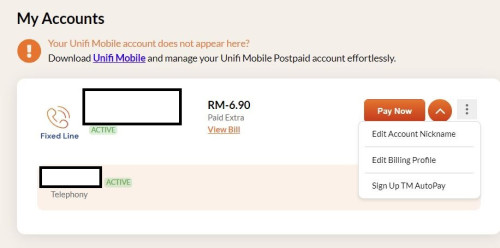
For unifi termination, if I cannot see the account in the unifi website and app it means it had been terminated rite?

Will I receive the final bill?

And do I need to return this BTU? (Used since Oct 2014). So big the BTU comparing to nowadays one.

If needs to return, can return without the power adapter?

user posted image

This post has been edited by westlife: Feb 6 2024, 10:40 PM
sp6068
post Feb 6 2024, 10:46 PM

Lights Out and Away We Go!
******
Senior Member
1,699 posts

Joined: Jun 2011
From: Home of Bak Kut Teh! :)


Looks like unifi got fucked again tonight
PRSXFENG
post Feb 6 2024, 10:50 PM

Look at all my stars!!
*******
Senior Member
2,614 posts

Joined: Nov 2020


QUOTE(laihuhng @ Feb 6 2024, 09:49 PM)
Changed to Bridge per instruction, ohers left untouched. Nothing works, even the 5G. Can't access the Dlink even with LAN. Please help.
*
Factory resetting it to default mayyyyyyyy work as the device will probably request and get sent the configuration from the server via TR069/CWMP

But not sure if it needs more configuration manually or not

failed.hashcheck
post Feb 6 2024, 11:08 PM

Neighborhood plant pathologist
*******
Senior Member
2,096 posts

Joined: Aug 2009
From: Shithole Klang
QUOTE(sp6068 @ Feb 6 2024, 10:46 PM)
Looks like unifi got fucked again tonight
*
Where got
BenYeeHua
post Feb 6 2024, 11:32 PM

Regular
******
Senior Member
1,873 posts

Joined: Nov 2010


QUOTE(failed.hashcheck @ Feb 6 2024, 11:08 PM)
Where got
*
Yup, quite stable, should be WiFi or shared network on his area getting bursted.

As many CNY going hometown, so network gonna crowd for WiFi and Fiber for those hometown that at kampung etc. tongue.gif
Just like highway getting crowd, network also crowd as the total bandwidth can't extend on load. laugh.gif
yenchenje
post Feb 6 2024, 11:56 PM

Enthusiast
*****
Junior Member
932 posts

Joined: Dec 2019
QUOTE(laihuhng @ Feb 6 2024, 09:49 PM)
Changed to Bridge per instruction, ohers left untouched. Nothing works, even the 5G. Can't access the Dlink even with LAN. Please help.
*
Did you change router mode or connection settings? There are two different settings, one disables the webUI of the device

If you did it correctly, router should have DHCP disabled and your device won’t get an IP automatically, set static with 192.168.1.1 as GW with /24, set your IP to like 192.168.1.100 or smth (I forgot if the original is 0.1 or 1.1 as I have mine modified)

This post has been edited by yenchenje: Feb 7 2024, 12:00 AM
laihuhng
post Feb 7 2024, 07:12 AM

On my way
****
Junior Member
603 posts

Joined: Jun 2005


QUOTE(PRSXFENG @ Feb 6 2024, 10:50 PM)
Factory resetting it to default mayyyyyyyy work as the device will probably request and get sent the configuration from the server via TR069/CWMP

But not sure if it needs more configuration manually or not
*
Then, I probably need to reset the router and give it a try. I don't see if I have other options after trying the whole night.


QUOTE(yenchenje @ Feb 6 2024, 11:56 PM)
Did you change router mode or connection settings? There are two different settings, one disables the webUI of the device

If you did it correctly, router should have DHCP disabled and your device won’t get an IP automatically, set static with 192.168.1.1 as GW with /24, set your IP to like 192.168.1.100 or smth (I forgot if the original is 0.1 or 1.1 as I have mine modified)
*
I've changed just 1 setting (Bridge) per the given instruction, nothing else.

TongCN
post Feb 7 2024, 09:01 AM

Look ma, I have lots stars :D
*******
Senior Member
6,716 posts

Joined: Aug 2008
From: Malaysia


QUOTE(westlife @ Feb 6 2024, 10:40 PM)
For unifi termination, if I cannot see the account in the unifi website and app it means it had been terminated rite?

Will I receive the final bill?

And do I need to return this BTU? (Used since Oct 2014). So big the BTU comparing to nowadays one.

If needs to return, can return without the power adapter?

user posted image
*
I already thrown away mine dunno which year spring clean
Make sure to reset the device before throwing XD

Don't think they wanna collect back already, basically e-waste
westlife
post Feb 7 2024, 09:14 AM

10k Club
********
All Stars
14,312 posts

Joined: Jan 2011
QUOTE(TongCN @ Feb 7 2024, 09:01 AM)
I already thrown away mine dunno which year spring clean
Make sure to reset the device before throwing XD

Don't think they wanna collect back already, basically e-waste
*
even termination of line also no need to return? Becos faq said rm500 will be imposed if no return.
TongCN
post Feb 7 2024, 09:27 AM

Look ma, I have lots stars :D
*******
Senior Member
6,716 posts

Joined: Aug 2008
From: Malaysia


QUOTE(westlife @ Feb 7 2024, 09:14 AM)
even termination of line also no need to return? Becos faq said rm500 will be imposed if no return.
*
No idea cause during the time i helped my parents to jump ship the line to Celcomfibre, Unifi doesn't even mention anything of returning from their side when i physically visit the centre for the confirmation of port out.

I then later live chat asked them those devices - Unifi TV, Router, Modem how? They say can continue use if want.... ok... whistling.gif Throw, lol ...
westlife
post Feb 7 2024, 11:11 AM

10k Club
********
All Stars
14,312 posts

Joined: Jan 2011
QUOTE(TongCN @ Feb 7 2024, 09:27 AM)
No idea cause during the time i helped my parents to jump ship the line to Celcomfibre, Unifi doesn't even mention anything of returning from their side when i physically visit the centre for the confirmation of port out.

I then later live chat asked them those devices - Unifi TV, Router, Modem how? They say can continue use if want.... ok...  whistling.gif Throw, lol ...
*
Ic. Then maybe no need to return anymore. Good then.

Becos I was at tm point last week, the staff also never mention about the return of device.
yenchenje
post Feb 7 2024, 12:21 PM

Enthusiast
*****
Junior Member
932 posts

Joined: Dec 2019
QUOTE(laihuhng @ Feb 7 2024, 07:12 AM)
Then, I probably need to reset the router and give it a try. I don't see if I have other options after trying the whole night.
I've changed just 1 setting (Bridge) per the given instruction, nothing else.
*
Please check if you’ve followed these
user posted image
laihuhng
post Feb 7 2024, 12:53 PM

On my way
****
Junior Member
603 posts

Joined: Jun 2005


QUOTE(yenchenje @ Feb 7 2024, 12:21 PM)
Please check if you’ve followed these
user posted image
*
These are the settings to follow after the Dlink is reset, right? Thanks a million.
yenchenje
post Feb 7 2024, 01:23 PM

Enthusiast
*****
Junior Member
932 posts

Joined: Dec 2019
QUOTE(laihuhng @ Feb 7 2024, 12:53 PM)
These are the settings to follow after the Dlink is reset, right? Thanks a million.
*
Do you have PLOAM password/PPPoE credentials/VoIP credentials on hand? If not, please obtain from TM or else you won’t have access to internet even after reset, I don’t believe TR-069 will be able to set these settings except for maybe PLOAM password

PLOAM is set in GPON mode in ONT tab (iirc), it’s not in my screenshot as my DPN-FX3060V is just doing ATA.

PPPoE in Connection_0 and VoIP to enable VoIP
loonsave
post Feb 7 2024, 02:51 PM

Regular
******
Senior Member
1,635 posts

Joined: May 2005


QUOTE(NickedAsy @ Feb 6 2024, 03:41 PM)
Yep, same here. Apala the TM techs doing other than makan gaji buta
*
QUOTE(darachan @ Feb 6 2024, 03:44 PM)
Terrible slow on certain local bank online banking website last night, unsure if it's related.
*
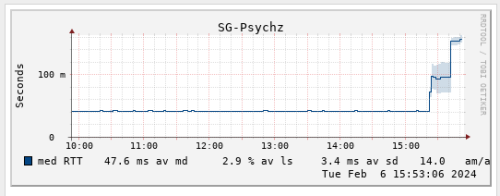
QUOTE(go626201 @ Feb 6 2024, 03:50 PM)
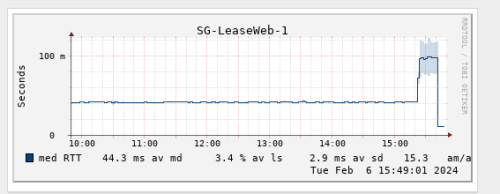
Looks like TM has change the routing with the fix.
My connection to LeaseWeb SG has back to below 20ms just now.
Previously it was 40ms for few months.
user posted image

And my connection to specific JP Server is high to 200+ms after routing change.  vmad.gif

And what the fxxk is this..  whistling.gif
Higher and higher latency.
user posted image
*
QUOTE(bugipunch @ Feb 6 2024, 03:50 PM)
they doing some configurations now. Now connection for international has return.
*
I guess not recovered yet to some International route. This is the feedback from one of my ISP.

CODE
Upon checking, the issue you are currently experiencing is due to subsea AAG cable repair, causing one of our backbone to go down. This led to the rerouting of traffic to its next available path, which is currently experiencing congestion. The current path your traffic is traversing is the best path on our end.


This post has been edited by loonsave: Feb 7 2024, 02:51 PM

495 Pages « < 53 54 55 56 57 > » Top
Topic ClosedOptions
 

Change to:
| Lo-Fi Version
0.0246sec    0.79    6 queries    GZIP Disabled
Time is now: 19th December 2025 - 10:31 PM