

Anyone knows how to remote access DPN-FX3060V from outside?
Unifi Official TM UniFi High Speed Broadband Thread V42, READ 1ST PAGE FOR RELEVANT WIFI INFO!
Unifi Official TM UniFi High Speed Broadband Thread V42, READ 1ST PAGE FOR RELEVANT WIFI INFO!
|
|
 Jan 26 2024, 12:13 AM Jan 26 2024, 12:13 AM
Return to original view | Post
#1
|
 
Junior Member
603 posts Joined: Jun 2005  
|
Anyone knows how to remote access DPN-FX3060V from outside?
|
|
|
|
|
|
Feb 4 2024, 06:15 AM
Return to original view | Post
#2
|
|
Junior Member
603 posts Joined: Jun 2005
|
My free speed upgrade notice missing from the account dashboard. How about yours?
|
|
|
Feb 5 2024, 12:49 PM
Return to original view | Post
#3
|
|
Junior Member
603 posts Joined: Jun 2005
|
QUOTE(BenYeeHua @ Feb 4 2024, 12:23 PM)  Even I am 100M, it is still showing 30M plan for me.  countingcrows liked this post
|
|
|
Feb 6 2024, 12:11 PM
Return to original view | Post
#4
|
|
Junior Member
603 posts Joined: Jun 2005
|
Any idea if speed information is hard-coded to the ONU? I've upgraded to 1gbps from 800. And, I've gotten myself a new Asus TUF-AX6000 to replace the router provided by Unifi. Reason I'm doing so is because I need the parental control feature.
When I'm using the Dlink DPN-FX3060Z, I managed to get full 1gpbs++ DL, 500gbps++ UL (wireless). However, when I'm using the old Huawei ONU + ASUS AX6000, I'm getting only 800+ DL and 200+ UL. Any idea why? Can anyone help? |
|
|
Feb 6 2024, 01:58 PM
Return to original view | Post
#5
|
|
Junior Member
603 posts Joined: Jun 2005
|
QUOTE(TongCN @ Feb 6 2024, 01:37 PM) Check your QoS any accidentally limit to 800 D ? QoS is at router, right? But my router is brand new. I didn't make any changes. I'm suspecting the old Huawei ONU. |
|
|
Feb 6 2024, 06:00 PM
Return to original view | Post
#6
|
|
Junior Member
603 posts Joined: Jun 2005
|
QUOTE(soonwai @ Feb 6 2024, 05:19 PM) Yes, it is. Not hard-coded but the speed is set in the ONU. For example, I'm on Unifi 800, if I use my ONU and my PPPoE login, I get 800. If I use my neighbors ONU and my PPPoE login, I get 500. No wonder. Is there an alternative solution so that I can make use of the new Asus router with existing hardware (DPN-FX3060V and Huawei ONU)? I'm not a networking guy. Please help. Thanks.My installation for 800 was in 2018. |
|
|
|
|
|
Feb 6 2024, 09:49 PM
Return to original view | IPv6 | Post
#7
|
|
Junior Member
603 posts Joined: Jun 2005
|
QUOTE(yenchenje @ Feb 6 2024, 06:22 PM)  For the ppl on D-Link ONR For the ppl on D-Link ONR |
|
|
Feb 7 2024, 07:12 AM
Return to original view | Post
#8
|
|
Junior Member
603 posts Joined: Jun 2005
|
QUOTE(PRSXFENG @ Feb 6 2024, 10:50 PM) Factory resetting it to default mayyyyyyyy work as the device will probably request and get sent the configuration from the server via TR069/CWMP Then, I probably need to reset the router and give it a try. I don't see if I have other options after trying the whole night.But not sure if it needs more configuration manually or not QUOTE(yenchenje @ Feb 6 2024, 11:56 PM) Did you change router mode or connection settings? There are two different settings, one disables the webUI of the device I've changed just 1 setting (Bridge) per the given instruction, nothing else.If you did it correctly, router should have DHCP disabled and your device won’t get an IP automatically, set static with 192.168.1.1 as GW with /24, set your IP to like 192.168.1.100 or smth (I forgot if the original is 0.1 or 1.1 as I have mine modified) |
|
|
Feb 7 2024, 12:53 PM
Return to original view | Post
#9
|
|
Junior Member
603 posts Joined: Jun 2005
|
QUOTE(yenchenje @ Feb 7 2024, 12:21 PM) Please check if you’ve followed these These are the settings to follow after the Dlink is reset, right? Thanks a million.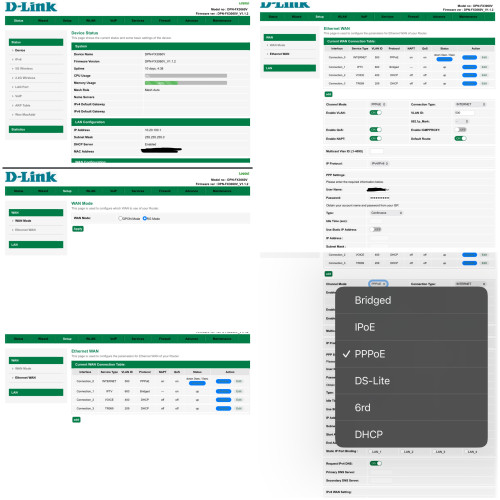 |
|
|
Feb 7 2024, 04:08 PM
Return to original view | Post
#10
|
|
Junior Member
603 posts Joined: Jun 2005
|
QUOTE(yenchenje @ Feb 7 2024, 01:23 PM) Do you have PLOAM password/PPPoE credentials/VoIP credentials on hand? If not, please obtain from TM or else you won’t have access to internet even after reset, I don’t believe TR-069 will be able to set these settings except for maybe PLOAM password PPPoE credentials - YES.PLOAM is set in GPON mode in ONT tab (iirc), it’s not in my screenshot as my DPN-FX3060V is just doing ATA. PPPoE in Connection_0 and VoIP to enable VoIP PLOAM - Maybe NOT. VoIP credentials - Maybe NOT. Let me check my screenshots to see if this information is available. Thanks. |
|
|
Feb 8 2024, 03:30 PM
Return to original view | Post
#11
|
|
Junior Member
603 posts Joined: Jun 2005
|
QUOTE(YoungMan @ Feb 8 2024, 01:47 PM) For jump ship AKA switching there is no need to return BTU because they will usually use the same BTU and only switch to lan 2 or 3. However if the installer change your BTU during switching, usually they will collect back the old BTU although some did not. Well, no problem anymore as I've found my backup config file. Reset the Dlink and restore using the config file. Everything up and running again.Usually TM won't give out ploam password. You either get it from technician during installation or try to find it in the device. |
|
|
Feb 16 2024, 07:04 AM
Return to original view | Post
#12
|
|
Junior Member
603 posts Joined: Jun 2005
|
Is there any reason why they are different by so much? Which one is more accurate?
Speed test from Speedtest.net app 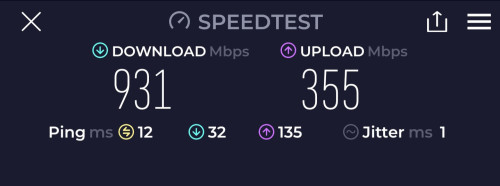 Speed test from Asus app 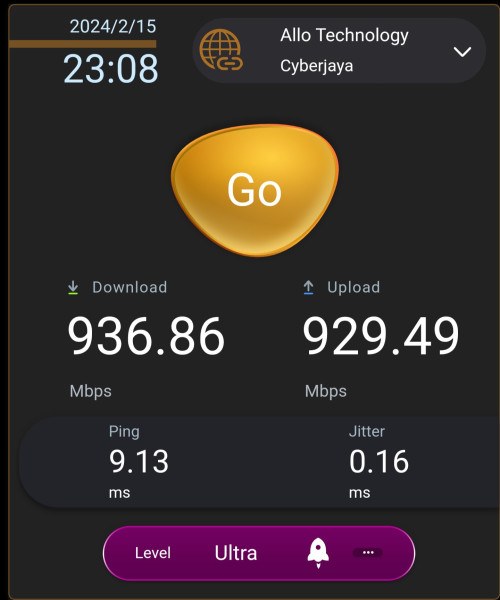 |
|
|
Feb 16 2024, 07:59 AM
Return to original view | Post
#13
|
|
Junior Member
603 posts Joined: Jun 2005
|
QUOTE(yenchenje @ Feb 16 2024, 07:45 AM) On router is the more accurate results, idk if asus allows Speedtest-cli to be installed there. It you can, try and install it and run again with Ookla speedtest instead of using asus’s in built. Although high chance that Asus speedtest also uses Ookla 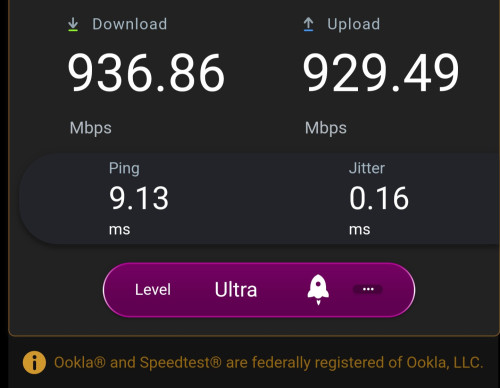 The in built is Ookla. That's why I am confused. This post has been edited by laihuhng: Feb 16 2024, 07:59 AM |
|
|
|
|
|
Feb 16 2024, 09:57 AM
Return to original view | Post
#14
|
|
Junior Member
603 posts Joined: Jun 2005
|
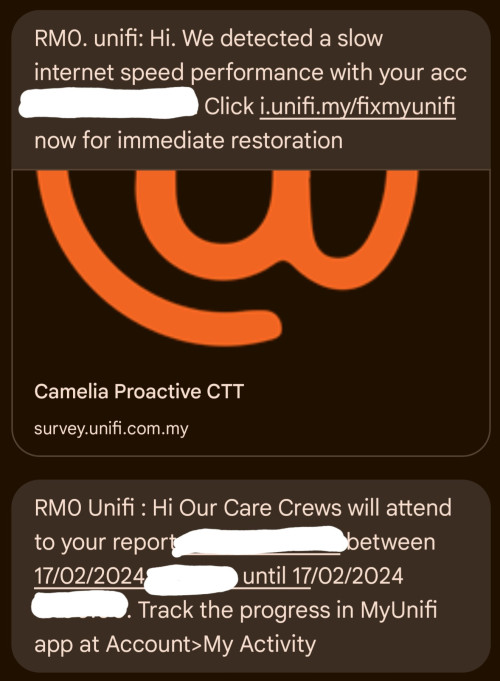 Received this out of sudden. Is this legit? Chargeable? |
|
|
Feb 16 2024, 10:36 AM
Return to original view | Post
#15
|
|
Junior Member
603 posts Joined: Jun 2005
|
QUOTE(soul_gamerz @ Feb 16 2024, 10:13 AM) both also using same server..? what i can think of both app uses different server to test the speed. that why differ so much Same. Even if I change the server, I'm still getting the consistent results. mujinkun liked this post
|
|
|
Feb 16 2024, 06:51 PM
Return to original view | Post
#16
|
|
Junior Member
603 posts Joined: Jun 2005
|
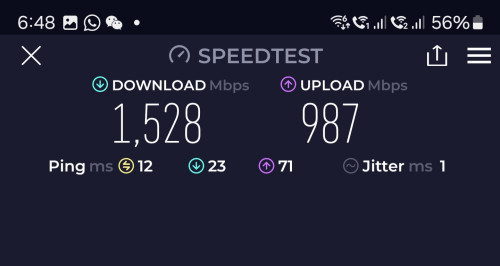 Does this mean that I have gotten my free speed upgrade from 1gbps to 2gbps? 😆 This post has been edited by laihuhng: Feb 16 2024, 09:59 PM |
|
|
Feb 17 2024, 06:59 AM
Return to original view | Post
#17
|
|
Junior Member
603 posts Joined: Jun 2005
|
QUOTE(tng55 @ Feb 16 2024, 11:53 PM) confirm you are 2GBPS found upload speed 1gbps = you are download speed is 2gbps My laptop has no LAN port. Thus can't try.can you try LAN Cable for PC do speedtest Thought of not getting free upgrade anymore since the free upgrade notice has been gone from the dashboard. This post has been edited by laihuhng: Feb 17 2024, 07:01 AM |
|
|
Feb 18 2024, 03:37 AM
Return to original view | Post
#18
|
|
Junior Member
603 posts Joined: Jun 2005
|
QUOTE(sadlyfalways @ Feb 17 2024, 01:55 PM) Helloo, is this with the tm supplied dlink router? Yes, using the supplied router.Shocking can get more than 1.2 on mobile device without WiFi 7 😍😍😍 QUOTE(tng55 @ Feb 17 2024, 09:15 PM) don't have PC Desktop ??? if have network must support 2.5Gbps No, I don't. |
|
|
Mar 15 2024, 12:53 PM
Return to original view | Post
#19
|
|
Junior Member
603 posts Joined: Jun 2005
|
QUOTE(cHiLdHo0drEaMz @ Mar 15 2024, 11:47 AM) TM already start contacting 800Mbps customer for speed upgrade. Only 1Gbps 🤦♂️ Still undecided 😅 I believe got. This is mine. But, there is no one contacted me for the speed upgrade. My plan 1gbps SWU3.0.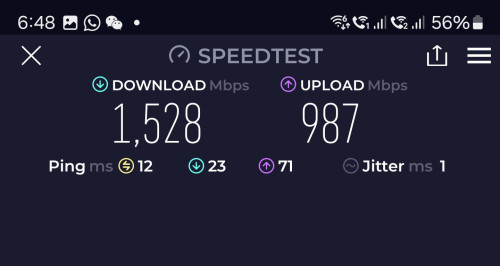 |
|
|
Mar 15 2024, 06:20 PM
Return to original view | Post
#20
|
|
Junior Member
603 posts Joined: Jun 2005
|
QUOTE(cHiLdHo0drEaMz @ Mar 15 2024, 02:33 PM) Mine contacted. The technician need to come to change equipment it seems. Weird. By right, there is nothing to change. Please update what are the changes once completed. Thanks. |
|
Topic ClosedOptions
|
| Change to: |  0.2818sec 0.2818sec
 0.51 0.51
 7 queries 7 queries
 GZIP Disabled GZIP Disabled
Time is now: 15th December 2025 - 02:38 AM |
 Quote
Quote