Welcome Guest ( Log In | Register )

Bump Topic Topic Closed RSS Feed

Outline · [ Standard ] · Linear+

Unifi Official TM UniFi High Speed Broadband Thread V42, READ 1ST PAGE FOR RELEVANT WIFI INFO!

views
     
loonsave
post Feb 7 2024, 02:51 PM

Regular
******
Senior Member
1,635 posts

Joined: May 2005


QUOTE(NickedAsy @ Feb 6 2024, 03:41 PM)
Yep, same here. Apala the TM techs doing other than makan gaji buta
*
QUOTE(darachan @ Feb 6 2024, 03:44 PM)
Terrible slow on certain local bank online banking website last night, unsure if it's related.
*
QUOTE(go626201 @ Feb 6 2024, 03:50 PM)
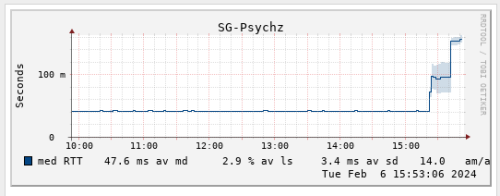
Looks like TM has change the routing with the fix.
My connection to LeaseWeb SG has back to below 20ms just now.
Previously it was 40ms for few months.
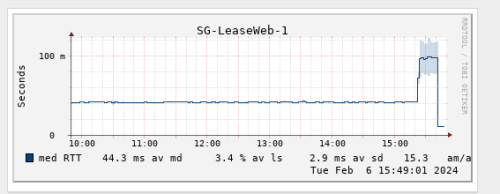
user posted image

And my connection to specific JP Server is high to 200+ms after routing change.  vmad.gif

And what the fxxk is this..  whistling.gif
Higher and higher latency.
user posted image
*
QUOTE(bugipunch @ Feb 6 2024, 03:50 PM)
they doing some configurations now. Now connection for international has return.
*
I guess not recovered yet to some International route. This is the feedback from one of my ISP.

CODE
Upon checking, the issue you are currently experiencing is due to subsea AAG cable repair, causing one of our backbone to go down. This led to the rerouting of traffic to its next available path, which is currently experiencing congestion. The current path your traffic is traversing is the best path on our end.


This post has been edited by loonsave: Feb 7 2024, 02:51 PM
loonsave
post Jul 23 2024, 12:24 PM

Regular
******
Senior Member
1,635 posts

Joined: May 2005


Anyone use the 2Gbps Unifi in business environment with own router? TM offered me free upgrade to 2Gbps package, but I would like to use our router/firewall instead of their router.

We are currently using 800Mbps with 5 fixed IP where the router/firewall do the PPPoE.
loonsave
post Jul 23 2024, 12:53 PM

Regular
******
Senior Member
1,635 posts

Joined: May 2005


QUOTE(karenzayn @ Jul 23 2024, 12:50 PM)
@Anime4000 <--- Has been deploying GPON SFP+ on biz environment

edit: idk how to tag someone in LYN, forgive me tongue.gif
*
Thank you. Let me ask in his GPON thread.
loonsave
post Jul 24 2024, 04:18 PM

Regular
******
Senior Member
1,635 posts

Joined: May 2005


Assuming I don't care if I can reach 1 or 2Gbps or not. If TM provide combo router for 2Gbps, can I request the technician on the spot to set it to bridge mode and make the PPPoE dial-up from my Sophos XG-210?

Or need to do it like TIME, call them to change it to bridge mode?
loonsave
post Jul 24 2024, 04:54 PM

Regular
******
Senior Member
1,635 posts

Joined: May 2005


QUOTE(blacktubi @ Jul 24 2024, 04:53 PM)
TM technical team are mostly outsourced contractors these days

Most of them have very limited IT knowledge and won't do anything that's out of their SOP

You can try asking but they will probably reject or they straight up have zero idea what you are talking about
*
If that's the case. Possible to call TM to change it? Or we can change it ourselves depends on which model they provide?
loonsave
post Jul 24 2024, 05:53 PM

Regular
******
Senior Member
1,635 posts

Joined: May 2005


QUOTE(kwss @ Jul 24 2024, 05:08 PM)
Just tell the technician you want to keep using your current ONU and sell the D-Link.
You might have more problem with the D-Link like broken speed or what not.
Your mission is to get the speed upgrade (especially upload).

As of now it seems TM do not have hardware that works properly at >= 1Gbps. In my opinion if the upgrade is free then take it. If you need to pay for it then don't. At this stage I won't even recommend people to upgrade their internal network gear just to try luck with > 1Gbps.
*
If I don't care the speed upgrade. They allow me to keep the current ONU with new 2Gbps plan?
Reading posts in this thread make me realized that many experiencing speed drop with the new hardware.


QUOTE(blacktubi @ Jul 24 2024, 05:24 PM)
You will need to do it yourself.
*
Understood. I just read some posts in this thread that it's workable. But I will try to keep existing ONU since those new hardwares are giving more problems than convenience.
loonsave
post Jul 31 2024, 01:17 PM

Regular
******
Senior Member
1,635 posts

Joined: May 2005


TM installer came to replace the fiberhome with D-Link Black ONR. He changed it to GPON Bridge as per my request, and the PPPoE up for few minutes, then down with the message

CODE

2024-07-31 11:38:17 Port1.500: PPPoE Link UP
2024-07-31 11:42:24 Port1.500: PPPoE Link DOWN
2024-07-31 11:43:24 Port1.500 : PADO Packet timeout no response from server.Please verify service name & ISP link status on modem. Restarting session.


He switched it back to GPON Router mode but failed to establish PPPoE connection. And he brought back the D-Link ONR, said got issue with it. sad.gif

Could it be related to this?

QUOTE(Anime4000 @ May 17 2024, 10:37 AM)
I think might not a bug on Bridge Mode,

if read ME 171, for example on Alcatel Lucent/Nokia (ALCL) OLT, the ME 171 explicitly tell:
Disable Bridge Port
VLAN 500,209 on LAN 1 & PPP
Disable LAN 2
Disable LAN 3
Disable LAN 4
VLAN 209,400 on VEIP & POTS

this cause permanent settings on newer D-Link, cannot change back to Router Mode unless factory reset.

Enforced ME 171 can prevent bridge and Disabled Ports
*
Since the D-Link do not have the option to set VLAN ID in GPON Bridge, I need to set the VLAN ID 500 in my own router?

This post has been edited by loonsave: Jul 31 2024, 03:30 PM
loonsave
post Sep 5 2024, 12:02 AM

Regular
******
Senior Member
1,635 posts

Joined: May 2005


QUOTE(PJng @ Sep 4 2024, 11:40 PM)
wait, after i set this, home wifi cannot use, phone pop up 'Private DNS server cannot be accessed.'
*
TM is out of luck for Google/Cloudflare DOH. They hijacked the IP.
loonsave
post Sep 5 2024, 09:40 AM

Regular
******
Senior Member
1,635 posts

Joined: May 2005


QUOTE(BladeRider88 @ Sep 5 2024, 03:45 AM)
AX73 Does not support DoH at all...for tp link routers that support DoH only BE series, as i hear DoT also being crippled by tmnut too
*
BE series support DOH? As I checked last month it's unsupported yet.
Maybe the latest firmware support it.
loonsave
post Sep 6 2024, 10:06 AM

Regular
******
Senior Member
1,635 posts

Joined: May 2005


QUOTE(Epic_winner091 @ Sep 6 2024, 10:04 AM)
They missed www.cloudflare.com. If the intention is to block Cloudflare entirely.  rclxub.gif
*
They missed dash.cloudflare.com, not www. tongue.gif
loonsave
post Sep 6 2024, 05:19 PM

Regular
******
Senior Member
1,635 posts

Joined: May 2005


QUOTE(yenchenje @ Sep 6 2024, 05:00 PM)
Time to properly take advantage of the power of VPN on my UDM tongue.gif

Yes I know Nord isn't the best VPN, I have mullvad but I need sometime to run through my devices and check which I can remove to add it to UDM whistling.gif

user posted image
*
I am VPN to Surfshark SG via WG from my Asus Router, then redirect traffic adguard-dns and quad9 via the WG tunnel only.
loonsave
post Sep 6 2024, 05:26 PM

Regular
******
Senior Member
1,635 posts

Joined: May 2005


QUOTE(yenchenje @ Sep 6 2024, 05:23 PM)
I’m just using Ubiquiti built in DoH function with DNS server, all my network traffic is using that as upstream DNS

My VPN is only in use with policy based routing, currently testing all traffic on a single device pass through before testing IP based pass through the upcoming weekend

But should be able to route anything that is no no to TM via my VPN server, basically traffic split tunneling instead of app split tunneling tongue.gif
*
I have 2 Raspberry Pi currently work as Adguard server, and using Adguard/quad9 DoT as upstream. Since I had subscribed Surfshark, then just leverage on it.
loonsave
post Sep 18 2024, 10:57 AM

Regular
******
Senior Member
1,635 posts

Joined: May 2005


I am using TM DLink FX3060 ONR with bridge mode. I saw some people commented that speed drop to 300Mbps from time to time. But I am experiencing other issue. The latency to gateway spiked to 3000ms+ and at minimum 25% packet loss until I restarted the ONR.

I do understand that his is a plague ONR. Suggest to change it back to the fiberhome modem?

Topic ClosedOptions
 

Change to:
| Lo-Fi Version
0.1680sec    0.37    7 queries    GZIP Disabled
Time is now: 6th December 2025 - 05:17 PM