Welcome Guest ( Log In | Register )

Bump Topic Topic Closed RSS Feed
495 Pages « < 52 53 54 55 56 > » Bottom

Outline · [ Standard ] · Linear+

Unifi Official TM UniFi High Speed Broadband Thread V42, READ 1ST PAGE FOR RELEVANT WIFI INFO!

views
     
laihuhng
post Feb 6 2024, 12:11 PM

On my way
****
Junior Member
603 posts

Joined: Jun 2005


Any idea if speed information is hard-coded to the ONU? I've upgraded to 1gbps from 800. And, I've gotten myself a new Asus TUF-AX6000 to replace the router provided by Unifi. Reason I'm doing so is because I need the parental control feature.

When I'm using the Dlink DPN-FX3060Z, I managed to get full 1gpbs++ DL, 500gbps++ UL (wireless).

However, when I'm using the old Huawei ONU + ASUS AX6000, I'm getting only 800+ DL and 200+ UL.

Any idea why? Can anyone help?
TongCN
post Feb 6 2024, 01:37 PM

Look ma, I have lots stars :D
*******
Senior Member
6,681 posts

Joined: Aug 2008
From: Malaysia


QUOTE(laihuhng @ Feb 6 2024, 12:11 PM)
Any idea if speed information is hard-coded to the ONU? I've upgraded to 1gbps from 800. And, I've gotten myself a new Asus TUF-AX6000 to replace the router provided by Unifi. Reason I'm doing so is because I need the parental control feature.

When I'm using the Dlink DPN-FX3060Z, I managed to get full 1gpbs++ DL, 500gbps++ UL (wireless).

However, when I'm using the old Huawei ONU + ASUS AX6000, I'm getting only 800+ DL and 200+ UL.

Any idea why? Can anyone help?
*
Check your QoS any accidentally limit to 800 D ?
laihuhng
post Feb 6 2024, 01:58 PM

On my way
****
Junior Member
603 posts

Joined: Jun 2005


QUOTE(TongCN @ Feb 6 2024, 01:37 PM)
Check your QoS any accidentally limit to 800 D ?
*
QoS is at router, right? But my router is brand new. I didn't make any changes. I'm suspecting the old Huawei ONU.
PRSXFENG
post Feb 6 2024, 02:36 PM

Look at all my stars!!
*******
Senior Member
2,611 posts

Joined: Nov 2020


QUOTE(laihuhng @ Feb 6 2024, 12:11 PM)
Any idea if speed information is hard-coded to the ONU? I've upgraded to 1gbps from 800. And, I've gotten myself a new Asus TUF-AX6000 to replace the router provided by Unifi. Reason I'm doing so is because I need the parental control feature.

When I'm using the Dlink DPN-FX3060Z, I managed to get full 1gpbs++ DL, 500gbps++ UL (wireless).

However, when I'm using the old Huawei ONU + ASUS AX6000, I'm getting only 800+ DL and 200+ UL.

Any idea why? Can anyone help?
*
you are not supposed to reuse old hardware, since provisioning is based on the details of the ont as far as I know (serial number, ploam credentials)
Im surprised the huawei even worked at all and they didnt disable it after you got the dlink

it is very frustrating that tm gave that crappy dlink, while also making it that you are not intended to replace it / use your own device either

you got a few options
1. use dlink
2. use dlink, connect asus via lan and disable wifi on dlink
cons
double nat
max speed of roughly 940mbps
3. get your current setup working but it will also get about 940mbps due to gigabit lan port limitation
4. replacement onu stick from Anime4000 on this forum, with 2.5g ports so you can get true 1gbps and also be future ready for 2gbps

i suppose you could try copying details from the dlink to the huawei
or contact tm

sHawTY
post Feb 6 2024, 02:44 PM

Frequent Reporter
********
All Stars
14,909 posts

Joined: Jul 2005

QUOTE(PRSXFENG @ Feb 6 2024, 02:36 PM)
SNIP
Alternatively, have TM (Telekom Malaysia) configure the DLINK device in bridge mode, functioning solely as an ONU modem. This allows the ASUS router to manage DHCP, Wi-Fi, and the PPPoE dial-up.

My office has implemented this setup, utilizing our Fortinet firewall as the PPPoE dialer. However, not all technicians are familiar with this configuration. During an upgrade, the initial TM technician observed that the process was incomplete in TM's system. Consequently, they had to abort the new ONU installation and await further instructions.

The following week, a different TM technician arrived at our location with a different DLINK ONU but lacked the expertise to perform the necessary configuration. Fortunately, I had the contact information of the first technician, enabling them to guide the second technician through the setup process.

This post has been edited by sHawTY: Feb 6 2024, 02:48 PM
kanonno
post Feb 6 2024, 03:35 PM

New Member
*
Junior Member
36 posts

Joined: Jul 2010
Seems like the same problem last Sunday night came back again. Connection to most site/app barely works until I use VPN
go626201
post Feb 6 2024, 03:35 PM

Regular
******
Senior Member
1,882 posts

Joined: Sep 2017
Unifi network boom again toward to same specific network.

This post has been edited by go626201: Feb 6 2024, 03:42 PM
NickedAsy
post Feb 6 2024, 03:41 PM

~: 6-Star Space Marshall :~
******
Senior Member
1,898 posts

Joined: Jan 2003
From: Kuala Lumpur


Yep, same here. Apala the TM techs doing other than makan gaji buta
go626201
post Feb 6 2024, 03:44 PM

Regular
******
Senior Member
1,882 posts

Joined: Sep 2017
I guess either something wrong with the core network device or human error.
darachan
post Feb 6 2024, 03:44 PM

Getting Started
**
Junior Member
87 posts

Joined: Jul 2022
QUOTE(kanonno @ Feb 6 2024, 03:35 PM)
Seems like the same problem last Sunday night came back again. Connection to most site/app barely works until I use VPN
*
Terrible slow on certain local bank online banking website last night, unsure if it's related.
go626201
post Feb 6 2024, 03:50 PM

Regular
******
Senior Member
1,882 posts

Joined: Sep 2017
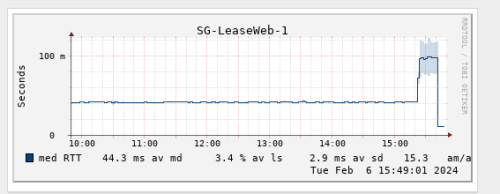
Looks like TM has change the routing with the fix.
My connection to LeaseWeb SG has back to below 20ms just now.
Previously it was 40ms for few months.
user posted image

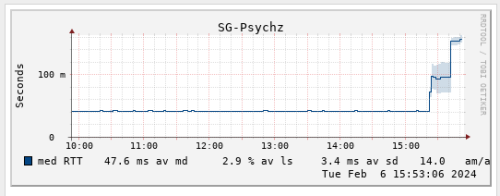
And my connection to specific JP Server is high to 200+ms after routing change. vmad.gif

And what the fxxk is this.. whistling.gif
Higher and higher latency.
user posted image

This post has been edited by go626201: Feb 6 2024, 03:54 PM
bugipunch
post Feb 6 2024, 03:50 PM

Getting Started
**
Junior Member
172 posts

Joined: Jul 2021
QUOTE(go626201 @ Feb 6 2024, 03:35 PM)
Unifi network boom again toward to same specific network.
*
they doing some configurations now. Now connection for international has return.
soonwai
post Feb 6 2024, 05:19 PM


********
All Stars
11,458 posts

Joined: Oct 2007
From: KL


QUOTE(laihuhng @ Feb 6 2024, 12:11 PM)
Any idea if speed information is hard-coded to the ONU? I've upgraded to 1gbps from 800. And, I've gotten myself a new Asus TUF-AX6000 to replace the router provided by Unifi. Reason I'm doing so is because I need the parental control feature.

When I'm using the Dlink DPN-FX3060Z, I managed to get full 1gpbs++ DL, 500gbps++ UL (wireless).

However, when I'm using the old Huawei ONU + ASUS AX6000, I'm getting only 800+ DL and 200+ UL.

Any idea why? Can anyone help?
*
Yes, it is. Not hard-coded but the speed is set in the ONU. For example, I'm on Unifi 800, if I use my ONU and my PPPoE login, I get 800. If I use my neighbors ONU and my PPPoE login, I get 500.

My installation for 800 was in 2018.
soonwai
post Feb 6 2024, 05:24 PM


********
All Stars
11,458 posts

Joined: Oct 2007
From: KL


QUOTE(PRSXFENG @ Feb 6 2024, 02:36 PM)
you are not supposed to reuse old hardware, since provisioning is based on the details of the ont as far as I know (serial number, ploam credentials)
Im surprised the huawei even worked at all and they didnt disable it after you got the dlink

...
*
For me, both the old ONU and current ONU still works. Both were installed in 2018. Actually both are the same Huawei HG8204H and were installed 2 weeks apart. Long story.

That was 2018 though.
sHawTY
post Feb 6 2024, 05:25 PM

Frequent Reporter
********
All Stars
14,909 posts

Joined: Jul 2005

laihuhng If you plan to ask TM to configure the ONU into bridge mode, please be aware that they may charge you, as it is not considered an issue with TM.
The request for a change to bridge mode should be submitted by the customer during the ONU replacement process, not afterward

Moreover, the helpline agent is unlikely to possess any information on this matter, so it's crucial to prepare beforehand

soonwai Have you ventured into configuring the DLINK ONU for bridge mode? I'm hopeful that someone with expertise on this can enlighten us with the process in the future

This post has been edited by sHawTY: Feb 6 2024, 05:29 PM
THE CLASS OF 13
post Feb 6 2024, 05:35 PM

Getting Started
**
Junior Member
171 posts

Joined: Nov 2009


QUOTE(sHawTY @ Feb 6 2024, 02:44 PM)
Alternatively, have TM (Telekom Malaysia) configure the DLINK device in bridge mode, functioning solely as an ONU modem. This allows the ASUS router to manage DHCP, Wi-Fi, and the PPPoE dial-up.

My office has implemented this setup, utilizing our Fortinet firewall as the PPPoE dialer. However, not all technicians are familiar with this configuration. During an upgrade, the initial TM technician observed that the process was incomplete in TM's system. Consequently, they had to abort the new ONU installation and await further instructions.

The following week, a different TM technician arrived at our location with a different DLINK ONU but lacked the expertise to perform the necessary configuration. Fortunately, I had the contact information of the first technician, enabling them to guide the second technician through the setup process.
*
hi can you share the first tm technician information? because currently my office on ultra 1gbs package and has this ONU, it caused so much instability for our office usage and we looking to use it in Bridge mode connecting to another router..
sHawTY
post Feb 6 2024, 05:57 PM

Frequent Reporter
********
All Stars
14,909 posts

Joined: Jul 2005

QUOTE(THE CLASS OF 13 @ Feb 6 2024, 05:35 PM)
hi can you share the first tm technician information? because currently my office on ultra 1gbs package and has this ONU, it caused so much instability for our office usage and we looking to use it in Bridge mode connecting to another router..
I'm sorry, but I have already deleted his number
The upgrade was completed over 6 months ago.
laihuhng
post Feb 6 2024, 06:00 PM

On my way
****
Junior Member
603 posts

Joined: Jun 2005


QUOTE(soonwai @ Feb 6 2024, 05:19 PM)
Yes, it is. Not hard-coded but the speed is set in the ONU. For example, I'm on Unifi 800, if I use my ONU and my PPPoE login, I get 800. If I use my neighbors ONU and my PPPoE login, I get 500.

My installation for 800 was in 2018.
*
No wonder. Is there an alternative solution so that I can make use of the new Asus router with existing hardware (DPN-FX3060V and Huawei ONU)? I'm not a networking guy. Please help. Thanks.
yenchenje
post Feb 6 2024, 06:22 PM

Enthusiast
*****
Junior Member
932 posts

Joined: Dec 2019
QUOTE(yenchenje @ Jan 10 2024, 06:39 PM)
Are you already using new ONR?

If so, go to Setup > Ethernet WAN > Connection_0 - Edit > PPPoE drop down change to bridge > to whichever router you want (From ETH port 1 to another router WAN)

You’ll turn the ONR into basically ONU again, it’s just handling VLAN segregation from TM (209,400,500) and ATA (VoIP), you can also leave the 5GHz WiFi band turned on so that you can connect to the WiFi to configure whenever when needed and no need to use any LAN cable

I’d find my post of screenshots but should be quite easily understandable

Also a reminder that doing this will limit your top speed to 940mbps due to TCP/IP transport overhead due to the presence of 1G port instead of 2.5G, so you won’t get the up to 1030Mbps limit of DL speed if you’re on 1Gbps plan and was expecting that
*
biggrin.gif For the ppl on D-Link ONR
eclectice
post Feb 6 2024, 07:59 PM

Look at all my stars!!
*******
Senior Member
2,734 posts

Joined: Mar 2008
I have had an Internal Server Error while trying to log into the Unifi Selfcare Portal desktop website since morning. Wonder why... But, no issue via its app.

Update: OK, after clearing its cookies, it works again.

This post has been edited by eclectice: Feb 6 2024, 08:11 PM

495 Pages « < 52 53 54 55 56 > » Top
Topic ClosedOptions
 

Change to:
| Lo-Fi Version
0.0185sec    0.49    6 queries    GZIP Disabled
Time is now: 15th December 2025 - 12:52 AM