Welcome Guest ( Log In | Register )

Bump Topic Topic Closed RSS Feed
5 Pages  1 2 3 > » Bottom

Outline · [ Standard ] · Linear+

Unifi Official TM UniFi High Speed Broadband Thread V42, READ 1ST PAGE FOR RELEVANT WIFI INFO!

views
     
BenYeeHua
post Dec 10 2023, 06:45 PM

Regular
******
Senior Member
1,873 posts

Joined: Nov 2010


QUOTE(sitescope @ Dec 10 2023, 03:10 PM)
Same slow spd
Btw, aldy called 100. They also confused n route to engineer to call me
Still waiting their call
user posted image

If using IDM, can get avg 66MB/s
*
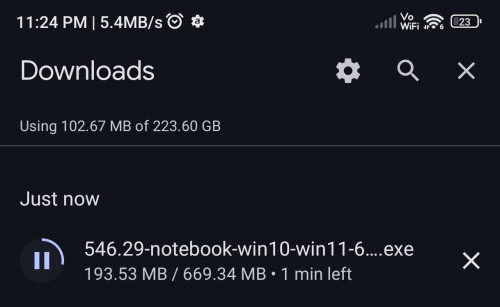
Try smartphone?
Stay in front of router, then download via chrome, see how.
BenYeeHua
post Dec 11 2023, 12:35 AM

Regular
******
Senior Member
1,873 posts

Joined: Nov 2010


QUOTE(sitescope @ Dec 10 2023, 11:27 PM)
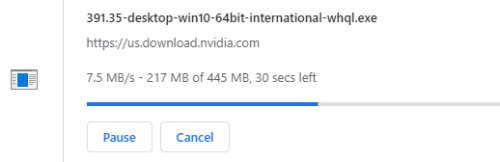
Worst. See top left.
Frm nvidia driver dload site
user posted image
*
2 possible
1. DNS give you slow routing of server
2. your routing got too many users, like too many 2Gbps users keep downloading 24/7 hours, so slow speed.

Try midnight or morning 8 AM?
BenYeeHua
post Dec 11 2023, 01:01 PM

Regular
******
Senior Member
1,873 posts

Joined: Nov 2010


QUOTE(sitescope @ Dec 11 2023, 09:10 AM)
1. Using cloudflare for both ipv4 n ipv6. Maybe need to try default tm dns
2. This is not sure. Meaning 2gbps user always got higher priority dload frm others ?

Tried few times before. Multiple timing. Still slow.
*
1. Try google dns, will give you prefer on Malaysia server than cloudflare which prefer SG server.
2. Nope, based on my testing, they got lower buffer allowed.
For example, me now 100Mbps, I can burst to 150Mbps for a short period(like 3s), but 500M customer always unable burst over 500M for short period, and more strict the speed limit.

I means is, the total bandwidth is used by them, yes it is a shared bandwidth.
During sharing of bandwidth, it is depend on latency of the server reach to your router.

So, if your server is far, higher latency, means you will be getting lower speed than those people who get lower latency, like Google local YouTube server etc.
If your speedtest to TM server is working, but not those download oversea, then it mean this la.

But I am kind of unsure who will watch YouTube 24/7 hours, lol. tongue.gif

QUOTE(kons @ Dec 11 2023, 11:03 AM)
downgrade maybe the speed even less.

i.e. 500mbps but only get 250mbps
*
Yes, possible.

The best will be keep argue together with your neighbor, let TM pull another/more port/fiber for your taman for load-balance, else it will be like that forever.
As your local speedtest got speed drop, easy for report.

For most normal customers(that just 100M-500M), the issues is the speed throttling on CloudFlare server at SG, which is yuck.
If you report to MCMC, TM just telling them it is at oversea SG, they can't do anything. sweat.gif
BenYeeHua
post Dec 11 2023, 03:19 PM

Regular
******
Senior Member
1,873 posts

Joined: Nov 2010


QUOTE(Marcus Cody @ Dec 11 2023, 03:17 PM)
Is there a way to get unifi 2gbps plan without aggregration? 2gbps splitted into 2x 1gbps. It is currently installed in my office
*
Yes, but need skill.

https://forum.lowyat.net/topic/4925452
BenYeeHua
post Dec 15 2023, 08:38 PM

Regular
******
Senior Member
1,873 posts

Joined: Nov 2010


QUOTE(kwss @ Dec 15 2023, 05:43 PM)
OK this makes it clear what's your situation.

For HOUSE A:
Post your DDNS setup and port forwarding setup

For HOUSE B:
Post how you setup your CCTV app

Do both house use the exact same CCTV setup?
*
There is 2 different on mobile network and Tm network.

1. routing
2. DNS

Maybe check both issues first?
Try use 1.1.1.1 as VPN and see can this issues resolved. hmm.gif

If issues solved, then know it is DNS or routing issues, else, need more troubleshoot.
BenYeeHua
post Dec 15 2023, 10:37 PM

Regular
******
Senior Member
1,873 posts

Joined: Nov 2010


QUOTE(kwss @ Dec 15 2023, 09:54 PM)
I'm still in the information gathering stage. A lot of "routing problem" and "DNS problem" and "IPv6 problem" is sprinkled all over this forum but nobody can pinpoint exactly what is wrong.

I think your DNS problem is the first of it's kind we know exactly what happened in details.

Don't get me wrong I am not trolling you but I do not remember reading any in-depth analysis of routing problem here.
*
Yes, just to identify it only happen on TM network or not, using VPN which act as another network for testing ma.

If mobile network and TM + VPN works, means it is TM only network got issues la.
Then the route to the answer is showing up, need start troubleshoot on TM only thing, just like my DNS issues, if I test it on VPN first, I should discover the packet drop issues on DNS router side. laugh.gif
BenYeeHua
post Dec 16 2023, 07:54 AM

Regular
******
Senior Member
1,873 posts

Joined: Nov 2010


QUOTE(kwss @ Dec 15 2023, 11:45 PM)
Let's see what user says first. I do not want to be bias in such an early stage of troubleshooting.
I also want to avoid the jump to conclusion steps. There are cases of just disable IPv6 and the problem go away. The user who reported the issue also go away after that.

Not everyone is technical. Even fewer people are interested in root-causing the issue. You are special case. You have the right router, right bank, right DNS server but also the attitude to hunt it down.

Your method have merits. But I also want to know how things are setup that might create the problem.
*
Understand, yours is more on white, as it is allowed to look into the configuration of CCTV and router, while me just simple blackbox testing lol.
Which works because router's firmware is blackbox, and are the cause.

QUOTE(kwss @ Dec 16 2023, 02:22 AM)
Hi, I am just guessing here so you need to try to find the setting.

In your Fiberhome, can you find anything that says UPnP or ALG or any similarly sounding term? Try to turn them ON.
UPnP = Universal Plug and Play
ALG = Application Layer Gateway

Or... Just turn OFF anything that says FIREWALL.

I am thinking your camera don't work on Fiberhome because it cannot open the port automatically using UPnP.
Why you cannot access your TIME camera on Fiberhome is because this camera use RTSP to stream video and the Fiberhome don't support ALG.

Do notification works? Like motion detection and all?

Also did you try updating the firmware for your camera?
*
Yup, came into same conclusion as yours, as I got the orange router, UPnP is disabled by default.

Even I don't wanna enable it, as you know, sometimes UPnP just leak internal network for those outside network request....
As IPv6 is public by default, so I just leave it as disable la, IPv4 which under CGNat enabled also useless, lol. laugh.gif

PS: I guess you means SPI firewall, yes, it is normally enabled by default, and yes, I always disabled it to prevent such issues, I faced a lot of time on it as well... sweat.gif


QUOTE(d100200 @ Dec 16 2023, 12:44 AM)
Sorry to say that the TIME router I got is almost 10 years old.
Now I am blank on how to maneuver the new router setup page.
And I have no idea what is all this.
1_INTERNET_R_VID_500
2_Other_B_VID_600
3_Other_B_VID_400
4_TR069_R_VID_209

And I can't find any VPN option in this Fiberhome AX3000 router.

Do you mind explaining how to setup the VPN ? Thanks.

Also, I am thinking to bring the D-LINK AC1200 Dual Band Gigabit Cloud Router from House A and try it in House B.
Not sure whether it will work for TM Unifi since it meant to use for TIME Internet.
*
Better don't, I sense a lacking knowledge of your side...
If you have no idea about that VID_500, it means you don't know about
1. Your PPPoE account and password
2. The configuration of VLAN 500 and 600 etc

It will take more time to switch router I will say, in days, yes.
Which quicker to take a look into your router's configuration and fix it.

QUOTE(d100200 @ Dec 16 2023, 02:12 AM)
Well. I was thinking of buying the TP-Link AX55 for a mesh setup.
But now need to know whether the problem is the router or TM backend.

Else spend money to buy a new router but still cannot remote access CCTV then it's pointless.
*
It was sound like router issues, as mention by kwss, seek for those configuration.
Screenshot it, post it out if you know nothing.

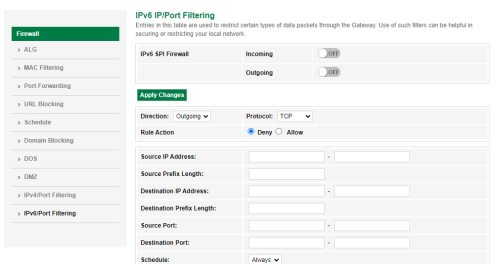
For SPI firewall, it look like this.
» Click to show Spoiler - click again to hide... «


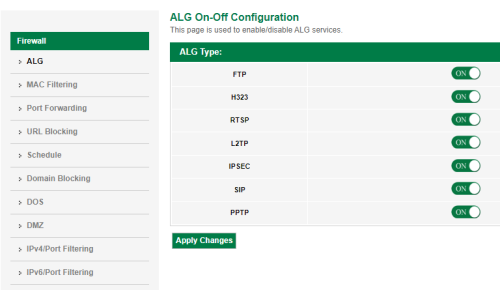
ALG is like this, got a lot like FTP, IPSEC etc.
» Click to show Spoiler - click again to hide... «


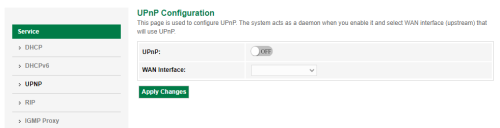
And UPnP just UPnP.
» Click to show Spoiler - click again to hide... «


Also, useless DoS.
» Click to show Spoiler - click again to hide... «


Screenshot it, post it out, then kwss will tell you disable or enable it. icon_rolleyes.gif

If you not gonna wait, then simple configuration is
1. Enable UPnP, select as 1_INTERNET_R_VID_500 if it asking you to choose which WAN Interface.
2. Enable all ALG
3. Disable All SPI in firewall configuration
4. Disable all DoS

Screenshot first, then do the change la, for the record to revert it back. thumbsup.gif
BenYeeHua
post Dec 16 2023, 11:16 AM

Regular
******
Senior Member
1,873 posts

Joined: Nov 2010


QUOTE(d100200 @ Dec 16 2023, 10:42 AM)
Thank you Sir !!!

Now found where is the problem.

user posted image

I think I changed the Level to "High".

After I change back to "Medium", all CCTV can access already.
*
Just saying, firewall bring more trouble than it should be, default, got it reason.
I guess it just kind of blocking incoming connection, so it is "safer", but p2p getting blocked as result.

QUOTE(d100200 @ Dec 16 2023, 10:52 AM)
THANK YOU EVERYONE who replied and provided your ideas.

THANK YOU !!! THANK YOU !!! THANK YOU !!!

Important thing say 3 times.

Well. Seems like a user problem. (which is me, hahaha)

Something that came to my mind.

I just received my phone bill, RM 20+ for calling 100.
Even though I spent 1 hours+ on the phone with the TM agent, I didnt yell or shout at them.
I was explaining the problem again and again and sometimes she got me wrong, I stayed calm.
Even helped her to write the problem description in the ticket word by word.

And now ME, MYSELF is the problem, at least I didn't feel bad.
*
Not bad la, RM 100 to learn about, understand how's Firewall works, before changing it.

There is many thing we don't really understand, but just use it, change it, and break it.

Just like car, most people know is, drive a car, bare min.
Smartphone, calling people, using app, bare min.

But, to use it max, well, it is a headache, and depend on learning skill.
There is too many stuff to be learn in this world, and there is not enough time for that, lol. laugh.gif

And hei, even most kids know nothing about a PC, but smart on smartphone, saying keyboard+mouse are slower than smartphone key in. laugh.gif

PS: Next time you should call via unifi mobile, 100 on unifi mobile is free. tongue.gif
BenYeeHua
post Dec 16 2023, 06:44 PM

Regular
******
Senior Member
1,873 posts

Joined: Nov 2010


QUOTE(Jjuggler @ Dec 16 2023, 02:23 PM)
Good afternoon, fellow forumers. Just a quick question. For RAHMAH package, what wireless class or brand of the router provided to the customer? Is it comes in mesh unit 2x stock isp router or single unit? Thanks.
*
It is 30M, if you need, go buy those SWU 3.0 mesh unit, a lot are selling. laugh.gif
BenYeeHua
post Dec 17 2023, 11:51 PM

Regular
******
Senior Member
1,873 posts

Joined: Nov 2010


QUOTE(zellleonhart @ Dec 17 2023, 10:08 PM)
yes I reported that, people on reddit also facing the same issue with Unifi.

I checked with my adguard home logs, whenever I am connected to wifi and try to login on android, there is not a single request sent to bitwarden. It is like either the app never requested that. But adguard home shows the request when I am on mobile network or VPN.

I have no idea whose fault is this - Unifi, bitwarden, or the app itself. Accessing vault.bitwarden.com on android phone still works, just not the app.
*
Maybe DNS?
If you get no respond from DNS, sure there will be no single request to bitwarden.
BenYeeHua
post Dec 18 2023, 07:59 AM

Regular
******
Senior Member
1,873 posts

Joined: Nov 2010


QUOTE(kwss @ Dec 18 2023, 02:38 AM)
What's the faulty domain name?

I don't have bitwarden so took a blind test with api.bitwarden.com

» Click to show Spoiler - click again to hide... «

Definitely a Cloudflare issue. Or at least between Cloudflare and Bitwarden server
*
Just test for fun.

It might be request the server list data from in.appcenter.ms, so there is some misconfiguration on Microsoft side.
If you connect directly, there is no server loaded, only bitwarden.com available, and no connection made to vault.bitwarde.com.


But...
If you use a VPN(I tested using 1.1.1.1 WARP, on KUL and on SG), it will success on receiving correct data from in.appcenter.ms.

By testing without clear data.
First, it request you to select "Self-hosted" at "logging in on", then saved it, there will be new server bitwarden.eu shown as second choice.
Then, it will success for connecting to vault.bitwarden.com, or vault.bitwarden.eu if you select .eu server.

And, if you reset app(clear data) with VPN enabled, the server list will be requested successful, and showing 2 server which is .com and .eu.
---
So, conclusion, someone at bitwarden fxxked up their server configuration list, and give the wrong server list + configuration to TM/UniFi IP range.
Or
Someone at Microsoft la.

I will said, complain to bitwarden to speed up the fixing. tongue.gif
BenYeeHua
post Dec 18 2023, 08:13 AM

Regular
******
Senior Member
1,873 posts

Joined: Nov 2010


And correction to my part, so it seem like there is some skip over DNS that I failed to capture, maybe DNS caching happen on my Android phone, lol.

So I find the f-droid version which removed Microsoft appcenter.

https://github.com/bitwarden/mobile/issues/1828

And confirmed it will request the server list from vault.bitwarden.com.
And yes, same issues, the server list will be failed to request.

If I keep looking into github for bitwarden's source code, I sure gonna find which API they are looking to fetch the server list.
But, nah, better keep complain to bitwarden la, lol. laugh.gif
BenYeeHua
post Dec 18 2023, 08:44 AM

Regular
******
Senior Member
1,873 posts

Joined: Nov 2010


After retest a few time, confirmed it should be cloudflare or bitwarden side issues, because I tried to changing the CloudFlare IP address by modifying the host file, still the same result.

So there is special result given to TM/UniFi customer IP address la...

QUOTE(kwss @ Dec 18 2023, 08:37 AM)
I didn't install the app and test, so I just blindly find some domain and hit it.
If you mitmproxy the app then I trust your analysis is correct.

BTW can I have the endpoint and perhaps the full GET or POST request? I just want to test it.
None of the listed endpoint in the "Bitwarden Addresses" belongs to Microsoft. However I noted func.bitwarden.com indeed is an Azure Function.

It is weird to have an endpoint reply differently based on IP address or telco.
*
As above, it still requesting the list of server configuration from vault.bitwarden.com or vault.bitwarden.eu.
For the which get or post request it is asking from, I kind of lazy on performing MiTM the request, lol...

Anyways, if you interesting on looking the source code, here it is.

https://github.com/bitwarden/mobile/pull/2454
https://github.com/bitwarden/mobile/blob/ma...nmentService.cs
https://github.com/bitwarden/mobile/blob/ma...nmentUrlData.cs

Still seeking which one is for the requesting server list, lol.
I wonder why they setup different API than the website version, which is https://vault.bitwarden.com/api/config

A bit tired to looking forward, as I not sleep yet. laugh.gif
BenYeeHua
post Dec 18 2023, 09:03 AM

Regular
******
Senior Member
1,873 posts

Joined: Nov 2010


QUOTE(kwss @ Dec 18 2023, 08:50 AM)
Alright. Then just leave it as it is. Since I don't use it, doesn't affect me. At least confirmed is not telco issue.
Full diagnostic can only happen with mitmproxy. Let that be an exercise for bitwarden user.
*
Done a bit with mitmproxy, it is getting as this.

https://vault.bitwarden.eu:443/api/config.

GET /api/config/ HTTP/1.1
Accept: application/json
Device-Type: 0
Bitwarden-Client-Name: mobile
Bitwarden-Client-Version: 2023.12.0
User-Agent: Bitwarden: Mobile/2023.12.0 (Android 10; SDK 29; Model HMA-L29)
Accept-Encoding: identify
Host: bitwarden.eu
Connection: Keep-Alive

Then it is dead silence from cloudflare, until timeout.
But should be the MiTM app got issues la, as it get frozen, lol. laugh.gif
---
Hmm, either MiTM app got issues, or it is the real cause found.
Nothing captured, except request head and empty body. tongue.gif

So cloudflare somehow refuse to answer?
Let me see with VPN.
-
And forgot MiTM is works as VPN lol.
Anyways, should enough data, wget etc with http/1.1 might get the answer out la.

vault.bitwarden.eu seem working, only vault.bitwarden.com got issues, hmm...

As the app got cert pin written, so I kind of failed to intercept it la...
---
Yes, if I fill in valut.bitwarden.eu as self-hosted, it works.
Only bitwarden.com down.

And this MiTM not working as it should be lol, lazy to install self-cert then go with fiddler on windows laptop.
Then let it go la, bitwarden issues, lol. tongue.gif

This post has been edited by BenYeeHua: Dec 18 2023, 09:15 AM
BenYeeHua
post Dec 18 2023, 09:19 AM

Regular
******
Senior Member
1,873 posts

Joined: Nov 2010


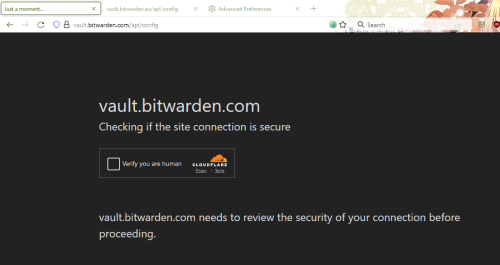
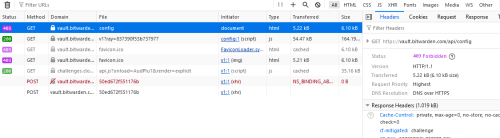
Done, with the power of, FIREFOX!!!!!

Someone was DDoS with TM/UniFi IP range of address, with the stupid of HTTP/1.1
So CloudFlare blocked TM/UniFi IP range with the power of, well, "Checking if the site connection is secure"

Solved, bitwarden is stupid one by requesting with old HTTP/1.1, and not supporting the blocking of CloudFlare, lol.

user posted image
user posted image
user posted image
BenYeeHua
post Dec 18 2023, 09:21 AM

Regular
******
Senior Member
1,873 posts

Joined: Nov 2010


QUOTE(kwss @ Dec 18 2023, 08:50 AM)
Alright. Then just leave it as it is. Since I don't use it, doesn't affect me. At least confirmed is not telco issue.
Full diagnostic can only happen with mitmproxy. Let that be an exercise for bitwarden user.
*
Result out, simple, blocked of cloudflare with request of HTTP/1.1, someone must be brute force with bot/zombie/infected computer running on TM IP range, lol. laugh.gif

And app failed to handle the blocking of cloudflare, double lol.
While app requesting with HTTP/1.1 or app's UA, triple lol!!!
(As that mitm app got issues, it might forcing downgrade the app's connection to HTTP/1.1 for capturing, based on my Tachiyomi skill, CloudFlare partial block based on UA)

In the end, lol!!! rclxms.gif
---
Also extra, it is same blocking happen on IPv4 and/or IPv6, as long as it is under TM la. laugh.gif

This post has been edited by BenYeeHua: Dec 18 2023, 09:25 AM
BenYeeHua
post Dec 18 2023, 09:27 AM

Regular
******
Senior Member
1,873 posts

Joined: Nov 2010


QUOTE(kwss @ Dec 18 2023, 09:25 AM)
MMM.... I cannot reproduce this problem...
I am on public IP... Those with problem, are you all behind CGNAT?
*
Yes, 60.53.x.x.

Can be me testing too much and get blocked, possible, but I was testing on my phone, which is under different IPv6 address, hmm.... hmm.gif
Did cloudflare block whole IPv6 range that assigned to each TM customer?
---
Retested again, Firefox

Disabled HTTP2 and HTTP3, only HTTP/1.1 get blocked by CloudFlare
Reenabled HTTP2 and/or HTTP3, solved this issues.

Might better look into the source code of this bitwarden app, see did it support HTTP2/HTTP3 or not? hmm.gif

This post has been edited by BenYeeHua: Dec 18 2023, 09:29 AM
BenYeeHua
post Dec 18 2023, 09:34 AM

Regular
******
Senior Member
1,873 posts

Joined: Nov 2010


QUOTE(kwss @ Dec 18 2023, 09:30 AM)
I wget with -4 and -6... Both got 403. So yes looks like the whole 2001:e68/32 is blocked.
*
Then it is kind of bitwarden's app issues la, even my comic reader app Tachiyomi know to inform me it get blocked by CloudFlare, and asking me to passing the test by opening website via WebView... doh.gif

Who the hell still using HTTP/1.1 at year 2023, aiyo...

Conclusion, bitwarden(at least Android version) is a lazy developer product, it is better to skip using it, as it seem like iOS app out of this issues... hmm.gif
---
QUOTE
Is this to mean you're using Cloudflare's CAPTCHA/bot detection on the API? If this is the case, that will cause many things to break as Cloudflare cannot natively handle API traffic with a CAPTCHA as it will respond with HTML or a JS response, which breaks the Bitwarden client. You would need to contain or custom-filter based on /path in Cloudflare's more advanced configuration to separate the API from the web vault SPA itself.

https://github.com/bitwarden/mobile/issues/...mment-975740275

QUOTE
@atjbramley I was able to debug the issue. The problem is that, when logging in, instead of getting the response, the extension (or android app, or desktop app) gets the Cloudflare "Verify that you are human" screen, and the request, of course, fails since it gets a different stuff than expected.
I'd say this is a problem in the relationship frontend - backend, not a customer support issue.

https://github.com/bitwarden/mobile/issues/...ment-1823211981

Kind of reminding me that app showing tips of "Network issues" when it is server caboom, lol. laugh.gif

This post has been edited by BenYeeHua: Dec 18 2023, 09:41 AM
BenYeeHua
post Dec 18 2023, 09:50 AM

Regular
******
Senior Member
1,873 posts

Joined: Nov 2010


QUOTE(kwss @ Dec 18 2023, 09:41 AM)
curl which has http2 support indeed success...
So its a combination of factor:
1. The Xamarin used by the Android app (explains why Apple iOS and browser works)
2. Cloudflare DDoS protection is trigger for TM with HTTP/1.1

Why Cloudflare only kills HTTP/1.1 on TM prefix is a mystery. Supposedly if there is an attack, IPv6 should still works since its not NAT.
But seems like they kill the whole AS4788.
*
Well, ya, and this app kind of failed the testing.
Because to bypass the pinned cert of app, you just choose https://vault.bitwarden.eu as server, then MiTM can happen.

Which means, if you trust the privacy of EU, and put your data on EU server, then it just becoming less secured than the defaulted US server... doh.gif

Also how strangely https://vault.bitwarden.eu safe/excluded from this Cloudflare DDoS protection.... sweat.gif

Why the hell still got people using this kind of app, lol!!! laugh.gif
BenYeeHua
post Dec 18 2023, 09:51 AM

Regular
******
Senior Member
1,873 posts

Joined: Nov 2010


QUOTE(kwss @ Dec 18 2023, 09:50 AM)
Found the bug:
https://github.com/bitwarden/mobile/blob/e6...orwarder.cs#L23

requestMessage.Version = new Version(1, 0);

Just change to Version(2, 0) and its done!
*
lol.
Still, they need to solve the cert pin issues for EU customer, by default they are not cert pin protected. laugh.gif
---
So, any comment for why they put it as 1, 0?
Let me see the commit history. brows.gif

5 Pages  1 2 3 > » Top
Topic ClosedOptions
 

Change to:
| Lo-Fi Version
0.2267sec    0.81    7 queries    GZIP Disabled
Time is now: 9th December 2025 - 01:30 PM