

For transfer of ownership, how soon it can take effect?
Unifi Official TM UniFi High Speed Broadband Thread V42, READ 1ST PAGE FOR RELEVANT WIFI INFO!
Unifi Official TM UniFi High Speed Broadband Thread V42, READ 1ST PAGE FOR RELEVANT WIFI INFO!
|
|
 Dec 10 2023, 01:19 PM Dec 10 2023, 01:19 PM
Return to original view | Post
#1
|
 
All Stars
14,267 posts Joined: Jan 2011 
|
For transfer of ownership, how soon it can take effect?
|
|
|
|
|
|
Dec 14 2023, 09:55 AM
Return to original view | IPv6 | Post
#2
|
|
All Stars
14,267 posts Joined: Jan 2011
|
if i still have about 8 months of contract for my unifi, and my cousin one is also under contract (not sure how many months left), is it still possible for me to transfer my unifi account to her?
|
|
|
Dec 14 2023, 11:46 AM
Return to original view | IPv6 | Post
#3
|
|
All Stars
14,267 posts Joined: Jan 2011
|
QUOTE(Oltromen Ripot @ Dec 14 2023, 10:09 AM) transfer ownership, probably possible while still under contract. transfer fee apply. penalty, not sure, but don't think so as line is not cancelled. can meh? i address can have 3 accounts? sure bo.. u mean on the same BTU can have multiple unifi accounts at the same time? i heard about 1 BTU can have unifi or maxis (or celcom/digi etc) at the same time. but never heard about the former.1 premise can have up to 3 accounts OF DIFFERENT OWNERS. if intent is to merge premise, i suggest don't transfer ownership, just move it.  i still have another 7 months of contract to go... but new place has no unifi coverage. so i have no choice but to switch to time broadband. then now left with this prob of how to deal with the remaining unifi broadband connection. the last visit to tm they said i can suspend the line up to 3 months due to no coverage. (it is a temperaily solution i can go with first before i have a solution to it. my parent's house has existing unifi connection already. rm89 (30Mbps now upgraded to 100Mbps). it is possible that i transfer them my SWU 2.0 (300Mbps now 500Mbps) plan becos they have no more contract, but i do not wish to do so. becos their usage is low. i am paying rm129 now. if i transfer to them, additional rm40 per month for nothing... they are better off to stay on rm89 for 100Mbps instead. besides, if i transfer my 7 months contract line to someone else, do they just need to serve the 7 months contract or it will be a reset to 24 months? if TM does allow multiple unifi line on the same premise, i can still relocate the line to my parent's house and they just use my 500Mbps line for 7 months (at least it will not go into waste). |
|
|
Jan 19 2024, 05:01 AM
Return to original view | IPv6 | Post
#4
|
|
All Stars
14,267 posts Joined: Jan 2011
|
QUOTE(Omochao @ Jan 18 2024, 02:01 PM) Just for sharing, cheapest i found online for an ax1800 rated mesh system, can support 500mbps no issues . Am using it at the moment , cheaper than what I bought from last sales. is it tri-band? if not, dual-band is trash seriously. Deco X20, is around RM500++ for 2 packs. If anyone wants a simple mesh, this works and can pair effortlessly.  |
|
|
Jan 19 2024, 05:46 AM
Return to original view | IPv6 | Post
#5
|
|
All Stars
14,267 posts Joined: Jan 2011
|
QUOTE(Omochao @ Jan 19 2024, 05:31 AM) well, for my dual band thrash, i can still manage to get 350mbps out from the mesh node despite is a dual band wireless backhauled.40 feets away and with a concrete wall in between. if tri-band can easily get above 500Mbps... not bad I would still say  other than speed, actually latency is also a big difference. if u do a speed test using fast.com, u can tell. This post has been edited by westlife: Jan 19 2024, 05:47 AM |
|
|
Jan 19 2024, 11:58 AM
Return to original view | IPv6 | Post
#6
|
|
All Stars
14,267 posts Joined: Jan 2011
|
QUOTE(Omochao @ Jan 19 2024, 09:04 AM) my speed is only 500mbps... getting near to max speed ,I'm happy and contented. for me i am more concerned about these figure as it will impact my mobile gaming. sometime speed fast but latency not good also no use. I would rather choose a simple and cheaper setup than getting high priced ones and facing intermittent drop offs. end of the day is about stability and how far it can cover. 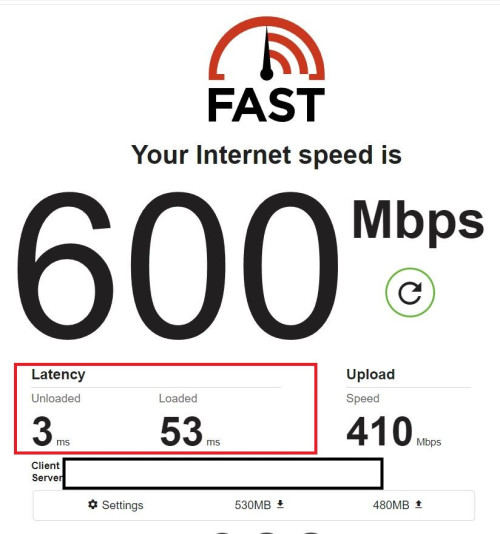 QUOTE(Omochao @ Jan 19 2024, 11:28 AM) Finally got in touch with one kind hearted person from TM , and passed me the file to update Fiberhome SR1041F router to RP0107. so updated to the newer firmware is a self-pwned?Though not much differences , but here is the minor changes; - No more attached devices shown under "status" tab - Cannot enable separate/multiple SSID when Bandsteering is turned on, previously I can turn on Bandsteering with 3 extra separate streams of 2.4ghz, and 2 more of 5Ghz, useful for people who wants to add another SSID for their specific devices like CCTV or that can only run on 2.4ghz , which I don't find it in any household routers unless on the enterprise grade ones. Seems like they found out about this and decide to lock it further. Though I have yet to turn all of it concurrently as I just need a separate 5Ghz for a PS5 device at home. - Can't select bandwidth Mhz anymore, is totally locked. With that said, RP0105 version is the best for now. This post has been edited by westlife: Jan 19 2024, 12:00 PM |
|
|
|
|
|
Jan 20 2024, 09:11 PM
Return to original view | IPv6 | Post
#7
|
|
All Stars
14,267 posts Joined: Jan 2011
|
QUOTE(blacktubi @ Jan 20 2024, 09:05 PM) When you use Ethernet connect to mesh node, you are not affect by the 50% Wi-Fi capacity issue. then tri-band save the troubles to identify the right model of dual-band mesh to buy to get the max speed.In layman terms If your phone connect to mesh node wirelessly, 50% airtime used for your phone, another 50% airtime used for the mesh node to connect to upstream main node. Hence, resulted in the half capacity issue on dual band mesh WiFi. But a lot people got it wrong, it's not halving the Internet speed. It's halving the capacity. Hence if you have a AX6000 dual-band mesh, you can still get 500Mbps on the mesh node over Wi-Fi easily. Oh ya, all TP-Link mesh uses multi-band backhaul. They no longer use dedicated backhaul. Got pros and cons for this. |
|
|
Jan 20 2024, 09:16 PM
Return to original view | IPv6 | Post
#8
|
|
All Stars
14,267 posts Joined: Jan 2011
|
QUOTE(blacktubi @ Jan 20 2024, 09:13 PM) Just buy the highest AX or BE number you can afford. ic. but price wise AX6000 will be much much more ex rite? if the max speed is about the same that can be achieve by both, of course one can consider go for the lower capacity tri-band mesh as well.An AX6000 dual band mesh will outperform an AX3600 tri-band mesh if both of them are of decent quality. |
|
|
Jan 20 2024, 09:18 PM
Return to original view | IPv6 | Post
#9
|
|
All Stars
14,267 posts Joined: Jan 2011
|
QUOTE(blacktubi @ Jan 20 2024, 09:17 PM) Dual-Band AX6000 will achieve much higher speed than Tri-Band AX3600. what about interferrence? since there are two 5GHz radio way on tri-band for signals to pass to and fro.This post has been edited by westlife: Jan 20 2024, 09:18 PM |
|
|
Feb 4 2024, 03:25 PM
Return to original view | IPv6 | Post
#10
|
|
All Stars
14,267 posts Joined: Jan 2011
|
QUOTE(failed.hashcheck @ Feb 4 2024, 03:14 PM) u sudah kena tipu. likely it is the $ collected by the contractor themselves as they know that the owner is not aware of this.You should not pay a single cent for cable breakage no matter what isp you are in. That cable outdoor is not your property. Why you pay gov infra maintenance out of your pocket?💀 go make report and get your money back. if there is no receipt given, very hard to raise dipute on this. this is the same for those contractors who collected $ for new unifi installation even their houses are within the installation limit (in terms of the free wiring lengths provided by the standard free installation). ------------------------------------------------------------------------------------------------------------------------ how come the search function is not working? 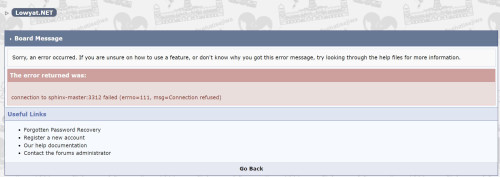 This post has been edited by westlife: Feb 4 2024, 03:26 PM |
|
|
Feb 6 2024, 12:37 AM
Return to original view | IPv6 | Post
#11
|
|
All Stars
14,267 posts Joined: Jan 2011
|
QUOTE(YoungMan @ Feb 5 2024, 02:57 PM) If your area has very good 5g coverage, invest in a good 5g modem and subscribe plan like U Home 68. no home internet plan can beat fibre.mobile broadband even 5G is not possible to replace fibre in terms of latency... and 5G depends on too many factors, including the no of users around ur area which can cause congestion. |
|
|
Feb 6 2024, 09:03 PM
Return to original view | IPv6 | Post
#12
|
|
All Stars
14,267 posts Joined: Jan 2011
|
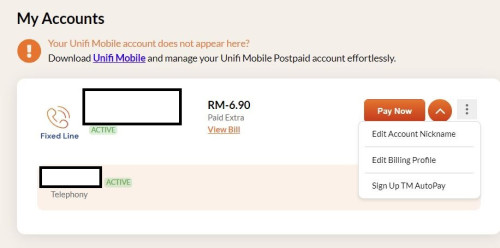
anyone of u still has the copper fixed line active now?
 QUOTE(cenkudu @ Feb 6 2024, 08:06 PM) Unifi technician came today to install new wifi router for SWU 4.0 extra. so my timeline: what is ur package for SWU 4.0?31/1: submit application to migrate to Maxis 1/2: received call from Unifi sales and counter offer for SWU 4.0 extra 6/2 morning: order created and chat with Unifi to reconfirm the package for SWO 4.0 6/2 afternoon: Technician call and came for wifi 6 installation all together about 6 days This post has been edited by westlife: Feb 6 2024, 09:03 PM |
|
|
Feb 6 2024, 10:40 PM
Return to original view | IPv6 | Post
#13
|
|
All Stars
14,267 posts Joined: Jan 2011
|
For unifi termination, if I cannot see the account in the unifi website and app it means it had been terminated rite?
Will I receive the final bill? And do I need to return this BTU? (Used since Oct 2014). So big the BTU comparing to nowadays one. If needs to return, can return without the power adapter? 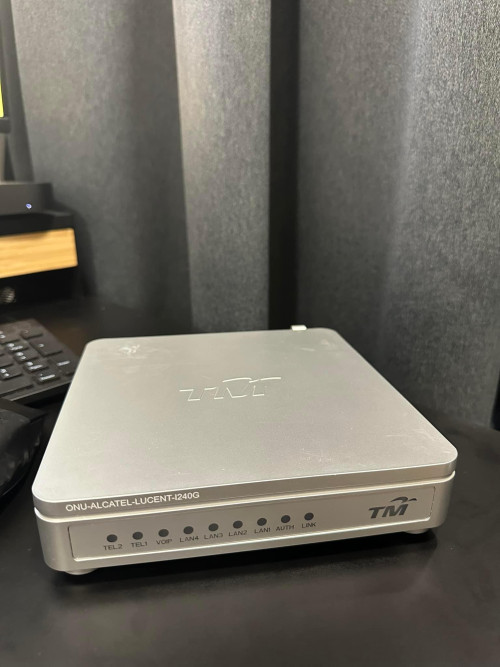 This post has been edited by westlife: Feb 6 2024, 10:40 PM |
|
|
|
|
|
Feb 7 2024, 09:14 AM
Return to original view | Post
#14
|
|
All Stars
14,267 posts Joined: Jan 2011
|
QUOTE(TongCN @ Feb 7 2024, 09:01 AM) I already thrown away mine dunno which year spring clean even termination of line also no need to return? Becos faq said rm500 will be imposed if no return.Make sure to reset the device before throwing XD Don't think they wanna collect back already, basically e-waste |
|
|
Feb 7 2024, 11:11 AM
Return to original view | Post
#15
|
|
All Stars
14,267 posts Joined: Jan 2011
|
QUOTE(TongCN @ Feb 7 2024, 09:27 AM) No idea cause during the time i helped my parents to jump ship the line to Celcomfibre, Unifi doesn't even mention anything of returning from their side when i physically visit the centre for the confirmation of port out. Ic. Then maybe no need to return anymore. Good then.I then later live chat asked them those devices - Unifi TV, Router, Modem how? They say can continue use if want.... ok...  Throw, lol ... Throw, lol ...Becos I was at tm point last week, the staff also never mention about the return of device. |
|
|
Feb 8 2024, 11:31 PM
Return to original view | IPv6 | Post
#16
|
|
All Stars
14,267 posts Joined: Jan 2011
|
QUOTE(bugipunch @ Feb 8 2024, 11:26 PM) best to replace the cable. If u go to shop they can get better quality and better workmanship. if it is from the terminal point inside ur house to modem one, then u just buy one to replace urself will do. |
|
|
Feb 18 2024, 02:03 AM
Return to original view | IPv6 | Post
#17
|
|
All Stars
14,267 posts Joined: Jan 2011
|
QUOTE(sadlyfalways @ Feb 17 2024, 01:54 PM) Get a mesh router with dedicated backhaul Tri-band wireless backhaul mesh is still not bad…If repeater or dual band wireless mesh, maximum you can get is half of main router and that is with excellent signal strength Best option is to wire, but tri band deco also can get 800+ wireless on node QUOTE(YoungMan @ Feb 15 2024, 10:23 PM) Yes, rm119 for 300mbps, rm139 for 500mbps. Fastest way to get is by visiting Tmpoint. worse promotion than SWU 3.0?Haha, wait no more. Do it while the promo is still available. QUOTE(andyz @ Feb 9 2024, 03:14 PM) Converted Unifi 800Mbps (Turbo Upgrade 2018) To Unifi Home 1Gbps staywithUnifi 4.0 Extra 1Gbps plan but upload speed is still at 500Mbps only? Jan 23rd Damansara Utama TMPoint to convert my present package (Unifi 800Mbps (Turbo Upgrade 2018)) to 1Gbps RM 249/mth .. sales personal switch me to 1Gbps staywithUnifi 4.0 rm235 a month.. 6 months free Jan 31st Installation (1 Dlink DPN-FX3060Z) 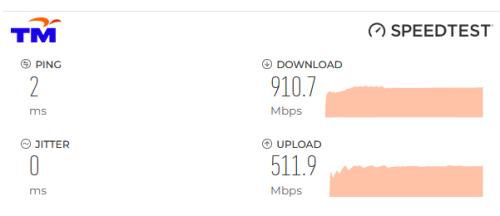 This post has been edited by westlife: Feb 18 2024, 02:29 AM |
|
|
Feb 18 2024, 01:09 PM
Return to original view | IPv6 | Post
#18
|
|
All Stars
14,267 posts Joined: Jan 2011
|
QUOTE(PJng @ Feb 18 2024, 10:48 AM) Use as AP mode, more stable, but become 2 wifi AP la That’s the prob for APs which the roaming across nodes is not so smooth.I buy cheap router use cable as AP, both also full speed 300mbps, anything just configure at main router, even ipv6, just a small problem some place of my home, phone does not auto connect stronger wifi after i leave If use mesh and connect via wired confirmed will outperformance this solution. QUOTE(Omochao @ Feb 18 2024, 10:34 AM) Either use ethernet cable and wire it to your 2nd mesh, or get a powerline kit, there's plenty of used one in the market. Powerline is used to be popular for a while before mesh solution is out. Becos many ppl who do not want to hack their walls to build new wired network points at their house can use it as a solution. But over time people realise the limitations of it. Not only that it cannot work on power extension cord and it needs a dedicated power point. Even one use the pass thru version of the powerline but it is more ex and again data connection via electrical wire is not stable and the speed was cut by quite a lot, the speed one can get it way lower than the theoretical speed. This is the reason why powerline is almost totally out of market now. Mesh (via wired or wireless - for tri-band only) is the best solution. This post has been edited by westlife: Feb 18 2024, 01:16 PM |
|
|
Feb 18 2024, 05:53 PM
Return to original view | IPv6 | Post
#19
|
|
All Stars
14,267 posts Joined: Jan 2011
|
QUOTE(Moogle Stiltzkin @ Feb 18 2024, 05:06 PM) like example the tplink wifi6e mesh. can either go for a 2pack (sufficient for most people) or 3pack (for bigger homes) mesh then connect them to the nodes via wifi backhaul. yes, wireless backhaul is likely will suit most ppl unless one really build all the wired network ports in the different locations that can be used with wired backhaul for their wifi mesh (e.g. new house renovation).or if possible you can even do wired backhaul for even better wifi. but if not, like u said, instead of powerline ethernet adapters, just the wifi backhaul to connect the mesh units will get the job done. another option is something like this https://soyacincau.com/2023/08/17/time-teas...-lower-latency/ though you'd have to pay for them to do that for you, if you insist on reliable wired solution to different locations around the home. If not mistaken they are still using a wifi mesh, but it seems to be a wired backhaul which is more better than a wifi backhaul for performance reliability. personally i hacked the wall and fished cat6a ethernet through the wall from 1 room to another. not everyone can or wants to do this, but if you want a neat wired setup, this is also one option. though these days most people will just be fine/happy with the mesh wifi option  but make sure it is tri-band, dun waste time with dual-band. Fibre-To-The-Room (FTTR) is the perfect solution, becos one can get super super low latency as their main node everyhere in house as they wish, but seriously the solution maybe too ex for most ppl. but it is worthwhile to invest on it actually. for rm1800 or rm2160 it is good enough to cover a 2 bedroom or 3 bedroom apartments units to ensure one has low latency internet anywhere in the house. to be fair, a super good wifi 6 or 6E mesh system now is also not cheap to be frank. 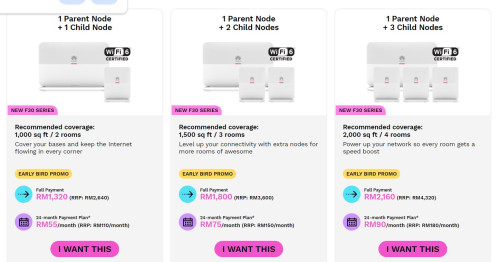 but for those who do not want to invest this like me (becos i am renting an apartment), i can only use wireless backhaul mesh. but not too bad, i can get very good connection for unit now with 3 x linksys MR8300 mesh nodes. 1 parent node placed at living and 2 x child nodes (one at study room and one at yard) which gives me decent latency that allows me to play my mobile game anywhere in the house and has the maximum download speed of at least 300Mbps and above for my 500Mbps plan. hacking walls are tough if one is already staying in the unit, hacking walls will cause tremendous amount of dusts which is crazy.. .  but agreed that the cost of it is lower than FTTR for sure. but agreed that the cost of it is lower than FTTR for sure.This post has been edited by westlife: Feb 18 2024, 06:01 PM |
|
|
Feb 18 2024, 08:34 PM
Return to original view | IPv6 | Post
#20
|
|
All Stars
14,267 posts Joined: Jan 2011
|
QUOTE(go626201 @ Feb 18 2024, 07:07 PM) FTTR without hacking wall also workable, since the invisible fiber is almost unseeable if you done in perfect way. (Maybe the cost cheaper than hacking wall,but need invest some time to do) I know that FTTR no need to hack wall. That’s why it is quite a worthy solution.But still need to figure out the path for sticking the invisible fiber to the side edge of wall. Hacking wall and build network ports but network ports using UTP cables should still be more be inferior to fibre cable after all. |
|
Topic ClosedOptions
|
| Change to: |  0.2338sec 0.2338sec
 0.22 0.22
 7 queries 7 queries
 GZIP Disabled GZIP Disabled
Time is now: 8th December 2025 - 05:51 PM |
 Quote
Quote