

QUOTE(nyunyu @ Jul 19 2021, 08:52 PM)
Oh, they now offers this to everyone now? That's good. Last I heard if call 100 the offers will be RM159 without Mesh.

Official TM UniFi High Speed Broadband Thread V39, READ 1ST PAGE FOR RELEVANT WIFI INFO
|
|
 Jul 19 2021, 09:46 PM Jul 19 2021, 09:46 PM
Show posts by this member only | IPv6 | Post
#3741
|
 
Senior Member
4,382 posts Joined: Jan 2003 
|
Where you heard? Try out 100 and find out yourself. RM159 300mbps with Mesh Wifi. QUOTE(nyunyu @ Jul 19 2021, 08:52 PM) Oh, they now offers this to everyone now? That's good. Last I heard if call 100 the offers will be RM159 without Mesh. 1tanmee liked this post
|
|
|
|
|
|
Jul 19 2021, 10:35 PM
Show posts by this member only | IPv6 | Post
#3742
|

Senior Member
1,394 posts Joined: Aug 2006 From: Sungai Petani 
|
QUOTE(jhleo1 @ Jul 19 2021, 09:46 PM) Where you heard? Try out 100 and find out yourself. RM159 300mbps with Mesh Wifi. Well, from this thread lar, like the one posted 2 days ago.Didn't know TM will also give you RM159 package including Mesh, that's news to me. QUOTE(aryz @ Jul 17 2021, 04:25 PM) Just going TM Point on friday , get offer 300mbps with maintain my unifi STB & Plus Box at RM159 .... Without Mesh wifi (if add mesh RM169) 1tanmee liked this post
|
|
|
Jul 19 2021, 11:16 PM
Show posts by this member only | IPv6 | Post
#3743
|
|
Senior Member
4,382 posts Joined: Jan 2003
|
The offer is given thru 100 only not TM Point. I did not take the offer because I don't want Mesh.
QUOTE(nyunyu @ Jul 19 2021, 10:35 PM) Well, from this thread lar, like the one posted 2 days ago. Didn't know TM will also give you RM159 package including Mesh, that's news to me. |
|
|
Jul 20 2021, 05:15 PM
Show posts by this member only | IPv6 | Post
#3744
|
|
Senior Member
1,573 posts Joined: Oct 2015
|
I am on 'unifi 500Mbps - Super Value YEP2019' package (Price is RM169 + RM30 Aneka Plus Pack)
Plan to find a cheaper package. Any recommendations? Hopefully is cheaper but with comparable speed This post has been edited by watabakiu: Jul 20 2021, 05:19 PM |
|
|
Jul 20 2021, 05:29 PM
|

Junior Member
103 posts Joined: Apr 2010 From: Shah Alam
|
Not sure if everyone experienced the same but I have recently change my 2nd router (TM C1200 which was set with assigned IP as access point) with another proper TPLink Access Point.
Since then, I felt the internet speed is more stable (maybe placebo effect) but the best thing is some website (eg prawnhub) is able to be accessed despite changing DNS previously. Perhaps it is a coincidence, perhaps not. TLDR - do not use TM issued router at all means This post has been edited by danialefendy: Jul 20 2021, 05:32 PM |
|
|
Jul 20 2021, 08:24 PM
|
|
Senior Member
6,818 posts Joined: Oct 2008 From: Kuala Lumpur 
|
QUOTE(watabakiu @ Jul 20 2021, 06:15 PM) I am on 'unifi 500Mbps - Super Value YEP2019' package (Price is RM169 + RM30 Aneka Plus Pack) Perhaps downgrade to 300mbps at RM159, no Playtv. Or try to check competing ISP see any cheaper 500mbps plan or not.Plan to find a cheaper package. Any recommendations? Hopefully is cheaper but with comparable speed 1tanmee liked this post
|
|
|
|
|
|
Jul 20 2021, 08:30 PM
|

Junior Member
584 posts Joined: May 2013
|
QUOTE(danialefendy @ Jul 20 2021, 06:29 PM) Not sure if everyone experienced the same but I have recently change my 2nd router (TM C1200 which was set with assigned IP as access point) with another proper TPLink Access Point. They forgot to switch back on DPI for those website?Since then, I felt the internet speed is more stable (maybe placebo effect) but the best thing is some website (eg prawnhub) is able to be accessed despite changing DNS previously. Perhaps it is a coincidence, perhaps not. TLDR - do not use TM issued router at all means sadlyfalways liked this post
|
|
|
Jul 21 2021, 01:37 AM
Show posts by this member only | IPv6 | Post
#3748
|
|
Senior Member
4,382 posts Joined: Jan 2003
|
coincidence.
QUOTE(danialefendy @ Jul 20 2021, 05:29 PM) Not sure if everyone experienced the same but I have recently change my 2nd router (TM C1200 which was set with assigned IP as access point) with another proper TPLink Access Point. Since then, I felt the internet speed is more stable (maybe placebo effect) but the best thing is some website (eg prawnhub) is able to be accessed despite changing DNS previously. Perhaps it is a coincidence, perhaps not. TLDR - do not use TM issued router at all means |
|
|
Jul 21 2021, 09:45 AM
Show posts by this member only | IPv6 | Post
#3749
|

Senior Member
1,598 posts Joined: Jan 2016
|
QUOTE(xCryptik @ Jul 20 2021, 08:30 PM) They forgot to switch back on DPI for those website? Nah, been “monitoring” the hub since MCO 1.0DNS method doesn't work at all, changing to third party router won't do either... Had to use VPN or modify config files |
|
|
Jul 21 2021, 11:01 AM
|
|
Senior Member
2,611 posts Joined: Nov 2020
|
Not sure on the some websites side of things but internet being better is definitely not a coincidence, stock router sucks
|
|
|
Jul 21 2021, 01:18 PM
|
|
Junior Member
109 posts Joined: May 2016
|
Any one have issue with steam game disconnection? Keep loading and failed to connect server. It happen all the time on my side. Only 2am onward, issue settle down but still appear once or twice every hour. It this related to the network or the router? Using stock router archer c1200.
|
|
|
Jul 21 2021, 02:46 PM
|

Junior Member
321 posts Joined: Aug 2008
|
QUOTE(comet2232 @ Jul 14 2021, 11:50 AM) Here is the content: Wow bro.so you seriously got transfer id nymber from digi to port out?or just gimmick?haha---------------------Begin Quote---------------------------------------------------- From: xxxxxxxxx@gmail.com Sent: 11/07/2021 19:23:53 To: help@tm.com.my Subject: Enquiry about Porting out my current unifi 100Mbps to Digi Home Fibre 300Mbps Dear customer service, Account No : 10xxxxxxx Unifi Plan : unifi 100Mbps Turbo Deal 2019 I was approved by Digi for a switch to their Digi Home Fibre (300Mbps) for RM100 and was provided with a transfer request ID that I must give to TMpoint within 10days. Before I go to TMPoint, I would like enquire about the followings: 1. What is the contractual expiry date of my current plan? 2. I was informed that Unifi does offer discounted rate for existing customer. I would like to know what is the best offer you can provide me @ 300Mbps? Eg, RM 159 for 300mbps + Mesh , No Unifi TV Looking forward to your reply YourName xxxxxxxxx |
|
|
Jul 21 2021, 03:53 PM
|
|
Senior Member
1,185 posts Joined: Nov 2020
|
QUOTE(QuantumEdge @ Jul 21 2021, 09:45 AM) Nah, been “monitoring” the hub since MCO 1.0 The hub has been accessible using custom DNS since last week. no need for vpn or secure dns DNS method doesn't work at all, changing to third party router won't do either... Had to use VPN or modify config files i ter notice when turned off vpn and everything still loaded lmao does it not work for you? maybe try reset router ? dpi definitely turned off for a while hahah xvid also working shaktiv8 and QuantumEdge liked this post
|
|
|
|
|
|
Jul 21 2021, 06:08 PM
Show posts by this member only | IPv6 | Post
#3754
|
|
Senior Member
1,598 posts Joined: Jan 2016
|
QUOTE(sadlyfalways @ Jul 21 2021, 03:53 PM) The hub has been accessible using custom DNS since last week. no need for vpn or secure dns Hub works for me but video doesn't, on FAST dns nowi ter notice when turned off vpn and everything still loaded lmao does it not work for you? maybe try reset router ? dpi definitely turned off for a while hahah xvid also working |
|
|
Jul 21 2021, 06:13 PM
|
|
Junior Member
363 posts Joined: Sep 2014
|
QUOTE(QuantumEdge @ Jul 21 2021, 06:08 PM) Hub works for me but video doesn't, on FAST dns now What kind of error do you get? Both works for me heheh |
|
|
Jul 21 2021, 08:39 PM
|
|
Newbie
11 posts Joined: Jun 2012
|
QUOTE(Reyz @ Jul 21 2021, 02:46 PM) Wow bro.so you seriously got transfer id nymber from digi to port out?or just gimmick?haha Yes I did have the transfer id but i decided not to proceed. :-D |
|
|
Jul 21 2021, 09:08 PM
|

Senior Member
1,417 posts Joined: Oct 2007
|
Just received my TM's Deco M4.
Installing is very easy... but a few questions... Does anyone has any comparison with the older Netis (orange) router? Seems like in my room, my phone only connected to the 2.4Ghz, but my PC is on 5Ghz (Using Netis, all my devices is on 5Ghz). Don't find anyway to separate both signals or forcing my phone to connect to 5ghz. I know I can plug in another Deco nearby, but is the signal's weaker? Is there any way to enable other functions of the Deco? Seems like there's not much function in the router's config page. Can't even change DNS or disconnect WAN. 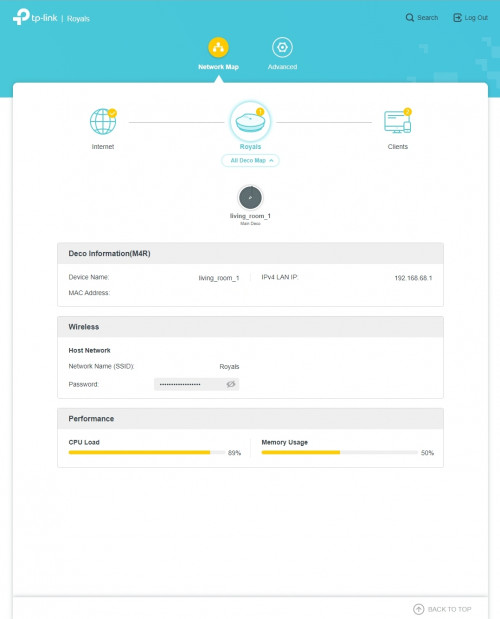 | | 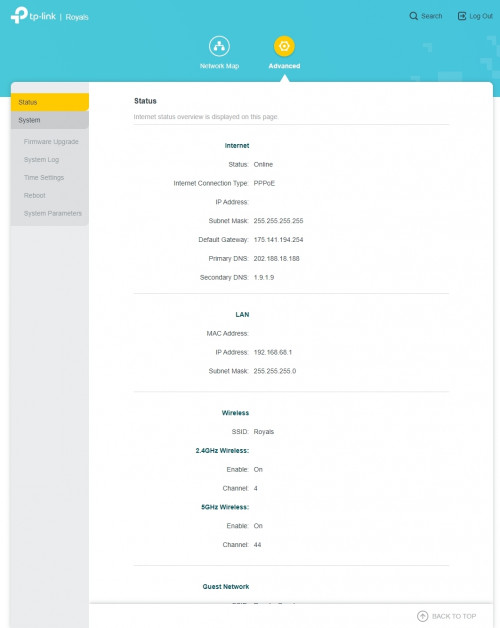 |
|
|
Jul 21 2021, 09:16 PM
Show posts by this member only | IPv6 | Post
#3758
|
|
Senior Member
4,382 posts Joined: Jan 2003
|
Anyone facing issues to view in UnifiTV app? Many channels are lock. Only can watch local TV channels? Other channels all lock. It happened after I updated the app just now.
|
|
|
Jul 21 2021, 09:32 PM
|
|
Junior Member
445 posts Joined: Apr 2008
|
QUOTE(jhleo1 @ Jul 21 2021, 09:16 PM) Anyone facing issues to view in UnifiTV app? Many channels are lock. Only can watch local TV channels? Other channels all lock. It happened after I updated the app just now. Try enter pin 123456 |
|
|
Jul 21 2021, 09:52 PM
Show posts by this member only | IPv6 | Post
#3760
|
|
Senior Member
1,524 posts Joined: Dec 2020 From: Perak
|
QUOTE(d3v073d_50uL @ Jul 21 2021, 09:08 PM) Just received my TM's Deco M4. Cant separate both signalInstalling is very easy... but a few questions... Does anyone has any comparison with the older Netis (orange) router? Seems like in my room, my phone only connected to the 2.4Ghz, but my PC is on 5Ghz (Using Netis, all my devices is on 5Ghz). Don't find anyway to separate both signals or forcing my phone to connect to 5ghz. I know I can plug in another Deco nearby, but is the signal's weaker? Is there any way to enable other functions of the Deco? Seems like there's not much function in the router's config page. Can't even change DNS or disconnect WAN. | U need to use the Deco App to access the settings. |
|
Topic ClosedOptions
|
| Change to: |  0.0271sec 0.0271sec
 0.39 0.39
 6 queries 6 queries
 GZIP Disabled GZIP Disabled
Time is now: 16th December 2025 - 06:21 AM |
 Quote
Quote