Welcome Guest ( Log In | Register )

Bump Topic Topic Closed RSS Feed

Outline · [ Standard ] · Linear+

 Official TM UniFi High Speed Broadband Thread V39, READ 1ST PAGE FOR RELEVANT WIFI INFO

views
     
d3v073d_50uL
post Jul 16 2021, 02:23 AM

Regular
******
Senior Member
1,417 posts

Joined: Oct 2007


ah.. i didn't know i can get lower offer for 300mbps ...
already took their offer on 300mbps + mesh (no unifi tv, which is OK for me..)
If i know I can get 139 without the mesh, i would've take it..
d3v073d_50uL
post Jul 16 2021, 04:30 AM

Regular
******
Senior Member
1,417 posts

Joined: Oct 2007


QUOTE(sadlyfalways @ Jul 16 2021, 03:58 AM)
Thank you for the info!

I’m cozy in bed lol. Too lazy go down to router. Will reset tomorrow šŸ˜‚
*
why just not restart by router config?
d3v073d_50uL
post Jul 21 2021, 09:08 PM

Regular
******
Senior Member
1,417 posts

Joined: Oct 2007


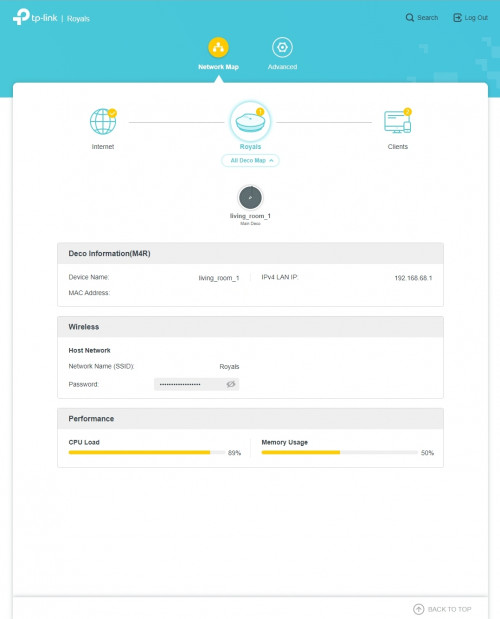
Just received my TM's Deco M4.
Installing is very easy... but a few questions...

Does anyone has any comparison with the older Netis (orange) router?
Seems like in my room, my phone only connected to the 2.4Ghz, but my PC is on 5Ghz (Using Netis, all my devices is on 5Ghz).
Don't find anyway to separate both signals or forcing my phone to connect to 5ghz.
I know I can plug in another Deco nearby, but is the signal's weaker?

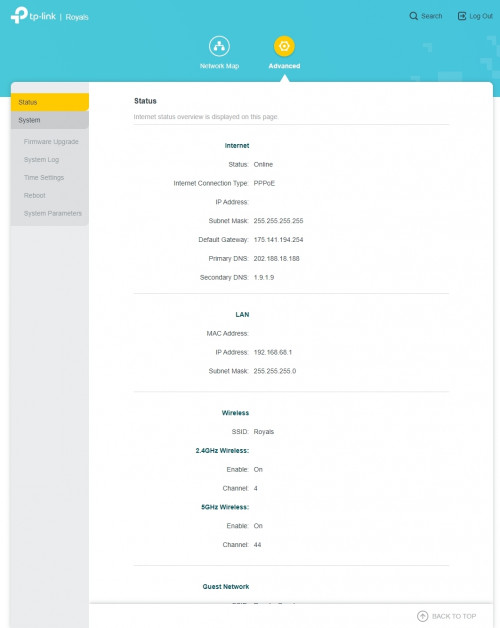
Is there any way to enable other functions of the Deco?
Seems like there's not much function in the router's config page.
Can't even change DNS or disconnect WAN.

user posted image | user posted image
d3v073d_50uL
post Jul 22 2021, 12:01 AM

Regular
******
Senior Member
1,417 posts

Joined: Oct 2007


QUOTE(QuantumEdge @ Jul 21 2021, 10:34 PM)
It is working for me now, guess they know when people use it often lol
My friend switched from Netis to Deco M4, upstairs speed increased from 10mbps to 80mbps beside the satellite unit.
If you need to configure the router, use their app
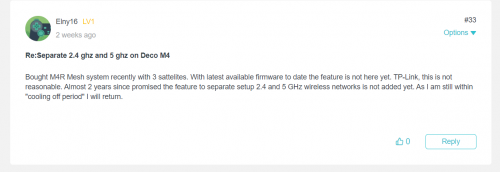
About separating 5ghz and 2.4ghz, you'll need to set up guest wifi
https://community.tp-link.com/en/home/forum...c/165738?page=1

user posted image
*
I guess, enabling guest mode is one of the way to force 5Ghz...
But it's weird why the my phone can't lock the 5ghz in my room but others can... (BTW, it's Galaxy Note 9).
Didn't try other devices yet except my PC...
Switching back to the Netis router for now...

Topic ClosedOptions
 

Change to:
| Lo-Fi Version
0.0603sec    0.49    7 queries    GZIP Disabled
Time is now: 13th December 2025 - 12:29 PM