Outline ·
[ Standard ] ·
Linear+
Official TM UniFi High Speed Broadband Thread V39, READ 1ST PAGE FOR RELEVANT WIFI INFO
|
danialefendy
|
 May 16 2021, 08:40 PM May 16 2021, 08:40 PM
|
Getting Started


|
Reading through the thread, I am still unable to come to the conclusion that should I enable or disable IPV6?
I noticed that some torrent sites like 1337x and yts returned as 404 sometimes. Not sure due to IPV6 or other issues.
|
|
|
|
|
|
danialefendy
|
Jun 5 2021, 10:59 PM
|
Getting Started
|
QUOTE(sHawTY @ Jun 5 2021, 08:56 PM) No. Once you've downgraded your UniFi Turbo package, you can never get it back This is why I stayed with my UniFi 800 Turbo at RM189 until now even though I stay alone in my house You're lucky to get 800 turbo at RM189, mine is RM240. Quite painful to pay every month |
|
|
|
|
|
danialefendy
|
Jun 7 2021, 05:26 PM
|
Getting Started
|
QUOTE(sHawTY @ Jun 5 2021, 11:09 PM) Trust me, there are people paying a bit lower than me I believe I saw someone paying RM169 for their Turbo 800 Nevertheless, I'm content with the price I'm paying right now PS: Why is your ping so high? 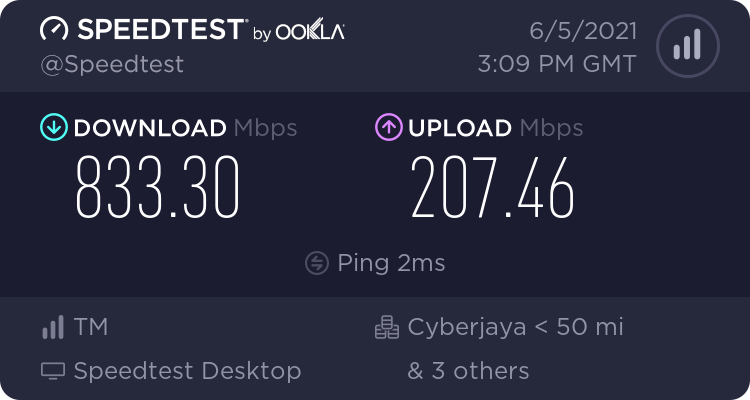 Not sure why ping is high, usually I cannot get 800Mbps if test thru my PC, need to do it thru my router's webpage then only I could achieve the speed. QoS set to standard (TP-link archer C2300) |
|
|
|
|
|
danialefendy
|
Jun 7 2021, 06:35 PM
|
Getting Started
|
QUOTE(sHawTY @ Jun 7 2021, 05:45 PM) Looks like TP-Link still hasn't improve anything since the era of TL-WDR3600 I can get full 800Mb/s just fine with all my ASUS routers. RT-AX56U, RT-AC68U, RT-AC88U, RT-AC86U & GT-AC5300 Oh and I disabled QOS because I don't need it at all Definitely gonna get ASUS Mesh in near future |
|
|
|
|
|
danialefendy
|
Jul 6 2021, 01:54 PM
|
Getting Started
|
Any suggestion to get a good Mesh/router set for my Unifi 800MBps? Currently using Tp-link C2300 with assigned IP on Tp-Link C1200. Budget around RM1k. Setup is for double-storey house, Main router ground floor, another top floor.
I feel like the connection now not that optimal under the current setup. Quite slow on my android phone when using certain apps like IMGUR.
This post has been edited by danialefendy: Jul 6 2021, 02:05 PM
|
|
|
|
|
|
danialefendy
|
Jul 6 2021, 02:00 PM
|
Getting Started
|
QUOTE(aniq8676 @ Jul 6 2021, 01:58 PM) TP-LINK Archer AX73 - RM399TP-LINK Archer AX90 - RM699Thank you for your suggestion. Do you mean to combine both router, using AX73 as AP mode? |
|
|
|
|
|
danialefendy
|
Jul 6 2021, 03:00 PM
|
Getting Started
|
QUOTE(QuantumEdge @ Jul 6 2021, 02:26 PM) TP-Link Deco X20, since you got the budget RM900 you can get 3 pack  Awesome!!! Will have a look at their specs and consider deeply |
|
|
|
|
|
danialefendy
|
Jul 20 2021, 05:29 PM
|
Getting Started
|
Not sure if everyone experienced the same but I have recently change my 2nd router (TM C1200 which was set with assigned IP as access point) with another proper TPLink Access Point.
Since then, I felt the internet speed is more stable (maybe placebo effect) but the best thing is some website (eg prawnhub) is able to be accessed despite changing DNS previously. Perhaps it is a coincidence, perhaps not.
TLDR - do not use TM issued router at all means
This post has been edited by danialefendy: Jul 20 2021, 05:32 PM
|
|
|
|
|



 Quote
Quote

 0.1803sec
 0.37
0.37
 7 queries
 GZIP Disabled