Outline ·
[ Standard ] ·
Linear+
TIME [OFFICIAL] TIME Fibre Broadband™ v4, Experience the ONE TRUE 2Gbps
|
LHY89 P
|
 Feb 9 2023, 10:33 AM Feb 9 2023, 10:33 AM
|
New Member


|
Hi all, newly subscribed to TIME package and was given the huawei Hg8145x6. I realized it combines the modem + router (mean the optical cable also connect to same unit)
Can anyone advise if i want a modem + router setup what is needed?
Can this huawei unit set as just modem (similar to TM/Maxis) then i attach my own router? or i need to buy a separate modem to achieve this?
Many thanks!
|
|
|
|
|
|
PRSXFENG
|
Feb 9 2023, 11:06 AM
|
|
|
QUOTE(LHY89 @ Feb 9 2023, 10:33 AM) Hi all, newly subscribed to TIME package and was given the huawei Hg8145x6. I realized it combines the modem + router (mean the optical cable also connect to same unit) Can anyone advise if i want a modem + router setup what is needed? Can this huawei unit set as just modem (similar to TM/Maxis) then i attach my own router? or i need to buy a separate modem to achieve this? Many thanks! Contact TIME to change the combo modem/router into modem only mode, then connect up your own router as usual. |
|
|
|
|
|
GameFr3ak
|
Feb 9 2023, 02:20 PM
|
|
|
Just got my "mesh" network configured by TIME. It was done with 2x HG8145X6 routers. 1 x became the main router 1 x became the AP Once everything was configured, I wanted to turn off all 2.4g as it's not necessary. I connected through 192.168.100.1 and turned off the 2.4g wifi but I noticed that it's still being transmitted through the AP. I tried turning off the main router and connecting a PC to the AP via LAN but it wouldn't let me in. I tried to turn off the 2.4g wifi via the main router, I unticked the 2.4g (refer to the screenshot) and clicked on apply but it pops back up. And I couldn't directly configure the AP as it wouldn't let me in. Any clues? 
|
|
|
|
|
|
victor87
|
Feb 9 2023, 06:25 PM
|
|
|
Hello,
I am existing TFBB user and was given HG8145X6 modem router.
Any idea how to set a scheduled reboot on the router itself?
I noticed that the speed is greatly reduced after a several days, and a reboot will bring back the reboot speed. Tried logging onto the router to find this function, but to no avail, I believe it was removed by the carrier Time itself.
Anyone running custom / stock Huawei firmware on these?
This post has been edited by victor87: Feb 9 2023, 06:26 PM
|
|
|
|
|
|
jjj2
|
Feb 9 2023, 10:36 PM
|
|
|
QUOTE(LHY89 @ Feb 9 2023, 10:33 AM) Hi all, newly subscribed to TIME package and was given the huawei Hg8145x6. I realized it combines the modem + router (mean the optical cable also connect to same unit) Can anyone advise if i want a modem + router setup what is needed? Can this huawei unit set as just modem (similar to TM/Maxis) then i attach my own router? or i need to buy a separate modem to achieve this? Many thanks! Hi, what you need to do is configure the X6 as Bridge Mode, and get your own router to perform the PPPOE dialing & handle all routing. Connect your router to LAN1 of the X6. Thanks. |
|
|
|
|
|
jjj2
|
Feb 9 2023, 10:44 PM
|
|
|
QUOTE(GameFr3ak @ Feb 9 2023, 02:20 PM) Just got my "mesh" network configured by TIME. It was done with 2x HG8145X6 routers. 1 x became the main router 1 x became the AP Once everything was configured, I wanted to turn off all 2.4g as it's not necessary. I connected through 192.168.100.1 and turned off the 2.4g wifi but I noticed that it's still being transmitted through the AP. I tried turning off the main router and connecting a PC to the AP via LAN but it wouldn't let me in. I tried to turn off the 2.4g wifi via the main router, I unticked the 2.4g (refer to the screenshot) and clicked on apply but it pops back up. And I couldn't directly configure the AP as it wouldn't let me in. Any clues?
When the 2 units are meshed together, both bands are being utilized. This is a bug, the 2.4GHz keeps coming back after a while even though you managed to turn it off. |
|
|
|
|
|
jjj2
|
Feb 9 2023, 10:58 PM
|
|
|
QUOTE(victor87 @ Feb 9 2023, 06:25 PM) Hello, I am existing TFBB user and was given HG8145X6 modem router. Any idea how to set a scheduled reboot on the router itself? I noticed that the speed is greatly reduced after a several days, and a reboot will bring back the reboot speed. Tried logging onto the router to find this function, but to no avail, I believe it was removed by the carrier Time itself. Anyone running custom / stock Huawei firmware on these? Hi Bro, try this. 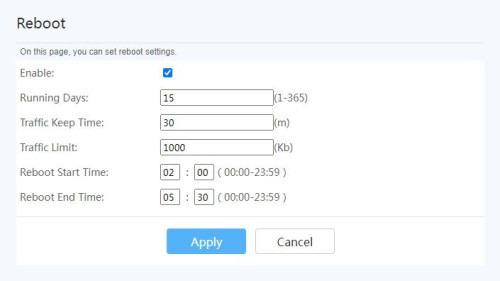 Go to Advanced > Maintenance Diagnostic > Reboot *Again, not guarantee it will always work on all version of firmware, as it has been modified for telco-specific. |
|
|
|
|
|
GameFr3ak
|
Feb 9 2023, 11:04 PM
|
|
|
QUOTE(jjj2 @ Feb 9 2023, 10:44 PM) When the 2 units are meshed together, both bands are being utilized. This is a bug, the 2.4GHz keeps coming back after a while even though you managed to turn it off. Thanks! Finally, an explanation. I thought I was going mad and technically inept. Is there any known fix to this? |
|
|
|
|
|
LHY89 P
|
Feb 11 2023, 03:55 PM
|
New Member
|
QUOTE(jjj2 @ Feb 9 2023, 10:36 PM)
Hi, what you need to do is configure the X6 as Bridge Mode, and get your own router to perform the PPPOE dialing & handle all routing.
Connect your router to LAN1 of the X6.
Thanks.
https://pictr.com/images/2023/02/11/EzlcGO.md.png
is this the setting? just change from GPON to AP? any other setting needed?
if needed i can further snap shot the pages within this router for better discussion.
Thanks in advance! |
|
|
|
|
|
blacktubi
|
Feb 11 2023, 04:06 PM
|
-

|
QUOTE(LHY89 @ Feb 11 2023, 03:55 PM) <a href='https://pictr.com/images/2023/02/11/EzlcGO.md.png' target='_blank'>https://pictr.com/images/2023/02/11/EzlcGO.md.png </a> is this the setting? just change from GPON to AP? any other setting needed? if needed i can further snap shot the pages within this router for better discussion. Thanks in advance! You can’t do it yourself Give TIME a call |
|
|
|
|
|
LHY89 P
|
Feb 11 2023, 04:21 PM
|
New Member
|
QUOTE(blacktubi @ Feb 11 2023, 04:06 PM) You can’t do it yourself Give TIME a call will this be a chargeable service? thanks. |
|
|
|
|
|
blacktubi
|
Feb 11 2023, 06:59 PM
|
-
|
QUOTE(LHY89 @ Feb 11 2023, 04:21 PM) will this be a chargeable service? thanks. No, they can do it remotely |
|
|
|
|
|
wirelessbuyer
|
Feb 12 2023, 11:39 AM
|
|
|
Any time fibre agent here, can pm me for any promo for new 100Mbps registration. Tq
|
|
|
|
|
|
LHY89 P
|
Feb 12 2023, 02:11 PM
|
New Member
|
Just a sharing. I contacted TIME via chat. They can direct configure the huawei unit to modem only ("bridge mode") and local side i only just need to setup my router with the PPPOE + time user ID + password.
So far everything is working and the whole process took <30mins.
|
|
|
|
|
|
jjj2
|
Feb 12 2023, 04:08 PM
|
|
|
QUOTE(LHY89 @ Feb 11 2023, 03:55 PM) <a href='https://pictr.com/images/2023/02/11/EzlcGO.md.png' target='_blank'>https://pictr.com/images/2023/02/11/EzlcGO.md.png </a> is this the setting? just change from GPON to AP? any other setting needed? if needed i can further snap shot the pages within this router for better discussion. Thanks in advance! Not this, you need to click on your Internet connection profile & change PPPOE to Bridge Mode. Please call TIME CS to request for the Bridge Mode Profile to be pushed over as we are not allowed to release the SuperAdmin login to customers/public. Thanks. |
|
|
|
|
|
Topet
|
Feb 13 2023, 01:36 AM
|
|
|
Anyone got a referral code for 500mbps. Thank you
|
|
|
|
|
|
LHY89 P
|
Feb 13 2023, 09:00 PM
|
New Member
|
QUOTE(jjj2 @ Feb 12 2023, 04:08 PM) Not this, you need to click on your Internet connection profile & change PPPOE to Bridge Mode. Please call TIME CS to request for the Bridge Mode Profile to be pushed over as we are not allowed to release the SuperAdmin login to customers/public. Thanks. Already called and change accordingly. Appreciate your tips  |
|
|
|
|
|
nixuotan
|
Feb 14 2023, 09:22 AM
|
New Member
|
Hi. I just got upgraded to 2 X6 units. 1 acting as modem/router and the other a mesh unit. All is well but currently it's wireless backhaul. If i want to run a network cable to do wired backhaul is there any settings I need to change? Or simply just connect the 2 units? Thank you.
|
|
|
|
|
|
FusionXY
|
Feb 14 2023, 11:58 AM
|
|
|
QUOTE(nixuotan @ Feb 14 2023, 09:22 AM) Hi. I just got upgraded to 2 X6 units. 1 acting as modem/router and the other a mesh unit. All is well but currently it's wireless backhaul. If i want to run a network cable to do wired backhaul is there any settings I need to change? Or simply just connect the 2 units? Thank you. You can connect each other. If speed does not improve, maybe there is some settings to change. |
|
|
|
|
|
xinjiechew
|
Feb 14 2023, 08:20 PM
|
Getting Started
|
Hi guys, any idea how does 2gbps roll out to existing time infra building? I checked online Novum has 2gbps already but my apartment building which is 2 building next to Novum still not available.
|
|
|
|
|



 Quote
Quote


 0.0297sec
 0.65
0.65
 6 queries
 GZIP Disabled