Outline ·
[ Standard ] ·
Linear+
TIME [OFFICIAL] TIME Fibre Broadband™ v4, Experience the ONE TRUE 2Gbps
|
Artofwar007 P
|
 Jan 10 2023, 08:34 PM Jan 10 2023, 08:34 PM
|
New Member


|
QUOTE(sylpid013 @ Jan 7 2023, 08:15 AM) The DNS can change as picture below. <a href='https://pictr.com/images/2023/01/07/EiNJJJ.md.jpg' target='_blank'>https://pictr.com/images/2023/01/07/EiNJJJ.md.jpg </a> The problem is many missing feature on current huawei  . Not sure If I can replace it with mikrotik or other router Yeah not very user friendly and features are limited. Best to get the TIME people to make it into a bridge. so you can use your own router. |
|
|
|
|
|
xMusashii
|
Jan 12 2023, 10:23 PM
|
Getting Started
|
Hi all, just relocated to a new place (1k sq ft), and renew my TIME contract to 500 mbps with free wifi6 router + mesh. With mesh, i get around 80mbps on my desktop, without it, i get 180mbps. Is there another way for me to get 400++ mbps? Need change to new wifi 6 router or mesh? sorry for noob question
|
|
|
|
|
|
Clavie
|
Jan 13 2023, 10:16 AM
|
Getting Started
|
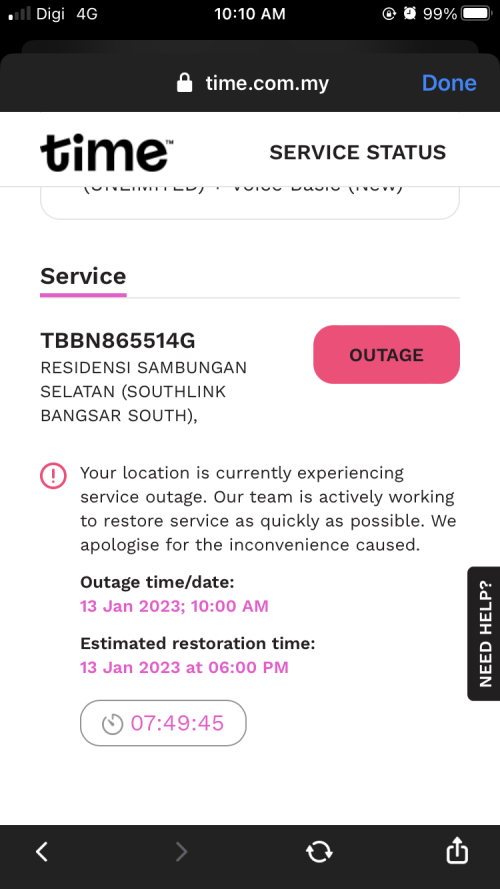
*edit: it is due to Time's outage and not the router* *******No longer relevant**** Did my Huawei modem/router just die?
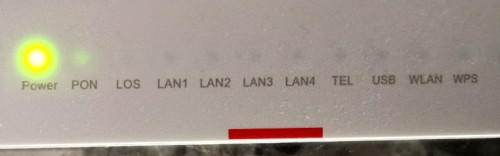 I have a 500mbps connection since a few month with that recent Huawei modem/router and suddenly no more WiFi. I tried accessing http://192.168.100.1/ but no access. I looked at the router and there were still some blinking lights like when it works well. I decided to press the button to switch it off and back on, then I only have the power light that turns green for 25 seconds then the green light goes away like it's off. It tried switching off the main power, waited some time, and same behavior when I turn it on. Anything else I could do? Or do I need to contact TIME? If so, what number to call? Thanks, I rely on fibre to work :-( Good day to you! This post has been edited by Clavie: Jan 13 2023, 10:38 AM |
|
|
|
|
|
codenchips
|
Jan 13 2023, 01:44 PM
|
Getting Started
|
QUOTE(xMusashii @ Jan 12 2023, 10:23 PM) Hi all, just relocated to a new place (1k sq ft), and renew my TIME contract to 500 mbps with free wifi6 router + mesh. With mesh, i get around 80mbps on my desktop, without it, i get 180mbps. Is there another way for me to get 400++ mbps? Need change to new wifi 6 router or mesh? sorry for noob question +1 I have the same question. It's performing better without the Mesh. lol |
|
|
|
|
|
jun_ng_1208
|
Jan 13 2023, 11:16 PM
|
|
|
QUOTE(xMusashii @ Jan 12 2023, 10:23 PM) Hi all, just relocated to a new place (1k sq ft), and renew my TIME contract to 500 mbps with free wifi6 router + mesh. With mesh, i get around 80mbps on my desktop, without it, i get 180mbps. Is there another way for me to get 400++ mbps? Need change to new wifi 6 router or mesh? sorry for noob question QUOTE(codenchips @ Jan 13 2023, 01:44 PM) +1 I have the same question. It's performing better without the Mesh. lol I have the same experience with the same Huawei Mesh unit provided by TIME, w/o mesh can hit 300+ mbps on wifi for my PC on 500mbps plan but with the mesh unit on the speed drops to less than 100mbps... AFAIK, this is due to the mesh is essentially a AP if you use it wirelessly, if you want full speed with the mesh on, you have to use the LAN connection between router and mesh... |
|
|
|
|
|
jjj2
|
Jan 14 2023, 10:15 PM
|
|
|
QUOTE(Clavie @ Jan 13 2023, 10:16 AM) *edit: it is due to Time's outage and not the router* *******No longer relevant**** Did my Huawei modem/router just die?
I have a 500mbps connection since a few month with that recent Huawei modem/router and suddenly no more WiFi. I tried accessing http://192.168.100.1/ but no access. I looked at the router and there were still some blinking lights like when it works well. I decided to press the button to switch it off and back on, then I only have the power light that turns green for 25 seconds then the green light goes away like it's off. It tried switching off the main power, waited some time, and same behavior when I turn it on. Anything else I could do? Or do I need to contact TIME? If so, what number to call? Pleae call 1800 18 1818Thanks, I rely on fibre to work :-( Good day to you! |
|
|
|
|
|
jjj2
|
Jan 14 2023, 10:16 PM
|
|
|
QUOTE(xMusashii @ Jan 12 2023, 10:23 PM) Hi all, just relocated to a new place (1k sq ft), and renew my TIME contract to 500 mbps with free wifi6 router + mesh. With mesh, i get around 80mbps on my desktop, without it, i get 180mbps. Is there another way for me to get 400++ mbps? Need change to new wifi 6 router or mesh? sorry for noob question Yes, go for WiFi6 Mesh Nodes on your own & make sure your receiving ends devices are supporting that as well. |
|
|
|
|
|
jjj2
|
Jan 14 2023, 10:17 PM
|
|
|
QUOTE(codenchips @ Jan 13 2023, 01:44 PM) +1 I have the same question. It's performing better without the Mesh. lol Yes, that is why the crap device is not supposed to give to customers at all. |
|
|
|
|
|
-kytz-
|
Jan 15 2023, 11:39 AM
|
|
|
Is it possible to get a new router to replace my existing Huawei Wifi 6 router? How would it work as the router is a modem as well. Mine is the 500Mbps plan
Also, would the Huawei router work well with other mesh products eg: Asus/TP Link etc? I think the huawei mesh system is kinda crap.
The speeds I'm getting in my room is only between 100-180Mbps, around 200-300Mbps outside the door and 500Mbps right next to the router.
This post has been edited by -kytz-: Jan 15 2023, 11:40 AM
|
|
|
|
|
|
jjj2
|
Jan 20 2023, 08:03 AM
|
|
|
Wishing all forumers a very prosperous Chinese New Year & Happy Holidays !  |
|
|
|
|
|
jjj2
|
Jan 20 2023, 08:06 AM
|
|
|
QUOTE(-kytz- @ Jan 15 2023, 11:39 AM) Is it possible to get a new router to replace my existing Huawei Wifi 6 router? How would it work as the router is a modem as well. Mine is the 500Mbps plan If your Huawei X6 is configured as ONT mode (fiber + routing), then you can configure it as Bridge Mode & Plug in your own Router to take over all the routing.Also, would the Huawei router work well with other mesh products eg: Asus/TP Link etc? I think the huawei mesh system is kinda crap. Nope it only works amongst Huawei & limited between certain models. Yes the ones provided are craps.The speeds I'm getting in my room is only between 100-180Mbps, around 200-300Mbps outside the door and 500Mbps right next to the router. |
|
|
|
|
|
blacktubi
|
Jan 20 2023, 09:32 PM
|
-

|
QUOTE(-kytz- @ Jan 15 2023, 11:39 AM) Is it possible to get a new router to replace my existing Huawei Wifi 6 router? How would it work as the router is a modem as well. Mine is the 500Mbps plan Also, would the Huawei router work well with other mesh products eg: Asus/TP Link etc? I think the huawei mesh system is kinda crap. The speeds I'm getting in my room is only between 100-180Mbps, around 200-300Mbps outside the door and 500Mbps right next to the router. If you are planning to get good speed on your PC, I will recommend changing a router and use a good WiFi 6 PCIE adapter. It will perform better than using a mesh WiFi. Your condition doesn't seem that bad until the extend where I will recommend a mesh. |
|
|
|
|
|
-kytz-
|
Jan 20 2023, 11:52 PM
|
|
|
QUOTE(jjj2 @ Jan 20 2023, 08:06 AM) Thanks! QUOTE(blacktubi @ Jan 20 2023, 09:32 PM) If you are planning to get good speed on your PC, I will recommend changing a router and use a good WiFi 6 PCIE adapter. It will perform better than using a mesh WiFi. Your condition doesn't seem that bad until the extend where I will recommend a mesh. I'm using an Asus AC88 PCIE but rated Wifi 5 only https://www.asus.com/my/networking-iot-serv...eries/pce-ac88/Which PCIE card do you recommend that's better? |
|
|
|
|
|
blacktubi
|
Jan 21 2023, 11:42 AM
|
-
|
QUOTE(-kytz- @ Jan 20 2023, 11:52 PM) Thanks! I'm using an Asus AC88 PCIE but rated Wifi 5 only https://www.asus.com/my/networking-iot-serv...eries/pce-ac88/Which PCIE card do you recommend that's better? Upgrade to the PCE-AX58BT and use a WiFi 6 router that's AX5400 and above will give you a huge boost in performance. I had the PCE-AC88 and upgraded to PCE-AX58BT as well. |
|
|
|
|
|
fishuu
|
Jan 27 2023, 10:44 PM
|
Getting Started
|
Happy CNY to all here, already checked the coverage via website but just to be sure is there any time coverage for Landed properties in Taman Bukit Serdang, Seri Kembangan ?
TiA
|
|
|
|
|
|
jsnhoh
|
Jan 28 2023, 12:18 AM
|
|
|
QUOTE(fishuu @ Jan 27 2023, 10:44 PM) Happy CNY to all here, already checked the coverage via website but just to be sure is there any time coverage for Landed properties in Taman Bukit Serdang, Seri Kembangan ? TiA Mostly not! |
|
|
|
|
|
Matchy
|
Jan 28 2023, 09:29 AM
|
|
|
Anyone that experience connection issue recently? Getting random time out.
|
|
|
|
|
|
jjj2
|
Jan 29 2023, 03:37 PM
|
|
|
QUOTE(Matchy @ Jan 28 2023, 09:29 AM) Anyone that experience connection issue recently? Getting random time out. Yes, intermittent connection drops. |
|
|
|
|
|
faizyunus
|
Jan 29 2023, 10:53 PM
|
|
|
QUOTE(Matchy @ Jan 28 2023, 09:29 AM) Anyone that experience connection issue recently? Getting random time out. Experiencing slowdown in browsing international websites. Already complained to TIME |
|
|
|
|



 Quote
Quote






 0.0329sec
 0.33
0.33
 6 queries
 GZIP Disabled