

QUOTE(faizyunus @ Jan 29 2023, 10:53 PM)
Experiencing slowdown in browsing international websites. Already complained to TIME

Yes happened to me too. I thought is router issue.TIME [OFFICIAL] TIME Fibre Broadband™ v4, Experience the ONE TRUE 2Gbps
|
|
 Jan 30 2023, 08:32 AM Jan 30 2023, 08:32 AM
Show posts by this member only | IPv6 | Post
#9641
|
 
Senior Member
7,356 posts Joined: Aug 2015   
|
QUOTE(faizyunus @ Jan 29 2023, 10:53 PM) Experiencing slowdown in browsing international websites. Already complained to TIME Yes happened to me too. I thought is router issue. |
|
|
|
|
|
Jan 30 2023, 11:38 AM
Show posts by this member only | IPv6 | Post
#9642
|

Senior Member
1,779 posts Joined: Jan 2003
|
ya time line not that smooth since few days ago.
|
|
|
Jan 30 2023, 12:33 PM
|

Junior Member
444 posts Joined: Feb 2014
|
Checking my network monitoring tool which pings my network from US East Coast during that period. Noticed spike in latency over the weekend from US East Coast to Malaysia.
 As of today it seem to have return back to normal. Will continue to monitor for tonight. 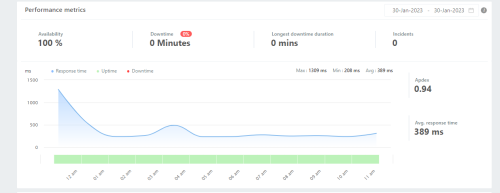 This post has been edited by faizyunus: Jan 30 2023, 12:40 PM |
|
|
Jan 30 2023, 01:07 PM
|
 
Elite
8,420 posts Joined: Jul 2008 
|
Singtel is having some issues right now
https://www.reddit.com/r/singapore/comments...ow_some_online/ In case you wonder why this is related, that's because TIME actually uses Singtel for their International peering https://bgp.he.net/AS9930 |
|
|
Jan 30 2023, 04:42 PM
Show posts by this member only | IPv6 | Post
#9645
|

Junior Member
682 posts Joined: Mar 2016
|
QUOTE(faizyunus @ Jan 30 2023, 12:33 PM) Checking my network monitoring tool which pings my network from US East Coast during that period. Noticed spike in latency over the weekend from US East Coast to Malaysia. out of topic but As of today it seem to have return back to normal. Will continue to monitor for tonight. may i know what is the network monitoring tool inside the screenshot? looks fancy haha |
|
|
Jan 30 2023, 05:19 PM
Show posts by this member only | IPv6 | Post
#9646
|
|
Junior Member
682 posts Joined: Mar 2016
|
QUOTE(blacktubi @ Jan 30 2023, 01:07 PM) Singtel is having some issues right now According to DigitalOcean https://status.digitalocean.com/incidents/kcnsscw1cmsz :https://www.reddit.com/r/singapore/comments...ow_some_online/ In case you wonder why this is related, that's because TIME actually uses Singtel for their International peering https://bgp.he.net/AS9930 The problems appear to be a direct result of multiple subsea fiber faults in the APAC region causing congestion resulting in packet loss |
|
|
|
|
|
Jan 30 2023, 05:29 PM
|
|
Junior Member
444 posts Joined: Feb 2014
|
QUOTE(Sam Leong @ Jan 30 2023, 04:42 PM) out of topic but That is a a free monitoring tool called Freshpingmay i know what is the network monitoring tool inside the screenshot? looks fancy haha |
|
|
Feb 1 2023, 11:48 AM
Show posts by this member only | IPv6 | Post
#9648
|
|
Probation
23 posts Joined: Sep 2022
|
So, no free upgrade to 2Gbps? The provided modem/router is not even good I read and they charge us. I have zenwifi xt12 and wondering if their lousy device will impact the performance of my own device. Any feedback on 2Gbps performance?
|
|
|
Feb 2 2023, 09:55 PM
Show posts by this member only | IPv6 | Post
#9649
|

Senior Member
1,495 posts Joined: Sep 2005 From: Damansara Perdana - KL
|
QUOTE(tartt @ Feb 1 2023, 11:48 AM) So, no free upgrade to 2Gbps? The provided modem/router is not even good I read and they charge us. I have zenwifi xt12 and wondering if their lousy device will impact the performance of my own device. Any feedback on 2Gbps performance? Hello everyone. Long time no return here. Just did the upgrade to 2Gbps today, upgrading my current 1Gbps package. On the 2.5gb via wired connection of course, it's beautiful, but now I am itching to return to my Deco X20 because I feel naked on the stock HNB245X6s. Anyone have any tips on how to just run the device as a modem and use back my Deco? EDIT: If I understand correctly, I just need to: i) Turn off the Wifi radios ii) Turn off the DHCP server so it stops functioning as a router. anything else I missed? Cannot tahan wanting to put back my Deco. This post has been edited by Lord_Ashe: Feb 2 2023, 10:01 PM |
|
|
Feb 2 2023, 10:18 PM
|
|
Elite
8,420 posts Joined: Jul 2008
|
QUOTE(Lord_Ashe @ Feb 2 2023, 09:55 PM) Hello everyone. Long time no return here. Just did the upgrade to 2Gbps today, upgrading my current 1Gbps package. On the 2.5gb via wired connection of course, it's beautiful, but now I am itching to return to my Deco X20 because I feel naked on the stock HNB245X6s. Anyone have any tips on how to just run the device as a modem and use back my Deco? The Deco X20 is a huge downgrade from the HN8245X6 thoughEDIT: If I understand correctly, I just need to: i) Turn off the Wifi radios ii) Turn off the DHCP server so it stops functioning as a router. anything else I missed? Cannot tahan wanting to put back my Deco. You might want to consider Deco XE200  |
|
|
Feb 2 2023, 10:45 PM
Show posts by this member only | IPv6 | Post
#9651
|
|
Senior Member
1,495 posts Joined: Sep 2005 From: Damansara Perdana - KL
|
QUOTE(blacktubi @ Feb 2 2023, 10:18 PM) The Deco X20 is a huge downgrade from the HN8245X6 though All in good time sir, maybe next year haha, but really it’s a huge downgrade if I go back to the AX20?You might want to consider Deco XE200 Mmmm didn’t think of that haha. To be fair, the combination of the ONT and two huawei “mesh repeaters” they gave as part of the upgrade does seem to provide me with pretty good speeds even in my bedroom which previously only got 40-70 mbps down. Now almost 200 lol. |
|
|
Feb 2 2023, 10:54 PM
|
|
Elite
8,420 posts Joined: Jul 2008
|
QUOTE(Lord_Ashe @ Feb 2 2023, 10:45 PM) All in good time sir, maybe next year haha, but really it’s a huge downgrade if I go back to the AX20? Yes, the Deco X20 is just Wi-Fi 6 AX1800Mmmm didn’t think of that haha. To be fair, the combination of the ONT and two huawei “mesh repeaters” they gave as part of the upgrade does seem to provide me with pretty good speeds even in my bedroom which previously only got 40-70 mbps down. Now almost 200 lol. The router from the 2Gbps plan supports AX6000, almost 3x more capacity Lord_Ashe liked this post
|
|
|
Feb 2 2023, 11:20 PM
Show posts by this member only | IPv6 | Post
#9653
|
|
Senior Member
1,495 posts Joined: Sep 2005 From: Damansara Perdana - KL
|
QUOTE(blacktubi @ Feb 2 2023, 10:54 PM) Yes, the Deco X20 is just Wi-Fi 6 AX1800 I guess that seals it for now! Thanks for the info, now I get to fantasize about the XE200…The router from the 2Gbps plan supports AX6000, almost 3x more capacity (Although I still will be curious how to make it work with the new ONT) |
|
|
|
|
|
Feb 2 2023, 11:38 PM
|
|
Elite
8,420 posts Joined: Jul 2008
|
QUOTE(Lord_Ashe @ Feb 2 2023, 11:20 PM) I guess that seals it for now! Thanks for the info, now I get to fantasize about the XE200… You probably can give TIME a call and ask them to change it into bridge mode so you can perform PPPoE on your own router.(Although I still will be curious how to make it work with the new ONT) Lord_Ashe liked this post
|
|
|
Feb 3 2023, 04:00 PM
|

Senior Member
3,608 posts Joined: Feb 2006
|
QUOTE(tartt @ Feb 1 2023, 11:48 AM) So, no free upgrade to 2Gbps? The provided modem/router is not even good I read and they charge us. I have zenwifi xt12 and wondering if their lousy device will impact the performance of my own device. Any feedback on 2Gbps performance? Hi, please stick to your own device... save your hassles with those poor performance devices. Not much feedback on 2Gbps yet. tartt liked this post
|
|
|
Feb 3 2023, 08:31 PM
Show posts by this member only | IPv6 | Post
#9656
|
|
Senior Member
2,687 posts Joined: Sep 2012
|
RM 69 for 100 Mbps. But limited to ppr area. 😮💨
|
|
|
Feb 6 2023, 10:36 AM
Show posts by this member only | IPv6 | Post
#9657
|

Junior Member
55 posts Joined: Sep 2004 From: Malacca, Malaysia 
|
Can someone guide me on how to port forward on my Time HG8145V5?
Over the years, I managed to successfully 'agak-agak' on other routers but this time I can't seem to get it working even after requesting Time to switch my connection to public IP. I'm also on Discord, if any helper prefers that; Eviltoaster#0001 Thanks in advance! |
|
|
Feb 8 2023, 01:44 AM
|

Senior Member
1,861 posts Joined: Feb 2008 From: Selangor
|
QUOTE(eviltoaster @ Feb 6 2023, 10:36 AM) Can someone guide me on how to port forward on my Time HG8145V5? Been trying to do this as well for a long time and with no luck. On my old asus router just go to Port Forwarding tab and voila. I'm on HG8145X6Over the years, I managed to successfully 'agak-agak' on other routers but this time I can't seem to get it working even after requesting Time to switch my connection to public IP. I'm also on Discord, if any helper prefers that; Eviltoaster#0001 Thanks in advance! |
|
|
Feb 8 2023, 09:20 AM
|
|
Senior Member
3,608 posts Joined: Feb 2006
|
QUOTE(eviltoaster @ Feb 6 2023, 10:36 AM) Can someone guide me on how to port forward on my Time HG8145V5? Hi, please try Advanced > Forward Rules > IPv4 Port MappingOver the years, I managed to successfully 'agak-agak' on other routers but this time I can't seem to get it working even after requesting Time to switch my connection to public IP. I'm also on Discord, if any helper prefers that; Eviltoaster#0001 Thanks in advance! * Note : It may/may not work as the ONT firmware has been modified & built for telco specific. Thanks. |
|
|
Feb 8 2023, 06:46 PM
Show posts by this member only | IPv6 | Post
#9660
|
|
Junior Member
55 posts Joined: Sep 2004 From: Malacca, Malaysia
|
QUOTE(jjj2 @ Feb 8 2023, 09:20 AM) Hi, please try Advanced > Forward Rules > IPv4 Port Mapping Yeah, I already did that and thought I needed to change more settings for it to work.* Note: It may/may not work as the ONT firmware has been modified & built for telco specific. Thanks. I guess I'm out of luck. |
| Change to: |  0.0264sec 0.0264sec
 0.56 0.56
 6 queries 6 queries
 GZIP Disabled GZIP Disabled
Time is now: 17th December 2025 - 10:49 PM |
 Quote
Quote