Outline ·
[ Standard ] ·
Linear+
TIME [OFFICIAL] TIME Fibre Broadband™ v4, Experience the ONE TRUE 2Gbps
|
Ryutaro
|
 Oct 27 2021, 10:52 AM Oct 27 2021, 10:52 AM
|

|
I'm on Cloudflare DNS but there are still some connectivity issues, ex: my Dropbox service is still in connecting status, my Spotify doesn't let me play any song but I can still remote to my workplace...
Wondering what is the issue here...
EDIT: After restarting my PC everything is back to normal, hmm what was happening this morning then since I am on Cloudflare DNS from the start...
This post has been edited by Ryutaro: Oct 27 2021, 12:43 PM
|
|
|
|
|
|
al_madd
|
Oct 27 2021, 04:40 PM
|
|
|
Hai
TIME will charge starting from date of confirm order or date of installation?
thank you
|
|
|
|
|
|
FusionXY
|
Oct 27 2021, 04:56 PM
|
|
|
QUOTE(al_madd @ Oct 27 2021, 04:40 PM) Hai TIME will charge starting from date of confirm order or date of installation? thank you Start from installation day. |
|
|
|
|
|
arefiq09
|
Oct 27 2021, 06:06 PM
|
Getting Started

|
Anyone in Klang Valley area still having connection issue? Mine still not resolved.
Edit: Resolved now.
This post has been edited by arefiq09: Oct 27 2021, 07:11 PM
|
|
|
|
|
|
xSean
|
Oct 27 2021, 06:47 PM
|
|
|
QUOTE(ju69an @ Oct 26 2021, 11:52 AM) I am using a 500mpbs plan but my speedtest only comes up to 200mbps using wifi. I tried using a phone and a computer and they get the same results. I am using the modem and router provided by TIME ( Archer C1200). Is this normal? Disable traffic statistics. Before disable, I cannot go up to 300mbps. Just can get around 200mbps. |
|
|
|
|
|
austinjklim
|
Oct 27 2021, 07:40 PM
|
Getting Started
|
Anyone having google service disruption here, loading youtube thumbnail slow or pinging to google.com gives higher than usual ping or even packet loss?
|
|
|
|
|
|
linkinstreet
|
Oct 28 2021, 11:47 AM
|
Red Bull Addict

|
QUOTE(austinjklim @ Oct 27 2021, 07:40 PM) Anyone having google service disruption here, loading youtube thumbnail slow or pinging to google.com gives higher than usual ping or even packet loss? A number of us have it since very early morning yesterday, but mine is okay now |
|
|
|
|
|
ashx
|
Oct 28 2021, 07:16 PM
|
Getting Started
|
Hi all,
Current TIME user with 500 plan AC1200 router, no contract. So i just noticed on the promo which means i can get 2x omnimesh if i re-contract.
I called CS,stating from website AC1200 is not compatible. So was informed the Omni mesh will be the router instead.
Any review on the unit? currently i have no problem with the AC1200. Is ok to just let the Omni take over AC1200?
|
|
|
|
|
|
jjj2
|
Oct 28 2021, 09:12 PM
|
|
|
QUOTE(ashx @ Oct 28 2021, 07:16 PM) Hi all, Current TIME user with 500 plan AC1200 router, no contract. So i just noticed on the promo which means i can get 2x omnimesh if i re-contract. I called CS,stating from website AC1200 is not compatible. So was informed the Omni mesh will be the router instead. Any review on the unit? currently i have no problem with the AC1200. Is ok to just let the Omni take over AC1200? Hi if Archer C1200 can fulfill your requirement, then in terms of upgrade you may consider to get yourself a single router Eg. TP-Link AX73. You know what I mean ya.... |
|
|
|
|
|
ashx
|
Oct 29 2021, 10:40 AM
|
Getting Started
|
QUOTE(jjj2 @ Oct 28 2021, 09:12 PM) Hi if Archer C1200 can fulfill your requirement, then in terms of upgrade you may consider to get yourself a single router Eg. TP-Link AX73. You know what I mean ya.... Will the TP-link support the omni? Thx. |
|
|
|
|
|
jjj2
|
Oct 29 2021, 12:15 PM
|
|
|
QUOTE(ashx @ Oct 29 2021, 10:40 AM) Will the TP-link support the omni? Thx. The Omni WA8021V5 only support omni-omni in full mesh mode. If you get TP-link single router, no need the Omni WA8021V5. If you insist to get it to work, then it can only be configured as wireless relay mode. Thanks. |
|
|
|
|
|
ashx
|
Oct 29 2021, 12:26 PM
|
Getting Started
|
QUOTE(jjj2 @ Oct 29 2021, 12:15 PM) The Omni WA8021V5 only support omni-omni in full mesh mode. If you get TP-link single router, no need the Omni WA8021V5. If you insist to get it to work, then it can only be configured as wireless relay mode. Thanks. Ah.. so i will have redundant 2x units. hmm.. oh well still worth the discounts heh or maybe sell ther extras to fund the new router  Thx |
|
|
|
|
|
jasonchan323
|
 Oct 29 2021, 03:00 PM Oct 29 2021, 03:00 PM
|
Getting Started
|
QUOTE(ashx @ Oct 28 2021, 07:16 PM) Hi all, Current TIME user with 500 plan AC1200 router, no contract. So i just noticed on the promo which means i can get 2x omnimesh if i re-contract. I called CS,stating from website AC1200 is not compatible. So was informed the Omni mesh will be the router instead. Any review on the unit? currently i have no problem with the AC1200. Is ok to just let the Omni take over AC1200? Hi, i have the similar concern but im currently using Dlink DIR-882 and if i switch to the free Huawei mesh i think its gonna be a downgrade. And according to the CS, the promotion ends on 31st Oct 2021. Wonder should i tie up another 2 year contact now or wait for upcoming promotion.  |
|
|
|
|
|
jasonchan323
|
Oct 29 2021, 03:05 PM
|
Getting Started
|
QUOTE(jasonchan323 @ Oct 29 2021, 03:00 PM) Hi, i have the similar concern but im currently using Dlink DIR-882 and if i switch to the free Huawei mesh i think its gonna be a downgrade. And according to the CS, the promotion ends on 31st Oct 2021. Wonder should i tie up another 2 year contact now or wait for upcoming promotion. If the 2 free Huawei Mesh can compatible with my current router (DIR-882) then ok la. No harm if just use it as extender instead of replacing the current router. But the TIME CS said its no compatible  |
|
|
|
|
|
contestchris
|
Oct 29 2021, 09:31 PM
|
|
|
I have an issue I hope someone would be able to help me out with.
Initially, when Time setup the Internet at home, there are two created:
xxx_5g (5GHz only)
xxx (2.4GHz only)
However, now I see that xxx (which is supposed to be for 2.4GHz channel) also has a 5GHz version under the same name. I'm not sure if this has caused some issues as sometimes the xxx network has only 1 bar, when in the past should be higher. I assume it is because the device is connecting to the 5GHz band, and only to 2.4Ghz when it drops off.
How can I solve this? I did not tinker with anything so not sure how come it's like that. I am also pretty sure that when the setup was done, there was no issue. This issue is more recent (last 2 weeks).
Thanks!
This post has been edited by contestchris: Oct 29 2021, 09:32 PM
|
|
|
|
|
|
PRSXFENG
|
Oct 29 2021, 10:18 PM
|
|
|
QUOTE(contestchris @ Oct 29 2021, 09:31 PM) I have an issue I hope someone would be able to help me out with. Initially, when Time setup the Internet at home, there are two created: xxx_5g (5GHz only) xxx (2.4GHz only) However, now I see that xxx (which is supposed to be for 2.4GHz channel) also has a 5GHz version under the same name. I'm not sure if this has caused some issues as sometimes the xxx network has only 1 bar, when in the past should be higher. I assume it is because the device is connecting to the 5GHz band, and only to 2.4Ghz when it drops off. How can I solve this? I did not tinker with anything so not sure how come it's like that. I am also pretty sure that when the setup was done, there was no issue. This issue is more recent (last 2 weeks). Thanks! Not sure on the connections side of things but you should be able to merge em together by removing the _5g from the 5ghz one |
|
|
|
|
|
jjj2
|
Oct 30 2021, 04:16 PM
|
|
|
QUOTE(contestchris @ Oct 29 2021, 09:31 PM) I have an issue I hope someone would be able to help me out with. Initially, when Time setup the Internet at home, there are two created: xxx_5g (5GHz only) xxx (2.4GHz only) However, now I see that xxx (which is supposed to be for 2.4GHz channel) also has a 5GHz version under the same name. I'm not sure if this has caused some issues as sometimes the xxx network has only 1 bar, when in the past should be higher. I assume it is because the device is connecting to the 5GHz band, and only to 2.4Ghz when it drops off. How can I solve this? I did not tinker with anything so not sure how come it's like that. I am also pretty sure that when the setup was done, there was no issue. This issue is more recent (last 2 weeks). Thanks! Hi, I believe the SI had enabled bandsteering... which router are you using now ? You will need to disable that & put a different SSID to distinguish it between 2.4GHz & 5GHz. Thanks. This post has been edited by jjj2: Oct 30 2021, 04:18 PM |
|
|
|
|
|
henry0917 P
|
Nov 1 2021, 02:32 AM
|
New Member
|
Hi all sifus. Currently on 500mbps package with Huawei HG8240H modem & TP-LINK EC230 Router. So far can receive good signal and speed except the coverage in my third room sucks, can only use 2.4ghz, 5ghz signal is very weak and keep disconnect constantly. Saw on TIME self care currently offers Huawei WA8021V5 x2 if I decided to renew for another 24 months. As my current modem does not support mesh so one will act as router. Anyone using the Huawei Mesh Devices or any sifu experts can give advice if change to this Huawei mesh device, coverage in my third room will be better? 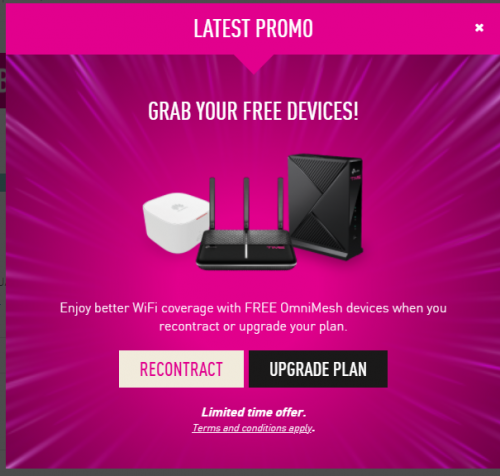 |
|
|
|
|
|
N9484640
|
Nov 1 2021, 09:05 AM
|
|
|
QUOTE(jasonchan323 @ Oct 29 2021, 03:05 PM) If the 2 free Huawei Mesh can compatible with my current router (DIR-882) then ok la. No harm if just use it as extender instead of replacing the current router. But the TIME CS said its no compatible I am currently using Asus Trio setup in Aimesh. I was able to setup the Huawei Edge ONT mesh as a wifi repeater. Only problem is I do not know if its doing anything or not. |
|
|
|
|
|
N9484640
|
Nov 1 2021, 09:12 AM
|
|
|
QUOTE(jjj2 @ Oct 13 2021, 10:45 AM) hi, I managed to setup my TIME given Huawei WA8021V5 as a repeater for my Asus Aimesh network but no idea if its really doing anything or helpful....how do I test?  |
|
|
|
|



 Quote
Quote




 0.0302sec
 0.50
0.50
 6 queries
 GZIP Disabled