Outline ·
[ Standard ] ·
Linear+
TIME [OFFICIAL] TIME Fibre Broadband™ v4, Experience the ONE TRUE 2Gbps
|
xSean
|
 Aug 19 2019, 12:40 PM Aug 19 2019, 12:40 PM
|

|
hi, i'm interested on time home fibre and i'm living at condo. I see some neighbor has installed it, the cable pull from MDF room to house unit and drill a small hole for cable to go inside the unit.
May i know is there any additional charges to installer for drill small hole? And the 20m free cable is count from the hole to the area inside my unit that i would like to installed, right?
|
|
|
|
|
|
xSean
|
Aug 19 2019, 10:36 PM
|
|
|
QUOTE(mushigen @ Aug 19 2019, 10:16 PM) TIME is still down at Bayan Lepas. From this afternoon. that's a bit long |
|
|
|
|
|
xSean
|
Aug 21 2019, 04:07 PM
|
|
|
QUOTE(senscents @ Aug 21 2019, 03:44 PM) Good to know that they (installer) do provide the said cable. If not i need to hunt foe the cable. 😁 actually no provide from installer, the router and modem come with it...usually 1m only This post has been edited by xSean: Aug 21 2019, 04:07 PM |
|
|
|
|
|
xSean
|
Aug 24 2019, 12:41 AM
|
|
|
QUOTE(tohca @ Aug 23 2019, 10:47 PM) Just got onto Time BB. Installation went without any hitch. The speed and stability of Time are certainly better than unifi. Got the TP-Link EC230. Confirm that my unit also has problems with 2.4g wifi. Connection keeps dropping and in the evening when the neighbours come home, it's almost impossible to connect to the router on 2.4g. Have replaced it with the more stable Tenda AC18. All problems with the 2.4g solved. The 5g wifi is great. u ask the installer change on the spot for tenda ac18? |
|
|
|
|
|
xSean
|
Sep 17 2019, 08:54 PM
|
|
|
QUOTE(DraGGarD @ Aug 17 2019, 03:29 PM) Hi all, currently on tp-link ec230. My 5Ghz wifi is working fine but as for my 2.4Ghz can connect but totally no internet connection. Setting problem ? need help from fellow expert here oh ya. i check the IP address i got for my 2.4Ghz wifi is 169.254.xx.xx instead of 192.168.xx.xx. I just installed with time and the installer updated the ec230 to latest Firmware Version:v1.0_190905.36575. Then he said need to reset the router after update firmware. No issue on 2.4ghz  |
|
|
|
|
|
xSean
|
Sep 18 2019, 05:39 PM
|
|
|
[yeapch01]
thanks for prompt service. just installed yesterday and everything work fine.
before that, worried about ec230 router issue but the installer quite experience and my router no issue on 2.4ghz such as intermittent and connected but no internet.
|
|
|
|
|
|
xSean
|
Sep 25 2019, 12:06 AM
|
|
|
QUOTE(justnits @ Sep 24 2019, 03:08 PM) TIME's EC230-G1 router cannot change DNS server? I noticed even after changing it on the config page, it still points to TIME DNS as primary and Google's as secondary. may I know how you change it? under which config page? |
|
|
|
|
|
xSean
|
Sep 27 2019, 01:56 PM
|
|
|
QUOTE(kennywai @ Sep 27 2019, 01:53 PM) hi all, new subscriber here. was wondering how is everyone's consistent connection throughput ? i am on 500mbps package. i understand the max speeds only achievable on 5ghz connection. during setup i get a very satisfactory 530+mbps U/D but the second day only managed a consistent 150+ U/D, been like this for 3 weeks, even when right beside the router.. is this normal ? on a side note, could a 5ghz repeater gizmo extend the 5ghz network range right to my bedroom ? which is furthest apart from the router, i only managed 2bars on iphone and intermittent loading while watching videos. rerouting the router is out of the question as all my cables are concealed. fiber and LAN. thanks in advance for insights. try with network cable even though your device next to your router.... |
|
|
|
|
|
xSean
|
Oct 5 2019, 01:14 AM
|
|
|
QUOTE(xinjiechew @ Oct 4 2019, 11:00 PM) anyone experience high ping in bangsar south? 1gb line here... 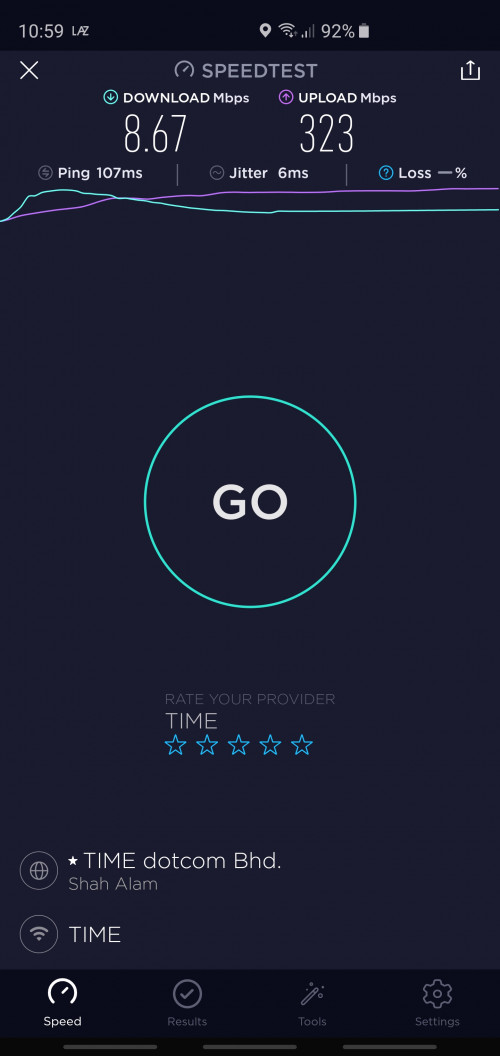 try other server |
|
|
|
|
|
xSean
|
Oct 10 2019, 10:07 AM
|
|
|
my router tp-link ec230 from TIME got an issue. Suddenly cannot detect wifi and it happened twice in a month. Then, restart the router and back to normal.
anyone also facing this problem?
|
|
|
|
|
|
xSean
|
Oct 11 2019, 02:29 PM
|
|
|
I tried setup ddns noip. First time create and setup the noip ddns and time wan ip successfully updated to noip server. Then nslookup ddns using my maxis line and it show my time wan ip correctly.
Then i restarted the modem and router, it successfully update wan ip to noip server but when i nslookup ddns using maxis line, it did not change the latest time wan ip but show the first time wan ip.
then restart router again and get new wan ip, the nslookup now show the second time wan ip instead of latest wan ip.
i also tried with old tplink router flashed with ddwrt, also same problem. anyone know what is the problem?
|
|
|
|
|
|
xSean
|
Oct 17 2019, 10:14 AM
|
|
|
QUOTE(jjj2 @ Oct 17 2019, 09:29 AM) Hi, rarely experiencing this, but speed slowing down at night, this is for sure. what is speed when slowing down at night? Also what is the time range at night when slowing down? |
|
|
|
|
|
xSean
|
Nov 1 2019, 06:37 PM
|
|
|
QUOTE(sofresh @ Nov 1 2019, 06:34 PM) Hi, Anyone interested in switching to TIME internet? Ideally I would like to swap with someone who has a UNIFI account, that way it's a win-win where both parties end up with shorter contracts. My reason is that I am moving to a condo that doesn't have TIME internet yet. My contract ends very soon, January 2020 and my bill is RM139 + tax for 500mbps. If you are interested in the transfer, kindly PM me. Thanks. why u wanna do that since your contract will end few months only? just curious? |
|
|
|
|
|
xSean
|
Nov 21 2019, 01:42 AM
|
|
|
Called cs, Puchong area down....
|
|
|
|
|
|
xSean
|
Sep 19 2021, 10:11 AM
|
|
|
QUOTE(IAmLejen @ Sep 19 2021, 10:06 AM) Anyone here using 500mbps while staying alone? I am using 100mbps now thinking of an upgrade. And also if I upgrade to 500mbps now am I entitled for the RM10x24months rebate? 100mbps should be more than enough for single user. Why wanna upgrade? |
|
|
|
|
|
xSean
|
Sep 19 2021, 06:08 PM
|
|
|
QUOTE(IAmLejen @ Sep 19 2021, 10:14 AM) Gatai  I pun gatai but plan to upgrade to 300mbps for rm10. Worth it since 100mbps enough for my small family? |
|
|
|
|
|
xSean
|
Sep 19 2021, 08:14 PM
|
|
|
QUOTE(Lineage @ Sep 19 2021, 07:35 PM) Depends on your usage..my house only 2 ppl..and i'm getting 500mbps  The highest usage IPTV, 2 mobile phones, 2 laptops for working and study. Still ok but add rm10 for 300mbps quite tempting |
|
|
|
|
|
xSean
|
Sep 20 2021, 08:45 PM
|
|
|
QUOTE(ktchang321 @ Sep 20 2021, 09:29 AM) Hi, I submitted upgrading 300mbps via self care portal yesterday. Today I checked again and found my selfcare already show my current package is 300mbps. FYI, my schedule for installation is 28/9/2021. So, I just want double check with you, is this same as those upgrading 300mbps? Before installation on new router, plan already change 300mbps? 2nd, I test speedtest and max speed get is around 200mbps only. So is this normal? My current router still EC230. Found the problem? Problem from router or time? |
|
|
|
|
|
xSean
|
Sep 21 2021, 08:13 PM
|
|
|
QUOTE(RagingCandy @ Sep 21 2021, 06:53 PM) Same result even connecting to TiME server or using TIME website to test it. Got called time? |
|
|
|
|
|
xSean
|
Sep 21 2021, 08:14 PM
|
|
|
QUOTE(ktchang321 @ Sep 20 2021, 09:07 PM) Use LAN Cat6 to retest internet speed few times. Download speed around 160-180mbps and upload speed can achieve almost 300mbps. Y like this? Any sifu can advise? Using existing router EC-230. Call time? |
|
|
|
|



 Quote
Quote

 0.0325sec
 0.66
0.66
 7 queries
 GZIP Disabled