Welcome Guest ( Log In | Register )

Outline · [ Standard ] · Linear+

TIME [OFFICIAL] TIME Fibre Broadband™ v4, Experience the ONE TRUE 2Gbps

views
     
Ryutaro
post Oct 15 2018, 12:09 PM

~ Just a noob programmer ~
****
Senior Member
545 posts

Joined: Mar 2011
I guess it's time for me to give some input, on saturday time authorised installer came over and install the new dir-882, the speed test he have done shows it top at 900mbps ish which is fine for me.

Well due to my house structure issue I need to use powerline to get a stable connection as the deepest room is not able to get good wifi signal..I bought 2 unit of TP-Link PA4010P to get full coverage in my house(keep in mind I already know the downside would be I am not getting full speed but I aim for stability anyway)

So back to the topic...using the AV500 powerline and running the dir-850l as an access point...I get around 30mbps ish speed for up/down stream on both WIFI and LAN connection..

The thing you can take away is that powerline significant reduce the speed

side note if anyone of you wish to tryout on the TP-Link PA4010 powerline you can PM me as I have an extra pair currently (might think of selling it off)
Ryutaro
post Oct 15 2018, 12:29 PM

~ Just a noob programmer ~
****
Senior Member
545 posts

Joined: Mar 2011
QUOTE(jimbet1337 @ Oct 15 2018, 12:26 PM)
900Mbps on 5ghz wifi?
*
of course not lol...its LAN connection speed
Ryutaro
post Oct 15 2018, 01:08 PM

~ Just a noob programmer ~
****
Senior Member
545 posts

Joined: Mar 2011
QUOTE(eas7even @ Oct 15 2018, 12:46 PM)
Just curious how is the max WiFi speed 882 can achieve ?
*
i nvr tried speed-testing it i remember the installer tested it and got 382mbps (not sure its on 5Ghz or 2.4) and then he tells me because my dad is watching video on youtube hence the speed could not reach higher (which i i think its bullshit if i understand MU-MIMO correctly) will try it tonight if ur keen to know
Ryutaro
post Oct 16 2018, 02:13 PM

~ Just a noob programmer ~
****
Senior Member
545 posts

Joined: Mar 2011
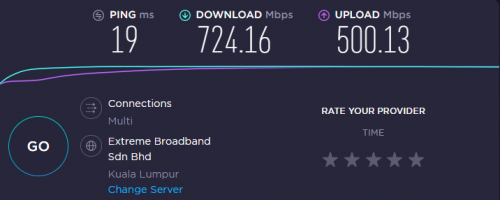
I did a speed test on the dir 882 at 5am in the morning...
speed test conducted using Ookla speedtest app on my Pixel2 XL connected to 5Ghz WIFI and standing right beside the router

Attached Image

will do a more thorough test when I have time

also dun ask me why am I still up at 5am lol

anyway the speed doesn't mean much as real world scenario it's quite hard to get this speed

This post has been edited by Ryutaro: Oct 16 2018, 02:14 PM
Ryutaro
post Oct 27 2018, 12:44 AM

~ Just a noob programmer ~
****
Senior Member
545 posts

Joined: Mar 2011
hey guys want to know what are the modes of supplying power to these mesh wifi router? the router need to be near a power plug? asking cause the best spot to put the router in my house may not have a power plug nearby to supply power to the router
Ryutaro
post Oct 27 2018, 01:40 AM

~ Just a noob programmer ~
****
Senior Member
545 posts

Joined: Mar 2011
QUOTE(jjj2 @ Oct 27 2018, 01:37 AM)
If you are refering to Tplink Deco, yes its powered by external 12V/2A power adaptor.
You will need enterprise grade mesh APs if you want POE support.

Thanks.
*
nah just for home use cause powerline really cant satisfy my speed hunger and I dont have power plug at a convenient enough spot to setup these router so kinda in dilemma now...thanks for answer bro
Ryutaro
post Dec 14 2018, 03:46 PM

~ Just a noob programmer ~
****
Senior Member
545 posts

Joined: Mar 2011
QUOTE(Lord_Ashe @ Dec 14 2018, 09:59 AM)
Bearing in mind that my original Asus RT1200G+ (which works well for many people I know) stutters and can't even reach my master bedroom without an extender, I admit it SEEMS the ROI is not good. But practical testing over the past 24 hours shows that coverage is CONSISTENT and dead zones are nil, which to me is more important than having a strong beam at 2-3 spots in the apartment.

My neighbors downstairs and in the block, also TIME users have invested in higher end routers with comparable results, so I'll chalk it up to our high congestion and building materials if you're in a residential apartment like me.
*
interesting I was planning to either buy the deco to setup the mesh network or manually pulling LAN cable, drill a hole and then setup an AP there... seems like the latter is the only choice I could go for to get high speed
p/s: currently using powerline but the performance is really bad sigh..

thanks for sharing ur setup and result rclxms.gif
Ryutaro
post Dec 14 2018, 04:53 PM

~ Just a noob programmer ~
****
Senior Member
545 posts

Joined: Mar 2011
QUOTE(jjj2 @ Dec 14 2018, 03:49 PM)
Hi,

Yes for consistency, you need a wired connection if possible pull a Cat6 over.
For some houses, powerline is bit challenging & tuning and customization need to be done to achieve high speed.

Thanks.
*
I am not using those WIFI extender kind just the ethernet kind so I don't think there are any config that can be done. Recently move my desktop to the furthest room in the house and the performance of the adapter drop another 10% doh.gif

QUOTE(Lord_Ashe @ Dec 14 2018, 03:52 PM)
Hope it helps!

If you can do the whole pull cable+install a strong AP that might be better. I have a total of 10 devices online most times and the Deco seems to be coping pretty well. Added bonus is I can shut down my kids' internet access with a click and see what apps they're using.
*
ahh that is quite good though I do not need such feature lol

QUOTE(kmrdeva @ Dec 14 2018, 03:54 PM)
Can still go for a mesh wifi solution but connect the mesh nodes to each other using wired/LAN backhaul. Best of both worlds.

If I could easily cable my 2 deco units together, I would. Wireless backhaul is not preferred but it works well enough for me.
*
I don't have any power socket lying in the middle of the house so that was what stopping me from buying the deco in the first place lol
Ryutaro
post Jan 11 2019, 03:27 PM

~ Just a noob programmer ~
****
Senior Member
545 posts

Joined: Mar 2011
QUOTE(red_scorpion @ Jan 11 2019, 10:37 AM)
Thanks for the replied bro.

Ya, I tested wired connection, can reach until 500mbps..
So in summary:

(i) Wired : 500mbps
(ii) Ipv6 5ghz wifi : 300mbps
(iii) Ipv4 2.4ghz wifi: 40-60mbps
So , is this normal? or Ipv4 2.4ghz wifi connection got problem? I already try change to less congestion channel..but still the same result..changed to google dns also same..  confused.gif  confused.gif
*
damn u made me question my general Internet knowledge for a awhile there==

first thing u should know is that ipv6 doesn't provide faster connection speed, u can see ipv6 as a substitute once we run out of address space that ipv4 can address

next read up a little on 2.4Ghz and 5Ghz WIFI on google and you will know why 5Ghz WIFI provide faster speed than your 2.4Ghz WIFI

Ryutaro
post Mar 18 2020, 03:14 PM

~ Just a noob programmer ~
****
Senior Member
545 posts

Joined: Mar 2011
QUOTE(blacktubi @ Mar 18 2020, 03:01 PM)
Are you guys getting the speed you paid for lately?

I paid for 1Gbps but currently I am getting not even 200Mbps.
*
mine seems fine, im in setapak btw

user posted image

This post has been edited by Ryutaro: Mar 18 2020, 03:14 PM
Ryutaro
post Mar 20 2020, 11:17 AM

~ Just a noob programmer ~
****
Senior Member
545 posts

Joined: Mar 2011
Am very interested in hearing jjj2 telling stories of how this stuff is fixed thou maybe there's too many P&C stuff

This post has been edited by Ryutaro: Mar 20 2020, 11:19 AM
Ryutaro
post Oct 27 2021, 10:52 AM

~ Just a noob programmer ~
****
Senior Member
545 posts

Joined: Mar 2011
I'm on Cloudflare DNS but there are still some connectivity issues, ex: my Dropbox service is still in connecting status, my Spotify doesn't let me play any song but I can still remote to my workplace...

Wondering what is the issue here...

EDIT: After restarting my PC everything is back to normal, hmm what was happening this morning then since I am on Cloudflare DNS from the start...

This post has been edited by Ryutaro: Oct 27 2021, 12:43 PM


Change to:
| Lo-Fi Version
0.0317sec    0.65    7 queries    GZIP Disabled
Time is now: 4th December 2025 - 03:44 PM