Welcome Guest ( Log In | Register )

Bump Topic Topic Closed RSS Feed
453 Pages « < 10 11 12 13 14 > » Bottom

Outline · [ Standard ] · Linear+

Unifi Official TM UniFi High Speed Broadband Thread V32, Enjoy Your Speed Upgrade

views
     
JohnLai
post Aug 21 2017, 05:07 PM

Skeptical Cat
*******
Senior Member
3,669 posts

Joined: Apr 2006
QUOTE(fruitie @ Aug 21 2017, 05:05 PM)
Hmm. First and foremost, never trust what an agent says (in all services and products), always check with TM Point (or authorized channel).
Moreover, TM never publishes that new applications still entitled for free upgrade.

Nothing much can be done. Move on.
*
sad.gif

EDIT: If they dare to charge me RM200 for cancelling.....what should I do?

This post has been edited by JohnLai: Aug 21 2017, 05:08 PM
ctwl368
post Aug 21 2017, 06:53 PM

New Member
*
Junior Member
38 posts

Joined: May 2011


Can you still check whether you're qualified for the free upgrade? Asking for a friend coz seems like the link to check is no longer available...
monkeybeh
post Aug 21 2017, 08:29 PM

On my way
****
Senior Member
572 posts

Joined: Sep 2008


QUOTE(JohnLai @ Aug 21 2017, 05:07 PM)
sad.gif

EDIT: If they dare to charge me RM200 for cancelling.....what should I do?
*
I would be surprised if you didn't keep any B&W written proof from your agent or you're just take for granted from their verbal promise?
BTW in what sense you're not qualified? due to condo technical limitation?

This post has been edited by monkeybeh: Aug 21 2017, 08:29 PM
fruitie
post Aug 21 2017, 08:38 PM

Rise and Shine
Group Icon
Staff
72,808 posts

Joined: Sep 2005
From: KUL

QUOTE(JohnLai @ Aug 21 2017, 05:07 PM)
sad.gif

EDIT: If they dare to charge me RM200 for cancelling.....what should I do?
*
Er, I don't think so la.

QUOTE(monkeybeh @ Aug 21 2017, 08:29 PM)
I would be surprised if you didn't keep any B&W written proof from your agent or you're just take for granted from their verbal promise?
BTW in what sense you're not qualified? due to condo technical limitation?
*
New subscribers not entitled for free upgrade.
JohnLai
post Aug 21 2017, 08:43 PM

Skeptical Cat
*******
Senior Member
3,669 posts

Joined: Apr 2006
QUOTE(monkeybeh @ Aug 21 2017, 08:29 PM)
I would be surprised if you didn't keep any B&W written proof from your agent or you're just take for granted from their verbal promise?
BTW in what sense you're not qualified? due to condo technical limitation?
*
I did have SMS from the first agent about the free upgrade, didn't expect the installation gonna take forever.....

QUOTE(fruitie @ Aug 21 2017, 08:38 PM)
Er, I don't think so la.
New subscribers not entitled for free upgrade.
*
This.....
Really pissed me off....

Cause both agent and installer came over.
Right before installation, I said, 'Finally my unifi with free 50Mbps will get installed'.
Both of them corrected me and saying it is only for promotion period crap where mine is not eligible. Fark!!!!
EDIT: -.- Installer wanna charge me RM200 for termination............ shocking.gif

This post has been edited by JohnLai: Aug 21 2017, 08:44 PM
Xitox
post Aug 21 2017, 09:50 PM

Getting Started
**
Junior Member
152 posts

Joined: Mar 2013
Hi , tm just replace my old router with TP link ac1200 archer c5. After replace with this router my always auto restart the router, how to fix this?
JohnLai
post Aug 21 2017, 11:53 PM

Skeptical Cat
*******
Senior Member
3,669 posts

Joined: Apr 2006
QUOTE(Xitox @ Aug 21 2017, 09:50 PM)
Hi , tm just replace my old router with TP link ac1200 archer c5. After replace with this router my always auto restart the router, how to fix this?
*
Hmm......There are few reasons for router instability:

1) Power = unstable electricity flip the wrong signal etc
2) Temperature = what about air flow around router?
3) Router SOC fabrication fault = well, you are doomed in this case.
4) Unstable router OS = How about updating the firmware?

tolaktakjatuh
post Aug 22 2017, 12:04 PM

Huehuehue
****
Senior Member
653 posts

Joined: Aug 2010
From: Alor Setar


TM just called me for the free upgrade 50 to 100mbps, but their technician can only come to my home early september. Wonder if TM auto upgrade to 100Mbps after they called, or still need to wait for technician to upgrade?
Icehart
post Aug 22 2017, 01:08 PM

72.55.191.6
********
All Stars
14,899 posts

Joined: Apr 2005
From: Kuala Lumpur & Selangor


QUOTE(tolaktakjatuh @ Aug 22 2017, 12:04 PM)
TM just called me for the free upgrade 50 to 100mbps, but their technician can only come to my home early september. Wonder if TM auto upgrade to 100Mbps after they called, or still need to wait for technician to upgrade?
*
Technician will come to your house and change the whole equipment set. The irony is in my home they change to the same model as before for the BTU. Router got upgrade la but end up didn't use. biggrin.gif
Xefron
post Aug 22 2017, 02:30 PM

Look at all my stars!!
*******
Senior Member
2,507 posts

Joined: Jan 2003


QUOTE(JohnLai @ Aug 21 2017, 04:59 PM)
Here is the first agent info that promised free 30 ---> 50 back in March.

[attachmentid=9064267]
Celaka betul...... mad.gif

EDIT: sorry for the 90 degree angle, no idea why.
*
kesian kena game, march...free speed upgrade offer already end.
tolaktakjatuh
post Aug 22 2017, 03:00 PM

Huehuehue
****
Senior Member
653 posts

Joined: Aug 2010
From: Alor Setar


QUOTE(Icehart @ Aug 22 2017, 01:08 PM)
Technician will come to your house and change the whole equipment set. The irony is in my home they change to the same model as before for the BTU. Router got upgrade la but end up didn't use.  biggrin.gif
*
So, they will upgrade the speed prior coming to my house or only upgrade the speed after they change the equipment?

I'm using Archer C7, i believe capable of handling 100Mbps. At office now, cant test if got any speed upgrade sweat.gif

This post has been edited by tolaktakjatuh: Aug 22 2017, 03:00 PM
Icehart
post Aug 22 2017, 03:05 PM

72.55.191.6
********
All Stars
14,899 posts

Joined: Apr 2005
From: Kuala Lumpur & Selangor


QUOTE(tolaktakjatuh @ Aug 22 2017, 03:00 PM)
So, they will upgrade the speed prior coming to my house or only upgrade the speed after they change the equipment?

I'm using Archer C7, i believe capable of handling 100Mbps. At office now, cant test if got any speed upgrade  sweat.gif
*
They will upgrade first before they come. When they're here they will do the necessary speedtest and Hyptv test.
KKW
post Aug 22 2017, 03:08 PM

Look at all my stars!!
*******
Senior Member
2,954 posts

Joined: Apr 2008


QUOTE(Icehart @ Aug 22 2017, 01:08 PM)
Technician will come to your house and change the whole equipment set. The irony is in my home they change to the same model as before for the BTU. Router got upgrade la but end up didn't use.  biggrin.gif
*
What router did they give you? Tplink Archer C5?
Icehart
post Aug 22 2017, 04:21 PM

72.55.191.6
********
All Stars
14,899 posts

Joined: Apr 2005
From: Kuala Lumpur & Selangor


QUOTE(KKW @ Aug 22 2017, 03:08 PM)
What router did they give you? Tplink Archer C5?
*
No. Dlink Ac1200
birain
post Aug 22 2017, 05:23 PM

良い一日を
******
Senior Member
1,448 posts

Joined: Apr 2007
QUOTE(Icehart @ Aug 22 2017, 04:21 PM)
No. Dlink Ac1200
*
850L ?
westlife
post Aug 22 2017, 05:28 PM

10k Club
********
All Stars
14,259 posts

Joined: Jan 2011
QUOTE(KKW @ Aug 22 2017, 03:08 PM)
What router did they give you? Tplink Archer C5?
*
TP-link archer c5 is the best stock wifi router that TM supplies.
jusbella
post Aug 22 2017, 10:02 PM

Look at all my stars!!
*******
Senior Member
3,033 posts

Joined: Dec 2011


QUOTE(westlife @ Aug 22 2017, 05:28 PM)
TP-link archer c5 is the best stock wifi router that TM supplies.
*
For me I guess I'm just out of luck. There is few forumer also complain about c5.

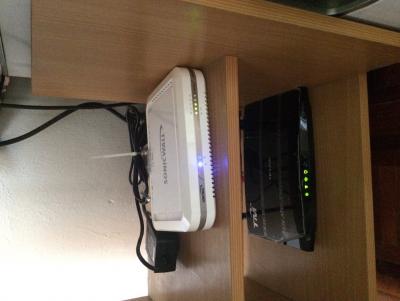
For my case my c5 is not stable after few minutes usage, flashed latest firmware, hard reset etc no solution, suspect SoC chip on pppoe got issue. My contract also ended so I don't wish to pay nor extend contract.

Then I test c5 act as access point there is no issue, then I ended up use c5 as access point.


Attached thumbnail(s)
Attached Image
westlife
post Aug 22 2017, 10:19 PM

10k Club
********
All Stars
14,259 posts

Joined: Jan 2011
QUOTE(jusbella @ Aug 22 2017, 10:02 PM)
For me I guess I'm just out of luck. There is few forumer also complain about c5.

For my case my c5 is not stable after few minutes usage, flashed latest firmware, hard reset etc no solution, suspect SoC chip on pppoe got issue. My contract also ended so I don't wish to pay nor extend contract.

Then I test c5 act as access point there is no issue, then I ended up use c5 as access point.
*
for my totally no problem. two C5, one at my own house, one at my parent one.

both are running default firmware that comes with it. Never flash any firmware etc. Performance is consistent and super stable. no issues at all.

Firmware Version:
3.17.1 Build 20160317 Rel. 4317
Hardware Version:
ArcherC5 v2
jusbella
post Aug 22 2017, 10:21 PM

Look at all my stars!!
*******
Senior Member
3,033 posts

Joined: Dec 2011


QUOTE(westlife @ Aug 22 2017, 10:19 PM)
for my totally no problem. two C5, one at my own house, one at my parent one.

both are running default firmware that comes with it. Never flash any firmware etc. Performance is consistent and super stable. no issues at all.

Firmware Version:
3.17.1 Build 20160317 Rel. 4317
Hardware Version:
ArcherC5 v2
*
that the reason I said I'm out of luck.
gahkin
post Aug 22 2017, 11:01 PM

Enthusiast
*****
Senior Member
735 posts

Joined: Jan 2003
From: Selayang , Kepong


QUOTE(jusbella @ Aug 22 2017, 10:02 PM)
For me I guess I'm just out of luck. There is few forumer also complain about c5.

For my case my c5 is not stable after few minutes usage, flashed latest firmware, hard reset etc no solution, suspect SoC chip on pppoe got issue. My contract also ended so I don't wish to pay nor extend contract.

Then I test c5 act as access point there is no issue, then I ended up use c5 as access point.
*
what your modem using ?

i also fact this issue pppoe with auto turn red within 2-3min usaga when connecting with VDSL2-ZTE-H268E . I was flash to latest firmware no luck. try replace using back stock router dlink 850l is ok. I was send back to tplink for RMA process.. let's how this going yet. hmm.gif

This post has been edited by gahkin: Aug 22 2017, 11:02 PM

453 Pages « < 10 11 12 13 14 > » Top
Topic ClosedOptions
 

Change to:
| Lo-Fi Version
0.0427sec    0.21    6 queries    GZIP Disabled
Time is now: 8th December 2025 - 02:49 AM