Welcome Guest ( Log In | Register )

475 Pages « < 377 378 379 380 381 > » Bottom

Outline · [ Standard ] · Linear+

 AMD Ryzen, AM4 / AM5 Platform

views
     
oldKyoo
post Mar 9 2021, 06:29 PM

Flashing at a street near you.
*****
Senior Member
961 posts

Joined: Jan 2011
From: Msia

QUOTE(nrw @ Mar 9 2021, 04:59 PM)
tongue.gif
If you want lower temps and better performance:

1) Set Scalar to Auto (which will hopefully be OFF with Gigabyte nowadays)
2) Consider setting the power limits to stock, not that you gain much performance there anyways
3) Consider to use CoreCycler to do a curve. But before you start with that, test without it to make sure your boost clock override is actually stable
https://github.com/sp00n/corecycler
*
Thank you for the feedback, will try that out!
nrw
post Mar 9 2021, 08:59 PM

Casual
***
Junior Member
398 posts

Joined: Jul 2014


QUOTE(oldKyoo @ Mar 9 2021, 06:29 PM)
Thank you for the feedback, will try that out!
*
maybe you wait until coming weekend though, still quite some bugs in that corecycler script. just read up on it. (don't have a vermeer myself at this time)
SSJBen
post Mar 9 2021, 09:26 PM

Stars deez nuts.
*******
Senior Member
4,523 posts

Joined: Apr 2006


QUOTE(raydenex @ Mar 9 2021, 05:32 PM)
Nope bro, not at all, frequently eyeballed the event logs etc to be sure. Experienced some crashes the first 2-3 days, which was resolved by not using XMP and just dialing in my memory main timings. Klevv Cras XR 4000c19 kit (Hynix DJR) tuned at 3800c16 stable. X570 Tomahawk, still running on BIOS revision 1.40 from End-Oct 2020 (AGESA 1.1.0.0).
*
Appreciate the feedback.

I too am running at 3800c16 with tighten sub timings, absolutely rock stable so far.

I believe there is one last major AGESA release left for Zen 3, probably slated for summer of this year.
TristanX
post Mar 9 2021, 11:34 PM

Where is my stars?
Group Icon
Elite
24,353 posts

Joined: Nov 2004
From: Setapak, Kuala Lumpur


Someone should bring this cooler in.
https://www.techspot.com/news/88865-fan-big...-weighs-44.html

Icegiant Prosiphon Elite review:
https://www.youtube.com/watch?v=U-BWEDfrE9c
yimingwuzere
post Mar 10 2021, 12:27 AM

Enthusiast
*****
Senior Member
990 posts

Joined: Sep 2005
From: Bolehland


QUOTE(SSJBen @ Mar 9 2021, 12:36 PM)
I don't have a 3090, but I do have a 3080 with a VR setup. No connectivity issues for me. Ironic enough nvidia drivers are the ones causing issues for VR instead lol.

Neither had any with the load of DACs and amps that I test on a weekly basis. Also have several arcade sticks and a simple racing rig too, all never had connectivity issues.
*
Heard it's related to higher overall bandwidth use, hence why it's more common for bonchi to get his errors after swapping to RTX3080.

I heard the same for VR posted by a few people. I know Ampere has driver issues with VR, not sure if the posters saying VR affects it was on 2080 Ti though.

QUOTE(SSJBen @ Mar 9 2021, 01:42 PM)
Huh? Who said so?

My opinion is that 5800x remains a stupid CPU because of its price being so close to 5900x. The latter also suffers less from temp hotspot, meaning better PBO and less irritating fan ramp fluctuations.

If you only need an 8 core, get a 10700k instead at this point or wait for RKL.
*
5800X is more common making it easier to buy, presumably because AMD is dumping lots of failed 5950X chips with one CCD in deep sleep. Many 5800X units apparently have a CCD2 sensor reported on HWinfo. Igor's Lab mentioned he found this several weeks ago with the HWinfo dev.

QUOTE(xKeneshirox @ Mar 9 2021, 01:57 PM)
That was what I thought. I think i've just been browsing around a lot looking at other people builds, and sorta noticed there's a lot more 5800x than ya, know, 5600x or other ones
*
QUOTE(raydenex @ Mar 9 2021, 04:09 PM)
I got a 5800x for about RM 2130 (slightly above its RM 2049 MSRP) as well back in late December when the 5900x was nowhere to be found for MSRP. Initially if you're comparing 5800x at RM 2049 to the 5900x at RM 2499 (was the MSRP 2449, 2459 or 2499, my memory fails me), then yes no way in hell I'd go for a 5800x, make so little sense even from a price point, we haven't even start talking about the temperature issues that were cropping up online specific to the 5800x.

Then I got the 5800x, installed it, used it and... pleasantly surprised. Cooled by an EK AIO 240, CP2077 load temps never breach 70c. Idles at 40-41c, and with my room A/C on, I've seen idles at 33c even. Most likely got a golden sample I guess.
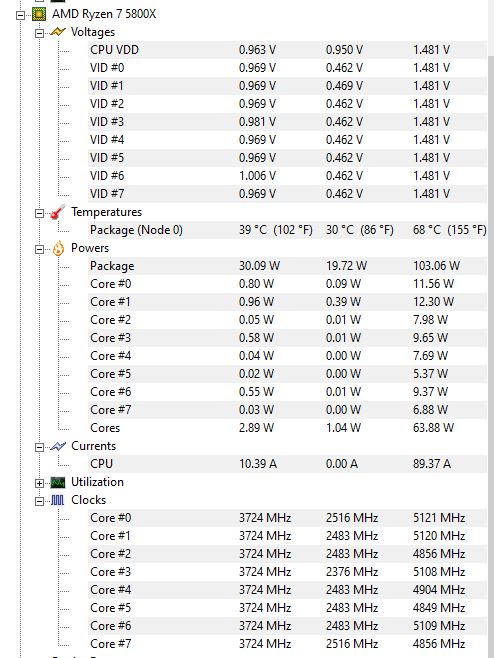
user posted image
*
What temps are you seeing without A/C? Thinking of getting the EK AIO as the non-RGB one is rather cheap.

Also, does CTR 2.0 report your chip as a golden sample after it tests your CPU?

QUOTE(TristanX @ Mar 9 2021, 11:34 PM)
IIRC this was built mainly for Threadripper?

TristanX
post Mar 10 2021, 12:37 AM

Where is my stars?
Group Icon
Elite
24,353 posts

Joined: Nov 2004
From: Setapak, Kuala Lumpur


QUOTE(yimingwuzere @ Mar 10 2021, 12:27 AM)
IIRC this was built mainly for Threadripper?
*
For multi chip packages, Zen 2 and 3 falls into that category.

https://www.icegiantcooling.com/
yimingwuzere
post Mar 10 2021, 02:28 PM

Enthusiast
*****
Senior Member
990 posts

Joined: Sep 2005
From: Bolehland


4200 RAM in coupled mode - is this a golden sample for IMC?

https://www.reddit.com/r/overclocking/comme...x_micron_rev_e/
Bonchi
post Mar 10 2021, 04:10 PM

KittehPowah
******
Senior Member
1,649 posts

Joined: Sep 2008
QUOTE(yimingwuzere @ Mar 10 2021, 02:28 PM)
4200 RAM in coupled mode - is this a golden sample for IMC?

https://www.reddit.com/r/overclocking/comme...x_micron_rev_e/
*
although the trfc is pretty loose for a rev E but not bad... but it's a 16GB single rank kit so I guess that helps too.
nrw
post Mar 10 2021, 05:00 PM

Casual
***
Junior Member
398 posts

Joined: Jul 2014


attached one other 4200 with DR. not mine but actually since early days there are already some being able to do 4200 synched. I even heard from dr b-dies doing this.


funny thing though is that this is not just a cpu issue apparently. I know ppl testing the same chip on different boards where on one board it maxes out on 1900 or before that and spews errors on >=1933 while just by changing the board n keeping other stuff it'll do 2000.

guess this needs some more testing of users to zero in on it as AMD doesn't seem to bother, at all.
SSJBen
post Mar 10 2021, 05:06 PM

Stars deez nuts.
*******
Senior Member
4,523 posts

Joined: Apr 2006


QUOTE(yimingwuzere @ Mar 10 2021, 12:27 AM)
Heard it's related to higher overall bandwidth use, hence why it's more common for bonchi to get his errors after swapping to RTX3080.

I heard the same for VR posted by a few people. I know Ampere has driver issues with VR, not sure if the posters saying VR affects it was on 2080 Ti though.
5800X is more common making it easier to buy, presumably because AMD is dumping lots of failed 5950X chips with one CCD in deep sleep. Many 5800X units apparently have a CCD2 sensor reported on HWinfo. Igor's Lab mentioned he found this several weeks ago with the HWinfo dev.

*
It could be bandwidth related, but as far as I've experienced - doesn't seem to be the only reason for connectivity issues. I have 3 external drives connected all the time too, so coupled that with the DACs I test and when gaming in VR/fighting/racing, the bandwidth load on the I/O should be very high. This is reflected in the ridiculous heat output on the X570 chipset specifically on the CH8, which goes up to 69c for me.

So what Bonchi experienced goes deeper than just I/O bandwidth IMO.

VR has been broken for months with nvidia drivers. 461.09 improved things, but still far from perfect. I'm still getting the odd judder here and there, doesn't make it unplayable like before where there are over 200ms frame spikes every few seconds. The last properly working driver was 446.14, but fucking 3080 doesn't work on that driver now does it? Dumbass nvidia. sweat.gif

This post has been edited by SSJBen: Mar 10 2021, 05:06 PM
thankyou
post Mar 10 2021, 05:21 PM

Regular
******
Senior Member
1,941 posts

Joined: Jan 2003
It's good to know 5900x demand is getting lower... YES IT listed the processor for RM 2,999 for quite sometime and it's yet to be sold. They have also increased the inventory to 2 units.

Maybe PC enthusiasts like you guys have gotten what you want... People who sitting on the fence still waiting for the price to be normalised and have no urgency to get it yet...
Bonchi
post Mar 10 2021, 06:11 PM

KittehPowah
******
Senior Member
1,649 posts

Joined: Sep 2008
QUOTE(SSJBen @ Mar 10 2021, 05:06 PM)
It could be bandwidth related, but as far as I've experienced - doesn't seem to be the only reason for connectivity issues. I have 3 external drives connected all the time too, so coupled that with the DACs I test and when gaming in VR/fighting/racing, the bandwidth load on the I/O should be very high. This is reflected in the ridiculous heat output on the X570 chipset specifically on the CH8, which goes up to 69c for me.

So what Bonchi experienced goes deeper than just I/O bandwidth IMO.

VR has been broken for months with nvidia drivers. 461.09 improved things, but still far from perfect. I'm still getting the odd judder here and there, doesn't make it unplayable like before where there are over 200ms frame spikes every few seconds. The last properly working driver was 446.14, but fucking 3080 doesn't work on that driver now does it? Dumbass nvidia. sweat.gif
*
yeap.. it is down to many things ... like chipset drivers, device drivers, windows version, software compatibility, and also RAM compatibility which plays a very BIG role .. and not to mention their crappy thing called AGESA.

This problem i dont think is something new, if you look back.. there's already such feedback since zen2 and Im one of them on a B450 board sweat.gif, as you know I have been having this problem since 2019...... I guess because more people using AMD now so there's more of such issue being reported and it has been over a year yet AMD still havent have a full fix for this. On one AGESA 6 months after I had my system running, they did make my USB hub work but not 100%... And later, took more than a year for them to officially acknowledge this problem and start to collect system configs that are affected, while before that they never entertain or reply any of my feedbacks.

So I dont have confidence that AMD will solve this anytime soon and so I made the leap back to intel.
SSJBen
post Mar 10 2021, 06:34 PM

Stars deez nuts.
*******
Senior Member
4,523 posts

Joined: Apr 2006


QUOTE(Bonchi @ Mar 10 2021, 06:11 PM)
yeap.. it is down to many things ... like chipset drivers, device drivers, windows version, software compatibility, and also RAM compatibility which plays a very BIG role .. and not to mention their crappy thing called AGESA.

This problem i dont think is something new, if you look back.. there's already such feedback since zen2 and Im one of them on a B450 board sweat.gif, as you know I have been having this problem since 2019...... I guess because more people using AMD now so there's more of such issue being reported and it has been over a year yet AMD still havent have a full fix for this. On one AGESA 6 months after I had my system running, they did make my USB hub work but not 100%... And later, took more than a year for them to officially acknowledge this problem and start to collect system configs that are affected, while before that they never entertain or reply any of my feedbacks. 

So I dont have confidence that AMD will solve this anytime soon and so I made the leap back to intel.
*
I think they are stuck in a conundrum. There are more people without the issues than there are with issues.

Now if they proceed and fix it for those with issues (because AGESA's tradition is fix one thing and break 10 other things), the ones without issues might THEN have issues lol. I don't think they know how to deal with that.

This post has been edited by SSJBen: Mar 10 2021, 06:34 PM
iZuDeeN
post Mar 10 2021, 08:48 PM

Look at all my stars!!
*******
Senior Member
3,466 posts

Joined: Jan 2003
From: PJ, Malaysia
I saw a new beta for MSI X570 Tomahawk

ComboAM4PIV2 1.2.0.1

Anyone knows whats the update about compared to AGESA 1.2.0.0 ?
llk
post Mar 10 2021, 09:08 PM

Look at all my stars!!
*******
Senior Member
4,158 posts

Joined: Jan 2003
From: KL
QUOTE(iZuDeeN @ Mar 10 2021, 08:48 PM)
I saw a new beta for MSI X570 Tomahawk

ComboAM4PIV2 1.2.0.1

Anyone knows whats the update about compared to AGESA 1.2.0.0 ?
*
Nothing major, just to fix L3 cache performance issue.
SSJBen
post Mar 10 2021, 10:34 PM

Stars deez nuts.
*******
Senior Member
4,523 posts

Joined: Apr 2006


QUOTE(iZuDeeN @ Mar 10 2021, 08:48 PM)
I saw a new beta for MSI X570 Tomahawk

ComboAM4PIV2 1.2.0.1

Anyone knows whats the update about compared to AGESA 1.2.0.0 ?
*
Fix L3 cache bug in AIDA64 benchmark.
iZuDeeN
post Mar 11 2021, 10:59 AM

Look at all my stars!!
*******
Senior Member
3,466 posts

Joined: Jan 2003
From: PJ, Malaysia
QUOTE(llk @ Mar 10 2021, 09:08 PM)
Nothing major, just to fix L3 cache performance issue.
*
QUOTE(SSJBen @ Mar 10 2021, 10:34 PM)
Fix L3 cache bug in AIDA64 benchmark.
*
no impact to gaming/daily use right?

I have problem with BIOS update ; everytime upgrade ; I cant restore all previous settings.. (even after backup to USB)

it will say the setting not compatible with new bios..

so if no impact to daily use Ill skip for now
SSJBen
post Mar 11 2021, 12:43 PM

Stars deez nuts.
*******
Senior Member
4,523 posts

Joined: Apr 2006


QUOTE(iZuDeeN @ Mar 11 2021, 10:59 AM)
no impact to gaming/daily use right?

I have problem with BIOS update ; everytime upgrade ; I cant restore all previous settings.. (even after backup to USB)

it will say the setting not compatible with new bios..

so if no impact to daily use Ill skip for now
*
No, the L3 cache was read wrongly in AIDA64. It's not read wrongly anywhere else. Don't have to update unless you absolutely love to just play AIDA benchmarks.

BIOS backup to new version is pointless. In fact I suggest you never use your back up from a previous version. There has been many reports when going from one version to the next, even if the backup works the settings may not be identical. This is because AGESA can move certain options around and the backup values are stored as a table.

So if the table is no longer identical, the BIOS no longer knows which value goes where and that's why it blocks it from applying your precious settings. Certain boards (Asus especially) allows the backup to be applied regardless, but there is a big chance your system would not boot up anyways. I know a guy from OCN he used his back up when going from AGESA 1.0.0.3 ABBA to 1.0.0.4 patch B, what he didn't realize was that the voltage options has changed places so his RAM voltage now has been taken place of the IOD. Meaning he was pumping 1.4v into the IOD and that basically has only 1 outcome - fail boot.
SSJBen
post Mar 11 2021, 01:56 PM

Stars deez nuts.
*******
Senior Member
4,523 posts

Joined: Apr 2006


OTOH reading some reports that 1.2.0.1 fixed USB drop out issues on Asus x570 boards. Hmm..
JohnLai
post Mar 11 2021, 03:23 PM

Skeptical Cat
*******
Senior Member
3,669 posts

Joined: Apr 2006
Strange, recently my 5950X start to randomly blue screen with WHEA.

But there is nothing at event viewer on which WHEA code (18 nor 19).

Just a bugcheck and a large Memory.DUMP

The random blue screen with WHEA (no error code) seems to happen on idle only.

475 Pages « < 377 378 379 380 381 > » Top
 

Change to:
| Lo-Fi Version
0.0318sec    1.04    6 queries    GZIP Disabled
Time is now: 18th December 2025 - 04:08 AM