Welcome Guest ( Log In | Register )

475 Pages « < 375 376 377 378 379 > » Bottom

Outline · [ Standard ] · Linear+

 AMD Ryzen, AM4 / AM5 Platform

views
     
Bonchi
post Mar 3 2021, 03:42 PM

KittehPowah
******
Senior Member
1,649 posts

Joined: Sep 2008
QUOTE(Current Events guy @ Mar 3 2021, 03:21 PM)
I haven't seen this in the community before. Care to share some examples of x570i chipsets melting?
*
QUOTE
X570 chipsets are HOT AF.

On my CH8, idle is 58c lmao in a room where ambient is 21c. And yes my case is well optimized for positive air flow and I do have air passing over the chipset areas.

And no, it doesn't get much cooler than that no matter what you do.
*
https://www.reddit.com/r/Amd/comments/cd6ze...t_temperatures/
https://forums.tomshardware.com/threads/saf...rature.3531213/
https://hardforum.com/threads/safe-x570-chi...oncern.2000597/

basically it will always be above 50C even on ATX in cold ountries. on ITX, easily 70-90C at load depending on airflow... sandwich one more gen4 nvme under the shared heatsink then 100C brows.gif. That's why x570i only got gigabyte, asrock and asus which are all not being recommended. MSI didnt even bother to make an ITX version.. and ASUS created the DTX form factor just to beef up the cooling even more.

You rarely see it in the itx community because majority knows of this problem and got the X470i/B450i instead for ITX builds... and now use B550...especially some B550i model have even beefier vrm than the x570.

This post has been edited by Bonchi: Mar 3 2021, 03:51 PM
Current Events guy
post Mar 3 2021, 04:18 PM

Enthusiast
*****
Junior Member
966 posts

Joined: Nov 2009
QUOTE(Bonchi @ Mar 3 2021, 03:42 PM)
https://www.reddit.com/r/Amd/comments/cd6ze...t_temperatures/
https://forums.tomshardware.com/threads/saf...rature.3531213/
https://hardforum.com/threads/safe-x570-chi...oncern.2000597/

basically it will always be above 50C even on ATX in cold ountries. on ITX, easily 70-90C at load depending on airflow... sandwich one more gen4 nvme under the shared heatsink then 100C brows.gif. That's why x570i only got gigabyte, asrock and asus which are all not being recommended. MSI didnt even bother to make an ITX version.. and ASUS created the DTX form factor just to beef up the cooling even more.

You rarely see it in the itx community because majority knows of this problem and got the X470i/B450i instead for ITX builds... and now use B550...especially some B550i model have even beefier vrm than the x570.
*
Im unsure of the mobo models ITX users have but I'm sure that there hasn't been a case of the chipsets melting, just as I'm sure that there are more than a handful of X570i users. If there was such as issue, it would have been highlighted in the community like the SF PSUs being faulty around 2q2020 or H1 potentially catching on fire.

I looked through the links and saw that they're on ATX but the thermals matched my experience on the ITX. I've got a couple giga X570is around and if we're going by anecdotes, the one in the smallest case I have (k39) gets to about 70°C during extended gaming. This isn't much of a problem as stated in the links given, unless I'm missing something.

Yes the chipset gets hot but it doesn't seem to be an issue.

This post has been edited by Current Events guy: Mar 3 2021, 04:19 PM
General_Nic
post Mar 3 2021, 04:35 PM

D5000 fully loaded n ready to shoot~!!
*******
Senior Member
3,508 posts

Joined: Apr 2009


QUOTE(Current Events guy @ Mar 3 2021, 04:18 PM)
Im unsure of the mobo models ITX users have but I'm sure that there hasn't been a case of the chipsets melting, just as I'm sure that there are more than a handful of X570i users. If there was such as issue, it would have been highlighted in the community like the SF PSUs being faulty around 2q2020 or H1 potentially catching on fire.

I looked through the links and saw that they're on ATX but the thermals matched my experience on the ITX. I've got a couple giga X570is around and if we're going by anecdotes, the one in the smallest case I have (k39) gets to about 70°C during extended gaming. This isn't much of a problem as stated in the links given, unless I'm missing something.

Yes the chipset gets hot but it doesn't seem to be an issue.
*
I think you're taking the word "melting" too literally laugh.gif
Bonchi is probably using "melting" as a figure of speech signifying too damn hot only icon_idea.gif
Current Events guy
post Mar 3 2021, 04:48 PM

Enthusiast
*****
Junior Member
966 posts

Joined: Nov 2009
QUOTE(General_Nic @ Mar 3 2021, 04:35 PM)
I think you're taking the word "melting" too literally  laugh.gif
Bonchi is probably using "melting" as a figure of speech signifying too damn hot only  icon_idea.gif
*
Definitely biggrin.gif

I'd like to share my viewpoint that chipsets in X-570i boards dont reach temps which render the boards unusable.
There are reasons why one should consider something other that the 570 when it comes to ITX boards, but chipset temps shouldnt be at the top of that list.
Maybe a mention in the footnote, if not omitted altogether.

yimingwuzere
post Mar 3 2021, 05:08 PM

Enthusiast
*****
Senior Member
990 posts

Joined: Sep 2005
From: Bolehland


QUOTE(Bonchi @ Mar 3 2021, 03:13 PM)
If can heat up the room in a -18C cold snap in texas... our lovely 34C malaysia weather can become fat burning sauna room laugh.gif

but damn.. if the room is really -10C, imagine the liquid inside the loop all froze up shocking.gif
*
RTX 3090 mining, problem solved tongue.gif

QUOTE(Bonchi @ Mar 3 2021, 03:42 PM)
https://www.reddit.com/r/Amd/comments/cd6ze...t_temperatures/
https://forums.tomshardware.com/threads/saf...rature.3531213/
https://hardforum.com/threads/safe-x570-chi...oncern.2000597/

basically it will always be above 50C even on ATX in cold ountries. on ITX, easily 70-90C at load depending on airflow... sandwich one more gen4 nvme under the shared heatsink then 100C brows.gif. That's why x570i only got gigabyte, asrock and asus which are all not being recommended. MSI didnt even bother to make an ITX version.. and ASUS created the DTX form factor just to beef up the cooling even more.

You rarely see it in the itx community because majority knows of this problem and got the X470i/B450i instead for ITX builds... and now use B550...especially some B550i model have even beefier vrm than the x570.
*
IIRC the Asus X570-I has better VRMs than all the B550 boards. And it's the only AM4 board with 8 rear USB ports.

Gigabyte X570 VRM is worse than B550, so no reason to use it unless you need 2 PCIE 4.0 NVME drives.

QUOTE(Current Events guy @ Mar 3 2021, 04:18 PM)
Im unsure of the mobo models ITX users have but I'm sure that there hasn't been a case of the chipsets melting, just as I'm sure that there are more than a handful of X570i users. If there was such as issue, it would have been highlighted in the community like the SF PSUs being faulty around 2q2020 or H1 potentially catching on fire.

I looked through the links and saw that they're on ATX but the thermals matched my experience on the ITX. I've got a couple giga X570is around and if we're going by anecdotes, the one in the smallest case I have (k39) gets to about 70°C during extended gaming. This isn't much of a problem as stated in the links given, unless I'm missing something.

Yes the chipset gets hot but it doesn't seem to be an issue.
*
Are you using the NVME slots linked to the chipset?
Bonchi
post Mar 3 2021, 05:12 PM

KittehPowah
******
Senior Member
1,649 posts

Joined: Sep 2008
QUOTE(Current Events guy @ Mar 3 2021, 04:18 PM)
Im unsure of the mobo models ITX users have but I'm sure that there hasn't been a case of the chipsets melting, just as I'm sure that there are more than a handful of X570i users. If there was such as issue, it would have been highlighted in the community like the SF PSUs being faulty around 2q2020 or H1 potentially catching on fire.

I looked through the links and saw that they're on ATX but the thermals matched my experience on the ITX. I've got a couple giga X570is around and if we're going by anecdotes, the one in the smallest case I have (k39) gets to about 70°C during extended gaming. This isn't much of a problem as stated in the links given, unless I'm missing something.

Yes the chipset gets hot but it doesn't seem to be an issue.
*
Melting is just an expression of it running really hot.. and by means anything above 60C is considered hot, 70-80 is really hot. Melting does not mean breaking down but literally means higher than comfort.

It's the same as to any electric components as we all want to keep it lower than 60C vrms included.


Current Events guy
post Mar 3 2021, 05:19 PM

Enthusiast
*****
Junior Member
966 posts

Joined: Nov 2009
QUOTE(yimingwuzere @ Mar 3 2021, 05:08 PM)

Are you using the NVME slots linked to the chipset?
*
Yep, got the OS on it.

QUOTE(Bonchi @ Mar 3 2021, 05:12 PM)
Melting is just an expression of it running really hot.. and by means anything above 60C is considered hot, 70-80 is really hot. Melting does not mean breaking down but literally means higher than comfort.

It's the same as to any electric components as we all want to keep it lower than 60C vrms included.
*
As hot as it is, and as much as we'd like for it to be lower, it's not noticeably affecting performance at least in my case.

Is there a temp limit from AMD somewhere stating the thermal limits of the X570 chipset?
yimingwuzere
post Mar 3 2021, 05:58 PM

Enthusiast
*****
Senior Member
990 posts

Joined: Sep 2005
From: Bolehland


QUOTE(Current Events guy @ Mar 3 2021, 05:19 PM)
Yep, got the OS on it.
As hot as it is, and as much as we'd like for it to be lower, it's not noticeably affecting performance at least in my case.

Is there a temp limit from AMD somewhere stating the thermal limits of the X570 chipset?
*
From what I read on forums, high chipset temps are strongly linked to using a PCIE4 NVME drive via the chipset.

Some SSDs also run worse off the chipset as opposed to the M2 slot linked to the CPU too.

This post has been edited by yimingwuzere: Mar 3 2021, 05:59 PM
Bonchi
post Mar 3 2021, 06:20 PM

KittehPowah
******
Senior Member
1,649 posts

Joined: Sep 2008
QUOTE(Current Events guy @ Mar 3 2021, 05:19 PM)
Yep, got the OS on it.
As hot as it is, and as much as we'd like for it to be lower, it's not noticeably affecting performance at least in my case.

Is there a temp limit from AMD somewhere stating the thermal limits of the X570 chipset?
*
affecting performance of course not. But yeah, according to AMD X570 limit is 105C so it is already expected to run very hot.
Put in the same perspective of overclocked 10900K running at 95C or the rtx3090 vram at 100C. These numbers are below max operating temps and are not throttling yet, but of course you wont sleep comfortable knowing the chips are constantly running at such temps, especially when it comes to parts longevity.


John Chaser
post Mar 4 2021, 03:48 PM

On my way
****
Junior Member
685 posts

Joined: Sep 2005


SAM support for 3000 series

I'm going "hmmm..." on x570 aorus master and Ryzen 3950x.
edmund_yung
post Mar 4 2021, 04:51 PM

Regular
******
Senior Member
1,198 posts

Joined: Aug 2009


QUOTE(John Chaser @ Mar 4 2021, 03:48 PM)
SAM support for 3000 series

I'm going "hmmm..." on x570 aorus master and Ryzen 3950x.
*
user posted image
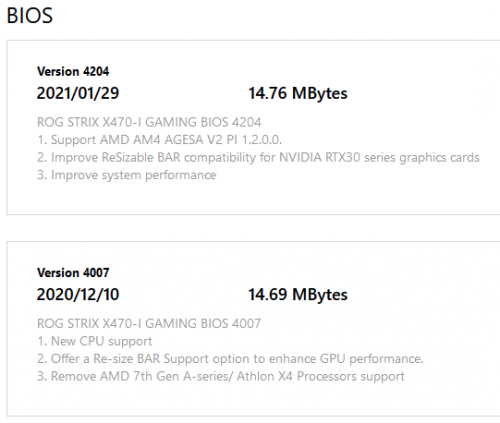
Then the last gen X470/B450 board are quite amazing, can support Zen 1 1600 to Zen 3 5950X, Resizable-bar for Ryzen 3000 and 5000.

In theory...
oldKyoo
post Mar 4 2021, 07:04 PM

Flashing at a street near you.
*****
Senior Member
961 posts

Joined: Jan 2011
From: Msia

user posted image

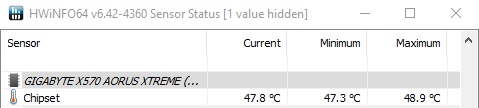
The chipset temps for me is manageable. Its the 5900x idling temps i have a problem with (unless i disable pbo, it never idles below 40c....)
cawan
post Mar 4 2021, 11:35 PM

Casual
***
Junior Member
404 posts

Joined: Jul 2006


Asking, was mobo b550 overkill for low-mid gaming setup?

Or enough with b450? How about Long term or future proof for this board?
yimingwuzere
post Mar 5 2021, 08:12 AM

Enthusiast
*****
Senior Member
990 posts

Joined: Sep 2005
From: Bolehland


QUOTE(cawan @ Mar 4 2021, 11:35 PM)
Asking, was mobo b550 overkill for low-mid gaming setup?

Or enough with b450? How about Long term or future proof for this board?
*
Depends on your use case - if PCIE 4.0 is not required B450 can be sufficient. That said, most B450 boards do not play well with 12 and 16 core CPUs as their VRM was originally designed with 8-core CPUs in mind like the 2700X, so if you're going with high core count it may be safer to stick to B550.
edmund_yung
post Mar 5 2021, 10:03 AM

Regular
******
Senior Member
1,198 posts

Joined: Aug 2009


QUOTE(cawan @ Mar 4 2021, 11:35 PM)
Asking, was mobo b550 overkill for low-mid gaming setup?

Or enough with b450? How about Long term or future proof for this board?
*
Then there's the limit of using more than one PCIE SSD. Look into the restriction of the specific board and decide if you need more PCIE storage in the very near future.
Bonchi
post Mar 5 2021, 11:37 AM

KittehPowah
******
Senior Member
1,649 posts

Joined: Sep 2008
QUOTE(cawan @ Mar 4 2021, 11:35 PM)
Asking, was mobo b550 overkill for low-mid gaming setup?

Or enough with b450? How about Long term or future proof for this board?
*
also the chipset bios may have some bug as B450 was designed with ryzen 2nd gen 20 pcie lanes in mind as compared to 3rd gen’s 24. So some motheboards will detect as 20cpu lanes and drop the 16x pcieE gen3 down to 8x when the m.2 slot is used... I had this problem with MSI B450i gaming plus AC.

And somehow for B450, AIB seldom publish the detailed info online or in the manual regarding how the pcie lanes are assigned.. so hardware pairing like using multiple m.2/pcie devices/sata devices together might cause either one to not be detected. B550 onwards tend to have a better info.

B450 and x470 actually reached end of line last year. It doesnt officially support the latest 5000 series but is made possible with a beta bios instead. While B550 will be last AM4 motherboard. So either way, there is no future proofing for both so just buy whatever that fits your budget and requirement.

This post has been edited by Bonchi: Mar 5 2021, 11:42 AM
General_Nic
post Mar 6 2021, 09:58 PM

D5000 fully loaded n ready to shoot~!!
*******
Senior Member
3,508 posts

Joined: Apr 2009


guys, which area should I troubleshoot now
when I set 3600mhz xmp on my ram, it takes ages to even post
then after entering windows, everything is noticeably slower/laggy than when running at non-xmp default speed

it's a 5800x on MSI X570 Unify, Trident Z Neo 3600MHz CL18-22-22-42 16GB x4
should I try updating the bios first or troubleshoot the rams 1 by 1?


Edit:
my bios is vA7, read that most ppl have this issue solved with vA8, gonna jump the gun and try it *fingers crossed*


Update:
updated bios and running 3600mhz xmp with no issues now
will continue to do more tests, but hopefully that's one less issue now

This post has been edited by General_Nic: Mar 7 2021, 12:13 AM
yimingwuzere
post Mar 7 2021, 03:22 PM

Enthusiast
*****
Senior Member
990 posts

Joined: Sep 2005
From: Bolehland


QUOTE(General_Nic @ Mar 6 2021, 09:58 PM)
guys, which area should I troubleshoot now
when I set 3600mhz xmp on my ram, it takes ages to even post
then after entering windows, everything is noticeably slower/laggy than when running at non-xmp default speed

it's a 5800x on MSI X570 Unify, Trident Z Neo 3600MHz CL18-22-22-42 16GB x4
should I try updating the bios first or troubleshoot the rams 1 by 1?
Edit:
my bios is vA7, read that most ppl have this issue solved with vA8, gonna jump the gun and try it *fingers crossed*
Update:
updated bios and running 3600mhz xmp with no issues now
will continue to do more tests, but hopefully that's one less issue now
*
Could be a BIOS issue. My board on AGESA 1.1.0.0 Patch C cannot run my RAM kit at 3800 stable at all, and fails to POST at 3866. Heard the recently released 1.2.0.0 BIOS fixes it and it should now hit 4000. Just haven't gotten around to update it yet and test.
SSJBen
post Mar 7 2021, 05:45 PM

Stars deez nuts.
*******
Senior Member
4,523 posts

Joined: Apr 2006


Just stay at 3800mhz, tighten your timings and be happy. 4000mhz doesn't offer anything over 3800mhz other than self circle jerk satisfaction.
yimingwuzere
post Mar 7 2021, 08:24 PM

Enthusiast
*****
Senior Member
990 posts

Joined: Sep 2005
From: Bolehland


QUOTE(SSJBen @ Mar 7 2021, 05:45 PM)
Just stay at 3800mhz, tighten your timings and be happy. 4000mhz doesn't offer anything over 3800mhz other than self circle jerk satisfaction.
*
Not really bothered to go for 4000, just doing a round to see how high it clocks then go back to lower voltage frequencies/timings haha

475 Pages « < 375 376 377 378 379 > » Top
 

Change to:
| Lo-Fi Version
0.0307sec    0.66    6 queries    GZIP Disabled
Time is now: 17th December 2025 - 04:06 AM