Welcome to V17 of official LYN thread for the Galaxy Note II
LYN Forum Rules: https://forum.lowyat.net/index.php?act=boardrules "The official language of Lowyat.NET is the English language. All threads and posts must be in English, with the exception of specific, designated threads in the Kopitiam, and limited use to convey a specific expression or interjection."
With the kind permission of XeactorZ, the TS of S3 thread, I reproduce some content which is relevant for us as well since both the Note 2 and S3 share a lot of similarities.
1. Strictly no discussions on warez/cracks or pirated apps. Please keep the thread CLEAN from such illegal stuff 2. Do NOT ask for links to such apps or links to get free apps which need to be paid for 3. Do NOT post links or references to such sites that promote downloads of pirated, cracked, warez apps 4. Any requests or demands for apps specified under points 1 to 3 will be outright ignored and will attract warning and suspensions from the mods. The community will help in the policing. 5. Please be civil and polite in your posts. Saying "Please" goes a long way. 6. Posts / assistance given in this thread are on a voluntary basis by the members and please respect that. 7. Readers are advised to try out any suggestions at their own risk. 8. Learn to use "Search Topic" at bottom left of each page before asking. Do not blame others if you don't know how to form a search term. 9. Read the first page if you have a question. Then read for 10 pages, AND the last 10 pages of a thread BEFORE YOU ASK ANYTHING.
10. READ UP THE BASICS BEFORE YOU START ASKING HERE!! BASIC QUESTIONS WILL NOT BE ENTERTAINED
Launched in Malaysia 11th October, 2012 In stores from 19th October,2012
Malaysia has the N7100 model by Samsung Malaysia. The N7105 LTE model may be obtained from other importers but LTE coverage is very limited as of now (Q1 2013)
Current latest firmware for Malaysia: N7100XXDMB4 Android 4.1.2, Week 3, Feb 2013.
You may also get an "unable to access server" message like in the pic link below. This just means that the Samsung update server is full. Try again at another time. Patience is virtue. https://forum.lowyat.net/index.php?act=Atta...post&id=3305103
DO NOT ASK WHAT HAS CHANGED COMPARED TO THE LAST VERSION(s). Samsung does not provide any meaningful changelogs.
For those who already know how to flash: Download official firmware from http://www.sammobile.com/firmware/ - login first. You will download a zip file. Unzip it for the tar file to be used for flashing
Specifications
» Click to show Spoiler - click again to hide... «
Memory 16/32/64GB User memory + 2GB (RAM) microSD slot (supports exFAT - the standard supports up to 2TB)
S Pen Optimized Features S Pen Experience - S Note, S Planner, Email with hand-writing integration - S Pen Keeper - Quick Command, Easy Clip, Photo Note, Paper Artist - Shape Match, Formula Match
1 Step tasking / Multitasking features Air View Popup Note, Popup Play Page Buddy / Tag Buddy / Word Buddy
Connectivity / Sharing Features Bluetooth® v 4.0 (Apt-X Codec support) LE USB 2.0 Host WiFi 802.11 a/b/g/n (2.4 & 5 GHz), Wi-Fi HT40 Wi-Fi Direct NFC S Beam Samsung AllShare Play & Control Samsung AllShare Cast (WiFi Display) - Mirroring & Extension Samsung AllShare Framework
Other Samsung TouchWiz / Samsung L!ve Panel Samsung Kies / Samsung Kies Air Samsung ChatOn mobile communication service Smart Stay, Direct claa, Screen Recorder, Quick Glance Samsung ChatOn mobile communication service Samsung S Suggest
Camera Main (Rear) : 8 Megapixel Auto Focus Camera with LED Flash, BSI Sub (Front) : 1.9 Megapixel VT Camera, BSI Best Photo, Best Group Pose, Low light shot
Audio Codec: MP3, OGG, WMA, AAC, ACC+, eAAC+, AMR(NB,WB), MIDI, WAV, AC-3, Flac Music Player with SoundAlive 3.5mm Ear Jack
Content / Services Samsung Apps Samsung Hub - Game Hub - Media Hub (US only) - Learning Hub / Music Hub / Video Hub ※ The availability of each Samsung Hub may differ by country
Sensors Accelerometer, RGB Light, Digital Compass, Proximity, Gyro, Barometer
GPS A-GPS Glonass
Enterprise Solutions On Device Encryption (H/W) Microsoft Exchange ActiveSync VPN(F5, Cisco, Juniper) MDM(Sybase Afaria, MobileIron, SOTI, Good) CCX Mware MVP
General Info,Reviews
» Click to show Spoiler - click again to hide... «
» Click to show Spoiler - click again to hide... «
What's in the sales package (applies only to SME sets) ● A sealed box with the blue Samsung sticker and an e-Warranty sticker. ● The serial number and IMEI stickers are at the side. ● In the box you will find the phone, battery, a WHITE 3-pin charger rated at 2A, a WHITE micro-usb cable, a pair of WHITE headphones and a short manual which also describes e-warranty. NOTE: If you are getting an AP set, the charger will have the pin configuration of the region it came from (eg 2 round pins for Europe sets) NOTE: If you get a set with a BLACK charger and BLACK cable, you may not be getting a Note II and it is likely a knockoff.
How to check your phone ● Check your IMEI by dialing *#06# and compare it with the one on the sticker on the box. It has to be the same. There could be an extra "/01" which you can ignore. ● Check all your phone's features by dialing *#0*#. You will get a full screen of clickable boxes. Click each one to ensure that those respective features are tested and working fine. Hit the back button to exit the test you are in. ● Remove the battery and confirm that there is a SIRIM sticker (applicable only to SME sets). Then compare the serial number, ensure it matches with the one on the box sticker. ● Go to Settings>Storage and ensure that it is showing 10.36Gb total space (if you have a 16Gb device) This is the correct amount of free storage after the default software is loaded.
» Click to show Spoiler - click again to hide... «
Key HARDWARE Features of the Note 2
Difference between LTE and Non-LTE versions of the Note 2 Due to some technical differences between N7100 and N7105, PLEASE READ CAREFULLY BEFORE YOU FLASH ROMS !!! Most roms/kernels on XDA are meant for the N7100. Please ensure that your rom/kernel can be used on the N7105 before you flash.
Video Reviews of ALL Features of the Note 2 (this includes hardware and software)
» Click to show Spoiler - click again to hide... «
Hello everyone!!! Here is probably -- pretentiously the most in-depth review on the Note II that you will ever see... LOL Enjoy, relax, stay a while, and pick a topic. OR watch the whole thing!!!
1. Intro (00:14) 2. Form Factor (1:15) 3. 4 device pile up (2:39) 4. Build Quality (3:30) 5. Durability - my dad dropped it!!! (5:26) 6. Out Door / Direct Sunlight Readability (7:09) 7. Pocket test (7:46) 8. Operating System *Start* (9:25) 9. Sensors and Motion (10:47) 10. Voice Recognition - S Voice and Google Now (15:35) 11. How to get Flash on Jelly Bean!!! (19:31) 12. S Pen Features *Start* (20:11) 13. Pen commands *menu, back, quick command, ETC (20:24) 14. USING S NOTE is a BLAST (23:08) 15. Pen and Photo Editing Wizardry (25:06) 16. Don't forget these Pen Tools! (27:16) 17. Pop Up BROWSER (28:12) 18. Multi-window (28:51) 19. Galaxy Note II Processors and Power *vs Note and SIII* (29:21) 20. CPU Browser speed test Note II vs SIII (30:58) 21. GPU and Game Play Power!!!! (32:21) 22. RAM Power 2GB buttery smoothness (34:29) 23. THE DISPLAY *START* (35:32) 24. Up close of Note Original and Note II Pixels (36:39) 25. Burn in??? (38:27) 26. Gorgeous MEDIA EXPERIENCE & NO black clipping!!!! (38:59) 27. NO Black Clipping demonstration (41:06) 28. Display IMPERFECTIONS (42:45) 29. Battery Life (45:58) 30. Antennas and Phone Versions (47:47) 31. The Cameras and Demonstrations (48:41) 32. Outside Video Tests and Photos (52:08) 33. THE END! Thank You for watching!!! (54:12)
ColdFustion - 18:43
» Click to show Spoiler - click again to hide... «
jimmyispromo Best Tips and Tricks of Samsung Galaxy Note 2 (1 of 2) - 11:51
» Click to show Spoiler - click again to hide... «
Best Tips and Tricks of Samsung Galaxy Note 2 (2 of 2) - 11:54
» Click to show Spoiler - click again to hide... «
Samsung Galaxy Note 2 (II) Settings Guide by TheAndroidizen - 10:55
» Click to show Spoiler - click again to hide... «
3G Signal Related Questions and Helpful Answers
» Click to show Spoiler - click again to hide... «
My 2 cents about battery use: Firstly, ALL USERS here on this forum report usages >12hours ie 1 whole day out, with at least 3hours AND MORE of "Screen On Time" or what we term "SOT". Typical battery life tends to be 4+hours SOT with 18+hours total use. This is a SMARTPHONE and should be enjoyed for all its wonderful features of large screen for movies/browsing/reading, powerful CPU for gaming, data connectivity for surfing etc. If you can get 1 whole day's use out of a full charge, I don't see why there is a need to complain. Charge when you are sleeping. Read the link about batteries, and you won't kill your battery from overnight charging.
IF you are getting less than 3hours SOT, and/or less than 12 hours of total use, then the most likely cause is some badly behaved app or apps that won't go to sleep and keeps your CPU running high. See Advanced Topics for Wakelocks and what to do about them.
Camera placeholder - contributors requested In the meantime, search through the threads for posts from Aspire2oo6. He is the resident photography expert and has posted some amazing shots, or: http://www.flickr.com/photos/thenokiagalle...57632367167724/
The site below is a well recognised site for Camera reviews. Now they have a subsection for Mobile Phone Cameras. It contains reviews for all the phones they have access to, and not just Note/Note 2 specific. RSS Feed for DPReview Mobile Camera reviews
Gorilla Glass
» Click to show Spoiler - click again to hide... «
How much will it cost to replace a cracked screen - PrinceCaspien The Note 2 screen has a Wacom digitizer, and this is bonded to the glass during assembly. When you replace the screen at the service center, both will get replaced as a single assembly.
If you are adventurous, you can try to do it yourself. See Advanced section.
Maxis 4G Smartphone Plan available Maxis is bundling Nokia and HTC models right now (2013/02/09) for the 2600MHz band. Users with N7105 should be able to use 4G now, but locations will be limited.
please PM me if there are changes to telco plans
More information will be added as it is announced or please feel free to highlight to me via PM what I may have missed.
None of us is as smart as all of us
Have fun everyone
This post has been edited by joytest: Feb 20 2013, 07:35 PM
Articles and Posts related to the features found in the Note 2
XDA site for Galaxy Note II (N7100 and N7105) Samsung Galaxy Note II - N7100 and N7105 XDA has 2 threads for Development (ie ROMs, kernels etc) discussions. The one called Android Development deals with ROMs/kernels/tweaks etc that are "cooked" ie modified from STOCK. The one called Android Original Development deals with ROMS/kernels/tweaks etc that are built from scratch (AOSP/AOKP) or are entirely original in their approach.
XDA sites for other variants of the Galaxy Note II (not N7100 or N7105) - applicable for sets from US Telcos AT&T Sprint T-Mobile Verizon
Common Issues/Problems encountered with the Note 2
» Click to show Spoiler - click again to hide... «
Common problems with sdcards placeholder - contributors requested The Note 2 uses microSD cards. MicroSD (or sometimes abbreviated "usd/uSD" card since "u" looks like the Greek letter "micro") is the physical format of the card. The logical format (ie how the computer/phone sees it) can be FAT16, FAT32 or exFAT. FAT32 officially supports up to 32Gb. Cards greater than 32Gb will default to 64Gb and be in exFAT format. The most common 64Gb uSD card is currently the Sandisk Ultra Class 10.
Used to be a diehard iPhone fan since 07. Switched to android in 11 and I love it. The difference between android and iOS: iOS is like living in a nice hotel. You don't have a lot of choice but it looks nice and easy to use. Android is like buyingg your own home. Buy an really nice home (android device) and you will probably love it. You can change and customize it however you want. It's yours! You can also buy cheap.
This post has been edited by joytest: Feb 20 2013, 05:42 PM
Getting into Download Mode Press Power + VOL Down + Home buttons simultaneously while the phone is off.
Getting into Recovery Mode Press Power + VOL Up + Home buttons simultaneously while the phone is off.
Rooting for Beginners - some general explanations and understanding
Easiest Explanation EVER To Explain Root Vs Jailbreak Think of it like the Matrix: Jailbreaking is comparable to what Morpheus could do. He could bend the rules of the system to overcome certain restrictions, but was still bound to its rules. Rooting is what Neo could do. Not only could he bend the rules, he could completely break them
» Click to show Spoiler - click again to hide... «
Difference between ios Jailbreaking and Android Rooting an excerpt: Now while IOS users might consider jailbreaking their iPhone the same thing as Android users rooting their Android phones, there is a HUGE difference. In fact, you can't even compare jailbreaking to rooting, and here's why. Android out of the box allows users to install 3rd party apps (also known as sideloading), already allows you to install themes, and even allows you to install applications directly from your SD card or internal memory of your device. Everything that IOS users hope to accomplish with jailbreaking their device is already included as basic functionality within Android.
» Click to show Spoiler - click again to hide... «
For samsung phones, its a yes and no answer. From terms and conditions, rooting/flashing will void your warranty, but samsung is not strict about this. So far there have not been cases of samsung rejecting rooted phone, but please be prudent and flash stock firmware before turning in your phone for warranty
What is the Flash Counter and Triangle Away?
» Click to show Spoiler - click again to hide... «
There is a counter in the phone that checks for flashing of custom roms. If yo have flashed a custom kernel or rom, the counter will increase. When you get into Download mode, it will show that the counter has increased. This tells Samsung that you have modified with your phone. You can reset this counter by using Triangle Away.
This tag will cause your post to show up on the tagged person's "Replies to Me (BETA)" at the top right corner of the forum.
LYN Forum setting to increase posts viewable per page to 40. The default is 20. Go My Controls > Board Settings (on lower left frame) > the Number of Posts to show for each topic page set to 40.
To clear your default "Open with" or "Action" app (eg you have set mp4 files to only always open with MXPlayer) Go to Settings > Application Manager > APPNAME > Clear defaults
Checking your data usage for Malaysian Telcos
» Click to show Spoiler - click again to hide... «
Maxis - dial *136*9*1# Celcom - sms VOL STATUS to 22188 Digi - use My Digi Playstore appkevintth
» Click to show Spoiler - click again to hide... «
If you are an advanced user and familiar with flashing etc from any other Android phone, the link here will point you to all such topics related to the Note 2. Samsung Galaxy Note II - N7100, N7105 - for other variants (eg AT&T etc), please search for those models on XDA as they are in a different forum.
If you are a noob/newbie to all this stuff, please read the link to the NOOB Guide FIRST before asking how to flash ROMS and so forth.
Having said that, if you do not wish to take the first plunge to root and flash your phone, that is perfectly fine as well. All users here have report immense satisfaction with the stock rom and across the web the general consensus is also that Samsung has done very well with the stock rom of the Note 2, barring any Touchwiz haters.
» Click to show Spoiler - click again to hide... «
Courtesy S3 thread / Waveweaver
Kies is well known for its un-reliable.(sic) Titanium backup - for your apps and data. Nandroid backup - for complete whole things (app + data + phone system..etc..). You do Nandroid before flashing custom roms. If anything bad happen during flashing you can restore back to your previous set up by using your Nandroid.
Wakelocks and How to Deal with Them
» Click to show Spoiler - click again to hide... «
XDA - [GUIDE] The Total Newb's Guide to Wakelocks If you're trying to maximize your battery life, you know this already. Some wakelocks are happy, friendly things, but many are silent leeches, sucking away your battery life while you remain blissfully unaware of what's happening. The goal of this guide is to list some of the more common wakelocks you'll encounter and how to wipe them off of your system.
Instagram is cool but there is no option to save bigger photo reso and aspect ratio is 1:1 Snapseed. is awesome! can save full photo resolution, tons of effect to use and free
Just in case to newbie asking what the official status looks like in the Download Mode (pressing Power + VOL Down + Home buttons simultaneously) while the phone is off...
This post has been edited by tot31: Feb 5 2013, 04:26 PM
Anyone can help me with the pic on the first post how not to have the forum automatically scale the size within the box? I resized the original pic from last TS and uploaded but it's being scalled even smaller by the forum.
Anyone can help me with the pic on the first post how not to have the forum automatically scale the size within the box? I resized the original pic from last TS and uploaded but it's being scalled even smaller by the forum.
why don;t you just image link from the source ?
CODE
[img]url[/img]
This post has been edited by tot31: Feb 5 2013, 04:36 PM
Anyone knows where to buy ori samsung wall charger? I went to Samsung digital mall, they say ori wall charger is not out in the market yet? Can't buy anywhere?
Anyone can help me with the pic on the first post how not to have the forum automatically scale the size within the box? I resized the original pic from last TS and uploaded but it's being scalled even smaller by the forum.
Don't upload to the forum. Use other site and just post the link like tot31 said.
This post has been edited by antt00: Feb 5 2013, 04:41 PM
Try flashing Wicked Fonts, available on post #2 of Wicked ROM thread. If it doesn't work on newer firmware, you might need to do some editing here and there maybe, but shouldn't be too difficult imo
Anyone knows where to buy ori samsung wall charger? I went to Samsung digital mall, they say ori wall charger is not out in the market yet? Can't buy anywhere?
Aim for the sky, as if you fall, you will reach the clouds!
Senior Member
1,557 posts
Joined: Feb 2011
Actually the Camera 360 and the stock camera is the same.. I tried both Camera 360 and the stock camera.. 4 X digital zoom ( not optical zoom ) And both can yield the same quality.. My enter button as a macro scale..
Hi there. After.the update my phone doesn't have any default apps. Like when I click smth on fb I've set it to open in Google chrome. Now it's just using the pop up browser. help me?
Hi there. After.the update my phone doesn't have any default apps. Like when I click smth on fb I've set it to open in Google chrome. Now it's just using the pop up browser. help me?
Go to Settings > Application Manager > Popup Browser > Clear defaults
Since some1 mentioned about macro shoot... I try to shoot with Marco focus mode... Somehow i manage to shoot with very close distance... If the camera bounced back with a red box, maybe because of insufficient light... Stock camera, macro focus mode, without any post processing...
hi guys i found out that when i set my phone on vibrate mode when sms comes in there is not vibration at all may i know how do i set the phone to vibrate when i receive sms when it is in vibration mode
hi guys i found out that when i set my phone on vibrate mode when sms comes in there is not vibration at all may i know how do i set the phone to vibrate when i receive sms when it is in vibration mode
have you enable vibration in the sms app? it's a different one from the one in settings.
hi guys i found out that when i set my phone on vibrate mode when sms comes in there is not vibration at all may i know how do i set the phone to vibrate when i receive sms when it is in vibration mode
Check ur Settings > Sound > Vibration intensity > Notification
I am ecstatic that some emphasis is finally levied on the proper use of the English language, good move albeit a teeny bit late. However, better late than never.
Good because with correct usage, whatever posted will be understood and whatever replies will not be misinterpreted, lest unnecessary debates ensue.
Actually the Camera 360 and the stock camera is the same.. I tried both Camera 360 and the stock camera.. 4 X digital zoom ( not optical zoom ) And both can yield the same quality.. My enter button as a macro scale..
Yea, even tiny stuff can be captured by stock camera app
try type this in whatsapp or any IM apps..including sms as well
2 is xxx xxx ma
the xxx is where you put words..can be alphanumeric. but must at least 2 word.
when u done and press send button...you'll see it becomes hyperlink...when clicked..it prompt a google map or waze..at least that's what happen on my device and some of my friend device...
weird huh...
This post has been edited by alcali: Feb 5 2013, 07:27 PM
I am ecstatic that some emphasis is finally levied on the proper use of the English language, good move albeit a teeny bit late. However, better late than never.
Good because with correct usage, whatever posted will be understood and whatever replies will not be misinterpreted, lest unnecessary debates ensue.
Yes sir you may have an orgasm as well as tot31 is wont to say
yeah i have check on the Vibration intensity but after screen lock there is no vibration when it is in vibrate mode @.@ anyone face this problem?
Besides ticking vibrate when ringing under sound in settings, have you, as stated by @antt00, also set the notification setting under the message app to vibrate as well?
I want to add a small writeup on AP vs SME warranties as this is also a popular question. Can anyone point me to some prior post as I know this has been covered ad nauseam.
It's tiring, I won't nitpick overmuch except for the more glaring ones. Maybe PeeEl can join in the fun, although I think he carries a larger cane in his pocket
It's tiring, I won't nitpick overmuch except for the more glaring ones. Maybe PeeEl can join in the fun, although I think he carries a larger cane in his pocket
Partaking in a sojourn of education particularly in languages, both ways, is tedious, to say the least. And can be hazardous as some will read too much into it and not accept it graciously. I'd rather in whatever feeble manner (with cane still in pocket) I can, point out the evidently absurd ones especially vis-a-vis the subject matter broached.
Can you share please? It will help those who face the same predicament.
just like what they say need to set it in the message app place....there is a tick box there for vibration....all the while i was finding for that in the setting but the setting was only available in the message app place
is there any possible step to trace lost note 2 other than built in find my mobile? if the hp was reflash firmware or factory reset, the samsung account gone means find my mobile is useless d rite?
Hi there.This is the thing that i hate on my Note 2 at the moment.Hu hu~ -The speaker sound quality like not very nice compare to the 1st Note. -Play Modern Combat 3 still lag (Some part)..i tout Note 2 have the best spec at the moment for gaming.No?2Gb ram with 1.6Ghz.Adoi..got any solution to fix the lag on gaming?
is there any possible step to trace lost note 2 other than built in find my mobile? if the hp was reflash firmware or factory reset, the samsung account gone means find my mobile is useless d rite?
yes, if the theif flash and wipe out your phone then trying to find it back is useless.
Hi there.This is the thing that i hate on my Note 2 at the moment.Hu hu~ -The speaker sound quality like not very nice compare to the 1st Note. -Play Modern Combat 3 still lag (Some part)..i tout Note 2 have the best spec at the moment for gaming.No?2Gb ram with 1.6Ghz.Adoi..got any solution to fix the lag on gaming?
You can try Settings -> Developer options -> Force GPU rendering (tick it)
This post has been edited by tot31: Feb 5 2013, 08:56 PM
any tricks to make the setting bound as factory setting,possible to do that for nowadays android technology?
I think you need to encrypt your phone and set a strong password with those Enterprise security software that can wipe your device, but the premise is that your phone is GONE that is why they will perform a remote wipe.
I think you need to encrypt your phone and set a strong password with those Enterprise security software that can wipe your device, but the premise is that your phone is GONE that is why they will perform a remote wipe.
Say goodbye to your phone if you've lost it.
ah..i know what u mean,at least just lost the hp but not all the data inside the phone rite? hmm..then sync all data to cloud storage better than depends on external sd
joytest I don't see any link to your wakelock ref best to link as well 2nas apps. just suggestion. maybe put it in 'expert/advance' section in 2nd 4th post
This post has been edited by nehalem176: Feb 5 2013, 09:14 PM
joytest I don't see any link to your wakelock ref best to link as well 2nas apps. just suggestion. maybe put it in 'expert/advance' section in 2nd 3rd post
Yeah give me a couple of days to add stuff up. Thanks for reminding. I will be quite busy the next few days as well.
You can try Settings -> Developer options -> Force GPU rendering (tick it)
Erm,thanks bro.But if i tick it,it will effect the game quality cos i prefer high quality gaming graphic when playing.And what does the thing do after i tick it?Anyway thanks for helping bro!
Erm,thanks bro.But if i tick it,it will effect the game quality cos i prefer high quality gaming graphic when playing.And what does the thing do after i tick it?Anyway thanks for helping bro!
that settings will force apps using GPU rendering instead of software IIRC,it will not effect game quality. although I am not into gaming but I am using it and my Note 2 really flies...
This post has been edited by tot31: Feb 5 2013, 09:51 PM
Need help/advise about power bank.Okay,i did survey and found this type Yoobao Power Bank Thunder YB-651 so cool.Well lot seller selling this type and everyone claim is ORI and provide checking code for buyer satisfaction.Short story already deal one seller but not paid yet.Tonight i go to Lelong and found this - Yoobao.What i see there seriously make me double think to deal early seller.
That my story..thank you.Any advise/info with humble my pleasure Inb4 my spoken..atas pagar only.
This post has been edited by honamd77: Feb 5 2013, 09:57 PM
Need help/advise about power bank.Okay,i did survey and found this type Yoobao Power Bank Thunder YB-651 so cool. Well lot seller selling this type and everyone claim is ORI and provide checking code for buyer satisfaction.Short story already deal one seller but not paid yet.Tonight i go to Lelong and found this - Yoobao.What i see there seriously make me double think to deal early seller.
That my story..thank you.Any advise/info with humble my pleasure Inb4 my spoken..atas pagar only.
If im not wrong, this one only has 1.5 or 1A ports unlike 11,200mAh which has both 1A and 2A
Need help/advise about power bank.Okay,i did survey and found this type Yoobao Power Bank Thunder YB-651 so cool.Well lot seller selling this type and everyone claim is ORI and provide checking code for buyer satisfaction.Short story already deal one seller but not paid yet.Tonight i go to Lelong and found this - Yoobao.What i see there seriously make me double think to deal early seller.
That my story..thank you.Any advise/info with humble my pleasure Inb4 my spoken..atas pagar only.
Need help/advise about power bank.Okay,i did survey and found this type Yoobao Power Bank Thunder YB-651 so cool.Well lot seller selling this type and everyone claim is ORI and provide checking code for buyer satisfaction.Short story already deal one seller but not paid yet.Tonight i go to Lelong and found this - Yoobao.What i see there seriously make me double think to deal early seller.
That my story..thank you.Any advise/info with humble my pleasure Inb4 my spoken..atas pagar only.
Just make sure is distributed by Mobile Dot com - infact the lelong site point 1-6 is sufficiently clear YES there are a lot of fakes Yoobao around Both my Yoobao is distributed by mobile dot com and is clearly shown in packaging
This post has been edited by benny888: Feb 5 2013, 10:08 PM
any tricks to make the setting bound as factory setting,possible to do that for nowadays android technology?
Rooted phone can make anti theft software like avast survive factory reset. But there is no way to survive a new rom flash as the whole system partition is formatted prior to flashing new rom.
Just make sure is distributed by Mobile Dot com - infact the lelong site point 1-6 is sufficiently clear YES there are a lot of fakes Yoobao around Both my Yoobao is distributed by mobile dot com and is clearly shown in packaging
Hi Uncle
Can share what the price ?.Seriously me blur right now In before making to deal.Seller first what uncle say..got sticker Mobile Dot Com and second seller also claim ori but dun have sticker.The different i found is warranty,6 month & 12 month.
» Click to show Spoiler - click again to hide... «
[attachmentid=3297983]
First seller attach this...
This post has been edited by honamd77: Feb 5 2013, 10:20 PM
so, joytest, have you tried Omega V11 with stock kernel for Allcast Share? I have yet got time to do it today other than the short failed test this morning. Will be busy these coming days as well for CNY.
Can share what the price ?.Seriously me blur right now In before making to deal.Seller first what uncle say..got sticker Mobile Dot Com and second seller also claim ori but dun have sticker.The different i found is warranty,6 month & 12 month.
» Click to show Spoiler - click again to hide... «
[attachmentid=3297983]
First seller attach this...
How much is seller charging you. Package looks genuine ( there is mobiledotcom sticker and is 3 pin plug ) . There are some selling RM 140-150 - I suggest stay away. Pricing should be around RM 190-200 lowest for original Msian warranty set ( standard is 1 year warranty) Anyway you have not pay for it yet - nothing to worry about. Physically check it before making payment Refer our fellow note 2 user brotan site : he is selling it RM 199 http://forum.lowyat.net/index.php?showtopi...l=Yoobao+YB+651
How much is seller charging you. Package looks genuine ( there is mobiledotcom sticker and is 3 pin plug ) . There are some selling RM 140-150 - I suggest stay away. Pricing should be around RM 190-200 lowest for original Msian warranty set ( standard is 1 year warranty) Anyway you have not pay for it yet - nothing to worry about. Physically check it before making payment Refer our fellow note 2 user brotan site : he is selling it RM 199 http://forum.lowyat.net/index.php?showtopi...l=Yoobao+YB+651
He give me RM195 via cod cause seller also live same area with me. Seller also have thread sale at lyn.Hmm,maybe why different price because this seller got it from authorized dealer and come with 12 month warranty.Other seller got item direct from factory a.k.a AP and that's why more less price (my opinion only).Maybe i go first seller..
just like what they say need to set it in the message app place....there is a tick box there for vibration....all the while i was finding for that in the setting but the setting was only available in the message app place
Good that we could help. To be honest, if you play around with the phone enough, you will be able to know the fundamental workings i.e. features and functions quite easily.
Yes. But your problem is not about the kernel. I think you need a full wipe to continue enjoying rom flashing.
i perform full wipe b4 installing the wanamlite 2.7 (changed from omega v11). but the wanamlite file name downloaded is stated as no wipe version. is that causing the problem? downloaded wrong file?
i perform full wipe b4 installing the wanamlite 2.7 (changed from omega v11). but the wanamlite file name downloaded is stated as no wipe version. is that causing the problem? downloaded wrong file?
No the rom is no wipe. If you face FC then just factory reset.
i perform full wipe b4 installing the wanamlite 2.7 (changed from omega v11). but the wanamlite file name downloaded is stated as no wipe version. is that causing the problem? downloaded wrong file?
It is always recommended to do a FULL wipe if you are moving from another developer. The developer can say is a NO WIPE rom and in fact wiping is a better method than no wipe Apps FC can also be due to 3rd party apps which are non official ( crack/pirated). Such apps behave differently in different roms When you select to restore apps from TB , only select restore missing apps NOT system/apps
This post has been edited by benny888: Feb 5 2013, 10:57 PM
so, joytest, have you tried Omega V11 with stock kernel for Allcast Share? I have yet got time to do it today other than the short failed test this morning. Will be busy these coming days as well for CNY.
Sorry bro no time to test yet. Looks like I will only have a chance to test much much later.
It is always recommended to do a FULL wipe if you are moving from another developer. The developer can say is a NO WIPE rom and in fact wiping is a better method than no wipe Apps FC can also be due to 3rd party apps which are non official ( crack/pirated). Such apps behave differently in different roms When you select to restore apps from TB , only select restore missing apps NOT system/apps
sadly those facing fc r official apps like browser,fb,fb games n etc. probably i restore themfrom the omega rom backup. will try to do factory reset n reinstall from market later. thx uncle
sadly those facing fc r official apps like browser,fb,fb games n etc. probably i restore themfrom the omega rom backup. will try to do factory reset n reinstall from market later. thx uncle
Why not use TB if you like to flash custom rom? Its more efficient and faster than re-downloading all your apps again.
Very bothered with the echo problem with most of my callers keep asking : how come your phone has echo ???
The echo comes and go. something is so serious that caller have to remake the call. Sometimes never happened. If it's the hardware issue the problem should be consistent.
It didn't happened 3 months ago when I first bought. The issue occur only recently. ....
I'm hoping it's the cut micro sim causing the problem.
Need to invest rm25 hoping that my note 2 is fine.
sigh...
This post has been edited by rayzrblade: Feb 5 2013, 11:19 PM
Very bothered with the echo problem with most of my callers keep asking : how come your phone has echo ???
The echo comes and go. something is so serious that caller have to remake the call. Sometimes never happened. If it's the hardware issue the problem should be consistent.
It didn't happened 3 months ago when I first bought. The issue occur only recently. ....
I'm hoping it's the cut micro sim causing the problem.
Need to invest rm25 hoping that my note 2 is fine.
sigh...
RM 25 ?? - Maxis , right ? NO NEED to pay. I refuse when I requested mine switch from full sim to micro sim. I demand to speak to the supervisor telling them Celcom don't charge ( cos i also did a change only about 2 weeks earlier ) and I am a long time customer. Immediately she waived it
Rooting and uptodate mods are in the 1st page. I believe those he removed are obsolete mods.
Damn, I need to learn to rephrase. I meant that this thread has all the nice and updated guides that were missing from the first page of the previous thread versions (which had obsolete guides, like you pointed out).
Damn, I need to learn to rephrase. I meant that this thread has all the nice and updated guides that were missing from the first page of the previous thread versions (which had obsolete guides, like you pointed out).
Oh yes, do be mindful of grammar, semantics and phraseology
Already 9 pages?! I know its a bit late but congrats to joytest. Knew this day would come and great first page. Myb we could have a section of frequent Q&A instead of just guides. Probably in the next version. Just a suggestion.
Already 9 pages?! I know its a bit late but congrats to joytest. Knew this day would come and great first page. Myb we could have a section of frequent Q&A instead of just guides. Probably in the next version. Just a suggestion.
No problem, just send me a PM or link or writeup but I'll be busy over the next few days, response may be delayed.
One immediate help needed. I tried using Chrome to browse some website and was prompted "Coolies are not enabled on your browser. Please adjust this in your security preferences before continuing"
The Accept Cookies in Chrome is checked, where else I need to make the setting?
Edited : Problem solved by rebooting
This post has been edited by Sampo: Feb 6 2013, 12:14 AM
One immediate help needed. I tried using Chrome to browse some website and was prompted "Coolies are not enabled on your browser. Please adjust this in your security preferences before continuing"
The Accept Cookies in Chrome is checked, where else I need to make the setting?
Damn, I need to learn to rephrase. I meant that this thread has all the nice and updated guides that were missing from the first page of the previous thread versions (which had obsolete guides, like you pointed out).
this was because his predecessor was not doing his job, he will just show his face when a new thread needed to be opened and he never bothered to browse or even checked out the thread.
I am a bit confuse here, you said 11% but your remaining battery was showing 57%, 100-57=43, or my math sucks ?
erm, it doesn't work that way, but for me to explain, Im not sure how to put in an understandable manner
lets say, 43% drained, out of that 43%, android system took 11% of it, meaning the other 89% from that 43% is taken by screen and other apps, uugghh what am I saying...but yeah, its something like that iinm
erm, it doesn't work that way, but for me to explain, Im not sure how to put in an understandable manner
lets say, 43% drained, out of that 43%, android system took 11% of it, meaning the other 89% from that 43% is taken by screen and other apps, uugghh what am I saying...but yeah, its something like that iinm
ok my bad, he was saying about the Android System.. was reading too fast...
This post has been edited by tot31: Feb 6 2013, 12:30 AM
Dilemma if I should move to rooted stock rom or custom rom. Previously when on Galaxy S, I migrated from stock to DarkyRom then SlimBean.
Which do you recommend? Thanks
Rooted stock rom is good enough . Unlike SGS1 , Note2 is totally different in terms of stock rom . Stock is good enough for daily use . If u dun c the need of a custom rom , just root it so u can use the full features of apps like TitaniumBackup , Ad Blocker , DNS changer , etc .
Rooted stock rom is good enough . Unlike SGS1 , Note2 is totally different in terms of stock rom . Stock is good enough for daily use . If u dun c the need of a custom rom , just root it so u can use the full features of apps like TitaniumBackup , Ad Blocker , DNS changer , etc .
yup I do agree that the stock rom and kernel are really awesome already to be used daily, just root it and you will be free... but if you just want to have fun with custom roms then why not just try them out...
Dilemma if I should move to rooted stock rom or custom rom. Previously when on Galaxy S, I migrated from stock to DarkyRom then SlimBean.
Which do you recommend? Thanks
As others have pointed out, stock rooted is really good. Even uncle Benny has high praises for stock this time round. I'm on stock rooted as well. You can have stock rooted with custom kernel for some kicks.
Lol. slightly bigger screen. This could be a good second phone. Only 1ghz dual core proc with 3600mA battery. This one probably has better battery life.
Appreciate some help..tried using Deep Sleep Battery Saver but seems its not working for my N2..using free version 1.7 and in Balance mode no whitelist..
My N2 is unrooted with stock 4.1.2 DMA6..Problem is whenever I turn on my screen..wifi/data is not turned on..is there something I did wrong here? Tried rebooting..uninstall/install (clear cache and data)..and different profile to no avail..
Only sign that the app is functioning is when it enter deep sleep..when screen on..need to open the deep sleep menu..only then does the data (only) is on..wifi still off..(only works from notification menu..but not working if launch thru apps icon)..any comment? Screen on delay is at No delay..
P/s: special attention to bro @tot31..tried posting in xda-developer sites but doesnt have enough privilege yet.. !-_-
But the clear default thing is shaded & Can't be clicked on. I want to set back to chrome & all. Any idea how? Sighh
Do you like, use any file explorer? Such as ES File Explorer or Astro File Manager? Clear your defaults in the app. Open it, search for setting. It solved my problem last time.
Hi, i just got myself a Note 2 from Samsung dealer. But I am having a problem whereby I cant connect to Maxis data network. But if connection through Wifi is ok. Do i need to do any settings? Btw my previous phone was Iphone 4S. Can anyone help me this?
Hi, i just got myself a Note 2 from Samsung dealer. But I am having a problem whereby I cant connect to Maxis data network. But if connection through Wifi is ok. Do i need to do any settings? Btw my previous phone was Iphone 4S. Can anyone help me this?
Check whether data is enabled Settings/more/mobile network/data Check also apn : should be unet
Appreciate some help..tried using Deep Sleep Battery Saver but seems its not working for my N2..using free version 1.7 and in Balance mode no whitelist..
My N2 is unrooted with stock 4.1.2 DMA6..Problem is whenever I turn on my screen..wifi/data is not turned on..is there something I did wrong here? Tried rebooting..uninstall/install (clear cache and data)..and different profile to no avail..
Only sign that the app is functioning is when it enter deep sleep..when screen on..need to open the deep sleep menu..only then does the data (only) is on..wifi still off..(only works from notification menu..but not working if launch thru apps icon)..any comment? Screen on delay is at No delay..
P/s: special attention to bro @tot31..tried posting in xda-developer sites but doesnt have enough privilege yet.. !-_-
I was having the same problem but a reboot solved it for me.
One immediate help needed. I tried using Chrome to browse some website and was prompted "Coolies are not enabled on your browser. Please adjust this in your security preferences before continuing"
yikes... you have coolies?!?
from wikipedia:
QUOTE
Historically, a coolie (variously spelled cooli, cooly, kuli, quli, koelie etc.) was an Asian slave or manual laborer, particularly in southern China, the Indian subcontinent, and the Philippines during the 19th century and early 20th century.
try type this in whatsapp or any IM apps..including sms as well
2 is xxx xxx ma
the xxx is where you put words..can be alphanumeric. but must at least 2 word.
when u done and press send button...you'll see it becomes hyperlink...when clicked..it prompt a google map or waze..at least that's what happen on my device and some of my friend device...
weird huh...
system things its a coordinate... ya, seen it happen, especially when a number is at the start of the sentence.
yup I do agree that the stock rom and kernel are really awesome already to be used daily, just root it and you will be free... but if you just want to have fun with custom roms then why not just try them out...
With root can install ad-away.When play game no more annoying ad Can freeze many-many software/application we dun use but eat memory ...just my 2 cent
RM 25 ?? - Maxis , right ? NO NEED to pay. I refuse when I requested mine switch from full sim to micro sim. I demand to speak to the supervisor telling them Celcom don't charge ( cos i also did a change only about 2 weeks earlier ) and I am a long time customer. Immediately she waived it
+1 agreed, my fren did the same, even thou she a new user, look for the supervisor and nego
btw, are you able to get the whitelist to work? I added whatsapp to the whitelist but it doesn't seem to work anyway
when you put whatever apps in the whitelist, DSBS won't turn off your wifi/data. so putting any apps into the whitelist is kind of defeating the purpose of this app. I am always on Slumberer profile. Why don't you make a custom profile to set your own interval timing.
when you put whatever apps in the whitelist, DSBS won't turn off your wifi/data. so putting any apps into the whitelist is kind of defeating the purpose of this app. I am always on Slumberer profile. Why don't you make a custom profile to set your own interval timing.
then what is the whitelist for? I'm using custom profile right now. Squeezing out 1day 9hrs with SOT of 3.5hrs with battery remaining 34%
then what is the whitelist for? I'm using custom profile right now. Squeezing out 1day 9hrs with SOT of 3.5hrs with battery remaining 34%
when this app was on v1.0 the whitelist was different, then a lot of people were requesting a whitelist that can make this app stop, maybe they in that particular day just want to use the app in the whitelist to poll data or whatever. if you read through the thread you will get what I mean.
so the DSBS is working for you ? I told you this app is awesome... ... last time I remembered that you were at me....
This post has been edited by tot31: Feb 6 2013, 09:45 AM
when this app was on v1.0 the whitelist was different, then a lot of people were requesting a whitelist that can make this app stop, maybe they in that particular day just want to use the app in the whitelist to poll data or whatever. if you read through the thread you will get what I mean.
so the DSBS is working for you ? I told you this app is awesome...
I got no problem with sms or whatsapp...whenever my screen is on all of my whatsapp messages will come in.... btw I am using the Pro version not the Free one...
This post has been edited by tot31: Feb 6 2013, 09:48 AM
Aim for the sky, as if you fall, you will reach the clouds!
Senior Member
1,557 posts
Joined: Feb 2011
My opinion about the battery life is okay only.. Because I played the dark knight rises. But my battery did not rise but decreased.. Like 5 percent within 15 minutes of gameplay.
This post has been edited by Positron: Feb 6 2013, 10:15 AM
when this app was on v1.0 the whitelist was different, then a lot of people were requesting a whitelist that can make this app stop, maybe they in that particular day just want to use the app in the whitelist to poll data or whatever. if you read through the thread you will get what I mean.
so the DSBS is working for you ? I told you this app is awesome... ... last time I remembered that you were at me....
I you cos didn't know you were using DSBS all these while ler. And besides your screen capture doesn't seem to have the DSBS icon on the top left as well
Only slight drawback with DSBS, - downloading TheStar ePaper would require you to disable DSBS or you have to keep your screen ON - audio streaming doesn't work if screen is OFF - to use WiFi tethering, you've got to switch DSBS OFF as well
in other words, if you need constant internet access - forget about DSBS or only activate DSBS when you're sleeping
My opinion about the battery life is okay only.. Because I played the dark knight rises. But my battery did not rise but decreased.. Like 5 percent within 15 minutes of gameplay.
what do you expect from playing game on note2?? the battery percentage maintain all the way???
Yday installed spigen screen protector for my little bro and my father on their S3. Fits quite perfectly with the curved sides. Thinking of getting for my note2 but I dont like that rubbery feel. Anyone had the matte one?
I you cos didn't know you were using DSBS all these while ler. And besides your screen capture doesn't seem to have the DSBS icon on the top left as well
Only slight drawback with DSBS, - downloading TheStar ePaper would require you to disable DSBS or you have to keep your screen ON - audio streaming doesn't work if screen is OFF - to use WiFi tethering, you've got to switch DSBS OFF as well
in other words, if you need constant internet access - forget about DSBS or only activate DSBS when you're sleeping
1- If you have saved a favourite page (stock browser) at the home screen, it will open as a pop up browser (half screen) instead of full screen previously.
2- Quick glance motion when the screen is off usually triggers a blue LED notification for a few seconds and then OFF. After the update, the blue LED notification stays ON, which is quite annoying as one have to now press the home button and so on to make it OFF again. Not sure if this only happens to my unit, so please try and let me know.
because: 1. your phone (i believe its a note 2 we are talking about) has a huge screen but huge power requirements 2. watch can charge and store the energy needed for night time operation within minutes.. phone cannotttt 3. without power, watch can just re-wind / re-set, phone will die
anyone got issue with the screen rotation? my phone like always stuck in landscape mode and even when i rotate to portrait already..the screen will not follow the orientation...
anyway...i tried to reset my phone and it seems to be working fine now....
anyone got issue with the screen rotation? my phone like always stuck in landscape mode and even when i rotate to portrait already..the screen will not follow the orientation...
anyway...i tried to reset my phone and it seems to be working fine now....
guys, do you know how to disable auto mail notification in yahoo mail app? I already disable the autosync in note2 under setting option. I also try go into the yahoo mail setting but there is no way to disable the autosync.
IT seem that yahoo mail notification overwrite the note 2 system autosync...how ah?
Slum mode still can get sms or line? haha.. really DK..
It just disable your network (3G data and Wifi) other than that is work as usual. U can receive call, sms, etc. Just not whatsapp, fb, viber, etc notification immediately until you unlock screen,
alexng2208 from your first dumpfile date 2013-02-05 14:14:28 your partial wakelock: Camera Monitor (com.google.android.apps.plus.Google+): 37 m 4 s get rid of your google+ if you didn't use that.
Kernel wakelock: "PowerManagerService" (): 1 h 13 m 25 s total wakelock from your partial wakelocks.
Aim for the sky, as if you fall, you will reach the clouds!
Senior Member
1,557 posts
Joined: Feb 2011
QUOTE(aspire2oo6 @ Feb 6 2013, 11:19 AM)
Screen rotation on note 2 lose to ios devices
Agree X (Graham's number) times. Btw don't try to picture how large is Graham's number really is.. They say that a person's head will collapse to a blackhole, because the amount to data stored in a normal person's brain when trying to picture how large Graham's number exceeds the total entropy that could be stored in a brain.
Anyway what I am trying to say is I cannot agree with you more.. The rotation is really ahem..
for me... if i know i'm gonna do intensive gaming... i plug in my yoobao. but it does make the phone warmer than normal if do that.
I thinking getting a portable charger how are those yoobao 10000++ capability like? Any idea how fast it charge? How long to charge it? Any recommended seller?
nehalem176 how to remove system app if no root ? got chance?
he's using custom rom and custom rom got an option to installed selected system apps (recog as bloatware). stock rom? i cant help. root mean administrators priviledge. for me as long you can ultilize your phone more than 24 hours, don't bother so much about your battery life.
I thinking getting a portable charger how are those yoobao 10000++ capability like? Any idea how fast it charge? How long to charge it? Any recommended seller?
i'm using the long march model. i think its 11200. comes with 1A and 2A. so for charging note 2, i use the 2A port. charges about the same/ similar to when i plug to the wall.
later today... i'll capture the current % from yoobao.
mine direct from china (taobao). got for like rm170. that's like 6 months back or so.
This post has been edited by mydragoon: Feb 6 2013, 12:03 PM
how to know it really shutdown 3g n wifi? since the screen is off.
You will not receive any notifications from your phone when the screen is OFF (whatsapp, wechat, fb, twitter, etc). If you set periodic wake up frequency to 1hour for 1min, your phone will only wake up to connect to 3G or WiFi in the period of 1hr with the duration of 1min.
QUOTE(nehalem176 @ Feb 6 2013, 12:00 PM)
he's using custom rom and custom rom got an option to installed selected system apps (recog as bloatware). stock rom? i cant help. root mean administrators priviledge. for me as long you can ultilize your phone more than 24 hours, don't bother so much about your battery life.
I thought the guys can manage to unistall the bloatware even without root. Apparently not possible yet
This post has been edited by Superman7: Feb 6 2013, 12:04 PM
nehalem176 & I already tested on the yahoo mail app. We conclude that there is no way to disable the autosync for email alert though you disable the toggle mode in note2. The auto mail alert will overwrite system notification and give you autosync by default.
Nevertheless, since yahoo mail app is indispensable to me, i will have to accept the fact. Hopefully like what nehalem176 commented via pm, the developer will put an interval sync onto the app for future release. As long as it doesnt drain my battery juice, im sticking on it....
This post has been edited by suntzulee: Feb 6 2013, 12:17 PM
Do you know why no one is answering you? You are asking questions which at best will get you hypothetical answers. And that to me and perhaps a whole load of others is just wasting bandwidth.
Is this apply to all Samsung phones or only Note 2? How about HTC, Nokia screen rotation ? If no root, stock rom can only disabled. I guess disable serve the same purpose to block the system apps from running in the background.
Are you guys using Gmail app or the Email app itself? Does the Email app saves the mails to the phone memory? or it's just the same principle as the Gmail app ?
haha ... I just found out myself last few days actually... Since Android 4.0 and later, you can disable the apps under the App Manager settings. Few service also can be disabled. Like samsung apps, all share, google +, maps, etc.
Do you know why no one is answering you? You are asking questions which at best will get you hypothetical answers. And that to me and perhaps a whole load of others is just wasting bandwidth.
Dont need ur respond instead.. Just ask for opinion..
This post has been edited by RazerDeathAdder: Feb 6 2013, 12:30 PM
Are you guys using Gmail app or the Email app itself? Does the Email app saves the mails to the phone memory? or it's just the same principle as the Gmail app ?
It depends what type of protocol u choose imap or pop3 or etc
Is this apply to all Samsung phones or only Note 2? How about HTC, Nokia screen rotation ? If no root, stock rom can only disabled. I guess disable serve the same purpose to block the system apps from running in the background.
Anyone facing HSDPA+ issue after updated recently? My Note2 after updating, the 3G or HSDPA+ will lost suddenly, and no matter how you do, switch off the data and on again, it won't come back until I restarted me phone, then it just came back, after 1-2 days, this problem will start again, anyone facing such weird problem?
haha ... I just found out myself last few days actually... Since Android 4.0 and later, you can disable the apps under the App Manager settings. Few service also can be disabled. Like samsung apps, all share, google +, maps, etc.
You're talking about stop or disable? Can't find "disable" in the Application Manager
lol, didn't know that now system apps can be disable but beware guys, disable certain apps might get unstable performance to your phone. refer to this google spreadsheet which apps safely to disable/remove HERE
lol, didn't know that now system apps can be disable but beware guys, disable certain apps might get unstable performance to your phone. refer to this google spreadsheet which apps safely to disable/remove HERE
The apps to safely disable/remove is a good 1st page material.
This post has been edited by gin&tonic: Feb 6 2013, 12:57 PM
lol, didn't know that now system apps can be disable but beware guys, disable certain apps might get unstable performance to your phone. refer to this google spreadsheet which apps safely to disable/remove HERE
TS can put the list under FAQ/General section on the 1st page?
I cant s beam recently. I checked both phone settings are correct. But mine cnt send and receive. At first i thought bcz my phone low battery. Now my phone fully charged also cannot.
Im using sandisk card. Sometimes whenever i unlock i see the notification saying memory card removed and checking..
I cant s beam recently. I checked both phone settings are correct. But mine cnt send and receive. At first i thought bcz my phone low battery. Now my phone fully charged also cannot.
Im using sandisk card. Sometimes whenever i unlock i see the notification saying memory card removed and checking..
HOHOHO....get ready to replace joytest ... list there boycott sandisk memory card lolx... always get corrupted 1
Anyone facing HSDPA+ issue after updated recently? My Note2 after updating, the 3G or HSDPA+ will lost suddenly, and no matter how you do, switch off the data and on again, it won't come back until I restarted me phone, then it just came back, after 1-2 days, this problem will start again, anyone facing such weird problem?
i am still evaluating this... not sure is due to the update or not.
1- If you have saved a favourite page (stock browser) at the home screen, it will open as a pop up browser (half screen) instead of full screen previously.
2- Quick glance motion when the screen is off usually triggers a blue LED notification for a few seconds and then OFF. After the update, the blue LED notification stays ON, which is quite annoying as one have to now press the home button and so on to make it OFF again. Not sure if this only happens to my unit, so please try and let me know.
Yday installed spigen screen protector for my little bro and my father on their S3. Fits quite perfectly with the curved sides. Thinking of getting for my note2 but I dont like that rubbery feel. Anyone had the matte one?
Matte one sacrifices the beautiful screen but finger print free. I would recommend ultra oleo. Im using one. Finger prints not so obvious and clear clarity too
Matte one sacrifices the beautiful screen but finger print free. I would recommend ultra oleo. Im using one. Finger prints not so obvious and clear clarity too
i just saw the review on Youtube and it doesn't cover the whole screen? not like the S3 version.
i just saw the review on Youtube and it doesn't cover the whole screen? not like the S3 version.
It covers the whole screen actually, just not the entire glass. Just the sides exposed, use a flip case and it wont be any issue. Probably done that way for easier installation
Dont need ur respond instead.. Just ask for opinion..
How the hell are we supposed to know if 4.2 is stable? Do you even have 4.2 on your Note 2? If no, then why bother asking silly and unrelated questions?
HTC One X just got the kernel source released for 4.1.1....a couple of months AFTER the update is released
at least even though exynos isn't as open as Qualcomm and OMAP,they usually release the kernel source code in about two weeks time after the first official firmware is released....
It covers the whole screen actually, just not the entire glass. Just the sides exposed, use a flip case and it wont be any issue. Probably done that way for easier installation
yeah. that's the main thing that attracts me. after i installed the sp to my bro's phone, it doesn't look like it has any screen protector on. if the version for Note2 does not cover the whole glass, i might as well use the one i already have.
Do you know why no one is answering you? You are asking questions which at best will get you hypothetical answers. And that to me and perhaps a whole load of others is just wasting bandwidth.
Seriously that guy is getting more irritating. Wonder if he is someone else.
yeah. that's the main thing that attracts me. after i installed the sp to my bro's phone, it doesn't look like it has any screen protector on. if the version for Note2 does not cover the whole glass, i might as well use the one i already have.
Yup, I agree. The sp is beautiful almost invincible. Actually it's kinda worth it from my point of view. I paid RM60 for it, got 2 inside the box.
i am still evaluating this... not sure is due to the update or not.
Apart from the obvious slightly more batt drain, i do not see any more bugs with the 4.1.2 rom. If you get anymore bugs its probably app related and your device need a factory reset
lol, didn't know that now system apps can be disable but beware guys, disable certain apps might get unstable performance to your phone. refer to this google spreadsheet which apps safely to disable/remove HERE
How the hell are we supposed to know if 4.2 is stable? Do you even have 4.2 on your Note 2? If no, then why bother asking silly and unrelated questions?
I was trying to engage in a civil discourse but he was begging for an answer like yours.
I saw some ppl selling for rm120+ tempted to get it.
Is the charging time using 2a port same as the wall charger?
@aspire2oo6 no comments abt the price as i've not been checking them out after i got mine. at that time, the price i paid is really good. but what i heard, prices already dropped a lot.
also, as shared by some others... you wanna be sure if its official product or parallel (AP) or worse... fake. yes, got fake yoobao in the market.
charging time... i din really time it but it does feel about the same as when i plug to the wall.
if you want something more scientific and accurate... not sure if the GCC numbers will be useful...
stats from my own Note 2 (AP)
FROM WALL: current_now: 1698 current_avg: 700 current_max: 700
FROM YOOBAO (AP set): current_now: 1698 current_avg: 1100 current_max: 1100
i find this to be just nice. got 2 ports (1A and 2A). can be used to charge phones and tablets. size isn't that big. smaller than Note2 but thicker.
Anyone facing HSDPA+ issue after updated recently? My Note2 after updating, the 3G or HSDPA+ will lost suddenly, and no matter how you do, switch off the data and on again, it won't come back until I restarted me phone, then it just came back, after 1-2 days, this problem will start again, anyone facing such weird problem?
Oh My bad Coz i saw on previous page someone ask him to add and he already added.
that was because it was night time and he was online and not that busy but today seems like he is a bit busy so it is better for you to PM him just to avoid he will miss your post...
This post has been edited by tot31: Feb 6 2013, 03:32 PM
i don't recommend buying from group deals like this. too much discount. most probably they are not giving you the original Spigen. read the terms: photos are illustration only. PLUS, they did not mention at all the products are from Spigen.
my phone, my work computer and my colleague's work computer is unable to detect my darned 32gb sandisk C10 stupid SD card yet again
to my luck and delight and slight slight astonishment, another colleague's older computer managed to barely read it (takes more than 1 try) using the supplied sd card adaptor. (note that the micro sd card was purchased from the KLCC samsung store)
i'm copying everything over after formatting and fingers crossed, nothing screws up
my phone, my work computer and my colleague's work computer is unable to detect my darned 32gb sandisk C10 stupid SD card yet again
to my luck and delight and slight slight astonishment, another colleague's older computer managed to barely read it (takes more than 1 try) using the supplied sd card adaptor. (note that the micro sd card was purchased from the KLCC samsung store)
i'm copying everything over after formatting and fingers crossed, nothing screws up
There have been a number of reports regarding Sandisk 31GB & 64GB class 10 of having such issue. That is why I am avoiding buying these variants....
my phone, my work computer and my colleague's work computer is unable to detect my darned 32gb sandisk C10 stupid SD card yet again
to my luck and delight and slight slight astonishment, another colleague's older computer managed to barely read it (takes more than 1 try) using the supplied sd card adaptor. (note that the micro sd card was purchased from the KLCC samsung store)
i'm copying everything over after formatting and fingers crossed, nothing screws up
Another one bites the dust. Considering the small group of user in this forum and we already hear alot of them failing. The actual number of failing sandisk C10 32/64gb must be very disturbing.
There have been a number of reports regarding Sandisk 31GB & 64GB class 10 of having such issue. That is why I am avoiding buying these variants....
QUOTE(antt00 @ Feb 6 2013, 03:50 PM)
Another one bites the dust. Considering the small group of user in this forum and we already hear alot of them failing. The actual number of failing sandisk C10 32/64gb must be very disturbing.
How the hell are we supposed to know if 4.2 is stable? Do you even have 4.2 on your Note 2? If no, then why bother asking silly and unrelated questions?
You can have 4.2.1 installed on note2 with AOKP or CM10.1 ROMs
Anyone facing HSDPA+ issue after updated recently? My Note2 after updating, the 3G or HSDPA+ will lost suddenly, and no matter how you do, switch off the data and on again, it won't come back until I restarted me phone, then it just came back, after 1-2 days, this problem will start again, anyone facing such weird problem?
faces this once awhile. i uses the airplane mode method to rectify this
you guys want to try apacer? so far sold many 32gb cl10 no return at all
how much? got special pricing bor
QUOTE(tot31 @ Feb 6 2013, 04:05 PM)
that was quite a heavy usage, IIRC uncle beeny posted before, saying that not to copy more than 3GB to the card....
as its a backup, i think its mainly transfering mini bite sized files each time with an accumulated 1gb+ for my TBPro and TWRP is it one shot i also have no idea
without this app when ever I receive any calls my data will be disconnected...maybe Samsung had already implemented this in their rom...
Well not really disconnected but i observe after 4.1.2 update during calls data connection drop from H+ to 3g and there is no data transfer. Sort of like suspended but not disconnected.
Not really, mostly songs, pictures and some MV and TB backup and at least 1 rom file as backup. I got no place to do nandroid backup Have not done any nandroid backup in months relying on TB backup if anything f***up while flashing.
Well not really disconnected but i observe after 4.1.2 update during calls data connection drop from H+ to 3g and there is no data transfer. Sort of like suspended but not disconnected.
the annoying part is when downloading big files, when got disconnected or interrupted had to download again and all those usage are gone....
I remember uncle Benny say not more than 4~5 GB to be save for the sandisk usage.
Hmm i happen to see the sanddisk warranty is life time warranty in internet? But when i buy it at challenger Melaka. They say only 5 year warranty o.0 Not so sure which is which ...
Would like to ask anyone of you using the NFC tiles ?
Rm65/4 pcs.
Any idea where we can apply it. NFC not widely used in M'Sia. Maxis say gonna use it but so far barely heard anything about it.
Let me know ya. =]
NFC tiles is something like a commander tat informs ur phone to perform some tasks...
For example, u can stick a NFC tile in ur car & use it to turn off ur phone data, turn on GPS, turn on Bluetooth (pair with headset) bla bla bla...
Another example, u stick in ur house, when u back from work, jz use the NFC tile to turn on ur phone wifi, turn off GPS/bluetooth/mobile data, play music bla bla bla...
NFC tiles is something like a commander tat informs ur phone to perform some tasks...
For example, u can stick a NFC tile in ur car & use it to turn off ur phone data, turn on GPS, turn on Bluetooth (pair with headset) bla bla bla...
Another example, u stick in ur house, when u back from work, jz use the NFC tile to turn on ur phone wifi, turn off GPS/bluetooth/mobile data, play music bla bla bla...
Watched the video on you tube before. Very interesting indeed
NFC tiles is something like a commander tat informs ur phone to perform some tasks...
For example, u can stick a NFC tile in ur car & use it to turn off ur phone data, turn on GPS, turn on Bluetooth (pair with headset) bla bla bla...
Another example, u stick in ur house, when u back from work, jz use the NFC tile to turn on ur phone wifi, turn off GPS/bluetooth/mobile data, play music bla bla bla...
Later people start complaining battery drain issue again with NFC constantly turn ON
i'm using the long march model. i think its 11200. comes with 1A and 2A. so for charging note 2, i use the 2A port. charges about the same/ similar to when i plug to the wall.
later today... i'll capture the current % from yoobao.
mine direct from china (taobao). got for like rm170. that's like 6 months back or so.
QUOTE(nehalem176 @ Feb 6 2013, 12:50 PM)
lol, didn't know that now system apps can be disable but beware guys, disable certain apps might get unstable performance to your phone. refer to this google spreadsheet which apps safely to disable/remove HERE
QUOTE(Isabell @ Feb 6 2013, 02:30 PM)
invincible or invisible?
invincible = Incapable of being overcome or defeated; unconquerable invisible = Impossible to see; not visible
so i assume you're trying to say that the sp is not destructible?
try that short convertible cable from yoobao...best performance.
QUOTE(gin&tonic @ Feb 6 2013, 03:53 PM)
Maybe TS can add the Sandisk issue in the 1st page 'To Avoid At All Cost".
i will think of how to phrase it properly since this can be touchy.
QUOTE(alexng2208 @ Feb 6 2013, 03:56 PM)
Effing agree on that..
Kingston sounds dodgy (omg my previous part time company at pc fair in my tweens)
I think i will go for an OEM-ish brand like Transcend or Samsung
please save pics of yr hot boss and send dropbox link. kingston is reliable but slow.
btw i'm using opera mobile it won't let me scroll properly in the text box that's why my multi reply post is screwed up.
i've added all owner requests as well but it's painful on a mobile browser. peeEl you can try hacker's keyboard it is full qwerty with shift,control and 4 cursor keys. you can perform ctrl-x and ctrl-v for cut and paste.
This post has been edited by joytest: Feb 6 2013, 06:31 PM
Maybe TS can add the Sandisk issue in the 1st page 'To Avoid At All Cost".
I think that's a little drastic. My personal experience. Bought a SanDisk 32gb Class 10 card when I bought the first S3 in July/August '12. Until now, no problems whatsoever. Then for my second S3, bought another card of the same variant in October last. This particular one went dead on me in December. Had it replaced. Until now, touch wood, no problems.
For the Note2 which I acquired not too long ago, bought a 16gb of the same brand and thus far still compliant.
I suppose it could well be that it is not compatible with Samsung phones, particularly S3 since there are many reports of it going dead in that thread but to tell people to avoid at all cost is going overboard, IMHO.
Banking malware: A highly specialised industry has popped up around capturing authentication information to access online financial institutions. While it started as simple key-logging software designed to capture your username and password, it has led to an advanced game of cat and mouse between criminals and banks. was reading up an article and stumble upon this
Modern banking Trojans are available for devices running BlackBerry, Windows, Android and more. These Trojans can capture SMS messages and record videos of your screen while you login, uploading YouTube-like videos for the criminals to see. One gang busted by the FBI in 2010 attempted to steal nearly US$220mil (RM660mil) from victims.
This post has been edited by brotan: Feb 6 2013, 06:37 PM
Banking malware: A highly specialised industry has popped up around capturing authentication information to access online financial institutions. While it started as simple key-logging software designed to capture your username and password, it has led to an advanced game of cat and mouse between criminals and banks. was reading up an article and stumble upon this
Modern banking Trojans are available for devices running BlackBerry, Windows, Android and more. These Trojans can capture SMS messages and record videos of your screen while you login, uploading YouTube-like videos for the criminals to see. One gang busted by the FBI in 2010 attempted to steal nearly US$220mil (RM660mil) from victims.
just a new attack vector. advice is to check permissions of apps before installing.
nehalem176 will add when i get to use a proper workstation.
isabell nice bit of pedantry.
i'm not really a pedant haha. i am a learner myself. but ever since i saw you trying to improve the English of our fellow forumers, i am too, trying my best.
our mission is the same. better english for malaysian.
I think that's a little drastic. My personal experience. Bought a SanDisk 32gb Class 10 card when I bought the first S3 in July/August '12. Until now, no problems whatsoever. Then for my second S3, bought another card of the same variant in October last. This particular one went dead on me in December. Had it replaced. Until now, touch wood, no problems.
For the Note2 which I acquired not too long ago, bought a 16gb of the same brand and thus far still compliant.
I suppose it could well be that it is not compatible with Samsung phones, particularly S3 since there are many reports of it going dead in that thread but to tell people to avoid at all cost is going overboard, IMHO.
I had this problem long time ago. I think some of the forumers know about my bragging with the sandisk sdcard. But somehow my sdcard is still alive after numerous time it went blank. Common problems are unmounted sdcard and sdcard blank notifications after waking up the phone from deep sleep. Please take note that if it shows blank sdcard, ur files are still there. I managed to save all my files and format the sdcard on both phone and pc.
So what permission items need to pay special attention to?
app permissions should be commensurate with the type of app. wallpapers shd not have any permissions, while launchers can do most things. hotsexygirl wallpaper with sms and internet access .... you can install it and see
btw i'm using opera mobile it won't let me scroll properly in the text box that's why my multi reply post is screwed up.
i've added all owner requests as well but it's painful on a mobile browser. peeEl you can try hacker's keyboard it is full qwerty with shift,control and 4 cursor keys. you can perform ctrl-x and ctrl-v for cut and paste.
Thanks mate but I have this queer habit of having my belongings as stock/original as possible. Rather not have something which is not of utmost importance than having to 'do modification'. This is one of the things I am steadfast about.
Thanks all the same for the exploratory effort in procuring a solution for yours truly.
Thanks mate but I have this queer habit of having my belongings as stock/original as possible. Rather not have something which is not of utmost importance than having to 'do modification'. This is one of the things I am steadfast about.
Thanks all the same for the exploratory effort in procuring a solution for yours truly.
it's just an app with the name of hacker's keyboard no mods whatsoever,you just need to install it from the play store. give it a spin. you can uninstall it if you're not happy. highly configurable.
it's just an app with the name of hacker's keyboard no mods whatsoever,you just need to install it from the play store. give it a spin. you can uninstall it if you're not happy. highly configurable.
I know my friend. That's why I put inverted commas in modification. I do not like to install stuff which is duplicating to address something of secondary importance to me. That's why I said I am queer, weird if you will.
But I will give it a twirl since you are resolutely recommending it. Cheers and keep up your good work.
I know my friend. That's why I put inverted commas in modification. I do not like to install stuff which is duplicating to address something of secondary importance to me. That's why I said I am queer, weird if you will.
But I will give it a twirl since you are resolutely recommending it. Cheers and keep up your good work.
haha ok thanks for the encouragement. fortunately the phrase "i am queer" does not seem to arouse much consternation in this part of the world. what merriment one can have with words.
Hi, I noticed only Viber has the popped up windows when there's incoming message and one is able to reply on it. What about Whatsapp, WeChat and Instant Messages? Any particular setting to do this?
Hi, I noticed only Viber has the popped up windows when there's incoming message and one is able to reply on it. What about Whatsapp, WeChat and Instant Messages? Any particular setting to do this?
guys wanna ask... all my photos saved to memory card... while browsing use the build in gallery apps like quite lagging like that, loading slightly slow not smooth.
Is that because i use class 4 memory card problem?
I think that's a little drastic. My personal experience. Bought a SanDisk 32gb Class 10 card when I bought the first S3 in July/August '12. Until now, no problems whatsoever. Then for my second S3, bought another card of the same variant in October last. This particular one went dead on me in December. Had it replaced. Until now, touch wood, no problems.
For the Note2 which I acquired not too long ago, bought a 16gb of the same brand and thus far still compliant.
I suppose it could well be that it is not compatible with Samsung phones, particularly S3 since there are many reports of it going dead in that thread but to tell people to avoid at all cost is going overboard, IMHO.
agreed.
my 2sen...
In the first place, s3 and note 2 reported many such cases... Maybe because it's one of few phones that have external memory slot that also support large capacity.
Secondly... If I'm not mistaken... Most of the reported cases are class 10 cards. I've been using 32gb class 6 cards for close to a year and still good. Yes... sandisk. But maybe also coz the files are not more than 3gb...?
But I'd think it's going overboard to put this on page 1.
guys wanna ask... all my photos saved to memory card... while browsing use the build in gallery apps like quite lagging like that, loading slightly slow not smooth.
Is that because i use class 4 memory card problem?
I am using class 10. My gallery is fast & fluid. Maybe class 10 is faster than class 4.
@aspire2oo6 no comments abt the price as i've not been checking them out after i got mine. at that time, the price i paid is really good. but what i heard, prices already dropped a lot.
also, as shared by some others... you wanna be sure if its official product or parallel (AP) or worse... fake. yes, got fake yoobao in the market.
charging time... i din really time it but it does feel about the same as when i plug to the wall.
if you want something more scientific and accurate... not sure if the GCC numbers will be useful...
stats from my own Note 2 (AP)
FROM WALL: current_now: 1698 current_avg: 700 current_max: 700
FROM YOOBAO (AP set): current_now: 1698 current_avg: 1100 current_max: 1100
i find this to be just nice. got 2 ports (1A and 2A). can be used to charge phones and tablets. size isn't that big. smaller than Note2 but thicker.
Thank you for your response. From your experience how many circle of charge can it charge your note 2 before its power runs out?
This post has been edited by aspire2oo6: Feb 6 2013, 08:22 PM
guys wanna ask... all my photos saved to memory card... while browsing use the build in gallery apps like quite lagging like that, loading slightly slow not smooth.
Is that because i use class 4 memory card problem?
I recall fruitie had some similar problem which was due to fb syncing. check that and see.
Aim for the sky, as if you fall, you will reach the clouds!
Senior Member
1,557 posts
Joined: Feb 2011
After the upgrade to 4.1.2.. I don't know why my Antutu Benchmarks is so much lower than when I was on 4.1.1.. Anyone experienced it? What is trying to imply is that the performance had been degraded?
Damn Chrome is sucking my battery juice like there's no tomorrow. Tried Boat, not so liking it. Or could be my signal issue as well. DiGi is not stable.
Side note, was at Maxis Centre KL Sentral, they have stocks for Note II. Both colors.
Damn Chrome is sucking my battery juice like there's no tomorrow. Tried Boat, not so liking it. Or could be my signal issue as well. DiGi is not stable.
Side note, was at Maxis Centre KL Sentral, they have stocks for Note II. Both colors.
Damn Chrome is sucking my battery juice like there's no tomorrow. Tried Boat, not so liking it. Or could be my signal issue as well. DiGi is not stable.
Side note, was at Maxis Centre KL Sentral, they have stocks for Note II. Both colors.
fruitie just checked out your blog. Mostly photos of yummy foods
NFC tiles is something like a commander tat informs ur phone to perform some tasks...
For example, u can stick a NFC tile in ur car & use it to turn off ur phone data, turn on GPS, turn on Bluetooth (pair with headset) bla bla bla...
Another example, u stick in ur house, when u back from work, jz use the NFC tile to turn on ur phone wifi, turn off GPS/bluetooth/mobile data, play music bla bla bla...
Thanks for the brief my friend. i know what it is. just asking if any users using it, and how do they use it in their daily lifes.
sadly, I still find stock browser to be quite bad. Other than the pop up feature, there's really nothing to talk about. rendering of website can be really bad when compared to others like Chrome.
I still like Chrome best.
And nope, still not touching Dolphin because of that run during start permission.
I hope next version of Android will allow us to micro manage permissions. like revoke 1- 2 permissions we find intrusive.
sadly, I still find stock browser to be quite bad. Other than the pop up feature, there's really nothing to talk about. rendering of website can be really bad when compared to others like Chrome.
I still like Chrome best.
And nope, still not touching Dolphin because of that run during start permission.
I hope next version of Android will allow us to micro manage permissions. like revoke 1- 2 permissions we find intrusive.
for me it's the other way around. stock browser is now my favorite. chrome is gonna be taking a long vacation.
Yeah, iPhone 5 too. They welcome people to walk in and buy. Staffs are friendly as well.
QUOTE(brotan @ Feb 6 2013, 09:33 PM)
fruitie just checked out your blog. Mostly photos of yummy foods
OT: Yeah, thanks. I'm a part time noob photography hobbyist.
Got really cheap Nokia phones price, staff price actually. I'm indirectly their staff in a way... Lumia 920 Can get for RM 1.7k RM 1.65k (just checked our price list again), cheap?
I haven't been so crazed over phones for many years, Note II relives my days again.
This post has been edited by fruitie: Feb 6 2013, 09:42 PM
Hi all, First time want to own Note II, a) how to know that the phone is Ori? b) What is included in the standard package?
Thanks for reply
a) Comes with the blue sticker and can register for e-warranty. The shop should be able to help you to register. b) Phone, battery, white 3-pin charger, white cable, brief manual, earphones.
This post has been edited by fruitie: Feb 7 2013, 01:18 PM
a) Comes with the blue sticker and can register for e-warranty. The shop should be able to help you to register. b) Phone, battery, charger, cable, brief manual, earphones.
' yup they did. According to the the guy in maxis gardens (was there to get my N2), this was their largest replenishment of N2 stock. i assume that all other maxis centre got plenty of new stock as well.
This post has been edited by cradle0fFilth: Feb 6 2013, 09:53 PM
a) Comes with the blue sticker and can register for e-warranty. The shop should be able to help you to register. b) Phone, battery, charger, cable, brief manual, earphones.
those cable and charger in white colour some china set provide black colour
This post has been edited by nehalem176: Feb 6 2013, 10:01 PM
Damn Chrome is sucking my battery juice like there's no tomorrow. Tried Boat, not so liking it. Or could be my signal issue as well. DiGi is not stable.
Side note, was at Maxis Centre KL Sentral, they have stocks for Note II. Both colors.
that one of the reason I do not use Chrome and in fact I freeze it. my main browser either firefox or dolphin.
I am using it . Actually I prefer dolphin but it will keep running on background if you do not exit properly. I usually open lots of tab so opening it again and again is troublesome. Boat browser will sleep nicely when you exit by home button.
haha ok thanks for the encouragement. fortunately the phrase "i am queer" does not seem to arouse much consternation in this part of the world. what merriment one can have with words.
I know where you are coming from. I assure you I am straight.
Btw, installed the keyboard recommended. After a snappy dry run, not into it too much. Will persist for a while to see if it will encourage me to keep it.
Installed Firefox and kinda like it. Shall monitor further.
haha another one move to firefox from chrome...
but i still cant figured out how to copy and paste the word in Firefox.... i highlighted those text on page, no copy and paste option... and one more thing bad in firefox is when u trying to remove text that you typed in between very annoying.
I just installed betterbatterystats to check on my wakelocks. When I selected "partial wakelock" it shows "No reference set yet". Anyone face this problem and how to solve it?
Noticed this service called "l2_hsic" was in my top 3 list. I checked on xda forum and they said it's a bug. So simply by performing power cycle(power off, remove and attach back battery, power on) and the problem is solved. Anyone had tried this method before?
Just need a confirmation. When Im in recovery mode, does clearing the cache affect my data stored on my phone including pics, apps, msgs etc? Reason being is that after flashing stock firmware, my phone just remains on the "samsung" logo animation so I figured clearing the cache should fix that. Correct me if im wrong anyone?
but i still cant figured out how to copy and paste the word in Firefox.... i highlighted those text on page, no copy and paste option... and one more thing bad in firefox is when u trying to remove text that you typed in between very annoying.
Highlight the word and hold on the highlight, "Copy" option will appear?
I just installed betterbatterystats to check on my wakelocks. When I selected "partial wakelock" it shows "No reference set yet". Anyone face this problem and how to solve it?
Noticed this service called "l2_hsic" was in my top 3 list. I checked on xda forum and they said it's a bug. So simply by performing power cycle(power off, remove and attach back battery, power on) and the problem is solved. Anyone had tried this method before?
No reference set yet -> restart your device. l2_hsic, what's your modem?
» Click to show Spoiler - click again to hide... «
HISC is the interface that connected the main Soc processor ( Also called Applciation Processor AP) to the modem ( 3G or 4G if there are two modems separately )
HSIC is uses the standard USB core library. And it is standard given by usb.org. The HSIC by itself consumes very less power and is one of the very power efficient and space efficient ways of interconnecting chips. Currently common to Qualcomm and Sammy Exynos architectures.
The reason seeing too many HSIC wake lock and other wake ups is due to the fact that the HSIC interface is waken up by modem (resulting modem scenarios are also so many) .
Also one important reason is EFS sync. A concept : that the new modem architectures doesn't support a flash storage.(Saves lot of cost to manufacturer) .So every time modem needs to store something , it wakes up hisc interface and ask the AP (Main processor) to store it for him in his flash.
So this CP storing via AP is a fairy frequent activity even during suspend/deep sleep mode. Remember modem is periodically awake to do "Cell Update message" all the time.
I see the concern over this L2_hsic wake lock. I can say at this point that it is quite natural activity. and a necessary evil for smooth working of your modem( network 2g,3g,4g ) subsystem.
Every company including Sammy have some kind of power optimization done in the HSIC. So they taking care of this we considering fairy high battery drainer issue. .
If it is too high, modem/network can be blamed , if too many frequent network ( too many cell re-selection activity due to low RF reception) changes force the modem to do more activity, thus waking AP to do the work of storing its data over HSIC.
im prefer use cleverconnectivity instead of dsbs or tasker to reduce network related wakelock
This post has been edited by nehalem176: Feb 6 2013, 11:57 PM
no idea, I saw s voice in samsung apps is 10.1, but can't update only can launch so I uninstall s voice and download from samsung apps then convert to system apps
» Click to show Spoiler - click again to hide... «
HISC is the interface that connected the main Soc processor ( Also called Applciation Processor AP) to the modem ( 3G or 4G if there are two modems separately )
HSIC is uses the standard USB core library. And it is standard given by usb.org. The HSIC by itself consumes very less power and is one of the very power efficient and space efficient ways of interconnecting chips. Currently common to Qualcomm and Sammy Exynos architectures.
The reason seeing too many HSIC wake lock and other wake ups is due to the fact that the HSIC interface is waken up by modem (resulting modem scenarios are also so many) .
Also one important reason is EFS sync. A concept : that the new modem architectures doesn't support a flash storage.(Saves lot of cost to manufacturer) .So every time modem needs to store something , it wakes up hisc interface and ask the AP (Main processor) to store it for him in his flash.
So this CP storing via AP is a fairy frequent activity even during suspend/deep sleep mode. Remember modem is periodically awake to do "Cell Update message" all the time.
I see the concern over this L2_hsic wake lock. I can say at this point that it is quite natural activity. and a necessary evil for smooth working of your modem( network 2g,3g,4g ) subsystem.
Every company including Sammy have some kind of power optimization done in the HSIC. So they taking care of this we considering fairy high battery drainer issue. .
If it is too high, modem/network can be blamed , if too many frequent network ( too many cell re-selection activity due to low RF reception) changes force the modem to do more activity, thus waking AP to do the work of storing its data over HSIC.
im prefer use cleverconnectivity instead of dsbs or tasker to reduce network related wakelock
it seems that cleverconnectivity and dsbs share similarity in features. in dsbs pro version, you can set to whatever intervals that suits your needs...
just wondering what are the basic thing to do... like "rooting"? etc
nah, just yanking your chains
But I do need help in the protection side
any recommendation of Sp and is there something like a SP for the back because to him, the phone is bulky enough, adding a case would increase that
search for skin in garage sales but mostly came up for apple
please read the first page for all information that you need, most of them are covered and as for sp for back cover there is but I can't remember the brand name...just google and I think you can find it.
I think AllianceROM have a lot simplistic control goodies
nice, this is one awesome ROM available for s2 that I didn't manage to try out and regretted lol. Might try it out!! Maybe Disaster ROM will make an appearance soon too!!
I just tried the ds battery saver. Turn on slumberer mode which turns off all wifi and cellular data when i went to sleep, puts it into deep sleep as well as supposedly shuts off all running apps. I left for about almost 6 and a half hour++, battery drop 3 percent. Natural?
Anyone got idea on my case? Every morning after I awake my phone seems to be after an auto restart.previously was on stock rom and now on monx. Still the same but the amount of restart compared to stock rom is less. There is one time when I try to charge my note 2 the whole phone goes blank and not responsive.any idea what has happened to note 2? And my counter has increased to 7.will it causes my phone to act in such ways?
I just tried the ds battery saver. Turn on slumberer mode which turns off all wifi and cellular data when i went to sleep, puts it into deep sleep as well as supposedly shuts off all running apps. I left for about almost 6 and a half hour++, battery drop 3 percent. Natural?
mine drop 2% but in custom mode during deep sleep. i think its pretty normal.. without ds battery saver, it will drop 5% when im sleeping.
Agreed. Dun understand why Samsung keep on release those mini series and plus series... all are about the same as original. See the S3 mini ... S2 is definitely better than S3 mini... why would they want to release a S3 mini just because of its brother S3...
QUOTE(antt00 @ Feb 7 2013, 08:34 AM)
chrome is not beta. there are 2 versions in the play store, beta and a stable version. Firefox is beta I think. but it's been beta too long.
i use chrome cause of the other devices feature, cause i always leave my desktop on with lots of websites on chrome so i when i go the toilet just use chrome on phone to continue reading whatever i'm doing on my pc chrome
i use chrome cause of the other devices feature, cause i always leave my desktop on with lots of websites on chrome so i when i go the toilet just use chrome on phone to continue reading whatever i'm doing on my pc chrome


 Feb 5 2013, 04:11 PM, updated 13y ago


 I will correct your grammar and semantics


 In stores from 19th October,2012




 Quote
Quote












 "Oh My English"

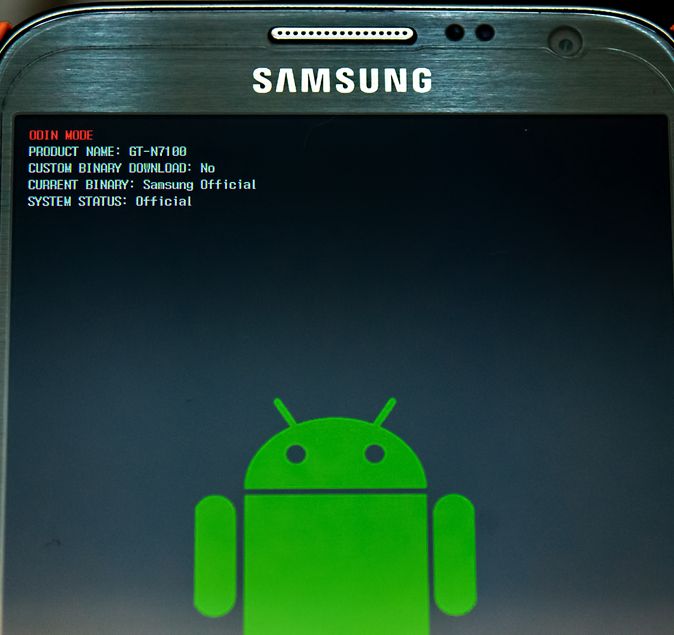


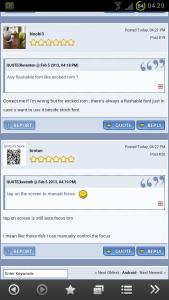

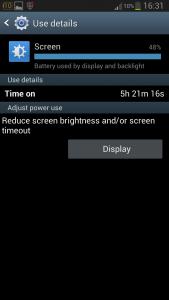


 Just use it for its effect.





 nicely structured. I will take a bit of time to digest and update relevant bits.


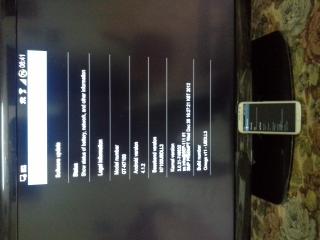


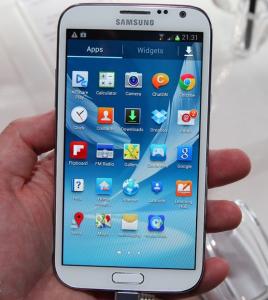



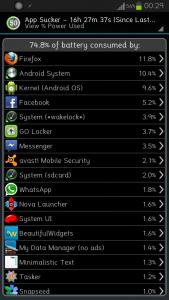












 ... wow awesome man... rooted device?

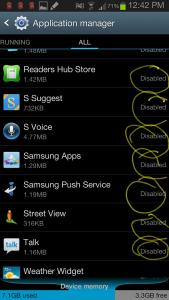





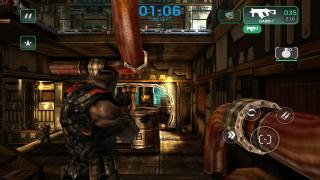


 ... ur note 2 very busuk then

 0.1915sec
 0.38
0.38
 6 queries
 GZIP Disabled