Welcome Guest ( Log In | Register )

826 Pages « < 384 385 386 387 388 > » Bottom

Outline · [ Standard ] · Linear+

Home Networking ASUS Malaysia Networking User & Technical Support, Managed by ASUS Malaysia Representative

views
     
krofal
post Jan 7 2018, 11:18 PM

Getting Started
**
Junior Member
133 posts

Joined: Feb 2012
QUOTE(ASUSmy @ Jan 3 2018, 10:30 AM)
Hi krofal,

Can you try downgrade the RT-N12 D1 firmware to version 3.0.0.4.380.7378 and try again.

Thank you
*
Hi Asus,

It's the same issue again. Even after downgraded software, the RT-N12 D1 as repeated only worked for one day only and next day same issue again.
toobad
post Jan 8 2018, 01:43 PM

Getting Started
**
Junior Member
291 posts

Joined: Oct 2008


Hi ASUS technical Support

Router: Wireless AC-1200 Dual Band
Recently updated to firmware Version:3.0.0.4.382_18991

I am using this router + an 8 port switch for my office network.
Recently we have been experiencing frequent disconnections within our office network. Which happens once or twice everyweek, and each time this happens we are disconnected for roughly 5 minutes and then it gets back to normal.

For most applications, the error we got was "ERR_CONNECTION_TIMED_OUT"
CCTV network, Google Chrome (when not connected to internet), Microsoft Outlook

Please advise

Thank you.
blacktubi
post Jan 8 2018, 01:56 PM

-
Group Icon
Elite
8,400 posts

Joined: Jul 2008

QUOTE(toobad @ Jan 8 2018, 01:43 PM)
Hi ASUS technical Support

Router: Wireless AC-1200 Dual Band
Recently updated to firmware Version:3.0.0.4.382_18991

I am using this router + an 8 port switch for my office network.
Recently we have been experiencing frequent disconnections within our office network. Which happens once or twice everyweek, and each time this happens we are disconnected for roughly 5 minutes and then it gets back to normal.

For most applications, the error we got was "ERR_CONNECTION_TIMED_OUT"
CCTV network, Google Chrome (when not connected to internet), Microsoft Outlook

Please advise

Thank you.
*
The model you have is not fit to be used in a demanding office environment. I afraid you need some better routers for that kind of purpose.
SilentVampire
post Jan 8 2018, 02:06 PM

Networking Enthusiast
*******
Senior Member
5,714 posts

Joined: Mar 2007


QUOTE(toobad @ Jan 8 2018, 01:43 PM)
Hi ASUS technical Support

Router: Wireless AC-1200 Dual Band
Recently updated to firmware Version:3.0.0.4.382_18991

I am using this router + an 8 port switch for my office network.
Recently we have been experiencing frequent disconnections within our office network. Which happens once or twice everyweek, and each time this happens we are disconnected for roughly 5 minutes and then it gets back to normal.

For most applications, the error we got was "ERR_CONNECTION_TIMED_OUT"
CCTV network, Google Chrome (when not connected to internet), Microsoft Outlook

Please advise

Thank you.
*
Get an enterprise router if you are in an office environment, something more powerful with stronger processor.
firdausbhari
post Jan 8 2018, 02:26 PM

Look at all my stars!!
*******
Senior Member
2,281 posts

Joined: Feb 2012


QUOTE(toobad @ Jan 8 2018, 01:43 PM)
Hi ASUS technical Support

Router: Wireless AC-1200 Dual Band
Recently updated to firmware Version:3.0.0.4.382_18991

I am using this router + an 8 port switch for my office network.
Recently we have been experiencing frequent disconnections within our office network. Which happens once or twice everyweek, and each time this happens we are disconnected for roughly 5 minutes and then it gets back to normal.

For most applications, the error we got was "ERR_CONNECTION_TIMED_OUT"
CCTV network, Google Chrome (when not connected to internet), Microsoft Outlook

Please advise

Thank you.
*
as others mentioned, get a powerful router such as AC68U or above

toobad
post Jan 8 2018, 04:38 PM

Getting Started
**
Junior Member
291 posts

Joined: Oct 2008


QUOTE(blacktubi @ Jan 8 2018, 01:56 PM)
The model you have is not fit to be used in a demanding office environment. I afraid you need some better routers for that kind of purpose.
*
QUOTE(SilentVampire @ Jan 8 2018, 02:06 PM)
Get an enterprise router if you are in an office environment, something more powerful with stronger processor.
*
QUOTE(firdausbhari @ Jan 8 2018, 02:26 PM)
as others mentioned, get a powerful router such as AC68U or above
*
Hi guys

thanks for your prompt feedback!

Any idea what is the root cause of the problem, how do I get a proper diagnosis to make sure that my router is not good enough for my office environment?

Additionally, this problem only started recently (a few months ago).
Bought the router August 2016, after using about 1 year plus only experience such issue.

On a side note, would be great to hear from ASUS technical support team as well smile.gif

This post has been edited by toobad: Jan 8 2018, 04:39 PM

TSASUSmy
post Jan 8 2018, 05:54 PM

Look at all my stars!!
*******
Senior Member
2,319 posts

Joined: Mar 2010
QUOTE(chuyeu @ Jan 5 2018, 05:53 PM)
I'm looking for 5GHz band, 3/4G USB and Android phone USB tethering support.

From what I survey, seem RT-AC1200G+ suite me. This model shouldn't be issue to let me share my android phone internet via USB to this router?
*
Hi chuyeu,

If you not looking for feature like fail-over or load balance, then RT-AC1200G+ are able to suite what you need.

Thank you
TSASUSmy
post Jan 8 2018, 05:59 PM

Look at all my stars!!
*******
Senior Member
2,319 posts

Joined: Mar 2010
QUOTE(HuorEarfalas @ Jan 5 2018, 08:36 PM)
Is Lyra now officially supported with Maxis Fibre?
*
Hi HuorEarfalas,

We tested the beta firmware are usable on UNIFI, as for the Maxis Fibre, we are still testing it. Hopefully can get the official firmware done ASAP.

Thank you
TSASUSmy
post Jan 8 2018, 06:04 PM

Look at all my stars!!
*******
Senior Member
2,319 posts

Joined: Mar 2010
QUOTE(krofal @ Jan 7 2018, 11:18 PM)
Hi Asus,

It's the same issue again. Even after downgraded software, the RT-N12 D1 as repeated only worked for one day only and next day same issue again.
*
Hi krofal,

Can you try sending the RT-N12 D1 for warranty claim?

Thank you
TSASUSmy
post Jan 8 2018, 06:08 PM

Look at all my stars!!
*******
Senior Member
2,319 posts

Joined: Mar 2010
QUOTE(toobad @ Jan 8 2018, 04:38 PM)
Hi guys

thanks for your prompt feedback!

Any idea what is the root cause of the problem, how do I get a proper diagnosis to make sure that my router is not good enough for my office environment?

Additionally, this problem only started recently (a few months ago).
Bought the router August 2016, after using about 1 year plus only experience such issue.

On a side note, would be great to hear from ASUS technical support team as well  smile.gif
*
Hi toobad,

Does this problem occur after the firmware update? Can you try do a factory reset on the router and try again?

If the problem still persist, can you share us the system log from the router?

Thank you
voncrane
post Jan 8 2018, 07:13 PM

Noir et fier!
*******
Senior Member
7,118 posts

Joined: Oct 2011
From: Wakanda


QUOTE(toobad @ Jan 8 2018, 04:38 PM)
Hi guys

thanks for your prompt feedback!

Any idea what is the root cause of the problem, how do I get a proper diagnosis to make sure that my router is not good enough for my office environment?

Additionally, this problem only started recently (a few months ago).
Bought the router August 2016, after using about 1 year plus only experience such issue.

On a side note, would be great to hear from ASUS technical support team as well  smile.gif
*
For starters, it would help if you provided the actual router & switch model info vs "Wireless AC-1200 Dual Band + 8 port switch"..
SilentVampire
post Jan 8 2018, 07:39 PM

Networking Enthusiast
*******
Senior Member
5,714 posts

Joined: Mar 2007


QUOTE(voncrane @ Jan 8 2018, 07:13 PM)
For starters, it would help if you provided the actual router & switch model info vs "Wireless AC-1200 Dual Band + 8 port switch"..
*
Bro I think he meant the Asus RT-AC1200G+ or this model: https://www.asus.com/my/Networking/RT-AC1200G-plus/
hiha123
post Jan 8 2018, 08:04 PM

Getting Started
**
Junior Member
198 posts

Joined: Nov 2017
Hi Asus MY
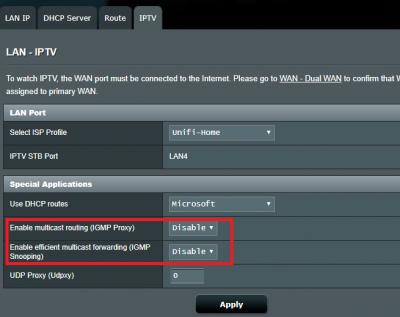
IT is all Asus router RT-AC1300UHP,RT-AC-58U,RT-AC1200G+,RT-N18U, all can support IPTV from TM STB Box?
I ask TM there say STB use different VLAN to play there are no lagging on IPTV,but when i download use fullspeed
the screen will become lag,my own router is RT-N12D1,maybe will change the router the selected

Got a question is IGMP Proxy and IGMP Snooping want to open when use the IPTV function? rclxub.gif


Attached thumbnail(s)
Attached Image
voncrane
post Jan 8 2018, 09:26 PM

Noir et fier!
*******
Senior Member
7,118 posts

Joined: Oct 2011
From: Wakanda


QUOTE(SilentVampire @ Jan 8 2018, 07:39 PM)
Bro I think he meant the Asus RT-AC1200G+ or this model: https://www.asus.com/my/Networking/RT-AC1200G-plus/
*
Ahh I see.. Then previous advice still apply.
AVFAN
post Jan 8 2018, 09:29 PM

20k VIP Club
*********
All Stars
24,453 posts

Joined: Nov 2010
QUOTE(hiha123 @ Jan 8 2018, 08:04 PM)
Hi Asus MY
IT is all Asus router RT-AC1300UHP,RT-AC-58U,RT-AC1200G+,RT-N18U, all can support IPTV from TM STB Box?
I ask TM there say STB use different VLAN to play there are no lagging on IPTV,but when i download use fullspeed
the screen will become lag,my own router is RT-N12D1,maybe will change the router the selected
*
i hv used rt ac1300uhp and rtn12hp_b1.

both pulg n play for hypptv stb, lan port#4.

the bandwidth for hypptv is separate from the other.

download full speed does not affect stb at all.

if u get lag with hypptv, it may be due to yr stb failing or a localized unifi problem.
hiha123
post Jan 8 2018, 09:32 PM

Getting Started
**
Junior Member
198 posts

Joined: Nov 2017
QUOTE(AVFAN @ Jan 8 2018, 09:29 PM)
i hv used rt ac1300uhp and rtn12hp_b1.

both pulg n play for hypptv stb, lan port#4.

the bandwidth for hypptv is separate from the other.

download full speed does not affect stb at all.

if u get lag with hypptv, it may be due to yr stb failing or a localized unifi problem.
*
But my STB is new,i want know is it my own router cant handler my download and STB on same time because when i use 30mb donwload full speed the cpu usage become 85-100% ald and the STB will become lagging doh.gif
AVFAN
post Jan 8 2018, 09:37 PM

20k VIP Club
*********
All Stars
24,453 posts

Joined: Nov 2010
QUOTE(hiha123 @ Jan 8 2018, 09:32 PM)
But my STB is new,i want know is it my own router cant handler my download and STB on same time because when i use 30mb donwload full speed the cpu usage become 85-100% ald and the STB will become lagging doh.gif
*
new stb can be problematic too... i have read comments the video "jerks" from time to time.

and did u ever try to muck around with that box to sideload 3rd party apps on it?

i am using the old silver one, all good.


your rtn12 cannot be so different from mine.

mine handled 50mbps no sweat, hypptv stb is fine.

u may want to check firmware, see if asusmy can comment.
chuyeu
post Jan 9 2018, 02:41 PM

New Member
*
Newbie
12 posts

Joined: Apr 2013
QUOTE(ASUSmy @ Jan 8 2018, 05:54 PM)
Hi chuyeu,

If you not looking for feature like fail-over or load balance, then RT-AC1200G+ are able to suite what you need.

Thank you
*
I found AC58U got some promo price at a shop and I go for this model.
Very good. Meet my requirement.
NightFelix
post Jan 9 2018, 04:03 PM

Samsung Exynos
********
All Stars
17,467 posts

Joined: May 2008
From: Lazada


QUOTE(chuyeu @ Jan 9 2018, 02:41 PM)
I found AC58U got some promo price at a shop and I go for this model.
Very good. Meet my requirement.
*
how much u bot?
kenlui
post Jan 10 2018, 09:45 AM

Look at all my stars!!
*******
Senior Member
2,380 posts

Joined: Mar 2005


Anybody has their asus routers set on scheduled reboot?

I used to set my AC68U to reboot 3 times a week, and after rebooting both my 2.4/5 GHZ wifi will go haywire and all my devices wont be able to reconnect. Have to manually restart most of the time. Hence I reduced mine to twice a week, and still the same issue. Any idea on what's wrong? I have home automation which relies on the internet connection so it's really troublesome to wake up finding that they are not working due to the router.

826 Pages « < 384 385 386 387 388 > » Top
 

Change to:
| Lo-Fi Version
0.0205sec    0.86    6 queries    GZIP Disabled
Time is now: 1st December 2025 - 02:17 PM